Pop Up Blocker for Edge

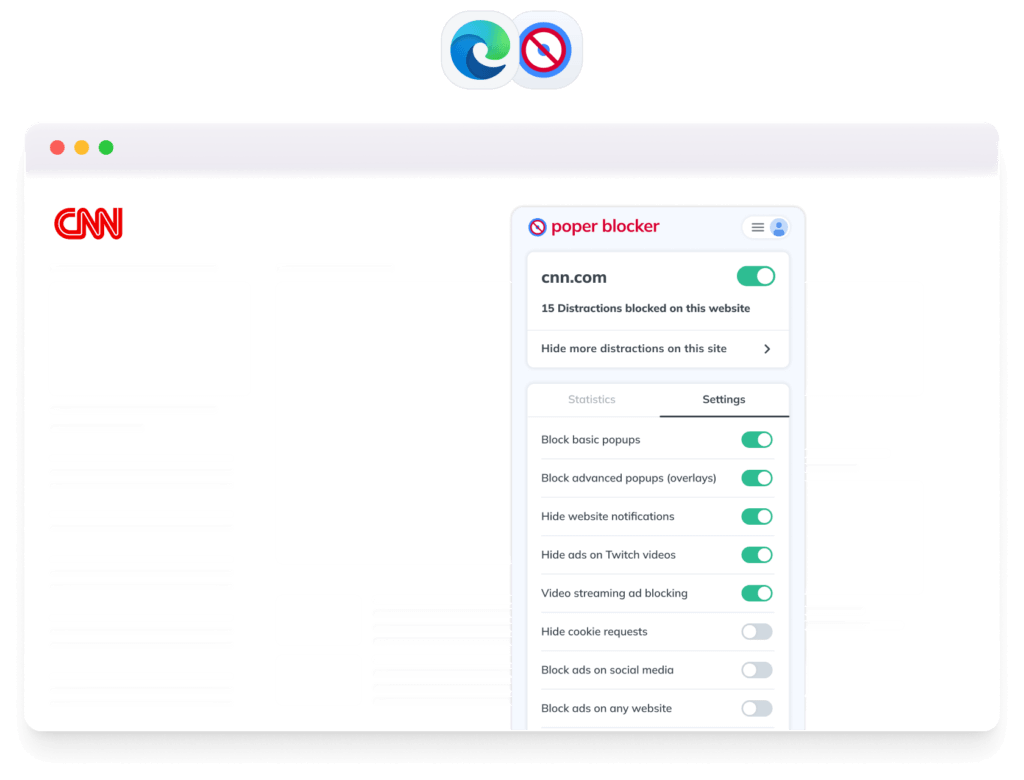
Tired of intrusive pop-ups and annoying ads? Poper Blocker for Edge stops pop-ups, overlays, YouTube ads, cookie banners, and social media ads, giving you a smooth, distraction-free browsing experience.

Free forever

No registration required

Works on popular browsers

Block ads on Microsoft Edge

Why Use Poper Blocker on Edge?

Tired of annoying pop-ups, overlays, and cookie banners?

Poper Blocker removes them all, so you can browse freely.

block

Best Pop-Up, Ads & Overlay Blocking

Blocks all types of intrusive pop-ups, ads, and overlays for a seamless browsing experience.

check-shield

Private and Secure

Blocks tracking pop-ups and intrusive ads without collecting your personal data.

bolt

Fast & Lightweight

Runs efficiently in the background without slowing down Microsoft Edge.

net

Distraction-Free Browsing

Eliminates unwanted interruptions so you can focus on content, not ads.

Featured by the Chrome Web Store

Trusted by 2,000,000+ Users Worldwide

Join millions who browse without interruptions
Stars

actually really helpful in movie websites and while shopping it removes pop ups super quickly without you even noticing there are some delays tho but really good overall. Thank you for the creators of this extension!!

Jessica L

Modified Jan 7, 2025

Stars

I had used the free version Poper Blocker for a very long time, and I decided to buy the Pro Version. I have always liked this blocker because it does a great job. It allows me to decide which popups to allow and it erases my tracking online such as when I access my bank accounts.

Sarah M

Modified Nov 17, 2025

Stars

Works super good! Haven’t had any pop ups anymore since I installed this!

James B

Modified Dec 20, 2025

How to Get Started

Get started in minutes with our easy installation process.

web-extension-download

Install Poper Blocker

Download and add the extension from the Microsoft Edge Add-ons Store.

toggle-check

Enable Blocking

Grant permissions for full protection against pop-ups and ads.

page-safe

Clean, Ad-Free Web

Browse without distractions and interruptions.

Frequently Asked Questions

Everything you need to know about our Edge extension.

How does Poper Blocker stop pop-ups in Edge?

Poper Blocker detects and blocks all types of pop-ups and overlays, ensuring they don’t appear while you browse.

Yes, you can add websites to the whitelist to allow pop-ups where needed.

No, it runs efficiently in the background without affecting your browser’s speed.

Pro-Lightning

Best Ad Blocker Extension

Take Control of Your Browsing

Stop pop-ups, overlays, and ads for good. Install Poper Blocker for Edge today!

Free forever

No registration required

Works on popular browsers

Available on all major browsers:

Firefox

Safari