
 Chrome Web Extension
 Edge Web Extension
 Android App


Let’s face it, your Facebook feed can sometimes feel overwhelming. From spoilers to political rants, certain words or topics can disrupt your online experience. But what if you had the power to filter out the noise? This comprehensive guide will show you how to tailor your Facebook experience to your preferences, ensuring a more enjoyable and personalized social media journey.
Why Mute Words on Facebook?
Imagine scrolling through your Facebook feed, only to have a long-awaited movie spoiled or to be bombarded with aggressive political debates. These instances are not just annoying but can significantly impact your online experience. The need to block words on Facebook stems from various pain points:
- Spoilers: Avoiding unwanted plot reveals from movies, TV shows, or books.
- Politics: Steering clear of often divisive and heated political discussions.
- Inappropriate or Offensive Content: Filtering out content that may be disrespectful or harmful.
- Adult Themes: Keeping your feed family-friendly or suitable for all audiences.
- Personal Triggers: Removing words or topics that may be emotionally distressing.
How to Mute Words on Facebook Comments
While Facebook doesn’t offer a native feature to mute specific words in your news feed, you can control the comments on your posts. Here’s how:
- Access Your Settings: Log into Facebook, click the down arrow or your profile icon, and select “Settings & Privacy” > “Settings”.
- Profile and Tagging Options: Choose “Profile and Tagging” on the left.
- Hide Specific Comments: Select “Hide comments containing certain words from your profile”.
- Customize Your List: Enter up to 1,000 words or phrases you wish to mute, separated by commas.
- Save Your Preferences: Click “Save” to apply these changes.
This feature ensures that your posts remain a safe space, free from unwanted words or phrases.
How to Block Posts with Specific Words on Your Facebook Feed
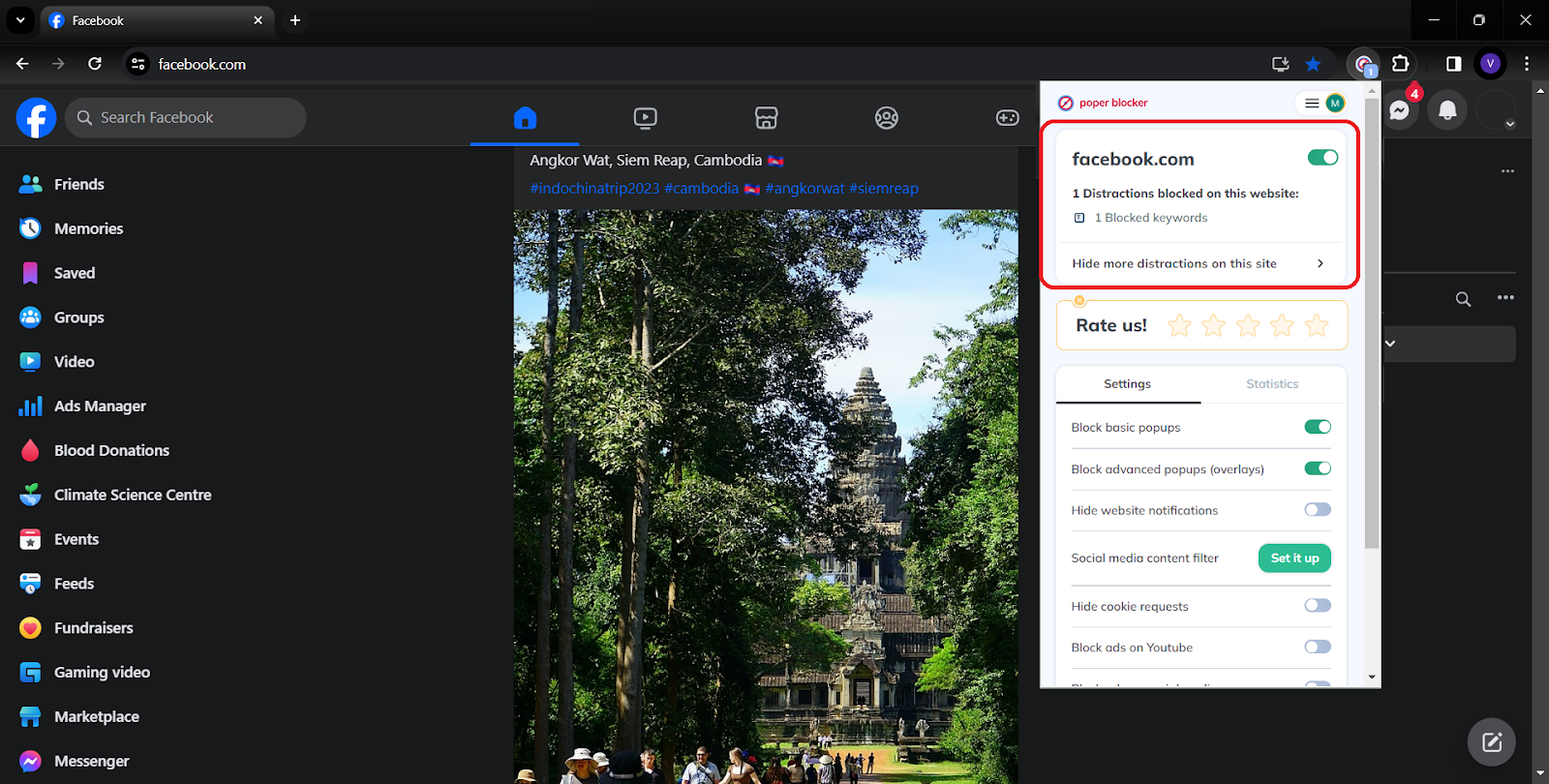
For a more comprehensive solution, Poper Blocker’s content blocker for social media steps in, offering a user-friendly tool designed to filter and block certain words on Facebook and even across various social media platforms, like Instagram, Twitter and LinkedIn.
While Facebook allows users to hide comments containing certain keywords through its settings, Poper Blocker takes this a significant step further. It empowers users with the ability to hide entire posts that contain specific keywords. This feature offers a more comprehensive solution for those seeking to tailor their social media experience, ensuring that their feed is not just free from unwanted comments, but also from any posts that might disrupt their online browsing experience.
Here’s how to use this tool:
1. Open Poper Blocker: Start by accessing the Poper Blocker tool.
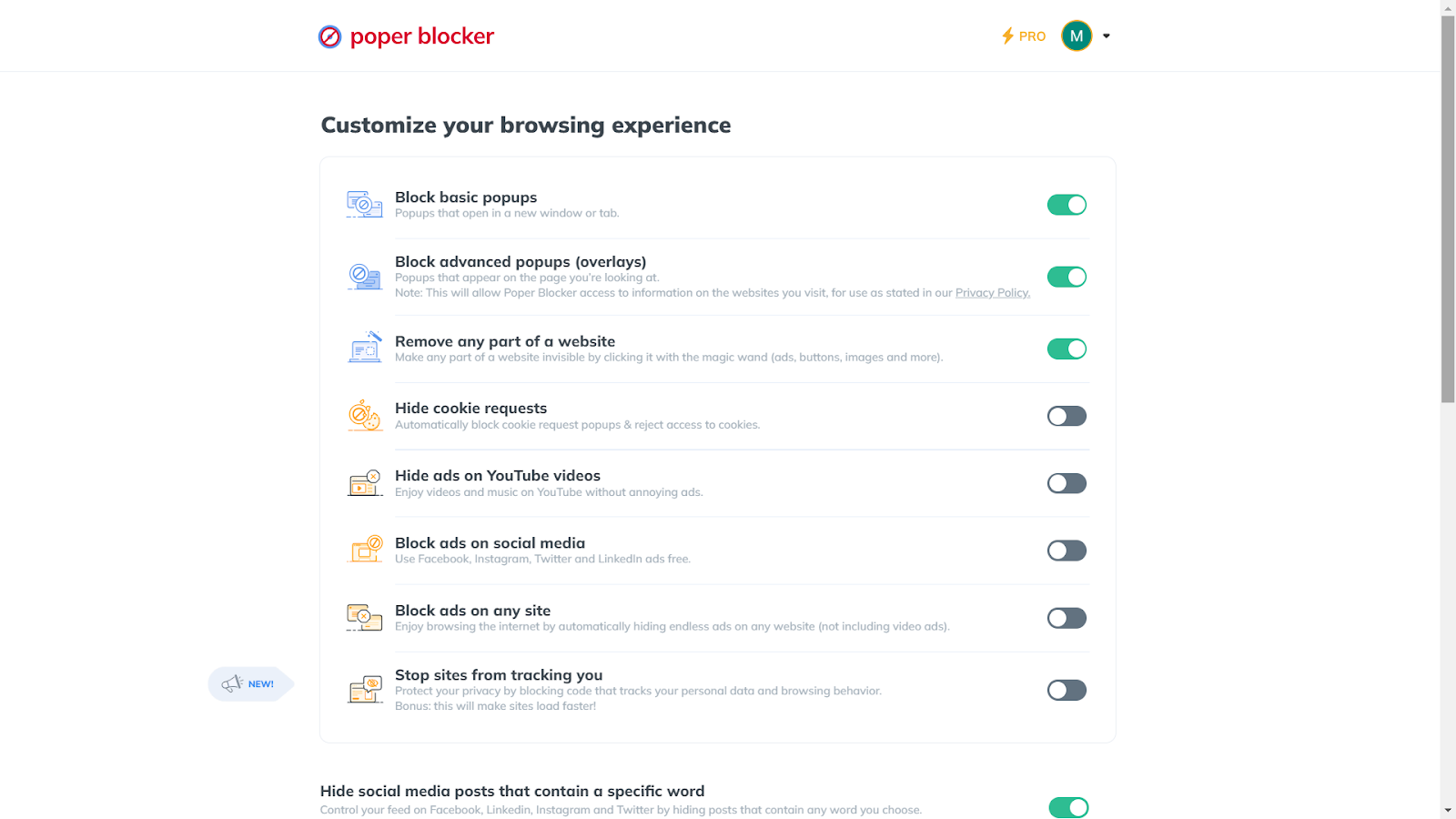
2. Activate the Feature: Go to “Hide social media posts that contain a specific word” and toggle it on.
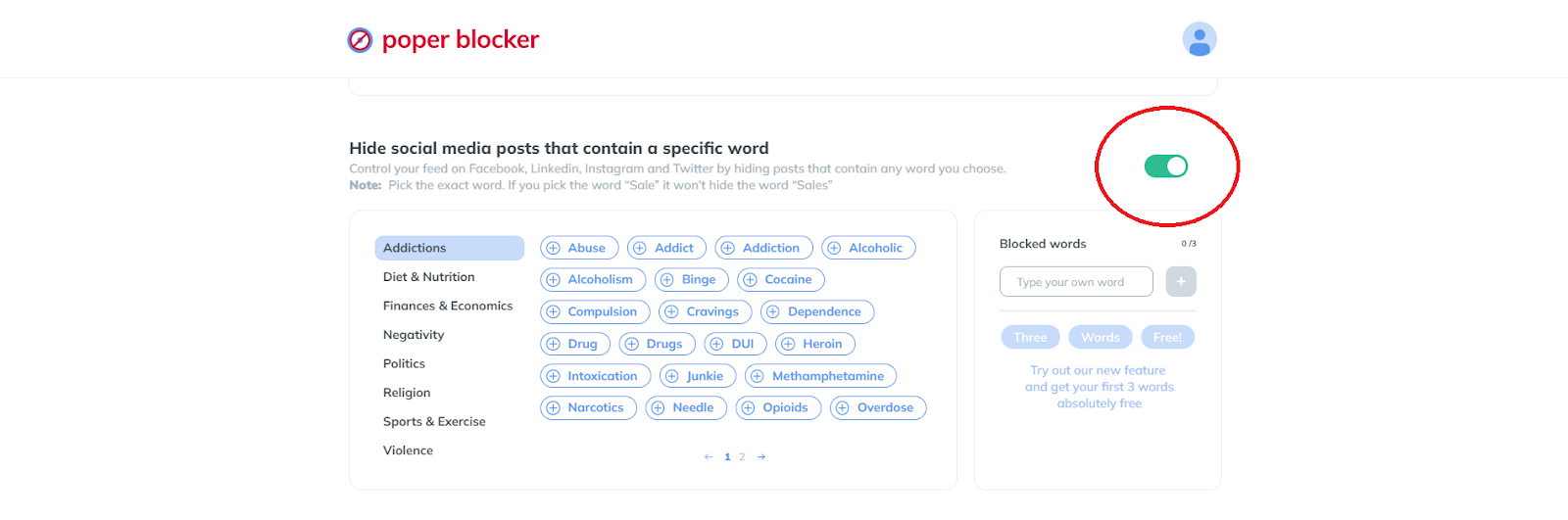
3. Select Your Words: This is how to block keywords on Facebook. Choose from a suggested list or enter your own words. Remember, the Pro version allows for an unlimited number of words.
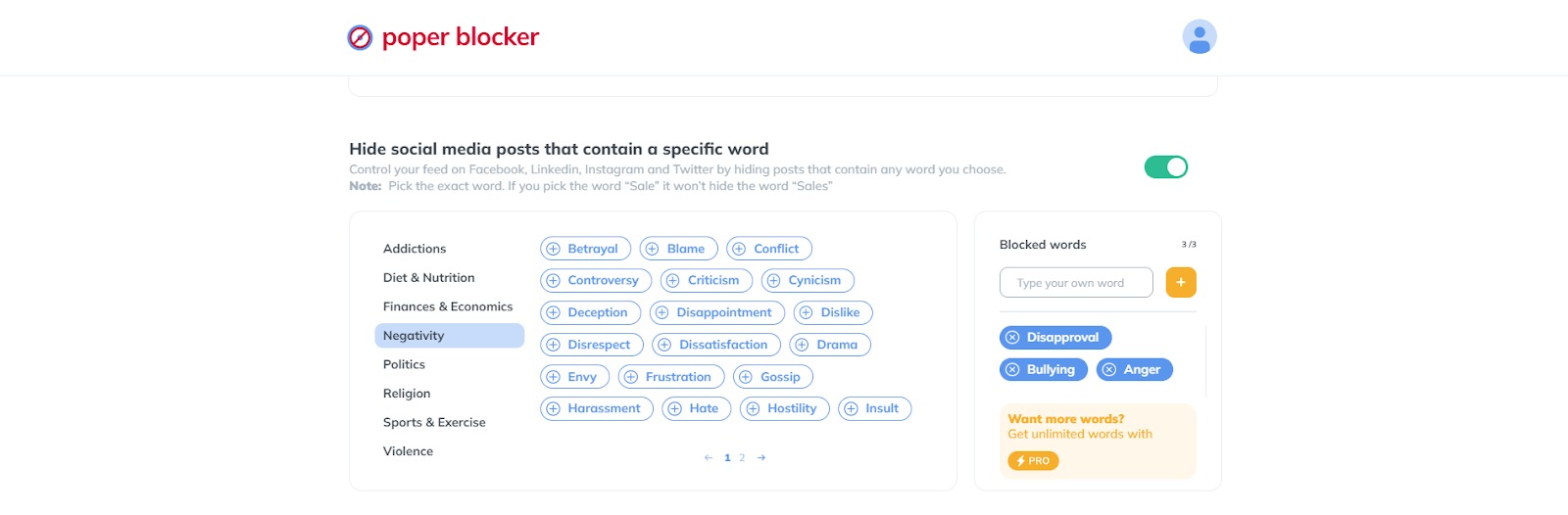
4. Apply and Enjoy: With these settings, your feed will now be free from your specified triggers.
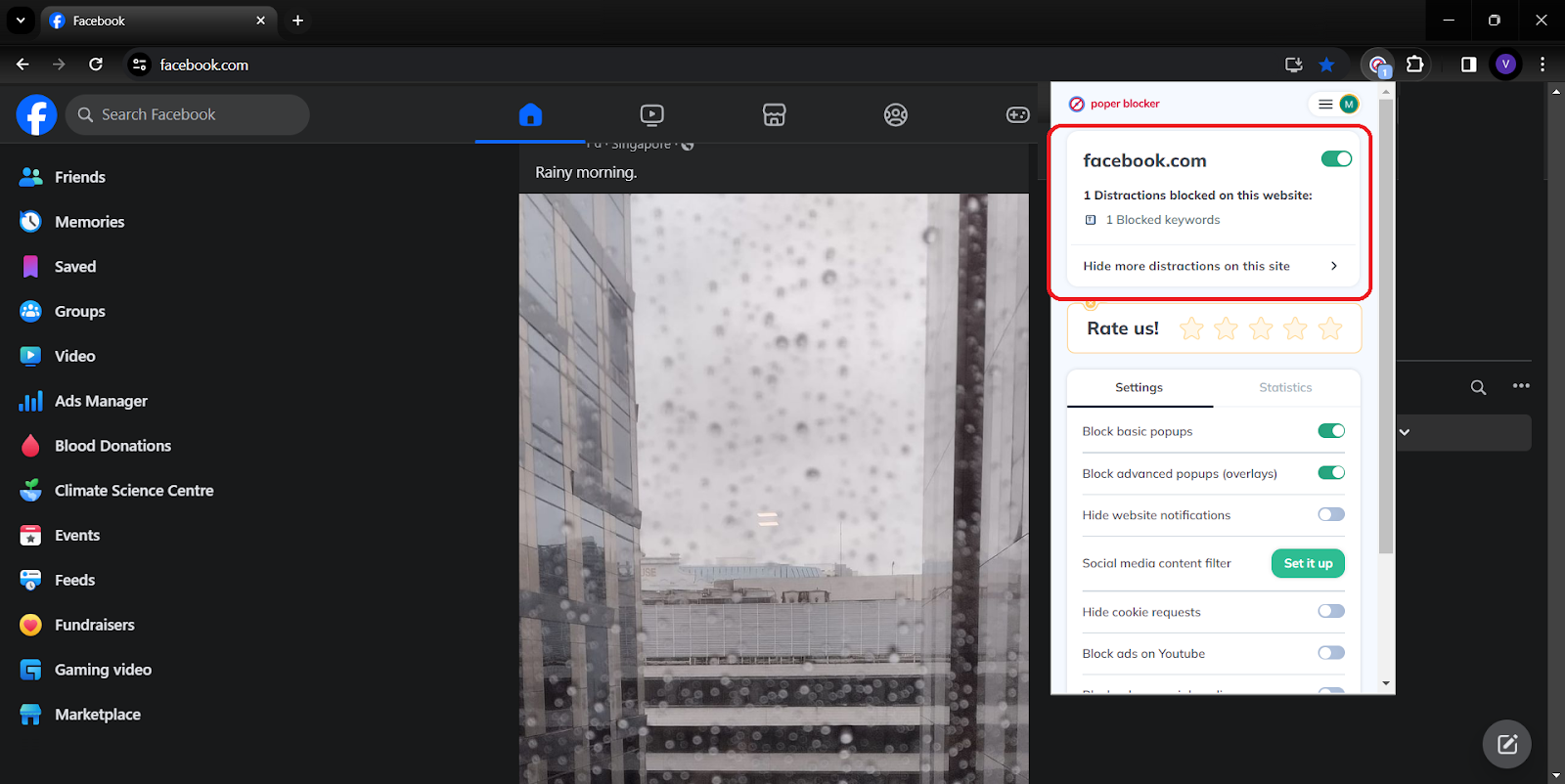
This tool is a game-changer for those seeking a more controlled and pleasant Facebook experience.
Empowering Your Social Media Journey: A Final Reflection
Your true power in the expansive world of social media lies in the ability to tailor your experience to your own preferences. The ability to mute words on Facebook and utilize tools like Poper Blocker transforms your online experience from a passive scroll to an empowered journey. This guide has not only shown you the steps to tailor your Facebook environment but also highlighted the importance of curating content that aligns with your values and mental well-being.
By filtering out unwanted words and topics, you reclaim control over your digital interactions. Remember, your online world is yours to shape. With these tools at your disposal, you are well-equipped to create a space that is uniquely yours, free from the noise and clutter of unwanted digital content.
Read more:
- How to Mute Words on Twitter
- How to Mute Words on Instagram
- Can You Mute Words on LinkedIn?
- How to Stop Ads on Facebook?
FAQs
Can I Mute Words in Facebook Groups?
Currently, Facebook does not provide a direct feature to mute specific words within groups or on your main news feed. This limitation means that while you can control the environment on your personal profile to a certain extent, groups remain outside this sphere of influence. However, remember that group administrators have the power to set certain moderation rules, which can indirectly help in maintaining a certain standard of conversation within these communities.
Will Muted Words Affect My Entire Facebook Experience?
Muting words on your profile specifically targets the comments on your posts. This means that the main content of your feed, including posts from friends and pages you follow, will not be affected by these settings. It’s a targeted approach, focusing on creating a safer and more comfortable space in the areas you can control – your personal posts.
Is Poper Blocker Effective on Other Social Media Platforms?
Poper Blocker is designed to be a versatile tool, extending its functionality beyond Facebook. It can be an effective solution for various social media platforms where content control is vital for a positive user experience. Whether you’re browsing Twitter, LinkedIn, or other platforms, Poper Blocker can assist in social media filtering, making your social media browsing more pleasant and aligned with your preferences.
Can I Temporarily Mute Words?
With Poper Blocker, flexibility is key. You have the option to toggle your settings on and off as needed. This feature is particularly useful for temporary events or topics you wish to avoid for a short period. For instance, if you’re avoiding spoilers for a newly released TV series, you can mute relevant words until you’ve caught up, then easily revert your settings to enjoy the full spectrum of your social media content once more.
Is There a Limit to the Number of Words I Can Mute with Poper Blocker?
The standard version of Poper Blocker offers a generous capacity for word filtering, but for those who require a more extensive range, the Pro version is the way to go. It allows for an unlimited number of words, giving you complete control over your social media content. This feature is particularly beneficial for users who have a wide range of topics they wish to avoid, or for those who manage pages or profiles with a high volume of diverse interactions.
Control Your Feed – Mute with Poper Blocker Now!
Did you know that the average person spends 2 hours and 24 minutes daily on social media? But what if you could make those hours more enjoyable, tailored to your preferences, and free from unwanted content? This is where social media filtering comes into play.
Why Would You Want to Filter Content on Social Media?
Social media is a double-edged sword. It connects us to the world but also exposes us to content that can be distracting, upsetting, or irrelevant. Filtering social media content isn’t just about comfort; it’s about mental health, productivity, and creating a digital space that aligns with your values and needs.
The staggering number of global social media users, reaching 4.95 billion as of October 2023, underscores the integral role social media plays in our daily lives. With the average person engaging with seven different social networks each month and spending almost 2.5 hours daily on these platforms, the digital landscape has become a significant part of our social and informational world.
This extensive engagement highlights the critical need for effective social media filtering tools to manage and personalize the vast array of content encountered, ensuring a positive and relevant online experience.
Example Topics to Filter from Your Social Media Feed
Your feed is your sanctuary. It’s a space that should reflect your interests, values, and comfort levels. But often, this space is cluttered with unwanted content that can range from mildly annoying to deeply distressing. Here’s a deeper dive into what you might consider filtering out for a more tailored and enjoyable social media experience.
- Spoilers to Movies and TV Shows: There’s nothing quite as frustrating as having the climax of a much-anticipated movie or TV show spoiled by an untimely social media post. Whether it’s the latest plot twist in a popular series or the unexpected ending of a blockbuster movie, spoilers can ruin the experience of enjoying a story unfolding in its intended pace and sequence.
- Adult Themes: Social media can sometimes expose users to adult themes that they might find inappropriate or uncomfortable. This could include explicit content, suggestive material, or topics that are of a mature nature. Filtering out such content helps maintain a feed that is safe and aligns with your personal boundaries.
- Politics: In an increasingly polarized world, political content on social media can be overwhelming. It often leads to heated debates and can create a stressful environment. By filtering out political content, you can keep your feed neutral and avoid unwanted confrontations or the stress of political arguments.
- Bullying: Cyberbullying is a significant concern in the online world. It’s important to create a safe space where negative comments, harassment, or any form of bullying are promptly removed. This not only protects your mental well-being but also fosters a positive and supportive online community.
- Cursing: The use of offensive language can be off-putting for many users. Filtering out curse words helps in maintaining a more respectful and pleasant social media environment. This is particularly important for younger users or those who prefer a more refined online experience.
- Spam: Unsolicited advertisements, repetitive posts, or irrelevant content can clutter your feed and detract from your social media experience. Filtering out spam helps in keeping your feed clean, relevant, and focused on content that truly interests you.
- Health and Fitness: For those sensitive to content about body image or diet, filtering out health and fitness topics can be beneficial.
- Financial Content: Avoiding posts about investments, stocks, or financial advice might be preferable for some who find these topics stressful or triggering.
- Personal Triggers: Everyone has unique triggers. Identifying and filtering out topics that cause personal discomfort or anxiety can significantly improve your social media experience.
Filter Social Media Content with Poper Blocker
Poper Blocker stands out as a versatile tool in this realm. It’s not just an ad blocker; it’s a customizable filter for your social media experience. You can hide posts containing specific words, ensuring your feed remains relevant and enjoyable.
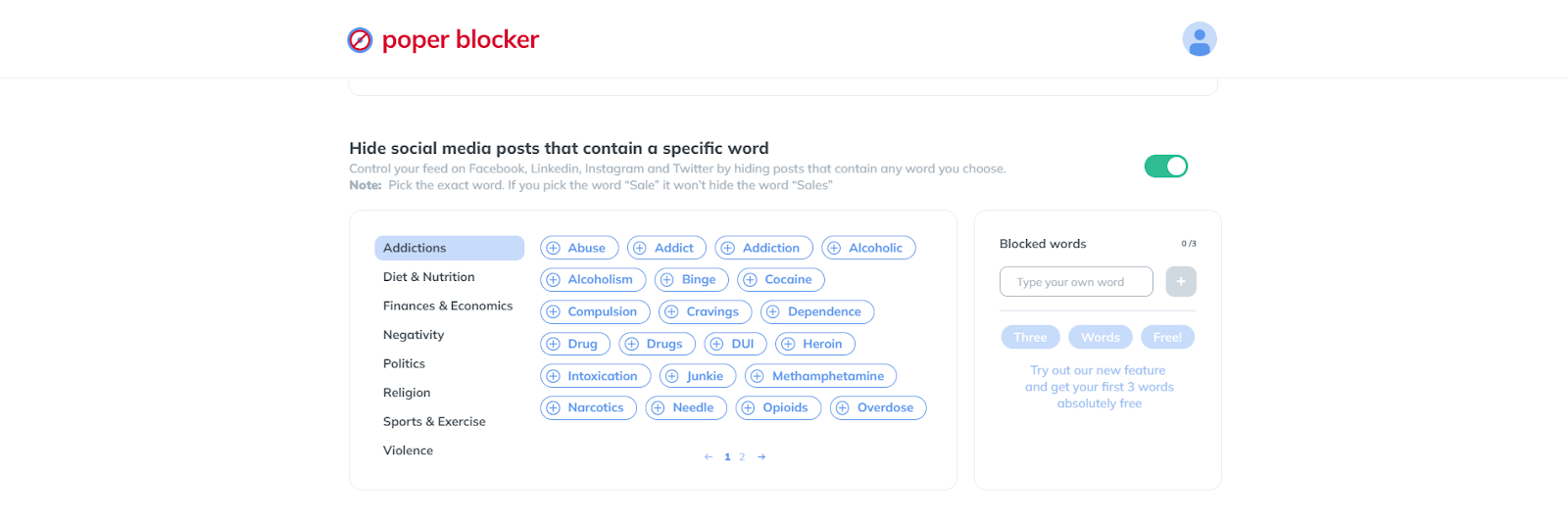
Features of Poper Blocker
- Word-Specific Blocking: Choose the exact word to block. For instance, blocking the word “sale” won’t hide the word “sales” so you need to be very specific about this.
- Pre-Set Categories: Browse through categories like Politics, Religion, or Sports to quickly set up your filters. For example, if you’d like to avoid topics about Addiction, this category will already give you a set of suggested words like abuse, addict, alcoholic, binge, etc.
- Platform Versatility: This tool works across major social media platforms. Whether it’s Facebook, LinkedIn, Instagram, or Twitter, Poper Blocker gives you control.
A Tailored Social Media Experience
The power to personalize your social media experience is not just a luxury; it’s a necessity for maintaining mental well-being and ensuring a positive digital experience. Poper Blocker emerges as a pivotal tool in this journey towards a customized online world.
Imagine logging into your social media accounts and being greeted by content that’s not just random, but carefully curated to match your interests and preferences. This is the reality that the Poper Blocker extension offers. By filtering out the noise and focusing on what truly matters to you, your time online becomes more enjoyable and less overwhelming.
Moreover, the impact of this tool goes beyond mere convenience. It’s about creating a safe space where you can freely explore, engage, and connect without the constant bombardment of unwanted content. Whether it’s avoiding spoilers, sidestepping political debates, or simply keeping your feed positive, this tool puts you in the driver’s seat of your social media experience.
Read More:
- How to Mute Words on Twitter
- How to Mute Words on Instagram
- How to Mute Words on Facebook
- Can You Mute Words on LinkedIn?
Tailor Your Social Media Experience with Poper Blocker – Start Now!
FAQs
What is Social Media Filtering, and How Does Poper Blocker Enhance It?
Social media filtering is the process of customizing your online feed to exclude unwanted content. Poper Blocker elevates this by allowing you to specify keywords or phrases that trigger the hiding of posts. This means you can avoid spoilers, political content, or any topic you prefer not to see, creating a more enjoyable and personalized social media experience.
Is Poper Blocker Easy to Use for Non-Tech-Savvy Individuals?
Absolutely! Poper Blocker is designed with user-friendliness in mind. It offers a straightforward interface where you can easily enter the words or phrases you want to filter out. There’s no need for technical know-how – it’s as simple as typing in a word and letting the tool do the rest.
Can I Filter Out Specific Topics Like Politics or Spoilers with Poper Blocker?
Yes, Poper Blocker is perfect for filtering out specific topics. Whether it’s avoiding spoilers for your favorite TV show or steering clear of political discussions, you can set your preferences to ensure these topics don’t appear in your feed.
Does Poper Blocker Work Across All Social Media Platforms?
Poper Blocker is versatile and works with major social media platforms like Facebook, LinkedIn, Instagram, and Twitter. This cross-platform functionality ensures a consistent social media filtering experience, no matter where you like to spend your time online.
Is There a Risk of Missing Important Content with Poper Blocker?
Poper Blocker is precise in its filtering, targeting only the words or phrases you specify. This precision minimizes the risk of missing out on important content. However, it’s always a good idea to review your filter settings regularly to ensure they align with your current preferences and needs.
Filter Your Feed Effortlessly – Discover Poper Blocker Today!
Imagine scrolling through your Instagram feed, a daily ritual for unwinding, connecting, and getting inspired. You come across vibrant photos, heartwarming stories, and updates from friends. But then, amidst this pleasant journey, you encounter a jarring post – a spoiler for the latest episode of your favorite show, a string of offensive comments, or perhaps a barrage of political rants that disrupt your peace. It’s like a sudden jolt in an otherwise smooth sail, isn’t it?
| Focus Area | Key Statistic | Source |
| Instagram and Mental Health | Instagram and Snapchat are the worst social media networks for mental health, according to a survey of teenagers and young adults. | TIME |
| Instagram Use Among Teens | Teens aged 13-17 make up 8.5% of registered Instagram users. 11% of parents say their 9-11-year-olds use their accounts, and 67% of teens report using Instagram. | Consumer Notice |
These statistics provide a comprehensive view of the various alarming aspects of Instagram content, particularly its impact on mental health and social dynamics among different age groups and demographics.
Why Would You Want to Mute Words on Instagram?
Instagram is a vibrant social media platform, but not all content is welcome. The need for a word muting feature or social media filtering isn’t just a luxury; it’s a vital tool for curating a space that aligns with our comfort and values. Let’s explore the reasons why this feature is so essential:
- Spoilers: There’s nothing quite as frustrating as having the climax of your favorite series or the twist in a much-anticipated movie revealed unwittingly through an Instagram post. Spoilers can ruin the experience of enjoying a story unfold at your own pace.
- Politics: While political discourse is essential, Instagram is often a space for relaxation and escape. Unsolicited political content, especially during heated election cycles or polarizing events, can turn a leisurely scroll into a source of stress.
- Inappropriate, Disrespectful, or Offensive Content: Social media should be a safe space, but often it’s marred by content that offends or disrespects personal values and beliefs. The ability to mute such content is crucial for maintaining mental well-being.
- Adult Themes: Not all content is suitable for every age group or personal preference. Muting adult themes helps in keeping your feed appropriate and comfortable for your viewing.
- Aggressive Marketing: Constant bombardment with ads and promotional content can be overwhelming. Muting specific marketing keywords can make your Instagram experience more about connections and less about commerce.
How to Mute Words in Instagram Comments and Message Requests
Instagram offers a built-in feature to mute words in comments and message requests. To utilize this, simply follow these steps:
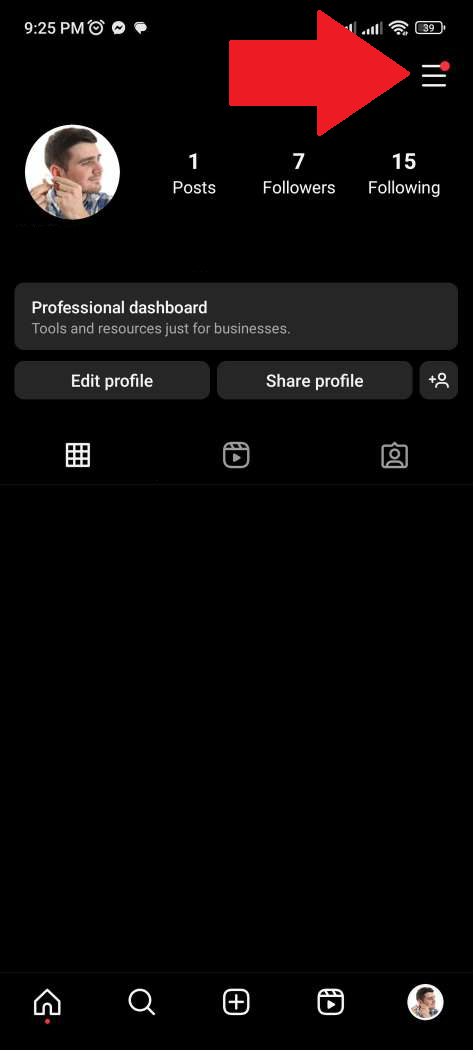
1. Access Settings: Tap the hamburger menu on your profile page.
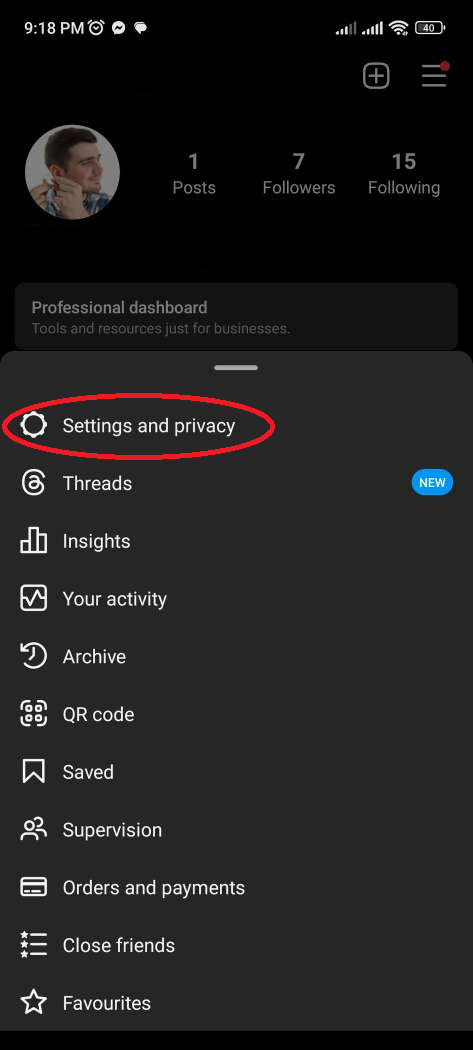
2. Navigate to Privacy: Select ‘Settings and privacy’ and then ‘Hidden Words’.
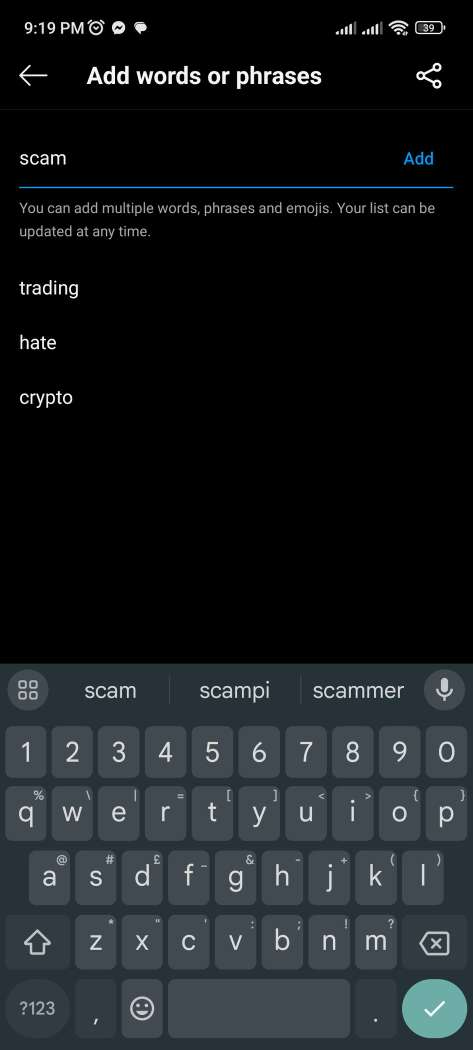
3. Manage Custom Words: Tap ‘Manage custom words and phrases’ and enter the words or phrases you wish to mute, separated by commas.
4. Activate the Feature: Ensure ‘Hide comments’ and ‘Hide message requests’ are toggled on.
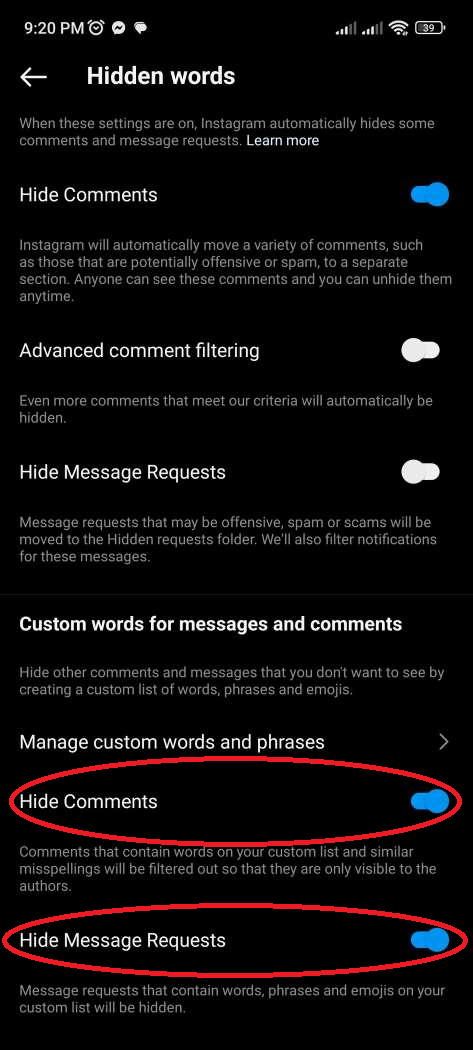
This feature is a first step in controlling your social media environment, but do take note that it has limitations.
How to Block Posts with Specific Words from Your Instagram Feed
While Instagram allows you to hide comments and message requests, as well as block suggested posts containing certain keywords, it doesn’t offer a way to block posts containing specific words from people you follow. This is where Poper Blocker steps in, and enables you to control your feed on Instagram by hiding posts containing any word you choose.
To use this tool for muting specific words on Instagram, follow these simple steps:
1. Access Poper Blocker: Start by accessing the Poper Blocker extension. This is your gateway to a more personalized Instagram experience.
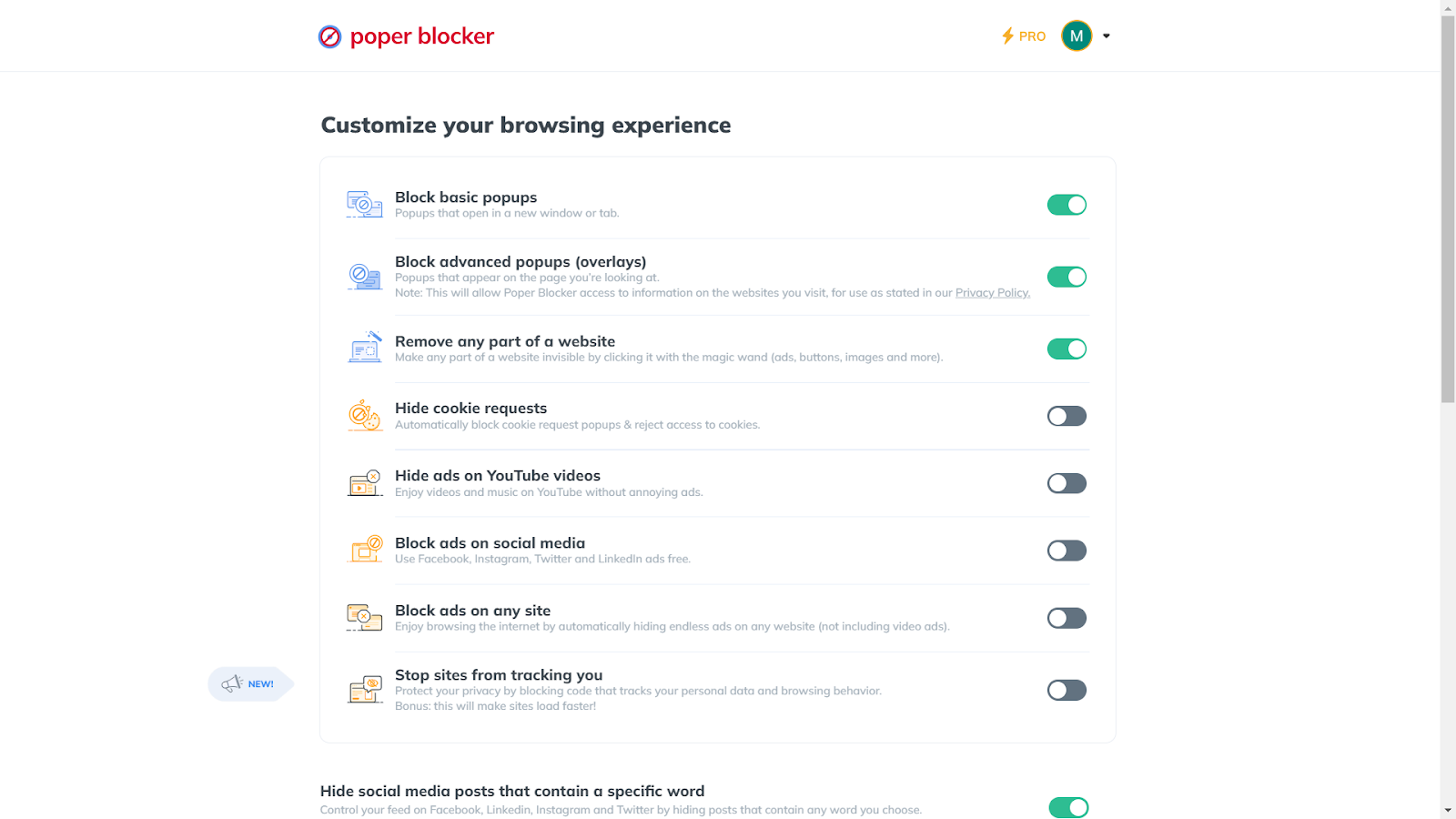
2. Turn on the Feature: Look for “Hide social media posts that contain a specific word” within the tool and toggle the feature on. This is where the magic happens, allowing you to start filtering out unwanted content.
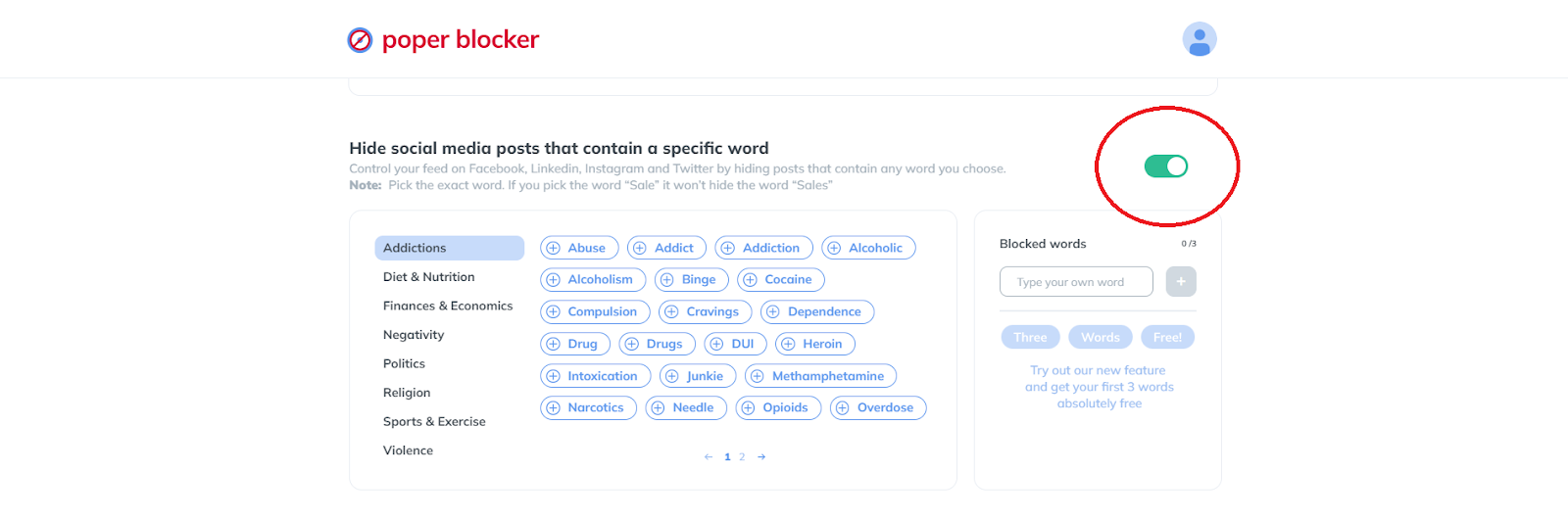
3. Set the Words You Want to Mute: You can choose words from a suggested list or input your own. For those who opt for the Pro version, there’s the added benefit of an unlimited word list, offering even greater control over your feed.
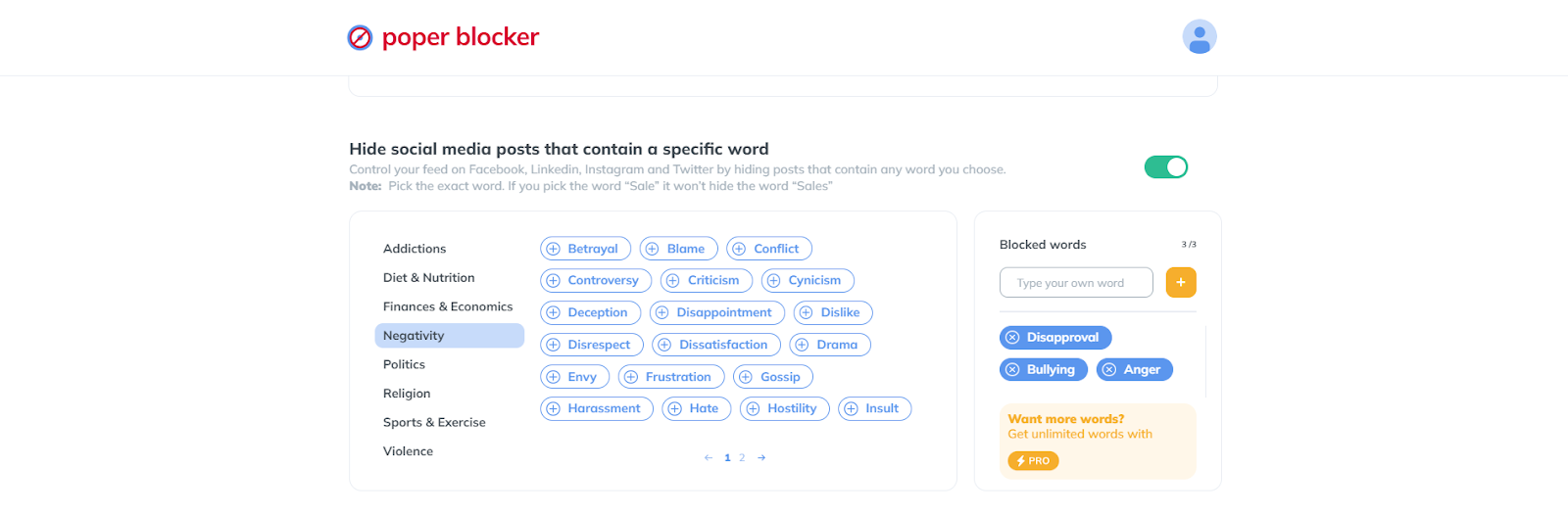
4. Start Browsing Instagram: Once you’ve set your preferences, your Instagram feed will transform, now free from the triggers or content you wish to avoid. Sit back and enjoy a more pleasant, customized browsing experience.
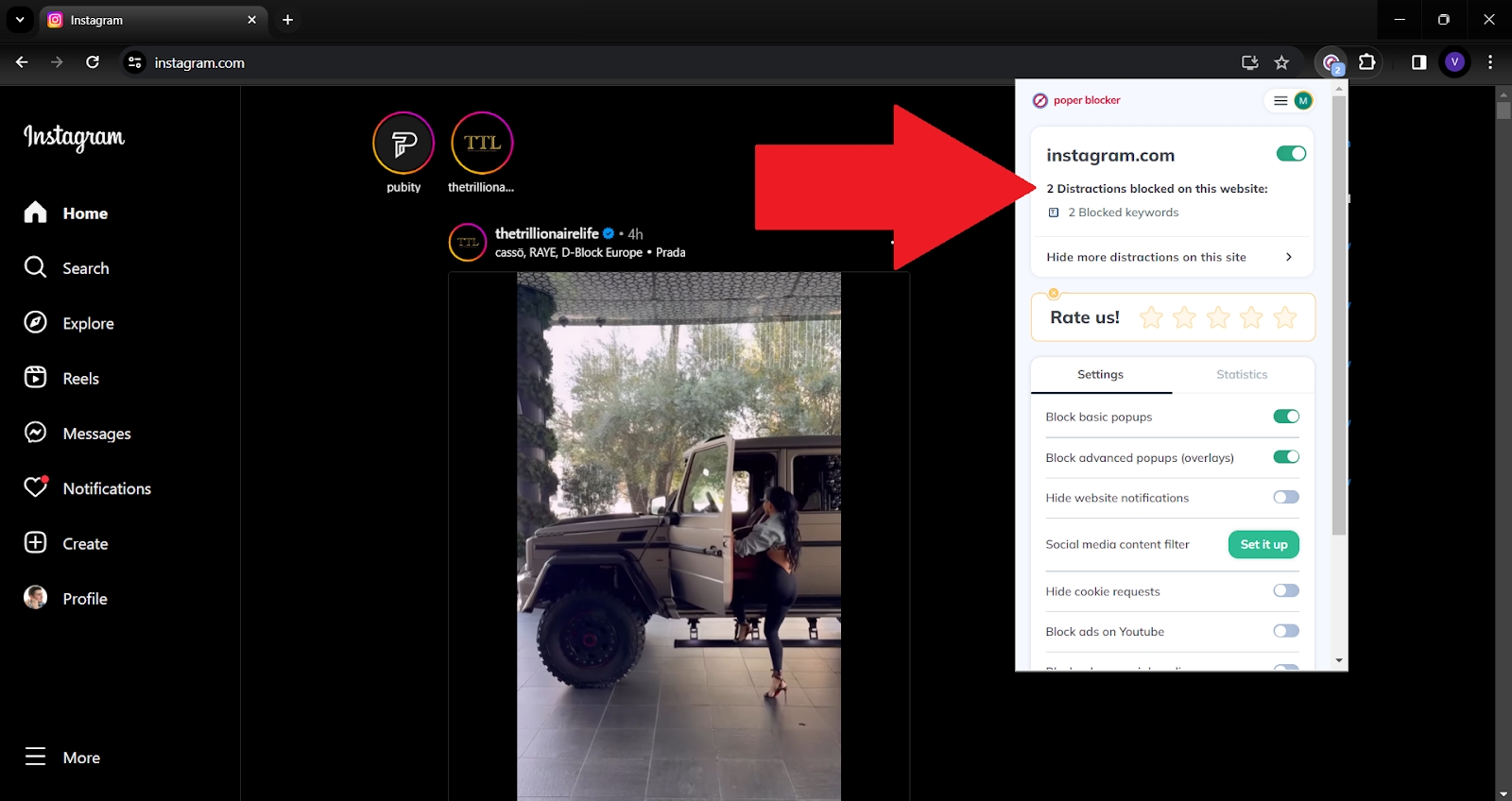
With Poper Blocker, you’re not just using Instagram; you’re shaping it to fit your unique preferences and needs.
The Final Piece: Crafting Your Ideal Social Media Space
Creating a personalized Instagram experience is akin to curating an art gallery. Each post you see should resonate with your tastes, interests, and comfort levels. This is where the power of word muting, especially with tools like Poper Blocker, becomes a game-changer in your social media journey.
Moreover, the flexibility to customize your feed extends beyond just avoiding negatives. It’s about enhancing positives too. You can tailor your feed to be more uplifting, educational, or entertaining based on your specific interests. The control is in your hands, and the possibilities are endless.
Read more:
- How to Mute Words on Twitter
- How to Mute Words on Facebook
- Can You Mute Words on LinkedIn?
- How to Block Ads on Instagram?
Say Goodbye to Unwanted Content on Instagram with Poper Blocker!
FAQs
How does muting specific words on Instagram enhance my browsing experience?
Muting words on Instagram allows you to tailor your social media environment to your preferences and comfort level. By filtering out unwanted content such as spoilers, political debates, or offensive language, you create a more enjoyable and stress-free browsing experience. This customization ensures that your time on Instagram remains aligned with your interests and values, making it a more positive and engaging space.
Can I mute words in Instagram stories and reels, or is it limited to comments and posts?
Currently, Instagram’s muting feature is primarily focused on comments and posts. This means you can prevent specific words or phrases from appearing in these areas. However, the feature does not extend to stories and reels. For more comprehensive control over the content you encounter, third-party tools like Poper Blocker can be useful, as they offer broader filtering capabilities across various types of content on Instagram.
Is the word muting feature on Instagram effective in different languages?
Yes, the word muting feature on Instagram is effective across different languages. When you add words or phrases to your mute list, Instagram filters them out regardless of the language. However, it’s important to add variations of the word or phrase in different languages if you’re multilingual or follow accounts that post in multiple languages to ensure comprehensive filtering.
Will other users know if I’ve muted certain words or phrases on Instagram?
No, other users will not be notified or aware if you mute certain words or phrases on your Instagram. The muting feature is a personal setting that only affects what you see on your feed and does not impact how others view content on the platform. Your privacy and choices are respected, allowing you to customize your experience discreetly.
How can I keep up with changes or updates to Instagram’s word muting feature?
To stay updated with changes or enhancements to Instagram’s word muting feature, you can regularly check the app’s update notes in your device’s app store and follow Instagram’s official blog or help center. These sources often provide detailed information on new features, improvements, and tips for optimizing your use of the platform. Additionally, tech news websites and social media forums are good resources for learning about user experiences and creative ways to use new features.
Make Instagram Yours – Filter Words Easily with Poper Blocker!
