
 Chrome Web Extension
 Edge Web Extension
 Android App


Instagram, boasting over a billion monthly active users, has transformed into a prime destination for advertisers. The following data highlights how this social media platform serves as a lucrative opportunity for marketers, while simultaneously posing as a potential source of annoyance for its users.
| Statistic | Source |
| Monthly Advertisers on Instagram: 2 million | ClearVoice |
| Estimated Advertising Reach on Instagram: 1.60 billion users | We Are Social |
Why Should I Block Instagram Ads?
The influx of ads on platforms like Instagram can be overwhelming. Here are several compelling reasons why blocking these ads can significantly enhance your online experience:
- Enhanced User Experience: Ads can disrupt the flow of your social media browsing. By blocking them, you ensure a smoother, more enjoyable scrolling experience, focusing solely on content that genuinely interests you.
- Time Efficiency: Ads not only interrupt but also prolong your time on the app. Removing them means you spend less time sifting through irrelevant content and more time engaging with posts that matter to you.
- Data Privacy Concerns: Many ads are tailored based on your online behavior and personal data. Blocking ads adds a layer of privacy, reducing the amount of data collected about your browsing habits.
- Mental Well-being: Constant exposure to ads, especially those promoting unrealistic standards or lifestyles, can impact mental health. Limiting this exposure can lead to a healthier, more positive social media experience.
- Avoidance of Misleading Content: Not all ads uphold the highest standards of truthfulness. Blocking ads reduces the risk of encountering scams or misleading information.
So, are you curious about how to block adverts on Instagram? In this comprehensive guide, we’ll look into the most effective methods you can employ to achieve this.
How Do I Stop Ads on Instagram?
The great news is that there are several effective strategies available to block these intrusive ads on Instagram. Below are some of the most efficient methods you should consider implementing:
1. Utilize Poper Blocker
Poper Blocker emerges as a formidable solution in your pursuit of an ad-free Instagram experience. This tool is available as a browser extension for Chrome and Edge.
Let’s dive into what makes it a game-changer and learn how to stop Instagram ads using this method:
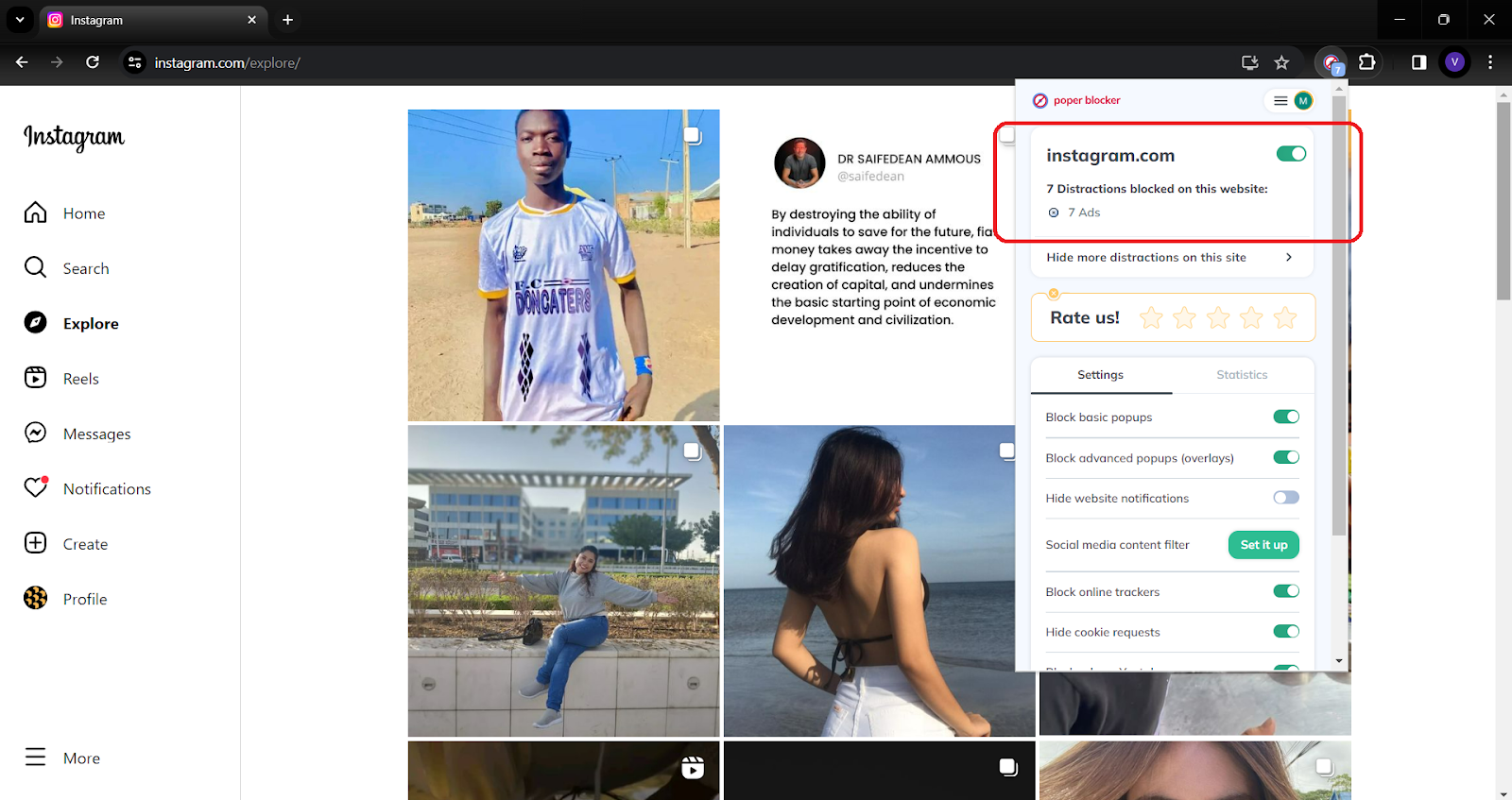
- Seamless Integration: This add-on effortlessly blends into your browsing experience. Once installed, it operates quietly in the background, ensuring that your Instagram feed remains free of ads without any manual intervention from you. This seamless integration means you can continue enjoying Instagram just as you always have, but with a significant enhancement – no more disruptive ads.
- Advanced Blocking Technology: At the heart of Poper Blocker is its advanced technology designed to identify and block a wide range of ads. Whether it’s a sponsored post in your feed or an ad in your stories, Poper Blocker works diligently to filter these out. This technology is continually updated to keep pace with new advertising strategies, ensuring that your Instagram experience remains uninterrupted.
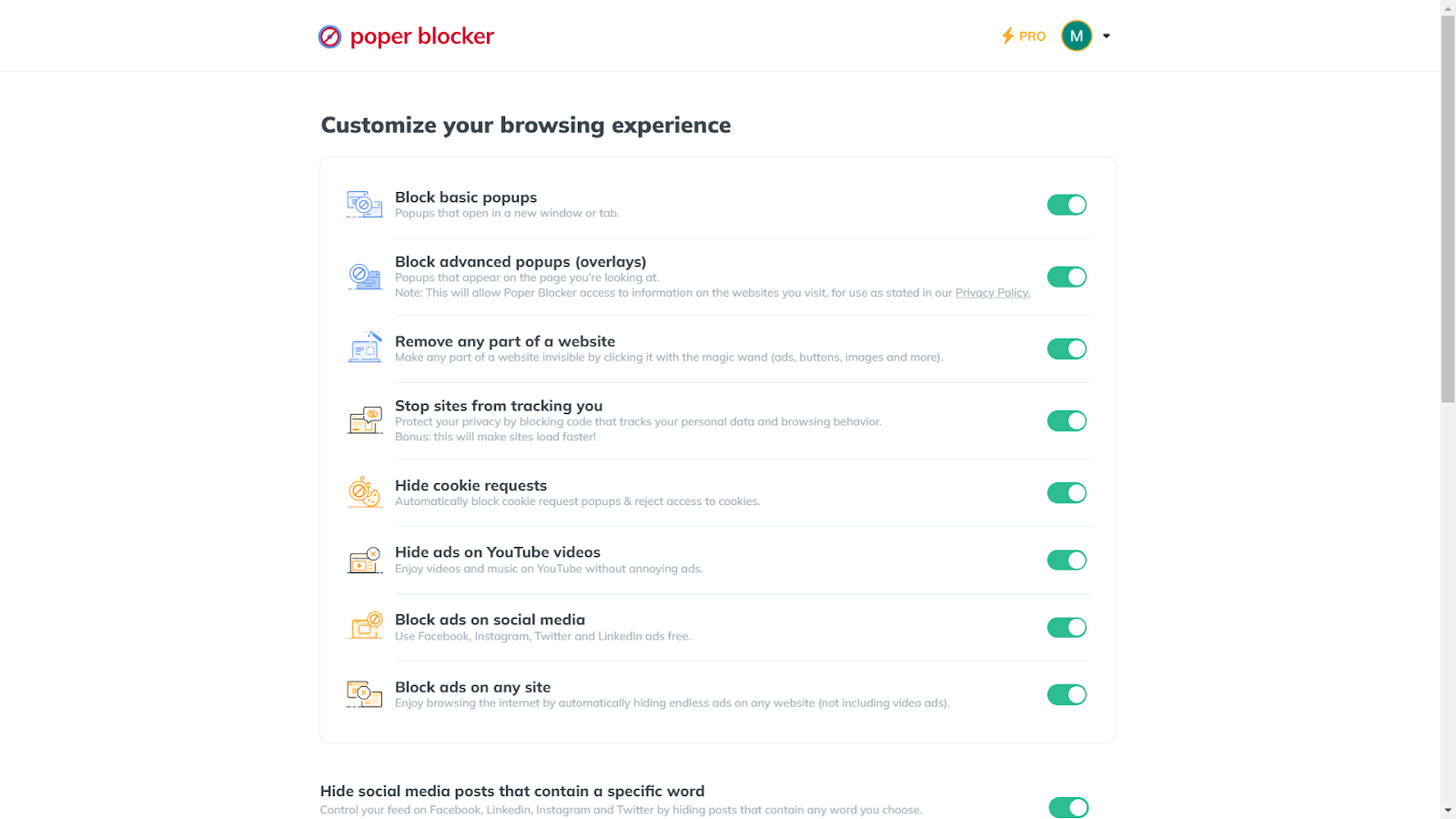
- User-Centric Customization: What sets this tool apart is its customizable nature. You have the power to tailor the ad-blocking experience to your preferences. If there are certain types of content you don’t mind seeing, Poper Blocker allows you to adjust its settings accordingly, giving you complete control over what gets blocked and what doesn’t.
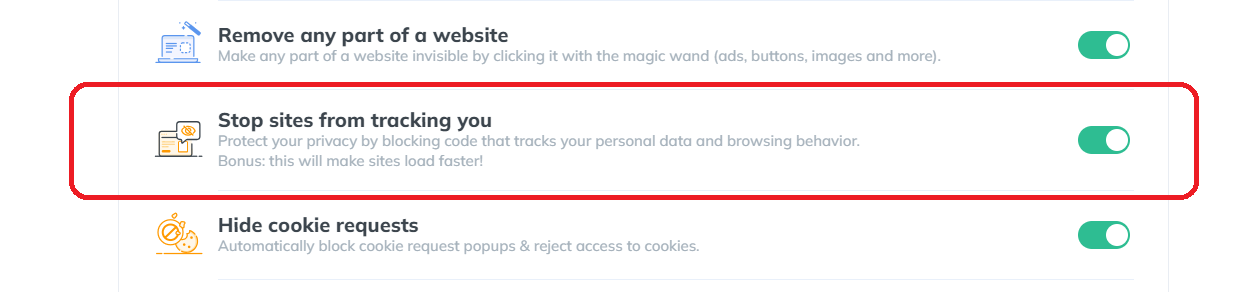
- Enhanced Privacy Protection: When you’re online, your data is often used to target ads, and the good news is that Poper Blocker offers an added layer of privacy. By blocking ads, it also limits the amount of data advertisers can collect about you, offering peace of mind and an extra layer of protection against intrusive data collection practices.
- Effortless User Experience: The beauty of Poper Blocker lies in its simplicity. Installation is a breeze, and once it’s up and running, it requires little to no maintenance. This ease of use makes it an ideal choice for anyone, regardless of their technical expertise.
Ready for an ad-free Instagram? Grab the Poper Blocker browser extension now!
2. Configure Instagram’s Features
While external tools like Poper Blocker are effective, leveraging Instagram’s own features can also significantly reduce ad intrusion. Here’s how you can take control:
Personalized Ad Experience
Instagram allows you to hide specific ads that don’t resonate with you. By tapping the three dots on an ad and selecting ‘Hide ad’, you inform Instagram about your preferences.
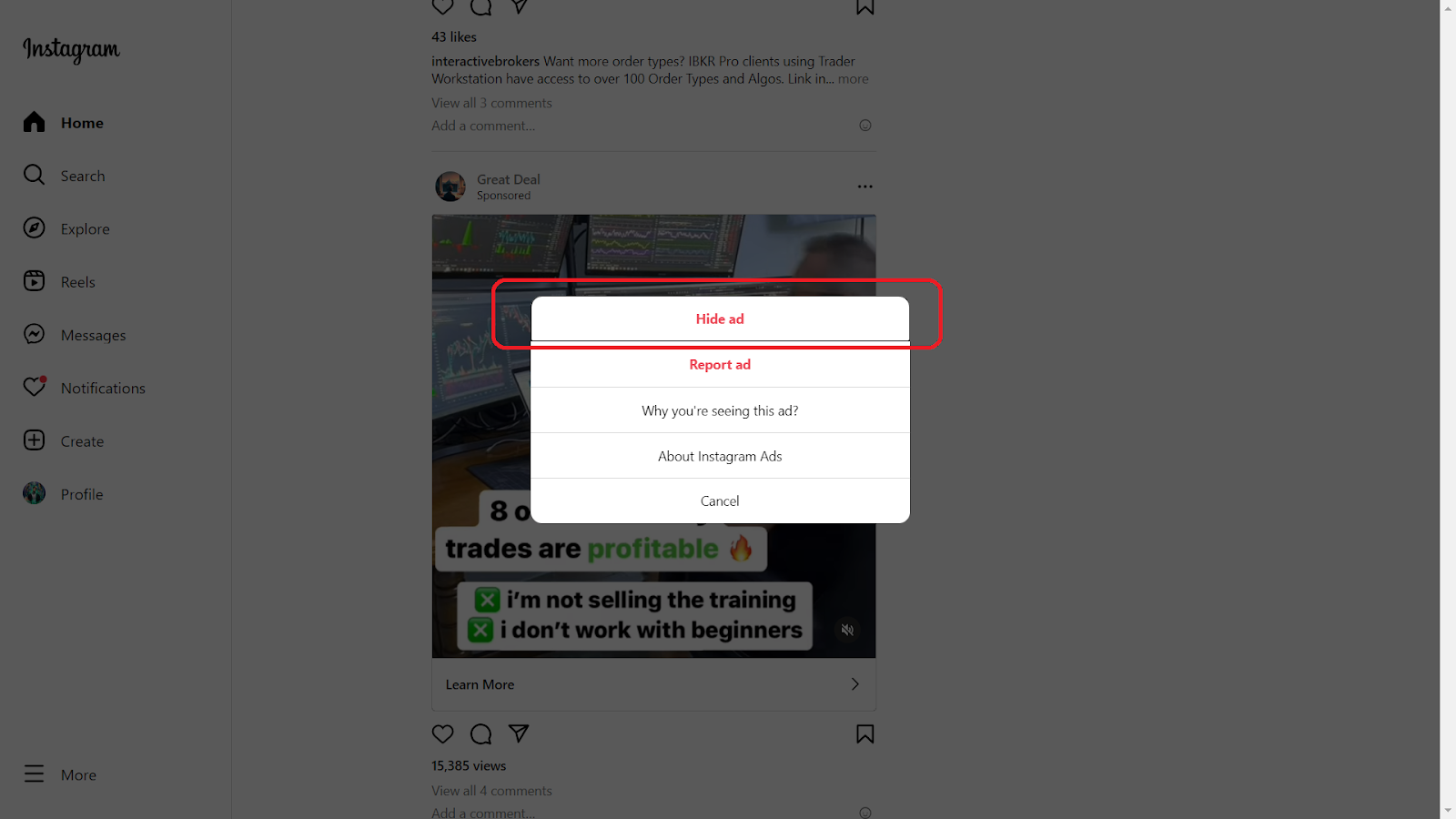
This action sends a signal to the algorithm, gradually tailoring the ad content to better suit your interests. It’s a proactive step towards curating a feed that aligns more closely with your tastes and dislikes.
Reporting Inappropriate Ads
Instagram is a diverse platform, and not all ads adhere to community standards or personal ethics. If you come across an ad that feels inappropriate, misleading, or offensive, you have the power to report it.
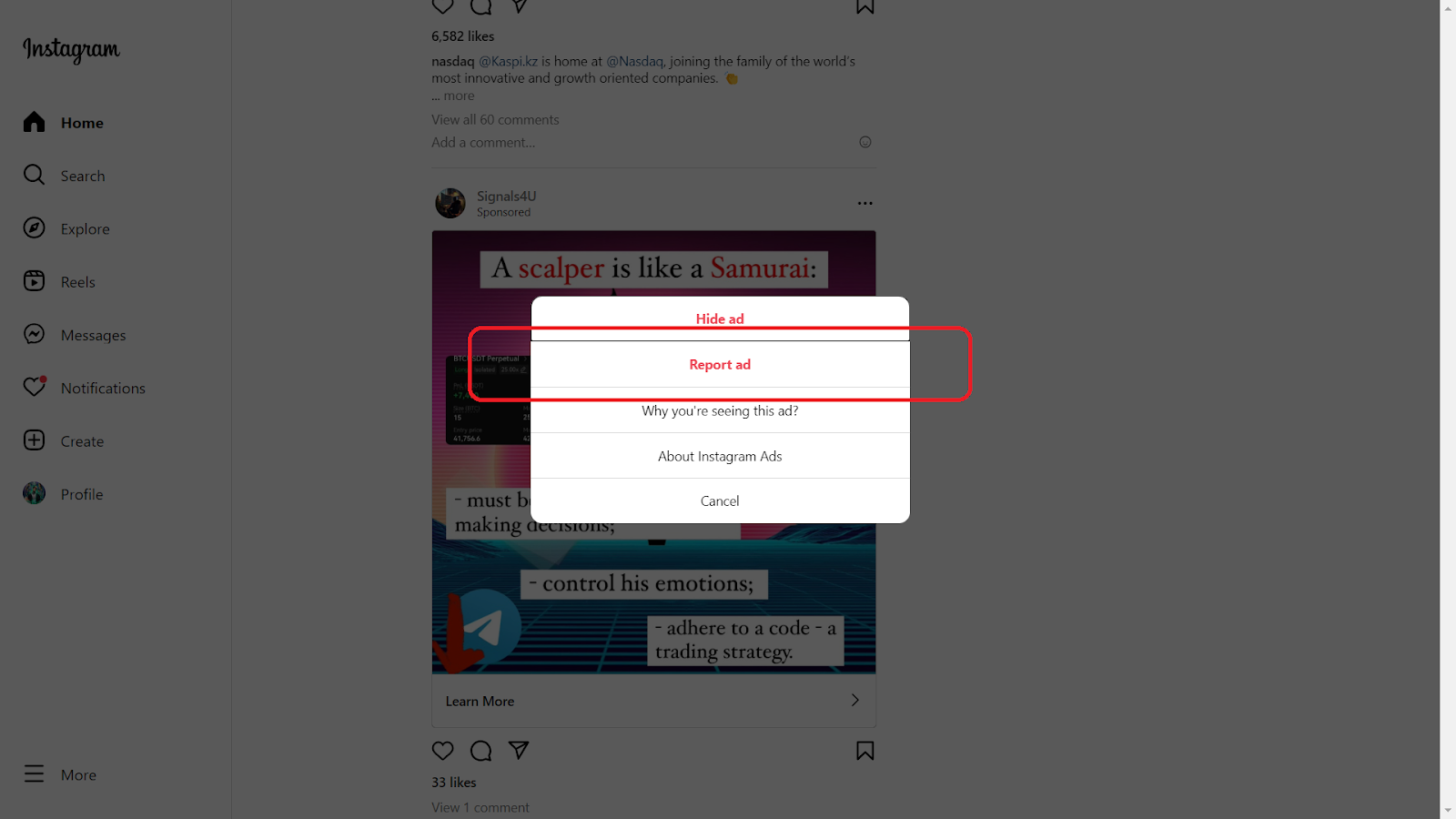
This not only removes the ad from your feed but also helps Instagram improve the quality of ads shown to the community. Reporting is a simple yet impactful way to contribute to a healthier online environment.
Blocking Ad Accounts
Sometimes, the best way to deal with persistent advertisers is to block their accounts. If you notice recurring ads from the same source that don’t interest you, go to the advertiser’s profile and block them.
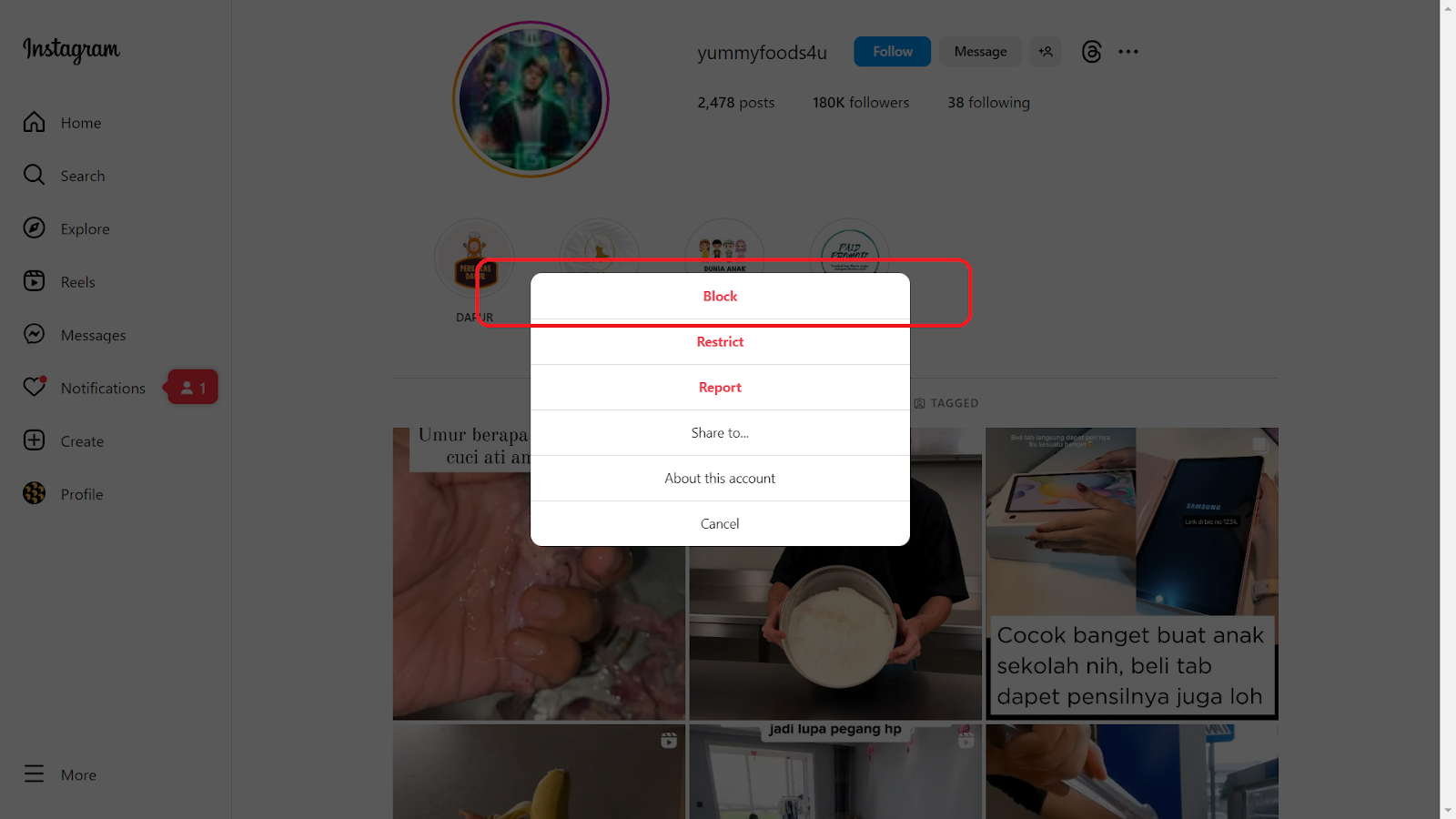
This action ensures that their content, including ads, no longer appears in your feed. It’s a straightforward yet effective method to cleanse your Instagram experience.
Adjusting Ad Preferences
Dive into the settings section of your Instagram account to fine-tune your ad preferences. Here, you can view and adjust the information Instagram uses to show you ads. This includes data from your activity on Instagram and its partner websites and apps.
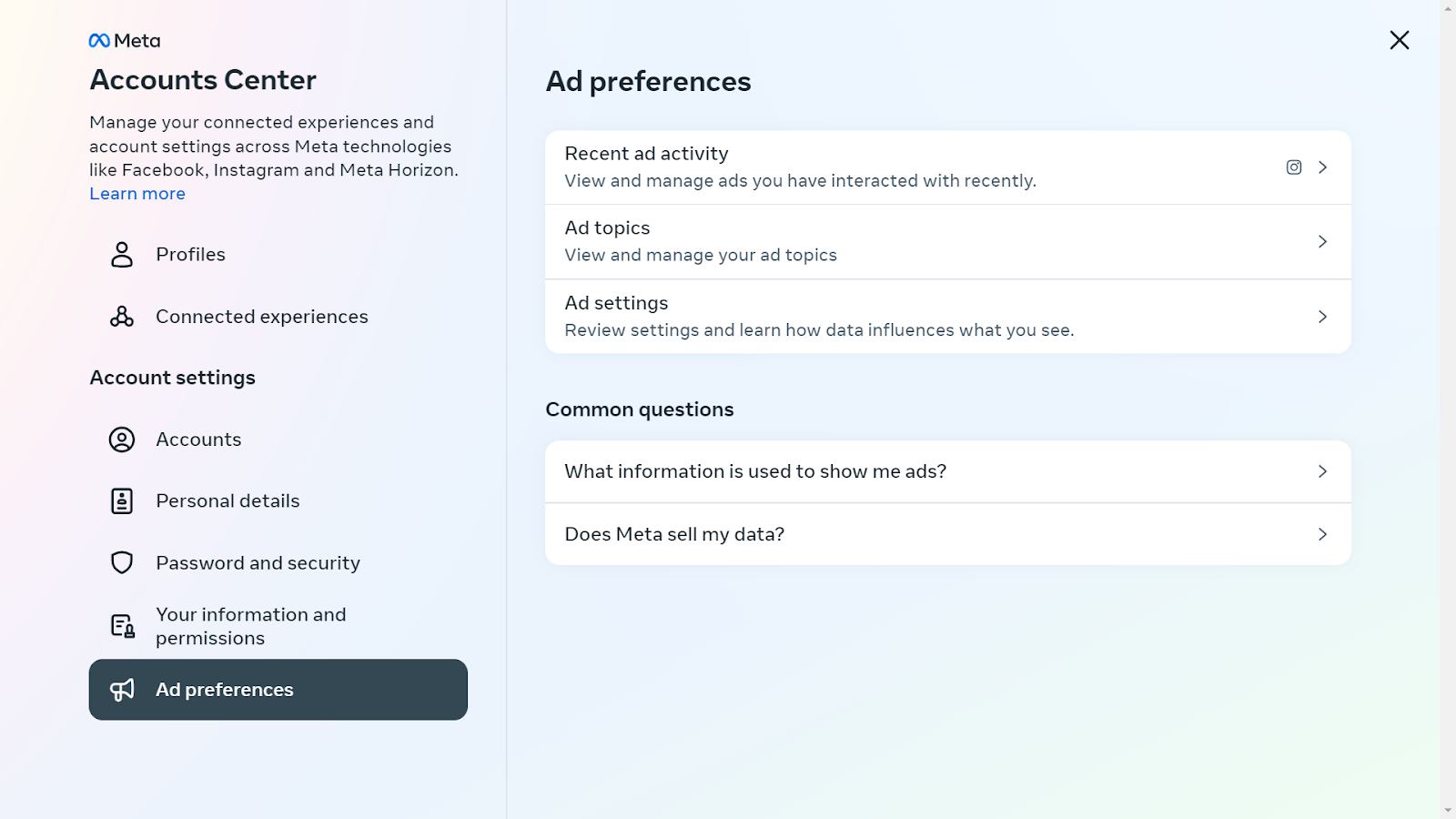
By customizing these settings, you gain more control over the types of ads that appear in your feed.
A Breath of Fresh Air on Instagram
In Instagram’s platform where online ads are increasingly pervasive, finding a sanctuary free from the constant bombardment of marketing messages is a breath of fresh air. Poper Blocker offers just that – a haven within Instagram where you can enjoy your social media experience without the incessant interruption of ads.
Alongside this powerful tool, configuring Instagram’s own features to manage ad preferences plays a crucial role. By hiding specific ads, reporting inappropriate ones, and blocking ad accounts, you gain more control over the content that appears in your feed. This dual approach, combining Poper Blocker with Instagram’s settings, empowers you to tailor your browsing experience to your liking.
So, why wait? Embrace the tranquility of an ad-free Instagram, where every scroll brings you closer to the content you truly care about. Let Poper Blocker and Instagram’s configurable features transform your social media interactions into uninterrupted moments of connection and discovery.
FAQs
Can I completely block all ads on Instagram?
While Poper Blocker significantly reduces the presence of ads on Instagram, it’s important to understand that completely eliminating all ads might not be feasible. Instagram, as a platform, integrates certain sponsored content directly into its feed and stories, which are harder to filter out. However, Poper Blocker does an excellent job at minimizing the majority of these interruptions, providing a much cleaner and more enjoyable browsing experience.
Is Poper Blocker safe to use?
Absolutely. Poper Blocker is designed with user safety and data privacy as top priorities. It operates by blocking unwanted content without compromising the security of your personal information. Users can trust that their browsing habits and data are not being tracked or misused. This assurance of safety and privacy is one of the key reasons why many choose Poper Blocker as their go-to ad-blocking solution.
How does hiding an ad affect my feed?
When you choose to hide an ad on Instagram, you’re essentially communicating your preferences to the platform. Instagram’s algorithm takes note of these actions. Over time, this feedback helps the platform tailor the types of ads and sponsored content you see, making them more relevant to your interests. While this doesn’t stop ads altogether, it does ensure that the ads you do encounter are more likely to align with your preferences, making them less intrusive.
Can I block ads on the Instagram mobile app?
Direct ad-blocking within the Instagram mobile app is limited. The app itself doesn’t provide a built-in feature to block ads completely. However, users can manage their ad preferences through the app’s settings by hiding specific ads, reporting inappropriate ones, and blocking ad accounts. These actions can help reduce the frequency and relevance of the ads shown.
Does Poper Blocker work on all browsers?
Poper Blocker is specifically designed for Chrome and Edge browsers. This focus allows for a more tailored and effective ad-blocking experience on these platforms. While it is not available for all browsers, users of Chrome and Edge can easily integrate Poper Blocker into their browsing experience to enjoy an ad-free journey on websites like Instagram.
Say goodbye to annoying IG ads – Install Poper Blocker today!
Simple fact: Twitter, a platform with over 330 million monthly active users, displays a variety of ads including promoted tweets and targeted advertisements.
Twitter, now known as X, has become a central hub for news, entertainment, and social interaction. However, the influx of ads on the platform can be overwhelming, leading to a cluttered and frustrating user experience.
Just take a look at these numbers:
| Statistic | Value | Source |
| Amount invested by Twitter on advertising | $167.1 million | Statista |
| Twitter’s advertising revenue | $2.5 billion | Bloomberg |
The social media company generated a substantial $2.5 billion in ad revenue, further investing millions into this sector, underscoring its significant dependence on advertising.
The problem with these adverts is that it can often disrupt the user experience. Are you looking for effective ways to block these ads?
Why Should I Block Twitter Ads?
Blocking Twitter ads can significantly enhance your social media experience. Here are key reasons to consider:
- Improved Focus: Without ads, your feed remains dedicated to content you choose, fostering better engagement.
- Enhanced Privacy: Blocking ads reduces the tracking of your online activities, protecting your personal data.
- Reduced Digital Clutter: An ad-free timeline means a cleaner, more streamlined interface, free from visual distractions.
- Better Control: You regain control over your feed, seeing only posts from people and organizations you follow.
- Increased Efficiency: With fewer interruptions, your browsing becomes more efficient, saving you time and frustration.
How Do I Stop Ads on Twitter?
There are several effective methods on how to block Twitter ads, each offering its own unique advantages. Let’s explore some of the top options or tools available to enhance your browsing experience by minimizing unwanted advertisements:
1. Install the Poper Blocker Browser Extension
Installing the Poper Blocker browser extension is a game-changer for those seeking a serene and ad-free Twitter experience. This can be installed as a browser extension for Chrome and Edge.
Here’s a breakdown of its standout features:
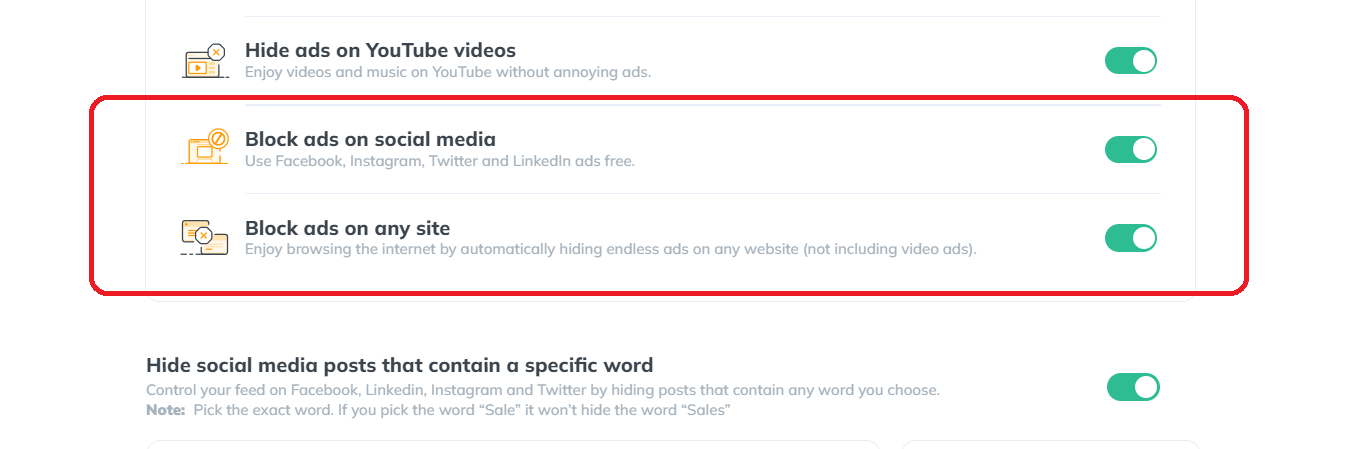
- Robust Ad Blocking: At its core, Poper Blocker excels in efficiently blocking a wide range of ads on Twitter. From intrusive promoted tweets to subtle sidebar advertisements, it ensures your feed remains clean and focused on the content you value.
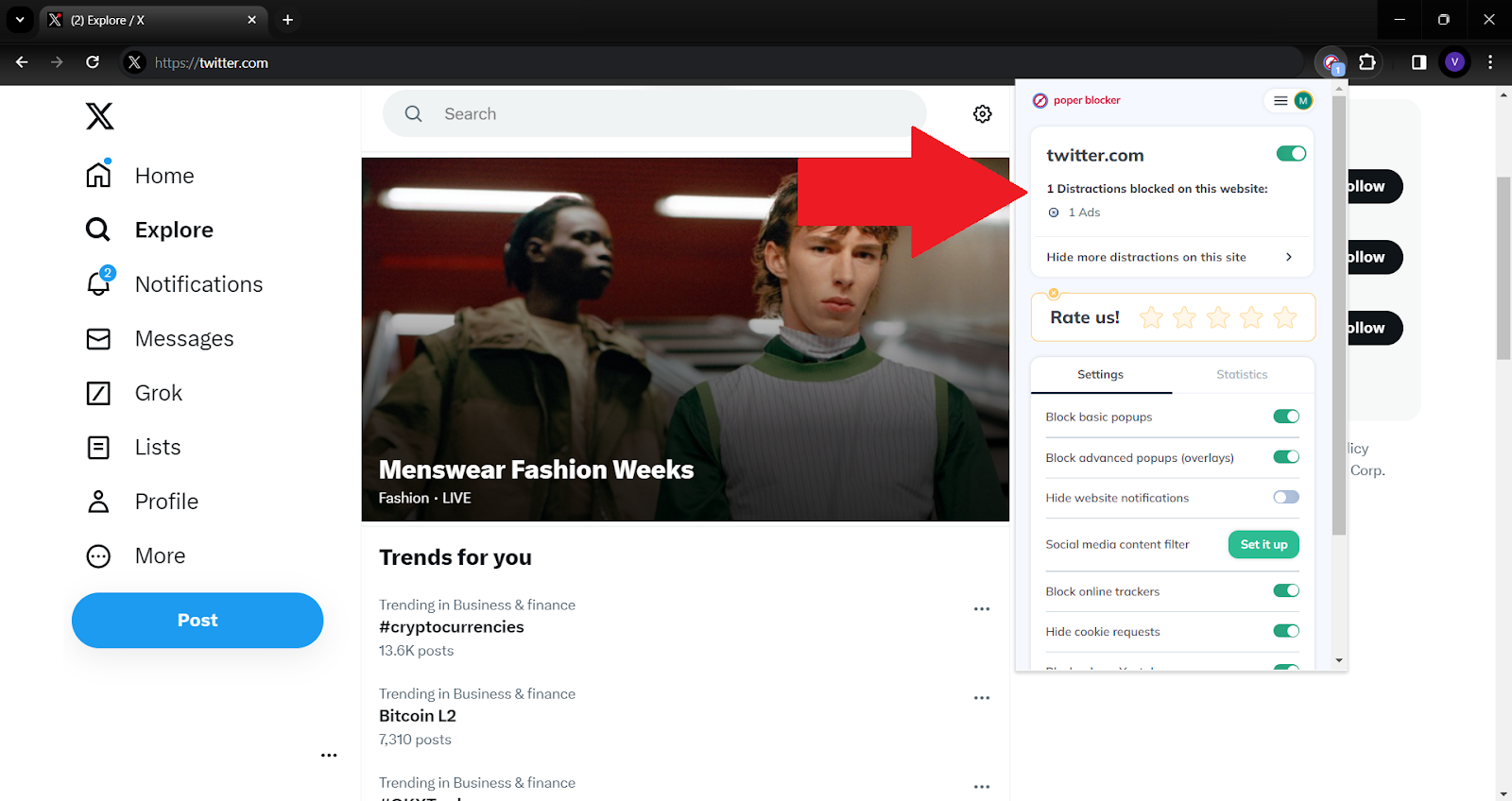
- Advanced Tracker Blocking: Beyond just ads, it also targets and blocks trackers. This feature is crucial for maintaining your online privacy, as it prevents advertisers from collecting data about your browsing habits and preferences.
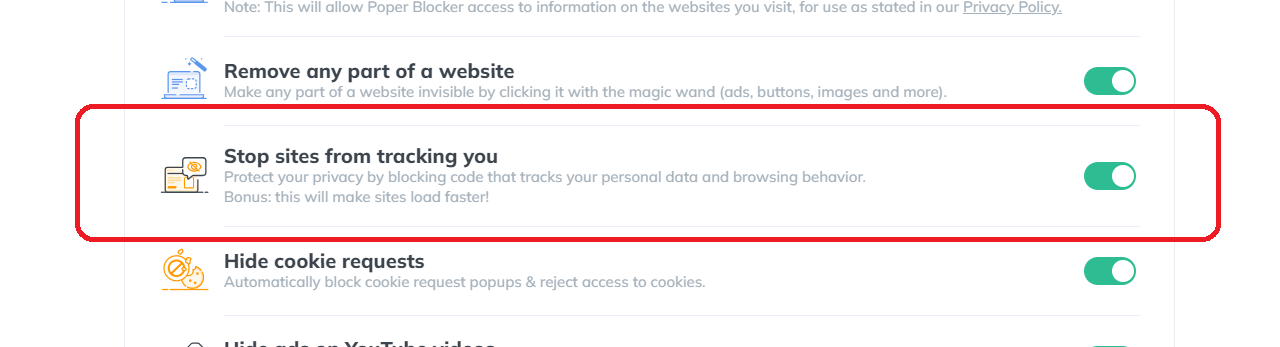
- Customizable Blocking Options: One of the most user-friendly aspects of this ad blocker is its customizable nature. Users have the flexibility to tailor their ad-blocking preferences, choosing to block specific types of ads or adjust settings to better suit their individual browsing experience.
- Seamless Integration: The tool integrates seamlessly into your browser, working quietly in the background. This ensures that your Twitter usage remains uninterrupted and fluid, without the need for constant adjustments or interference.
- Regular Updates: The digital landscape is always evolving, and so are the strategies of advertisers. Poper Blocker stays ahead of the curve with regular updates, ensuring that even the newest ad formats and tracking techniques are effectively blocked.
Transform your X journey – Grab Poper Blocker and block ads effortlessly!
2. Configure X (Twitter) Ad Settings
Configuring your Twitter ad settings is a strategic move to reduce the influx of ads and tailor your online experience. Here’s how you can take control:
Accessing Ad Preferences: Start by diving into your Twitter account settings. Here, you’ll find the ‘Ad Preferences’ section, a control center for managing how ads are served to you.
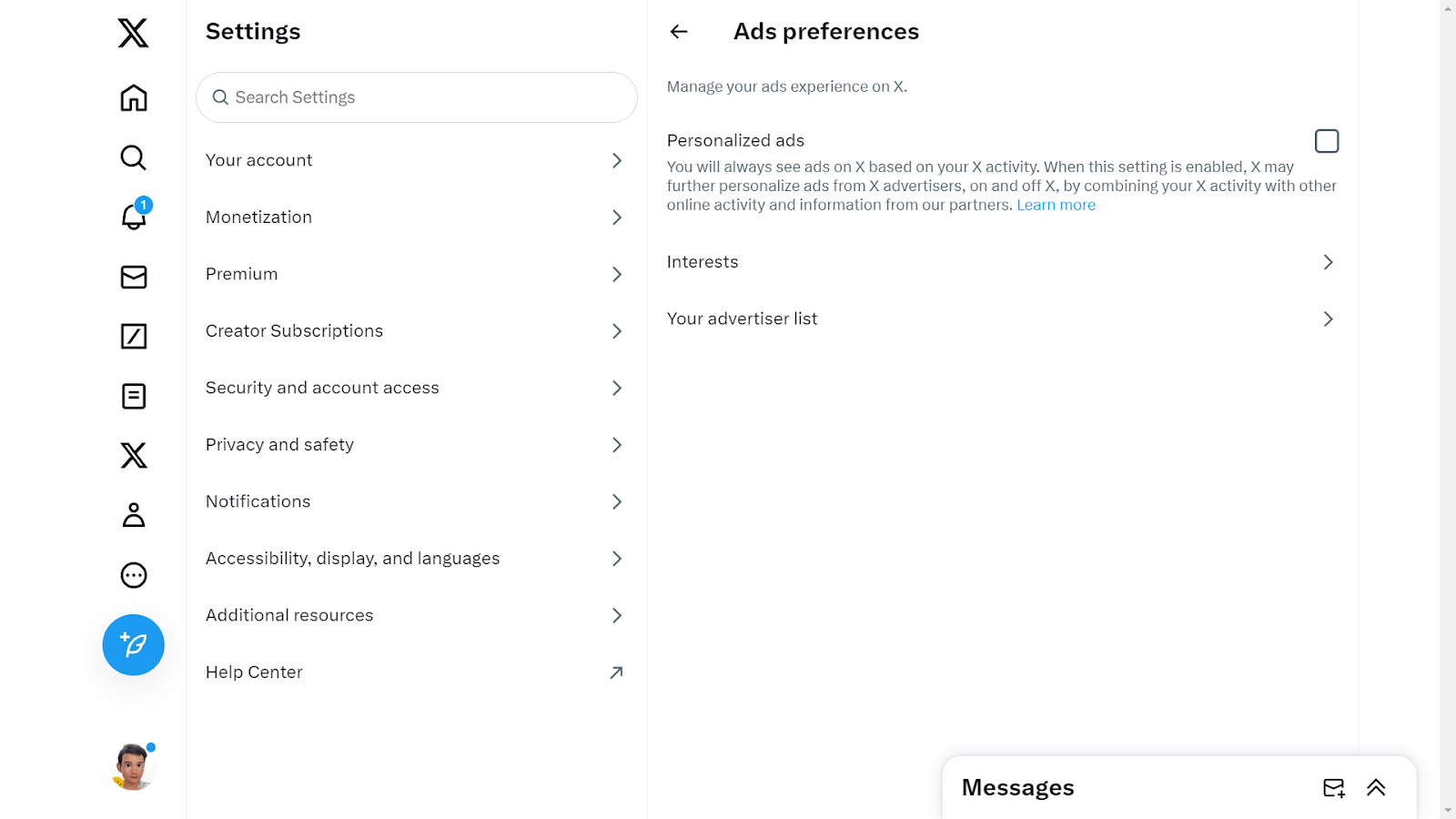
- Opting Out of Personalized Ads: One of the key features in this section is the ability to opt-out of personalized ads. This means Twitter will limit its use of your data to tailor ads, resulting in a less targeted ad experience.
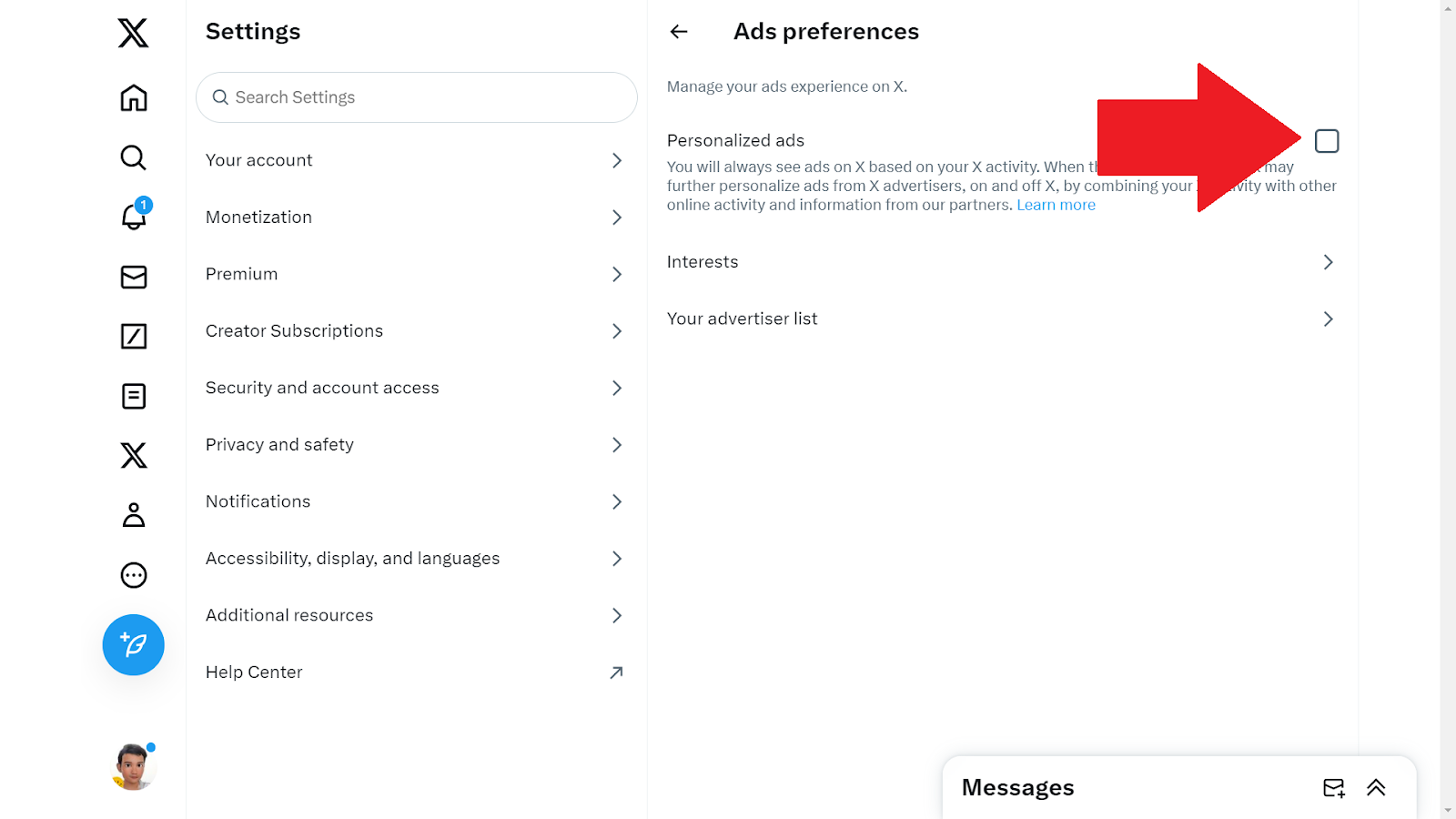
- Reviewing Data Sharing Options: Take a moment to explore the data sharing settings. Twitter uses your data to enhance ad relevance, but you have the power to restrict this data sharing, further reducing ad personalization.
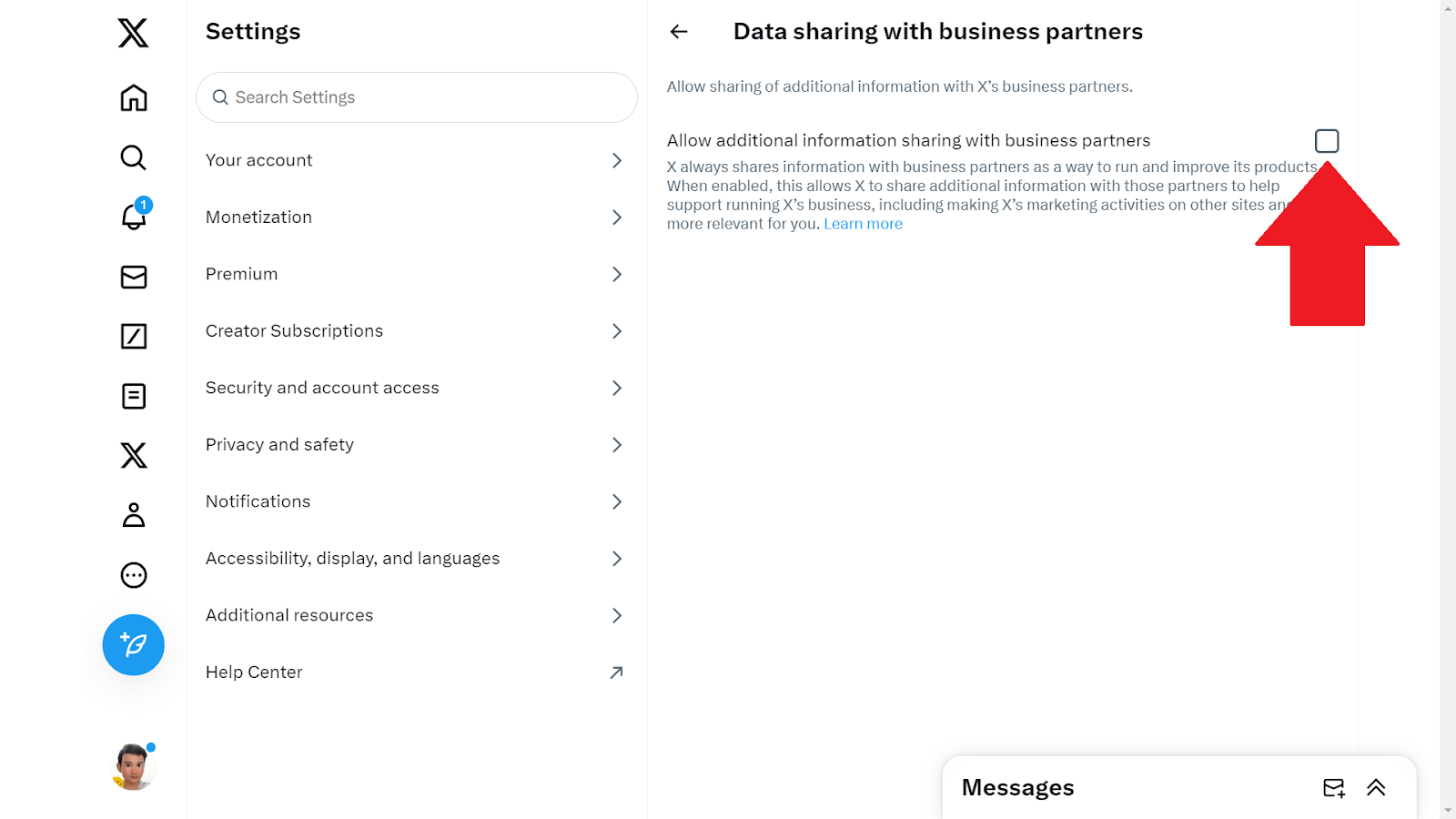
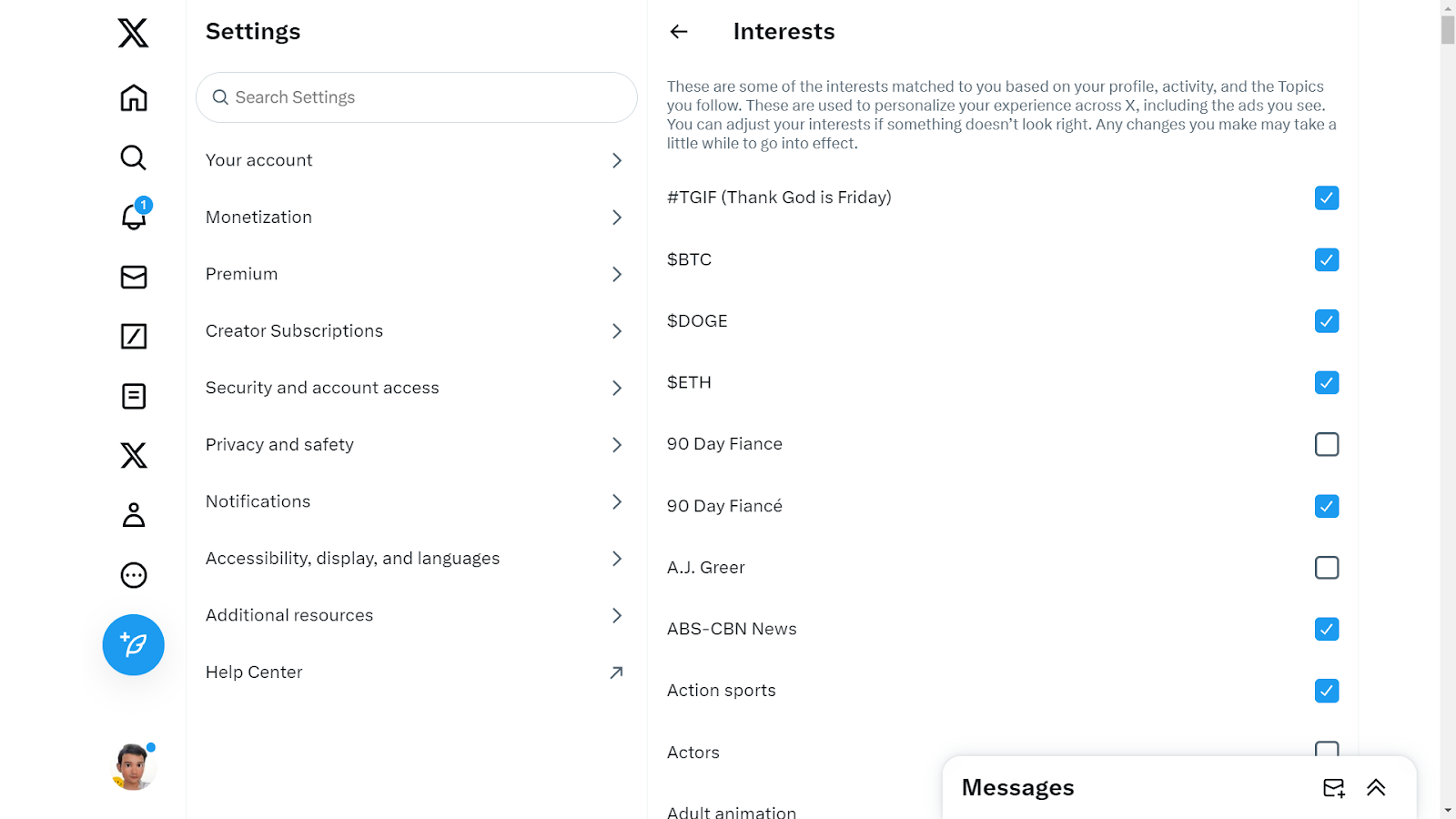
- Adjusting Interest Settings: Twitter curates ads based on your perceived interests. Dive into the ‘Interests’ section to uncheck topics that don’t resonate with you, thereby reducing irrelevant ad content.
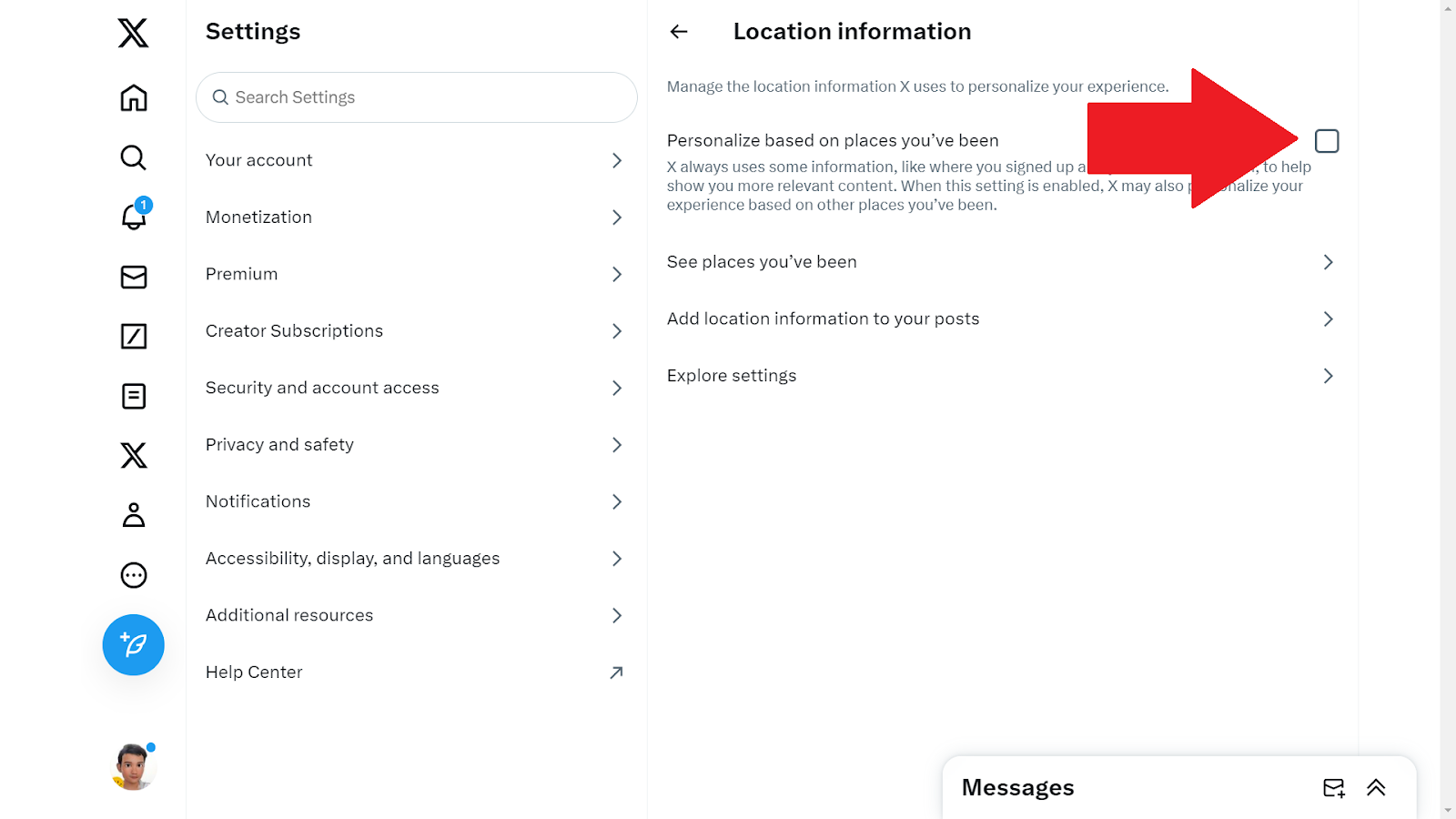
- Controlling Location-Based Ads: Location data can significantly influence the ads you see. If you prefer not to receive location-specific ads, you can turn off location-based ad targeting in your settings.
- Regular Review and Adjustment: Your interests and preferences may change over time, so it’s beneficial to periodically revisit these settings. Regular adjustments ensure that your ad experience remains as relevant and unobtrusive as possible.
3. Explore Other Ad Blocking Tools
In addition to specific browser extensions like Poper Blocker, there are several other tools available that can enhance your Twitter experience by minimizing or eliminating ads. Here’s a look at some types of tools you might consider:
- Privacy-Focused Web Browsers: Certain web browsers are designed with privacy as a priority, inherently blocking ads and trackers. These browsers offer an integrated solution for those who want a more secure and ad-free online experience. When you use such a browser to access Twitter, it automatically filters out most of the ads and tracking scripts.
- Mobile Apps for Ad Blocking: For those who primarily use Twitter on mobile devices, there are apps available that can block ads across different applications, including Twitter. These apps work by setting up a VPN or a local DNS proxy on your device to filter out ad traffic, thereby reducing the number of ads displayed in your Twitter feed.
- Custom Script Blockers: For the more tech-savvy users, custom script blockers offer a more hands-on approach. These tools allow you to create and implement custom rules for blocking content, including ads on Twitter. This method requires a bit more effort but offers a high degree of customization in controlling what content you see on your feed.
Enjoy a Cleaner, Ad-Free Twitter Experience
Embracing an ad-free experience on Twitter is not just about eliminating distractions; it’s about reclaiming control over your online environment. By effectively blocking ads, you can transform your Twitter feed into a space that’s solely focused on the content you care about, free from the clutter of unwanted promotions.
Tools like Poper Blocker not only enhance your browsing experience but also fortify your online privacy, shielding you from the relentless tracking often associated with digital advertising. This shift towards a cleaner, more streamlined Twitter experience allows for deeper engagement with the platform, ensuring that your time spent online is both enjoyable and meaningful.
Remember: Your online space is yours to curate, and with the right tools, you can ensure it remains a reflection of your interests, free from the intrusion of unwanted ads.
Tired of annoying ads on Twitter? Try the Poper Blocker extension for instant relief!
FAQs
Can I completely block all ads on Twitter?
Absolutely. Tools like Poper Blocker are designed to significantly reduce, if not entirely eliminate, the visibility of ads on Twitter. By using such tools, you can enjoy an ad-free experience on the platform. However, it’s important to note that while most ads can be blocked, occasional promotional content might still appear due to the evolving nature of ad technologies.
Will blocking ads affect my Twitter functionality?
No, using ad blockers like Poper Blocker won’t impact your ability to enjoy Twitter’s main features. These tools are designed to work seamlessly in the background, targeting only the ads and leaving the rest of your Twitter experience untouched. You’ll still be able to tweet, retweet, follow, and engage with content just as you did before, but without the constant interruption of ads.
Is it safe to use ad blockers like Poper Blocker?
Yes, Poper Blocker is a reputable and reliable tool for blocking ads. It prioritizes user safety and privacy, ensuring that your browsing experience is not only ad-free but also secure from potential online threats. The tool is regularly updated to maintain its effectiveness and to safeguard against any new types of adware or malicious ads that might emerge.
Can I customize what ads I block on Twitter?
Many ad blockers, including Poper Blocker, offer customization options. This means you can choose to block specific types of ads or adjust settings to suit your browsing preferences. Whether you want to completely eliminate all forms of advertising or just certain types of promotional content, these tools provide the flexibility to tailor your ad-blocking experience.
Do ad blockers also stop trackers?
A significant advantage of using ad blockers like Poper Blocker is their ability to block trackers as well. Trackers are used by websites and advertisers to collect data about your online behavior. By blocking these trackers, ad blockers enhance your privacy online, preventing advertisers from gathering personal data and targeting you with ads based on your browsing history and preferences. This dual functionality makes ad blockers an effective tool for both enhancing your browsing experience and protecting your online privacy.
Say goodbye to Twitter ads – Get Poper Blocker for a cleaner feed now!
Did you know that the average Facebook user clicks on 11 ads per month? (Source: DataReportal) With over 2 billion people targeted by Facebook ads, it’s no wonder many are seeking ways to reduce this digital clutter. But how do you effectively block these ads?
What are Facebook Ads?
Facebook ads are tailored advertisements that typically appear in your:
- News feed
- Stories
- Videos
These ads are based on your online behavior, interests, and demographics. They are designed to capture your attention and often lead to impulsive online shopping.
Why is it Important to Block Facebook Ads?
Blocking Facebook ads isn’t just about removing a minor annoyance; it has several significant benefits. Here’s why it’s crucial:
Enhanced Focus
Ads can be a major distraction, interrupting your flow as you scroll through your feed. Removing them helps maintain your focus on what matters – connecting with friends and family, and enjoying meaningful content.
Improved Mental Well-being
Constant exposure to ads, especially those promoting unrealistic standards or unnecessary products, can impact mental health. Limiting this exposure can lead to a more positive online experience.
Data Privacy
Many ads use tracking technology to gather data about your online behavior. Blocking these ads can help protect your personal information from being collected and used without your consent.
Reduced Bandwidth Usage
Ads consume data. By blocking them, you can save on bandwidth, which is particularly beneficial if you’re on a limited data plan or using a slower internet connection.
Faster Browsing Speed
Did you know that Facebook Reels currently represents 3.3% of the platform’s ad impressions? (Source: Emarketer) Given the growing trend of user engagement with Reels, it’s likely that the frequency of ads in this format will increase in the future. Such ads can slow down page loading times. Without them, your Facebook experience becomes smoother and more efficient, enhancing overall usability and enjoyment.
How Do I Get Rid of Ads on Facebook?
So how do you stop ads on Facebook? By utilizing these features, you can significantly enhance your Facebook browsing experience, making it more tailored to your preferences and less cluttered with unwanted ads.
1. Use Poper Blocker
Poper Blocker, a renowned ad-blocking tool, offers robust features to block ads on Facebook. It’s designed to enhance your browsing experience by eliminating unwanted ads and pop-ups.
Here’s why it’s a game-changer:
- Efficient Ad Blocking: Poper Blocker is engineered to target and eliminate a wide array of ads on Facebook. From those pesky sidebar adverts to the interruptive video ads that pop up mid-stream, Poper Blocker handles them all with ease. This means a cleaner, more streamlined Facebook experience, free from distractions.
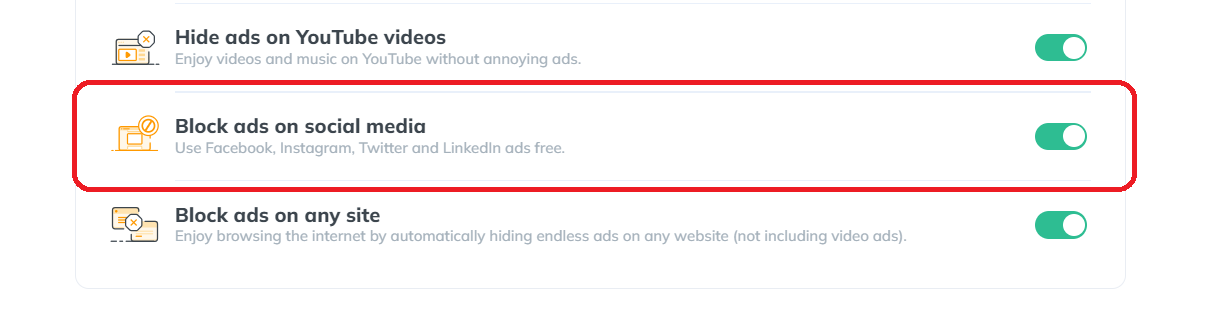
- User-Friendly Interface: One of the standout features of Poper Blocker is its simplicity and ease of use. You don’t need to be tech-savvy to navigate its interface. With just a few clicks, you can install the extension and watch it seamlessly integrate into your browser, working quietly in the background.
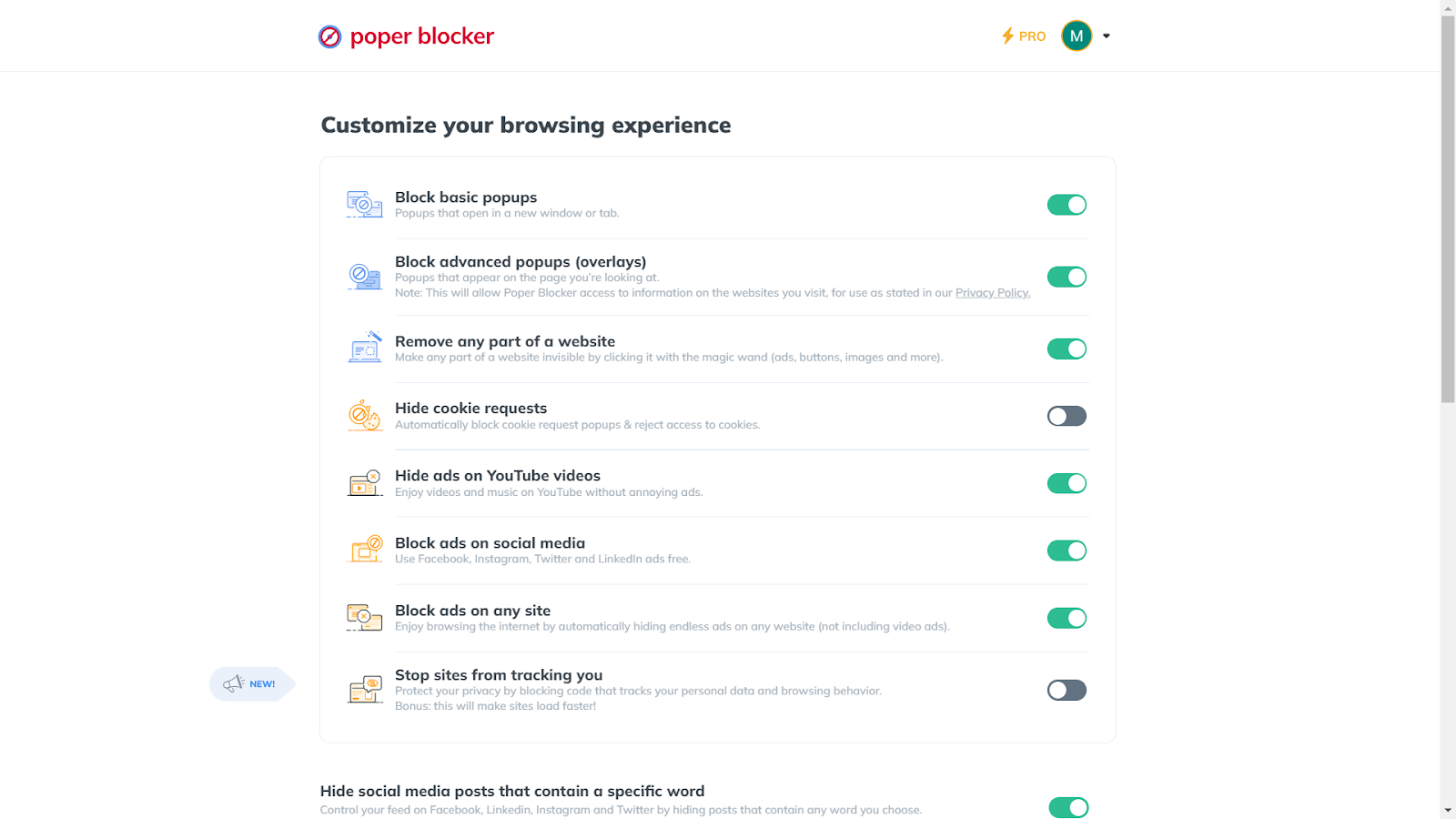
- Customizable Controls: Flexibility is key with this browser extension. You have the power to customize your ad-blocking experience. Whether you want to block adverts on Facebook or just specific types, Poper Blocker gives you the control to tailor your browsing experience according to your preferences.
- Privacy Protection: In an online world where privacy is paramount, Poper Blocker ensures that your browsing habits and data stay private. It blocks trackers that often accompany ads, safeguarding your digital footprint from prying eyes.
- Enhanced Browsing Speed: By eliminating the load of unnecessary ads, Poper Blocker can significantly improve your browsing speed on Facebook. This not only makes for a more enjoyable experience but also benefits those with limited bandwidth or slower internet connections.
Transform your Facebook feed – Try Poper Blocker for seamless browsing!
2. Utilize Facebook’s Features
Harnessing Facebook’s own features to control ad exposure is an effective strategy. Here’s how you can make the most of these options:
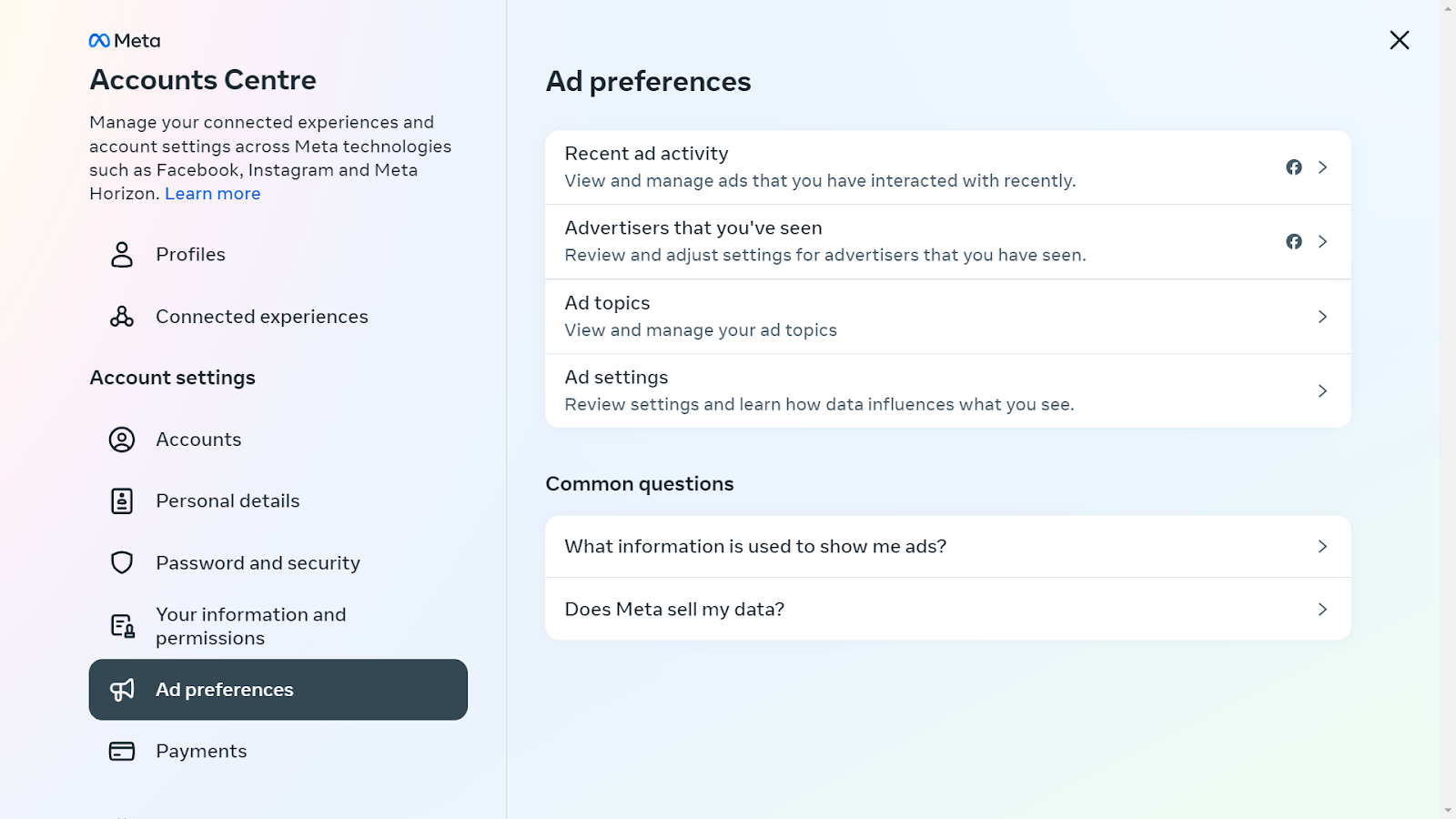
- Adjusting Ad Preferences: Facebook allows you to dive into your settings and tweak your ad preferences. This is a proactive way to influence the types of ads you see. You can limit ads based on your activity on other apps and websites, making them more relevant to your interests. It’s like telling Facebook, “Show me what I like, not just anything.”
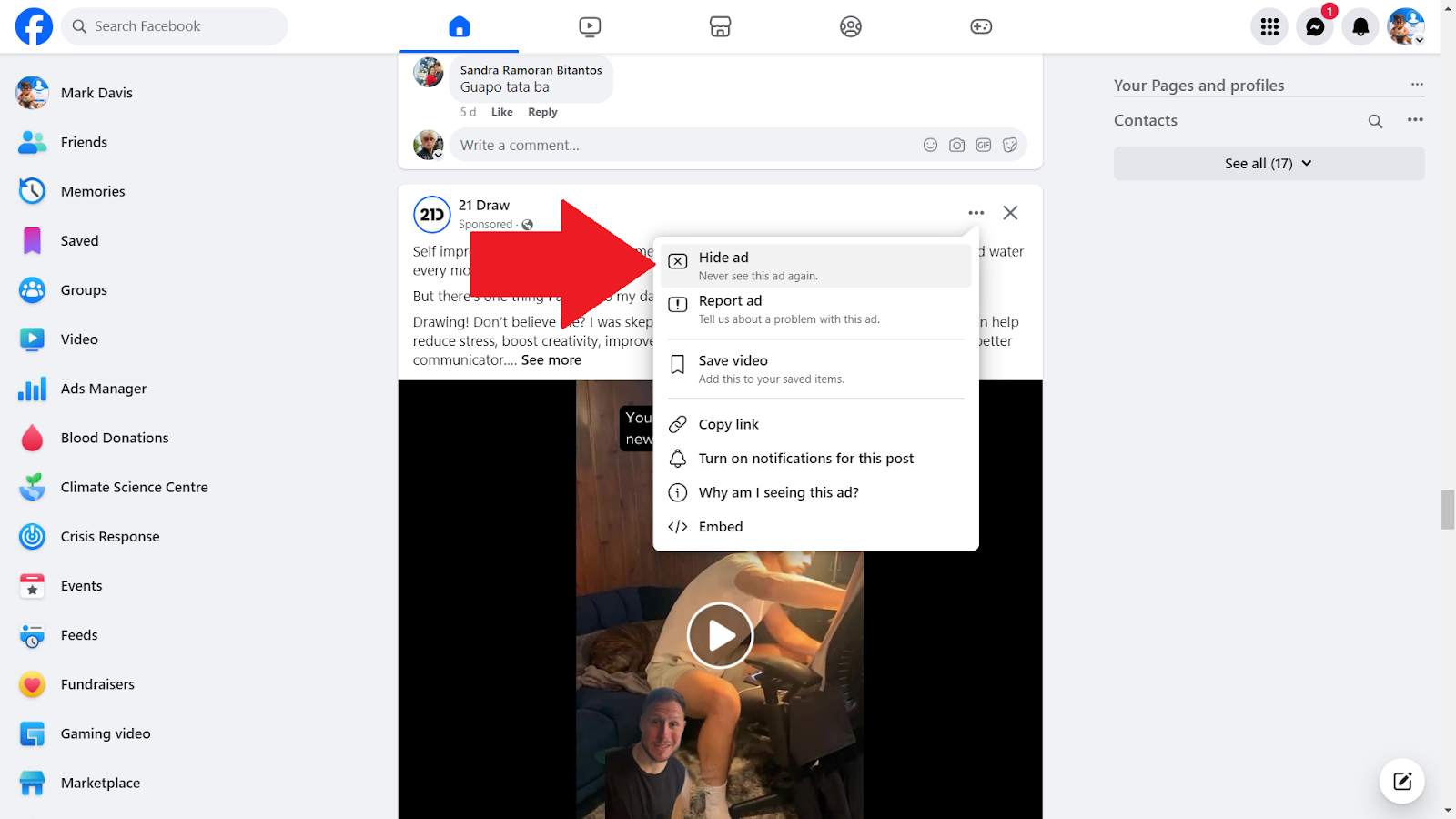
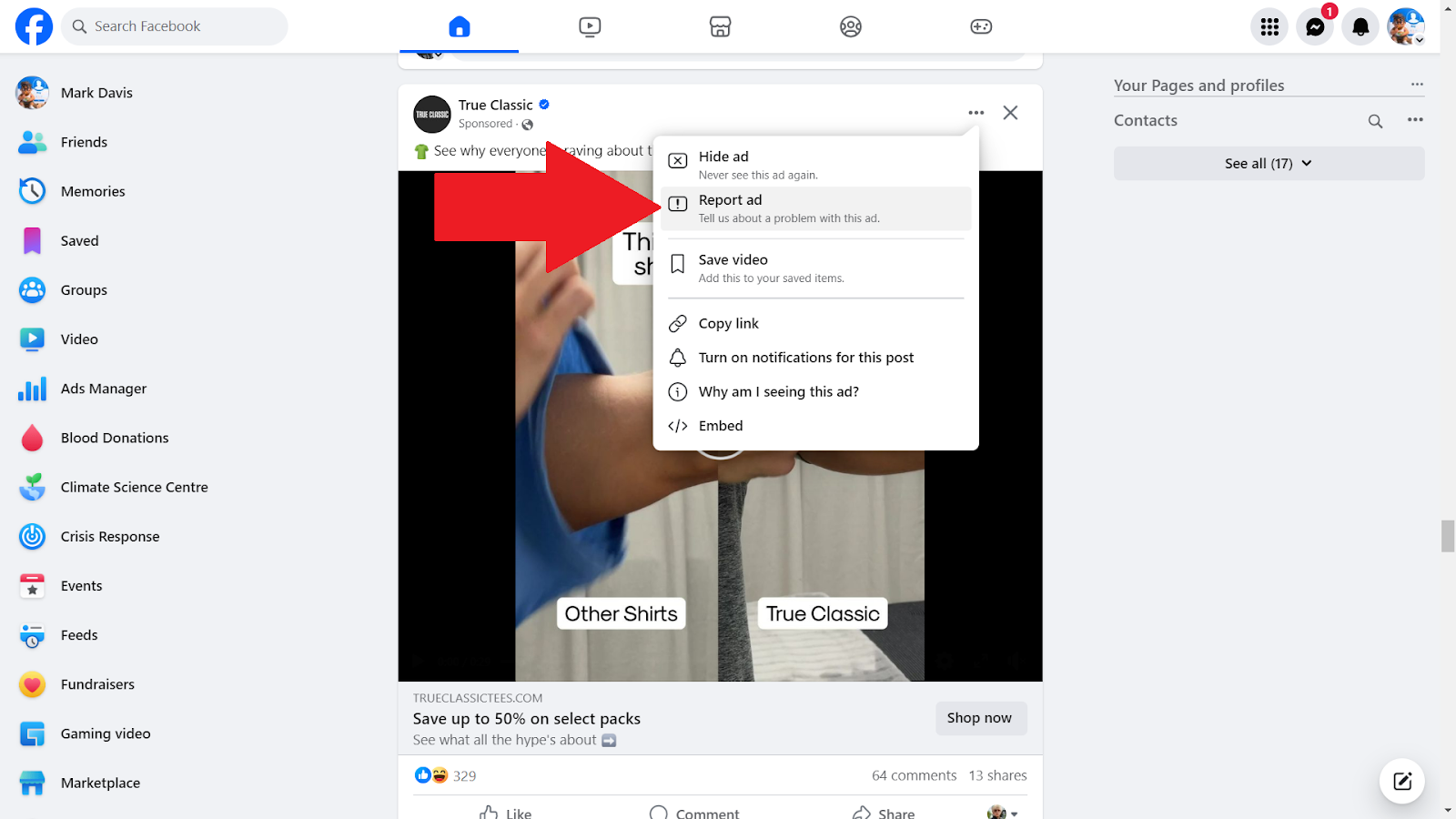
- Hiding Specific Ads: Ever seen an ad that just doesn’t resonate with you? Facebook gives you the power to hide it. With a simple click on the three dots in the ad’s corner, you can choose to hide it and similar ones in the future. It’s a quick fix to remove those one-off annoyances.
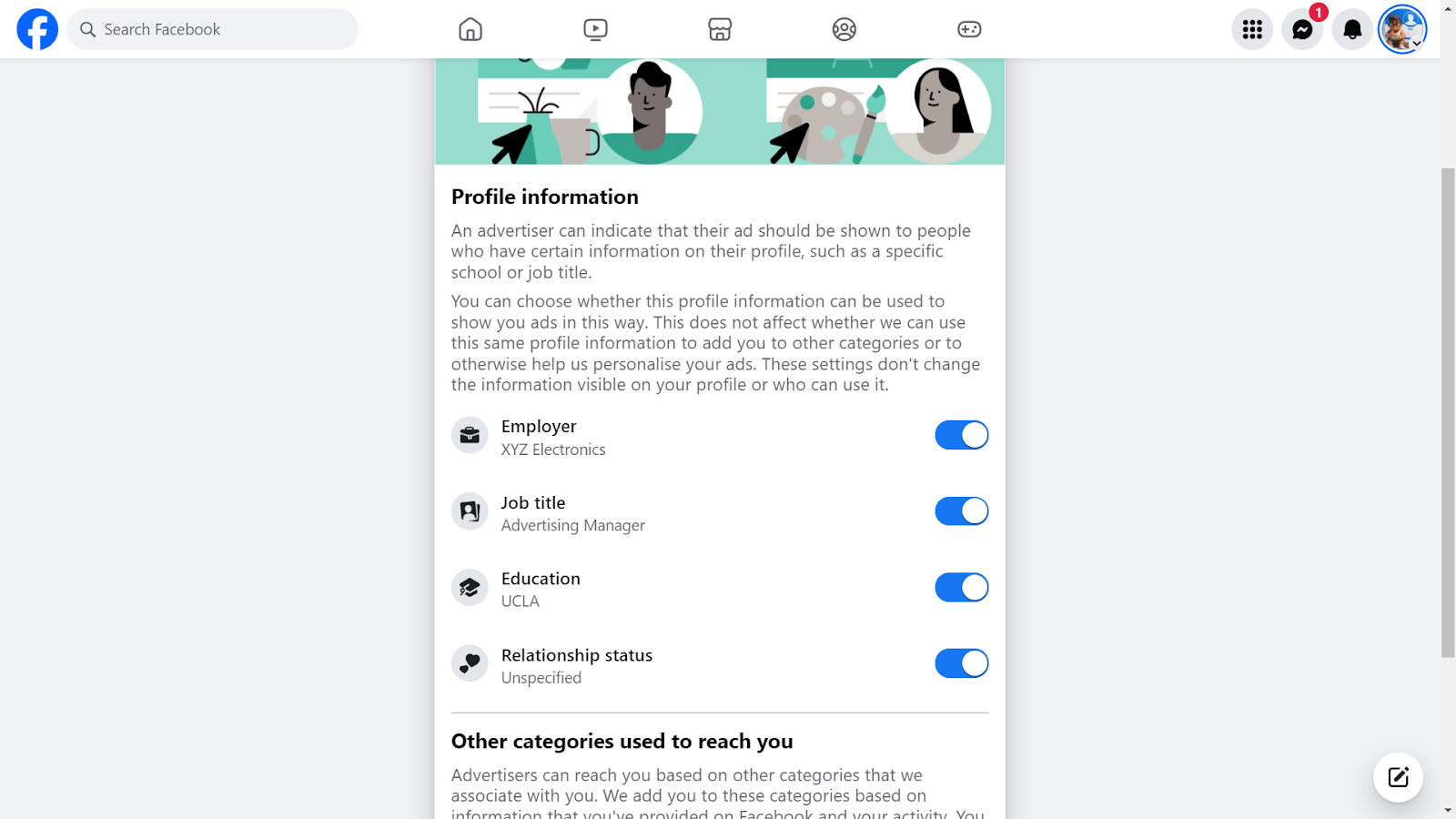
- Opting Out of Personalized Ads: If you’re not a fan of ads that feel a bit too personal, Facebook lets you opt out of this targeting. By adjusting this setting, you can stop Facebook from using your profile data to tailor ads, giving you a sense of privacy and control over your data.
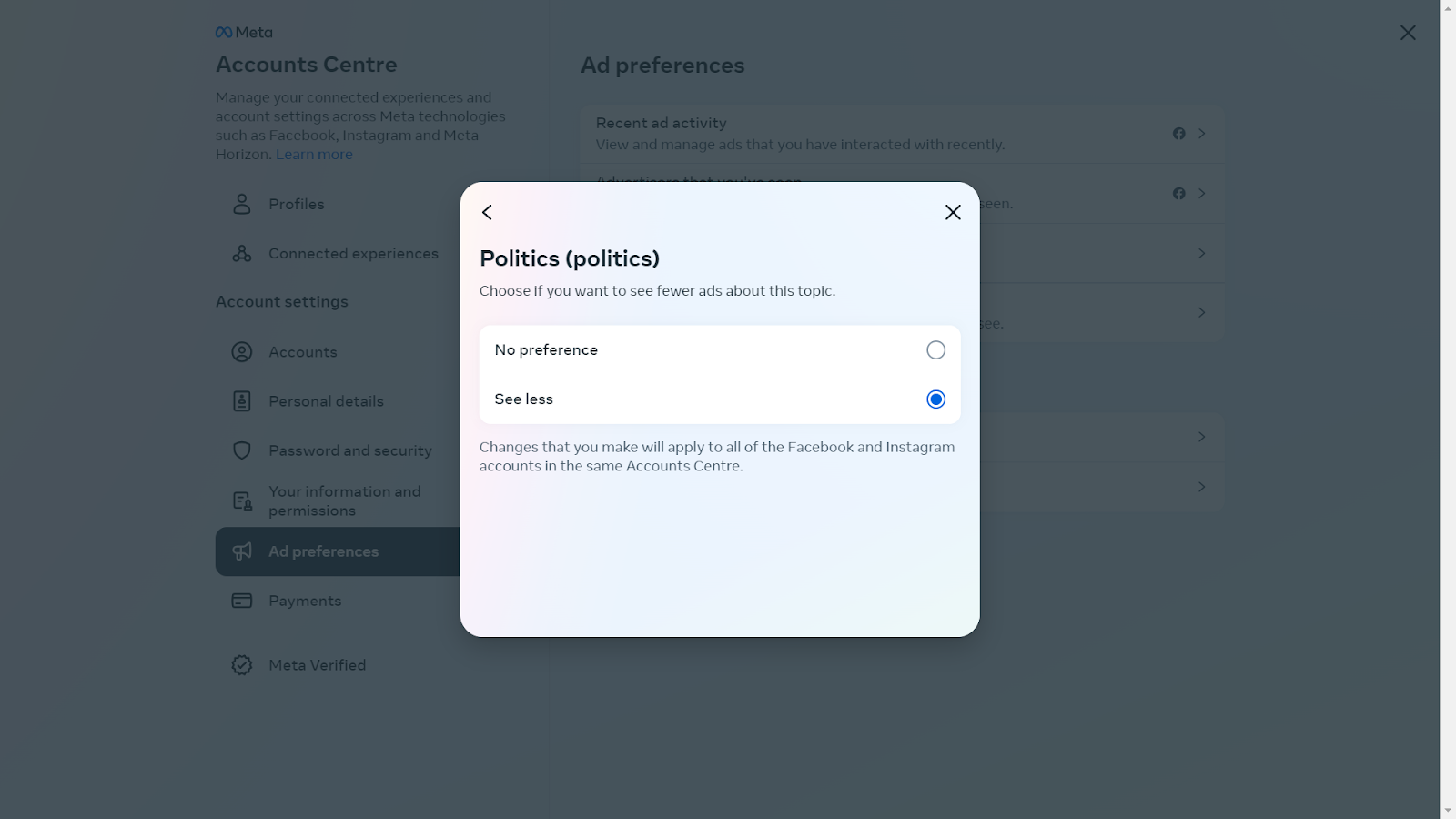
- Blocking Categories of Ads: Facebook understands that some topics are sensitive or irrelevant. That’s why it allows you to block entire categories of ads. Whether it’s politics, alcohol, or something else, you can tailor your feed to exclude these topics.
- Reporting Inappropriate Ads: Lastly, if you come across ads that are misleading, inappropriate, or just plain spammy, Facebook empowers you to report them. This not only cleans up your feed but also helps improve the ad experience for everyone.
3. Other Tools
Apart from Poper Blocker and Facebook’s in-built features, there are several other tools at your disposal to enhance your ad-free experience. Let’s explore these options:
- Browsers with Built-In Ad Blocking: Some modern browsers come equipped with their own ad-blocking capabilities. For instance, Brave and Opera are not just regular browsers; they offer an integrated solution to block ads and trackers. This means less hassle in managing extensions and a smoother browsing experience.
- Antivirus Software with Ad-Blocking: Many antivirus programs now include ad-blocking features. This dual functionality not only keeps your device safe from malware but also enhances your browsing by eliminating ads. It’s a two-in-one solution for security-conscious users who also value a clean online experience.
Take Control of Your Facebook Online Space
Facebook, with its targeted ad strategies, can often lead to a cluttered and distracting experience. This is where tools like Poper Blocker become invaluable. By effectively blocking unwanted ads on Facebook, this adverts Blocker not only enhances your browsing experience but also ensures that your online interactions are more about meaningful content and less about sifting through endless advertisements. It’s about creating a more focused, personalized, and enjoyable online environment, where you are in control of what you see and how you engage with content.
Online advertising is highly pervasive on Facebook, which is why taking control of your digital space is more important than ever. So, if you’re seeking a more streamlined and ad-free Facebook experience, it’s time to consider Poper Blocker. Embrace this change and enjoy a cleaner, more efficient, and more enjoyable time on one of the world’s most popular social platforms.
FAQs
Can I completely eliminate ads on Facebook?
Absolutely. By using ad blockers like Poper Blocker, you can significantly reduce or even completely eliminate ads on Facebook. These tools work by filtering out ad content, giving you a cleaner and more streamlined browsing experience. It’s important to note, however, that some ads might occasionally slip through, as ad technologies constantly evolve.
Are there any risks to using ad blockers?
Generally, there are no significant risks associated with using reputable ad blockers. These tools are designed to enhance your browsing experience by removing unwanted content. However, it’s crucial to choose ad blockers that are well-reviewed and trusted, as some lesser-known ad blockers might pose privacy concerns or interfere with the normal functioning of websites.
Will blocking ads affect my Facebook experience?
Blocking ads will primarily affect the visual aspect of your Facebook experience. It will declutter your social media feed, leading to a more focused and enjoyable browsing experience. You’ll notice fewer distractions, which can make your time on the platform more about connecting with friends and less about sifting through a barrage of ads. However, some site functionalities that rely on ad content might be impacted.
Can I customize what ads I see on Facebook?
Yes, Facebook allows you to customize your ad preferences. This means you can control the types of ads you see based on your interests, past interactions, and more. While this doesn’t stop ads entirely, it does ensure that the ads you encounter are more relevant to your preferences, making them less intrusive and potentially more useful.
Is Poper Blocker easy to use?
Poper Blocker is renowned for its user-friendly interface. It’s designed to be intuitive, making it easy for anyone, regardless of their technical expertise, to use. Installation is straightforward, and once it’s set up, the blocker runs seamlessly in the background, requiring minimal input from the user. You can also customize settings to suit your browsing preferences, giving you control over what gets blocked and what doesn’t.
