
 Chrome Web Extension
 Edge Web Extension
 Android App


What Is Ad Tracking?
Ad tracking, often perceived as a shadow in the vast online landscape, is a sophisticated process where companies monitor your internet activities. This surveillance is not just about observing; it’s about compiling a detailed profile based on your digital footprints. Every website visit, every click, and even the time spent on specific content contribute to this profile.
So what are ad trackers? Their primary goal is to tailor advertisements to your unique interests and online behavior. It’s a strategy that transforms generic advertising into a personalized marketing experience. For instance, if you spend time looking at sports equipment on various e-commerce sites, don’t be surprised to see ads for related products popping up on different websites and social media platforms.
This targeted approach is designed to increase the likelihood of you engaging with the ads, and potentially, making a purchase. While it can lead to discovering products that genuinely interest you, it also raises significant privacy concerns. Your information and behavior can become valuable data for advertisers:
- Online preferences
- Shopping habits
- Personal information like location and age
This data collection is relentless and often occurs without explicit consent, making understanding and managing ad tracking an essential aspect of maintaining online privacy. With digital ad spending projected to hit an astounding $876 billion by 2026, as reported by Statista, taking steps to restrict these tracking activities has never been more crucial.
Types of Ad Tracking
Ad tracking employs various techniques, each with its unique way of gathering user data:
1. Tracking Pixels
These are minuscule, almost invisible 1×1 pixel images embedded in emails and web pages. Their size makes them virtually undetectable to users. Despite their inconspicuous nature, they are powerful tools for tracking user interactions.
Here’s what happens: When you open an email or visit a webpage containing these pixels, they send information back to the server. This data can include whether an email was opened, which links were clicked, and even the device used for access.
2. Tracking URLs
These are specially crafted web addresses that track user behavior after clicking on them. They look like standard URLs but have additional parameters attached. When you click on a tracking URL, it records where you came from, allowing marketers to understand the effectiveness of their campaigns.
For example: A link in a marketing email might use a tracking URL including UTM parameters to see how many recipients clicked through to the website.
3. Cookies
Perhaps the most well-known tracking method, cookies are small data files stored on your browser. They track and remember your online activities, such as site preferences, login details, and items in your shopping cart. While some cookies enhance user experience by remembering useful information, others are used extensively for tracking purposes.
These cookies collect data on the sites you visit, the products you view, and the purchases you make, contributing to a detailed profile for targeted advertising.
What Information Do Ad Trackers Collect?
Ad trackers are like digital detectives, gathering a wide array of information to create a detailed profile of your online behavior.
- One primary data point is your browsing history. Trackers monitor the websites you visit, how long you stay on each page, and what content you engage with. This information helps advertisers understand your interests and preferences.
- Search history is another crucial element. The terms you search for provide direct insight into your current interests and needs. Whether you’re looking up a new gadget or searching for a recipe, these searches are valuable indicators for advertisers.
- Purchase history is also collected, especially from e-commerce sites. Items you buy, those you add to your cart but don’t purchase, and even the ones you just view, all feed into your consumer profile.
- Interaction with ads is closely monitored too. Trackers note which ads you click on, which you ignore, and how you interact with them. This feedback is vital for advertisers to gauge the effectiveness of their ads.
- Personal information such as age, location, and even device type is often collected. While some of this data might be provided directly by you, other bits are inferred from your online activities.
Together, these data points allow ad trackers to build a comprehensive profile, enabling advertisers to target you with precision, often in real time. While this can lead to more relevant ads, it also raises significant privacy concerns, highlighting the importance of understanding and managing ad tracking.
How to Limit Ad Tracking Using Poper Blocker
Poper Blocker stands as a formidable tool in the fight against intrusive ad tracking, offering several features to enhance your browsing privacy:
1. Tracker Blocking
This feature is your digital shield against trackers. When activated, Poper Blocker blocks the code that tracks your personal data and browsing behavior. This not only protects your online privacy but also contributes to faster site loading times.
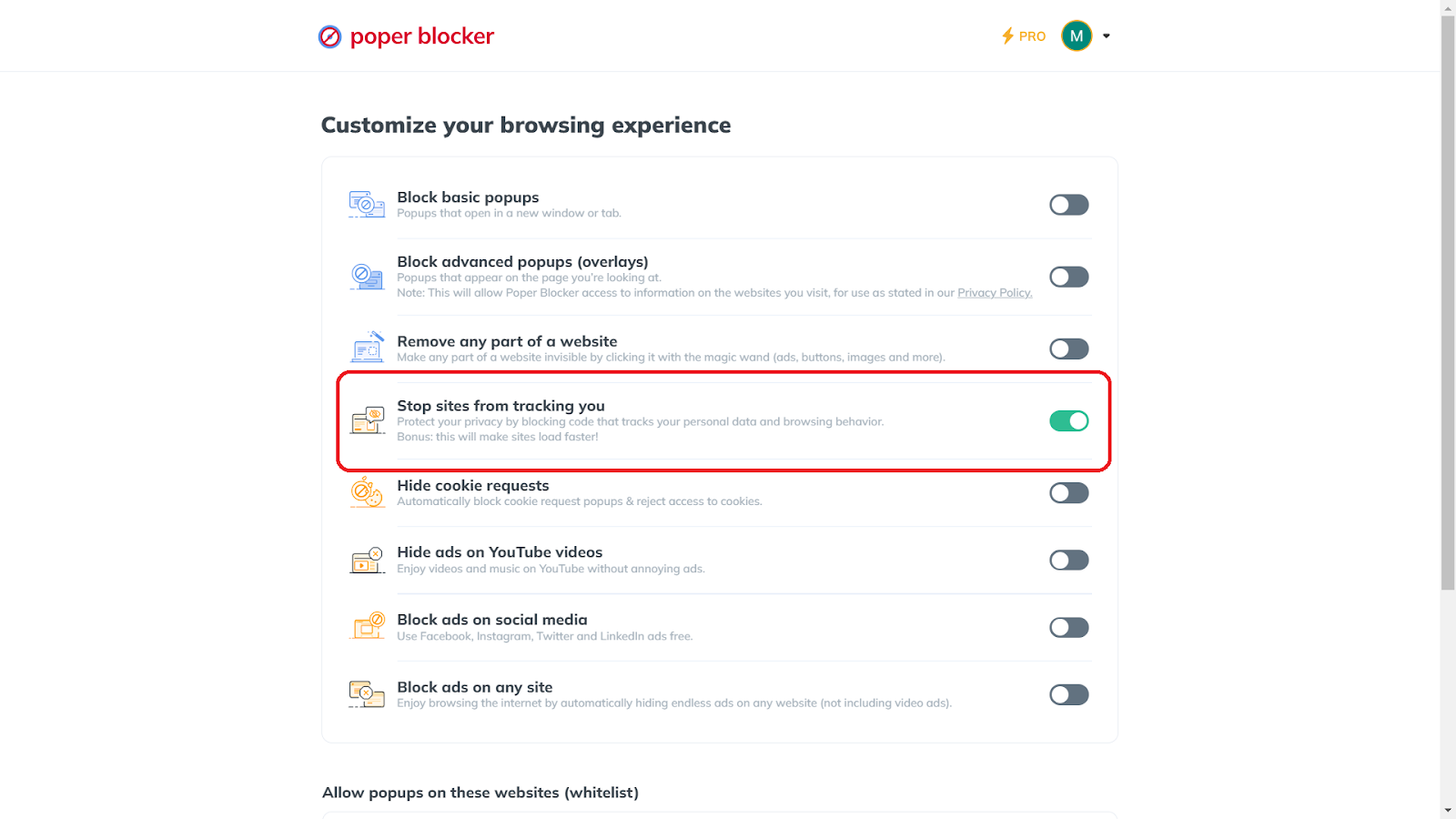
Activating this is straightforward: open the extension, navigate to Advanced Settings, and enable “Stop sites from tracking you.” This action disrupts the trackers’ ability to build a comprehensive profile of your online activities.
2. Cookie Consent Message Blocking
Poper Blocker’s cookie blocker automatically deals with persistent cookie consent pop-ups. Blocking these requests and rejecting access to cookies, significantly reduces the trackers’ ability to monitor your online behavior.
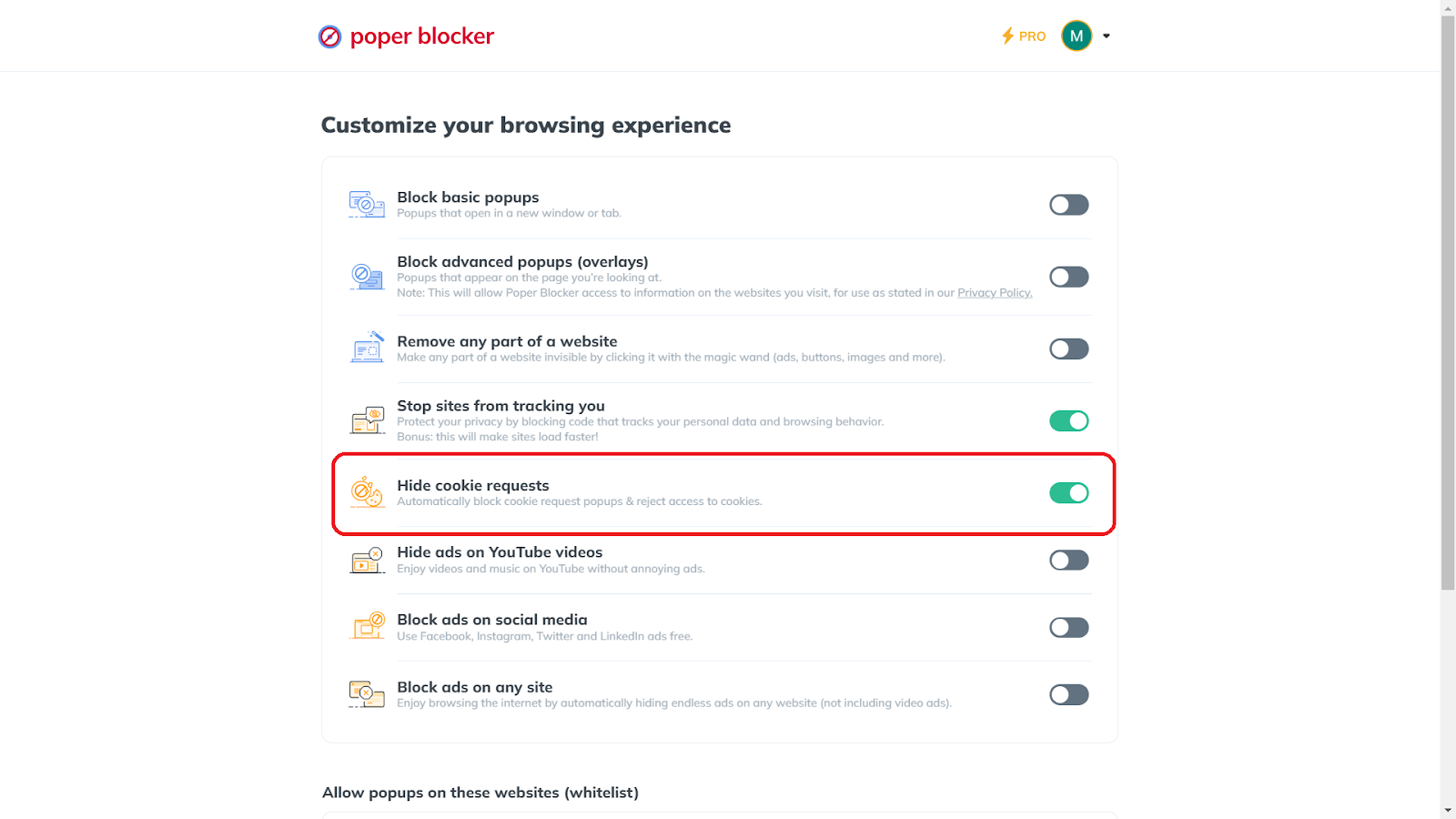
To activate this feature, simply go to Advanced Settings and turn on “Hide cookie requests.” This ensures a smoother browsing experience, free from constant interruptions.
3. Ad & Pop-up Blocking
Beyond tracking and cookies, Poper Blocker excels in eliminating unwanted ads and pop-ups. This feature blocks basic pop-ups that open in new windows or tabs and advanced pop-ups that appear on the page you’re viewing.
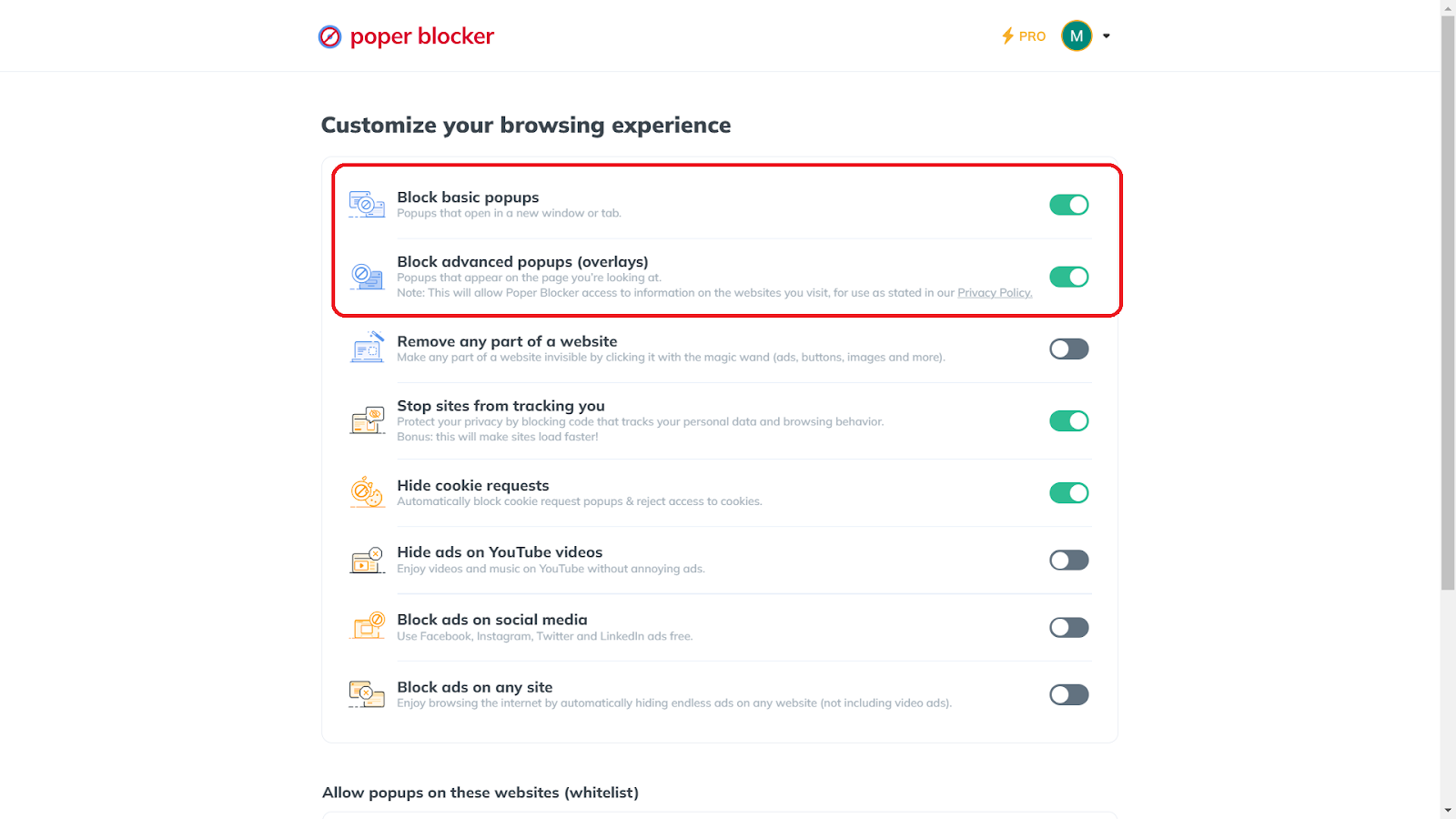
To enable this, access Advanced Settings and activate “Block basic popups” and “Block advanced popups (overlays).” This comprehensive blocking not only enhances your privacy but also declutters your digital space, allowing for a more focused and enjoyable browsing experience.
More Methods to Limit Ad Tracking
While tools like Poper Blocker are effective, combining them with other strategies can further enhance your privacy. Here are additional methods on how to stop ad tracking:
1. Browse Incognito
Utilizing the incognito or private browsing mode in your browser is like moving through the online world with a cloak of invisibility. This mode ensures your browsing history and search records are not stored, making it harder for ad trackers to compile data about your online activities.
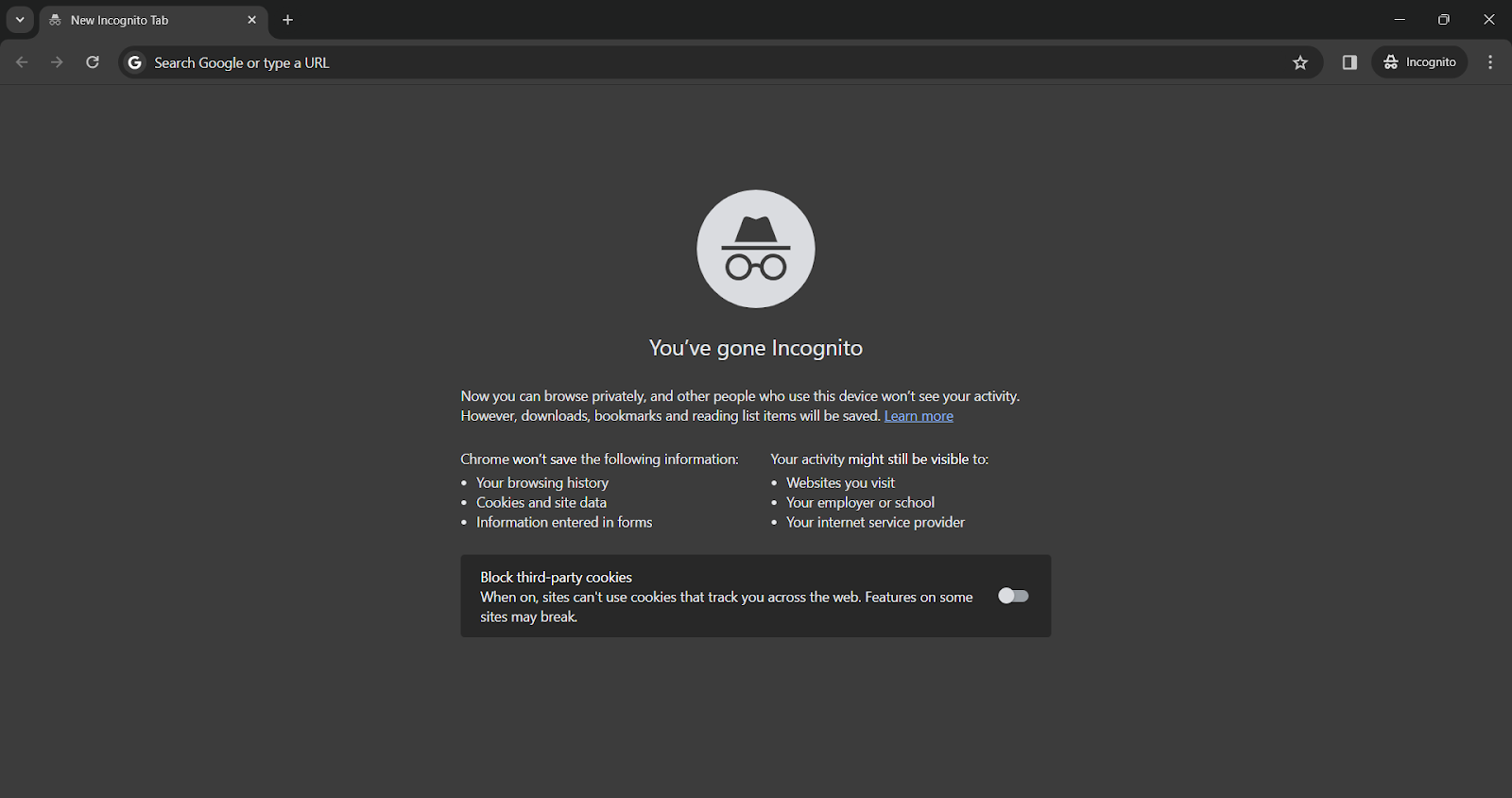
While incognito mode doesn’t block trackers inherently, it prevents the accumulation of your browsing data in a single session, offering a layer of privacy.
Learn how to use Poper Blocker in Incognito mode.
2. Turn off Cookies on Your Browser
Cookies are the footprints you leave behind on every website you visit. Turning them off in your browser settings is another strategy on how to block ad tracking.. While essential cookies necessary for website functionality will still operate, disabling non-essential cookies significantly cuts down the data available to trackers.
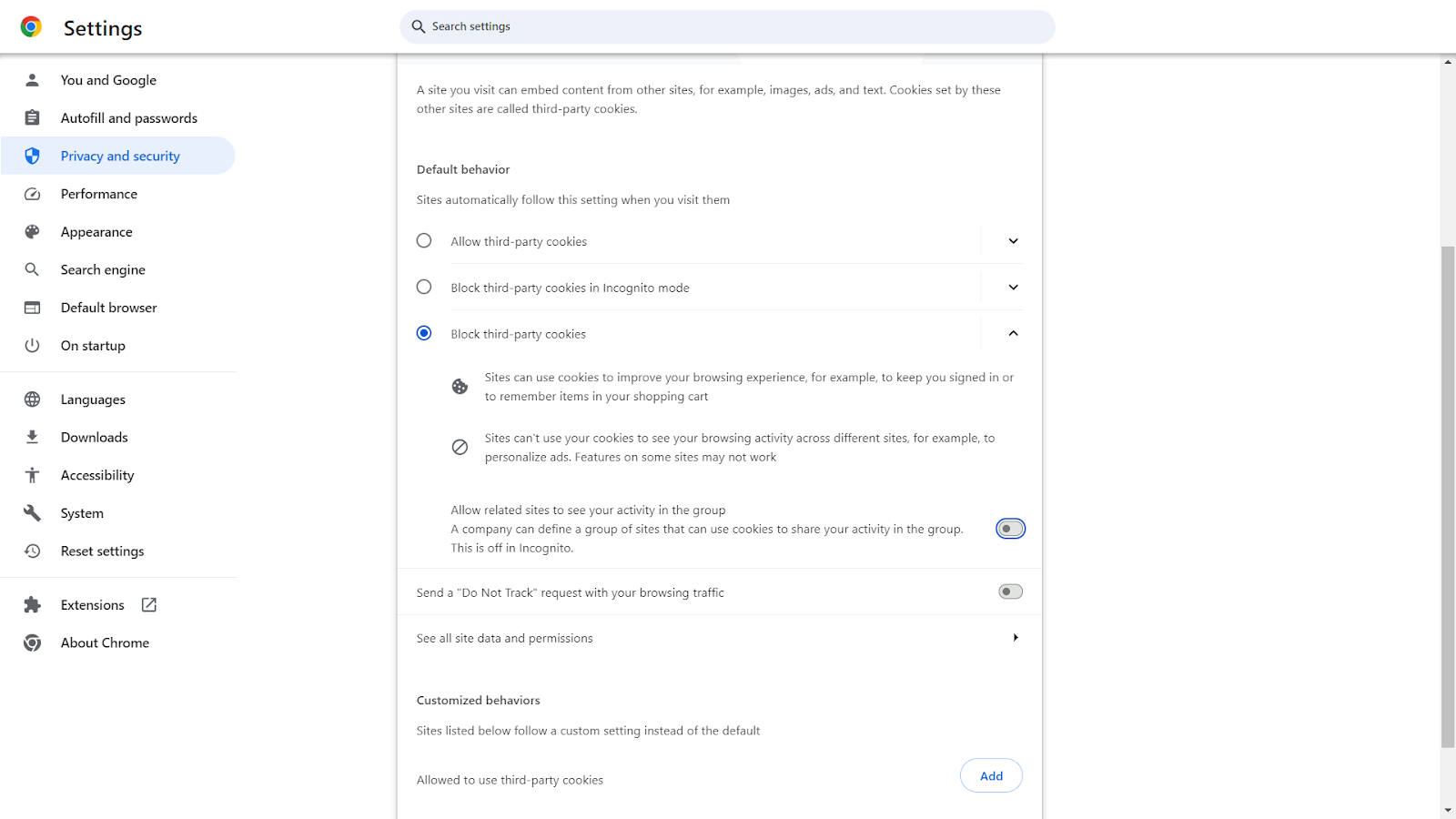
This step, however, may change your browsing experience, as sites won’t remember your preferences or login details.
3. Use a Private Browser
Opting for a browser designed with privacy in mind is like choosing a fortified vehicle for your journey through the internet. These browsers typically come with built-in features that resist tracking, such as:
- Default incognito mode
- Integrated ad blockers
- Enhanced encryption
While they don’t guarantee complete invisibility from trackers, they significantly reduce your online visibility to them.
Taking Control: Your Power in the Online Advertising World
As we wrap up this exploration of ad tracking, it’s clear that while we can’t completely escape the watchful eyes of digital advertisers, we have significant power in managing our online footprint. Understanding the mechanisms of ad tracking and employing tools like Poper Blocker empowers us to assert control over our digital experiences. This journey is about striking a balance between enjoying personalized content and maintaining our cherished privacy.
Every step you take, from using tracker blockers to browsing in incognito mode, fortifies your defense against unwanted digital surveillance. This journey towards a more private online experience is ongoing, and staying informed is key. Take these insights and tools, and turn the tables on ad tracking, making your online world a space where you dictate the terms of your digital interactions.
Don’t let ads track you – download Poper Blocker for protection
FAQs
Can ad trackers access my personal emails?
Ad trackers typically don’t access the content of your personal emails directly. However, if you click on links or ads within emails, trackers can follow your online activity from that point. Email platforms may use their own tracking systems to collect data on email engagement, which is separate from typical ad tracking.
Does disabling cookies completely stop ad tracking?
Disabling cookies significantly reduces ad tracking but doesn’t completely stop it. Trackers can still use other methods like browser fingerprinting or tracking pixels embedded in websites. However, disabling cookies does disrupt the most common tracking method, making it a worthwhile step for enhancing privacy.
How does ad tracking influence my online shopping?
Ad tracking can tailor your shopping experience by showing you products that align with your previous searches and purchases. This can be both beneficial and intrusive. On one hand, it can lead to discovering relevant products; on the other, it can result in an overwhelming number of targeted ads and potentially impulsive buying.
Is total anonymity from ad trackers achievable online?
Achieving complete anonymity is challenging due to the sophisticated methods used by trackers. However, using tools like Poper Blocker, browsing in incognito mode, and employing a privacy-focused browser can significantly reduce your digital footprint. Remember, some level of tracking is almost always in play when you’re online.
Do ad blockers affect how websites function?
Ad blockers can sometimes interfere with website functionality, especially on sites that rely heavily on ad revenue or have integrated ads into their navigation. This can lead to issues like broken web pages or restricted access. However, most ad blockers offer the option to disable blocking for specific websites, allowing you to maintain functionality where needed.
Ready to block ads? Get Poper Blocker for a cleaner browsing experience!
The digital landscape we engage with daily is a complex web of interactions, where personal information can easily become public domain. Our virtual footprints, if left unchecked, can lead to vulnerabilities in our personal and professional lives. The need to protect our online presence is not just a matter of preference but a pressing necessity in today’s interconnected world.
According to a Pew Research study, a significant 79% of Americans express skepticism about companies being transparent regarding the misuse or compromise of their data. Furthermore, research from Spread Privacy reveals that an overwhelming 79.2% of individuals have either modified their social media privacy settings or curtailed their usage, highlighting growing concerns over online privacy.
As we increasingly live out significant portions of our lives online, from social interactions to financial transactions, the stakes have never been higher. Cyber threats, identity theft, and privacy breaches are not just hypothetical risks; they are everyday challenges that require proactive measures.
So how can you protect your privacy online? This guide is crafted to empower you with knowledge and tools to safeguard your online privacy effectively.
Why Is Online Privacy Important?
Online privacy is a multifaceted issue, impacting various aspects of our lives. Here are eight reasons why it’s crucial:
1. Protection Against Identity Theft
One of the most significant risks of exposed personal information is identity theft. Cybercriminals can use details like your name, address, and social security number to:
- Impersonate you
- Open new accounts
- Make fraudulent purchases
Protecting your online privacy helps safeguard your identity from such malicious activities.
2. Personal Safety
Sharing too much information online can compromise your physical safety. These details can be used by stalkers or burglars:
- Location
- Routines
- Holiday plans
By controlling what you share, you reduce the risk of being targeted. Oversharing can also lead to unwanted contact or attention from strangers, putting your personal safety at risk.
It’s important to be mindful of the information you post on public forums and social media, as it can reveal more about your daily life than you may realize. Keeping personal details private helps maintain your physical security in the real world.
3. Financial Security
Financial details are a goldmine for cybercriminals. Such information can be used for unauthorized transactions or financial fraud:
- Credit card numbers
- Bank account details
- Purchase history
Keeping this information private is crucial for your financial security. Additionally, revealing seemingly harmless details like your favorite shopping sites or recent purchases can make you a target for sophisticated phishing schemes.
Look: Cybercriminals often use small pieces of gathered information to build trust and trick you into revealing more sensitive financial data. Vigilance in protecting your financial information online is key to preventing financial loss and maintaining your credit integrity.
4. Maintaining Professional Boundaries
In the professional world, the separation between personal and work life is essential. Inappropriate or excessive personal information online can lead to compromised professional relationships or even impact your career prospects.
Colleagues, managers, and potential employers often research online profiles, and unprofessional content can adversely affect their perceptions. Maintaining a clean and professional online presence is crucial for career advancement and reputation management. It’s important to regularly review and manage your digital footprint to ensure it aligns with your professional image and goals.
5. Avoiding Targeted Marketing
Online activities are often tracked for targeted advertising. While some may find this convenient, it can also be intrusive and manipulative. Protecting your privacy helps you avoid being bombarded with ads based on your browsing history or personal preferences. This constant targeting raises the question, “What does Google know about me?” as it’s one of the primary platforms that track online activities for ad targeting.
This relentless marketing can lead to a skewed perception of needs and wants, driven more by these targeted ads than by genuine interest. Understanding and managing what information Google and similar entities have about you is crucial in maintaining control over your online experience.
6. Control Over Personal Narrative
Your online presence contributes to your personal narrative. When your privacy is compromised, you lose control over how you are perceived online. By protecting your privacy, you maintain control over your personal story and how it’s shared. This control is crucial in an era where online reputations can have lasting impacts on personal and professional relationships.
7. Freedom of Expression
Online privacy allows for freer expression. Knowing that your activities and opinions are not being monitored or judged encourages more open and honest communication, which is essential for personal growth and societal development.
This freedom fosters a diverse range of ideas and opinions, contributing to a richer, more vibrant online community. It also supports democratic values by allowing for the safe exchange of thoughts and opinions, crucial for the healthy functioning of society.
8. Psychological Well-being
Constant monitoring and data breaches can lead to anxiety and stress. Knowing that your personal information is secure contributes to a sense of well-being and peace of mind. This security is vital in an online environment where threats can come from many directions.
The assurance that your data is protected not only reduces stress but also enhances your overall experience online.
How to Protect Your Privacy Online
Online privacy goes beyond simply hiding information; it’s about taking control of your personal space, ensuring your safety, and shaping your own narrative in a world where digital connections are ubiquitous. It is a crucial element in maintaining your autonomy and integrity in all your online interactions.
Here are the most effective tips and strategies we recommend on how to protect your internet privacy:
1. Use Poper Blocker’s Tracker Blocking Feature
Welcome Poper Blocker, your steadfast guardian in the online sphere. This tool is not just about maintaining privacy; it’s about reclaiming your digital autonomy. With Poper Blocker’s tracker-blocking feature, your online activities stay private, ensuring that your browsing habits are exclusively yours to keep.
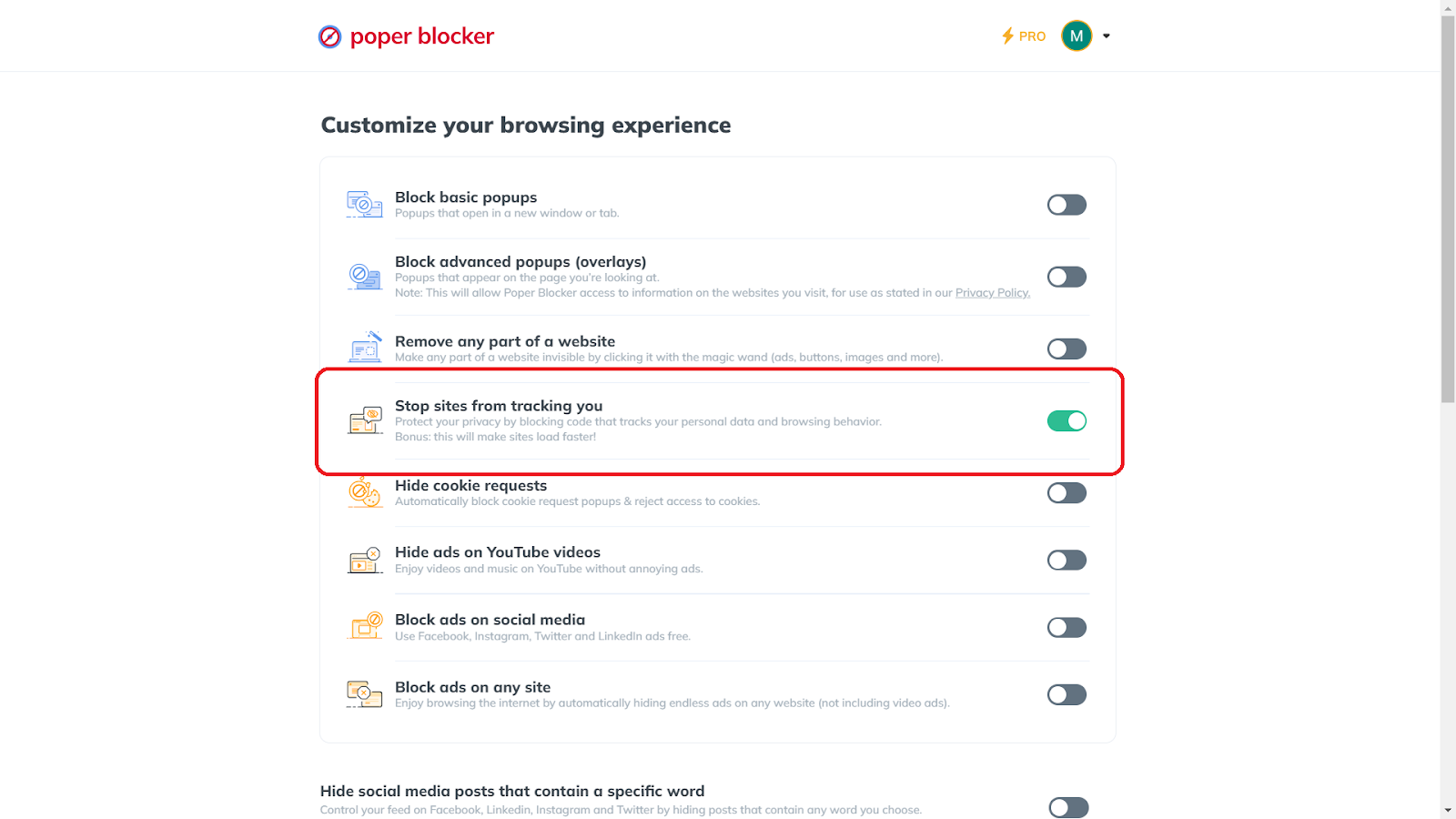
To activate this shield, simply launch the extension, head to Advanced Settings and select “Stop sites from tracking you.” This feature not only fortifies your privacy but also enhances your browsing experience by accelerating site loading times. It’s a dual benefit that optimizes both your security and efficiency online.
2. Block Ads and Pop-Ups with Poper Blocker
Tired of relentless ads and pop-ups disrupting your online journey? Turn to Poper Blocker ad-blocking feature for relief. Renowned for its superior ad and pop-up blocking prowess, Poper Blocker offers a tranquil browsing environment. To access this oasis of uninterrupted browsing and ad blocker features, just open the extension, proceed to Advanced Settings, and activate “Block basic popups” along with “Block advanced popups (overlays).”
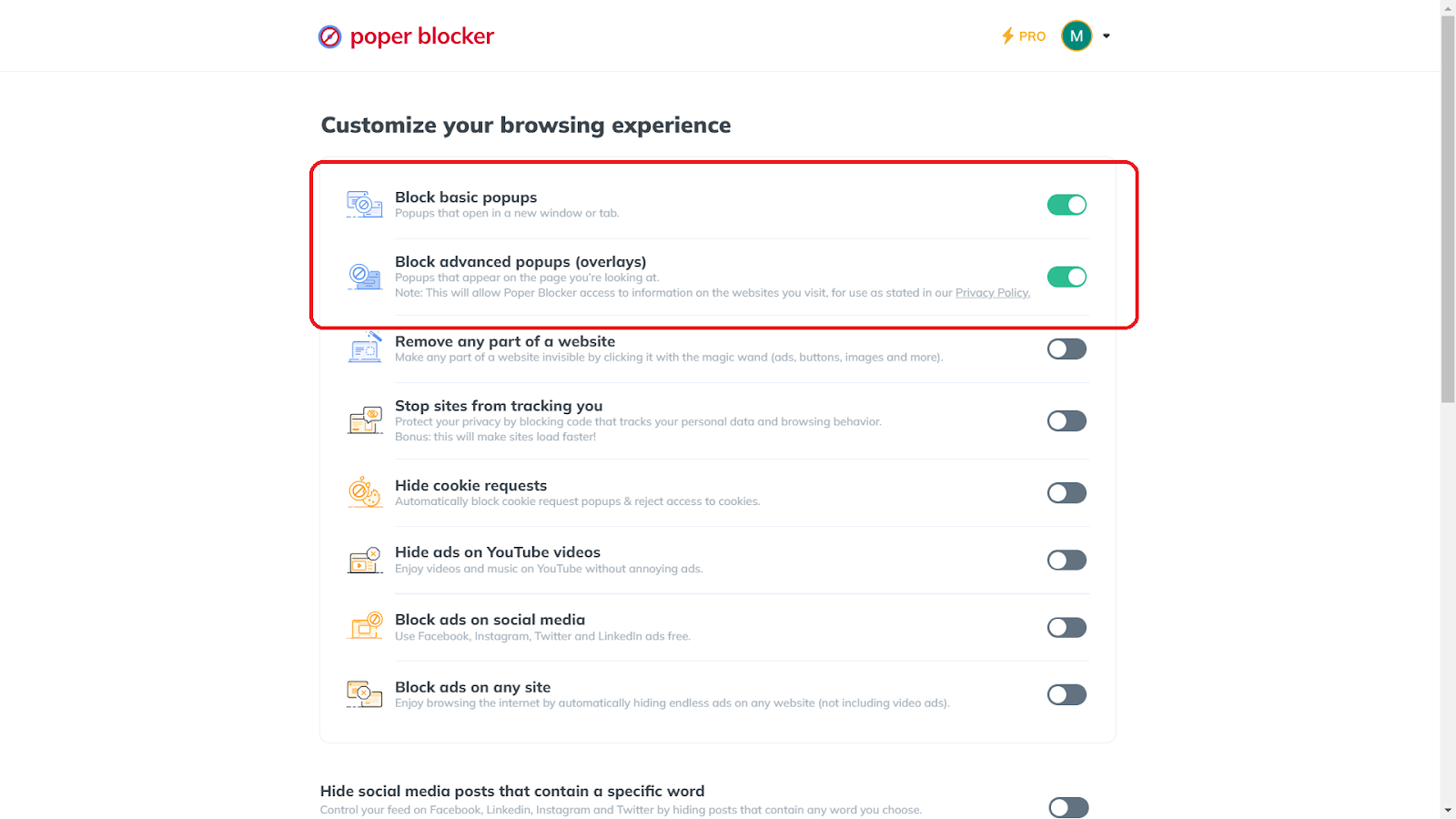
These popup blocker settings are designed to create a smoother, more enjoyable online experience, free from digital clutter and the distraction of unwanted ads and pop-ups. With Poper Blocker, your online sessions become more focused, efficient, and enjoyable.
3. Share Limited Personal Information Online
Sharing less online is a crucial strategy on how to protect personal information online. Every piece of personal information shared can potentially be accessed by others. Therefore, it’s essential to be judicious about what you post, especially on social media and public forums.
Before sharing, consider the necessity and potential impact. Could this information be used against you? Could it aid in identity theft? Remember, once something is online, it’s challenging to erase it completely. Cultivate a habit of restraint and thoughtfulness in your digital interactions.
4. Create Strong Passwords and Use 2FA
Strong, unique passwords, combined with two-factor authentication (2FA), form a formidable barrier against unauthorized access. Each account should have a distinct password, ideally a complex mix of:
- Letters
- Numbers
- Symbols
Avoid common phrases or easily guessable information like birthdays. 2FA adds an extra layer of security, typically requiring a code sent to your phone or email, making it harder for intruders to gain access even if they crack your password. Regularly update your passwords to keep your defenses strong.
5. Use a VPN
Using a VPN is akin to creating a secure tunnel for your internet activities and is an effective method on how to protect internet privacy. It masks your IP address, making your online actions much harder to track and intercept. This is particularly important when using public Wi-Fi networks, which are often less secure.
A VPN encrypts your data, protecting sensitive information like bank details and personal messages from cybercriminals. It’s an essential tool for anyone looking to enhance their online privacy and security.
Read More: Do VPNs Block Ads?
6. Audit Your Social Media Privacy Settings
Social media platforms can be significant sources of privacy leaks. It’s vital to regularly review and adjust your privacy settings to control who sees your posts and personal information. Here are some things that you can do:
- Start by reviewing the visibility of your personal information, such as phone numbers and email addresses. Ensure these details are not publicly accessible.
- Periodically adjust your post settings to limit their audience to friends or friends of friends, rather than the entire online community.
- Be mindful of the information you share, particularly your location. Revealing your address or broadcasting extended periods away from home can make you vulnerable to theft or other security risks.
- Be cautious with friend requests, especially duplicates from existing connections. These could be attempts to infiltrate your network by scammers using cloned accounts.
- Resist the temptation to use your social media credentials for third-party site logins, as this can expose you to additional risks.
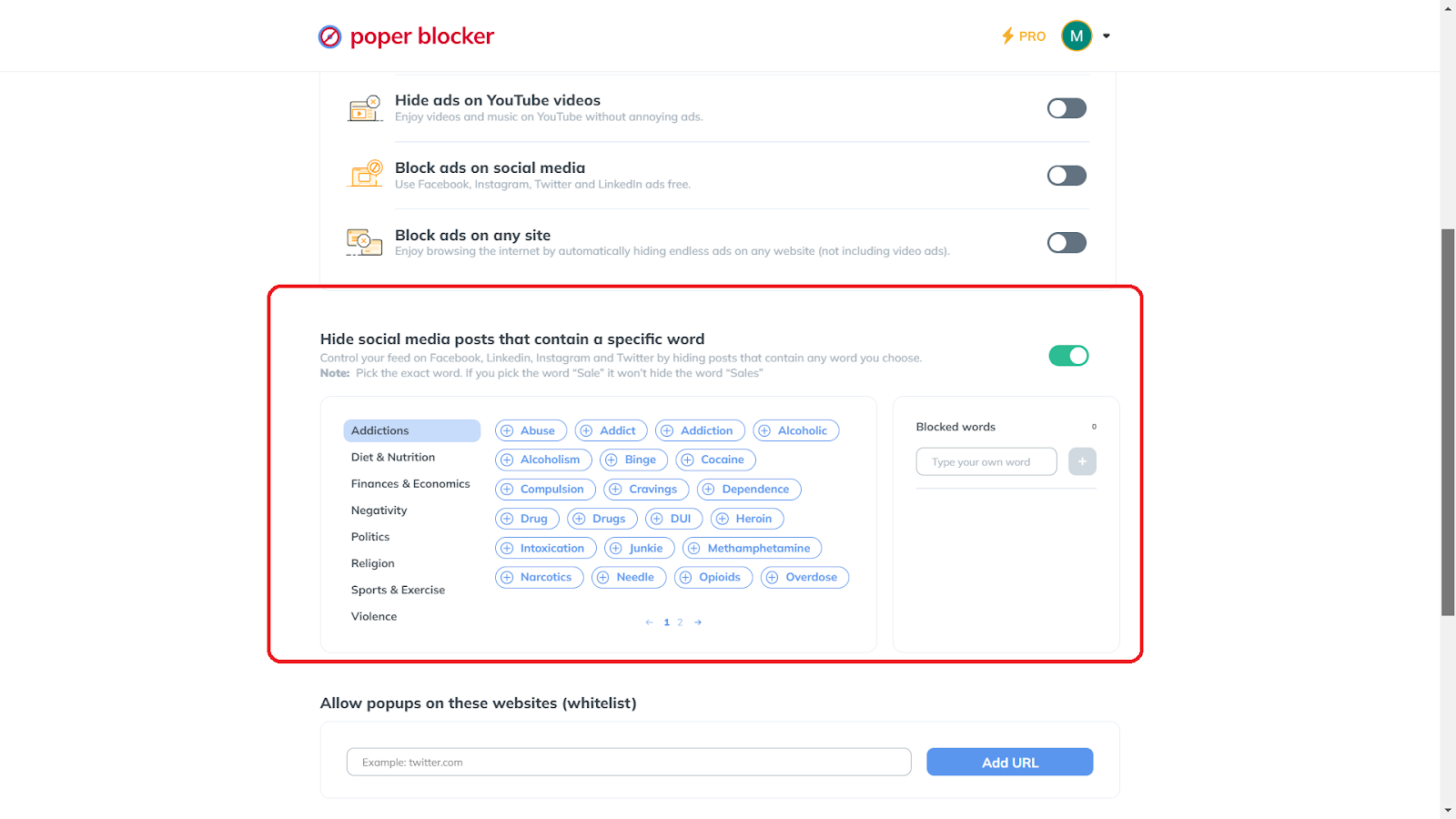
And speaking of social media filtering, Poper Blocker has a feature that will give you the capability to mute specific words on platforms like Twitter, Instagram, and Facebook. You can do this by simply turning on “Hide social media posts that contain a specific word” and selecting the words that you’d like to be muted or hidden.
7. Beware of Phishing
Phishing attempts are increasingly sophisticated, often mimicking legitimate sources to trick you into divulging sensitive information. Always scrutinize emails and messages for authenticity. Look for telltale signs of phishing, like the following:
- Urgent requests for information
- Unexpected attachments or links
- Sender addresses that don’t match the supposed organization
When in doubt, contact the organization directly through official channels rather than responding to the suspicious message.
Additionally, be cautious of generic greetings and poor grammar or spelling, which can be red flags. Regularly updating your spam filters and reporting phishing attempts can also help protect not only you but others from falling victim to these scams.
Educating yourself about the latest phishing techniques is crucial in this ever-evolving landscape of cyber threats.
8. Install an Antivirus Software
Antivirus software acts as a shield, protecting your devices from various cyber threats, including viruses, malware, and ransomware. These software programs actively scan and identify potential threats, helping to prevent damage to your system and theft of your data.
Ensuring regular updates is essential for your antivirus software to effectively recognize and combat the latest threats. Investing in dependable antivirus software is a key component of how to protect your digital privacy, forming a critical barrier against evolving cyber risks.
9. Browse in Private Mode
Private browsing, or incognito mode, is a feature in most browsers that prevents your browsing history, cookies, and site data from being stored. This mode offers a degree of privacy, especially when using shared or public computers, as it minimizes the digital traces left behind.
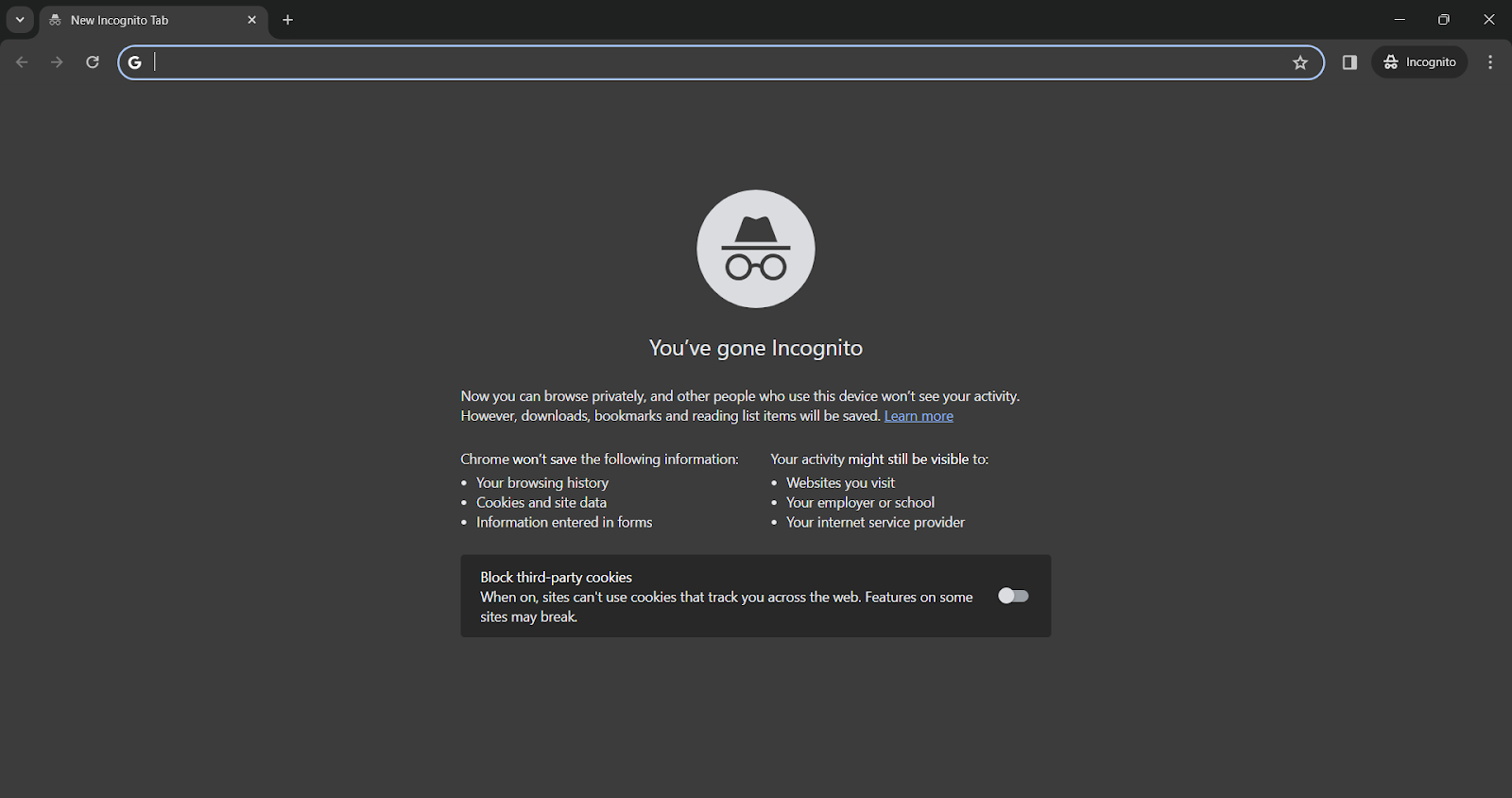
However, it’s important to note that private browsing doesn’t make you anonymous on the internet. Your ISP and the websites you visit can still track your activities.
Moreover, any downloads or bookmarks created during a private browsing session remain in your browser. Employing additional privacy tools, such as VPNs or secure browsers, can enhance privacy alongside private browsing. It’s also wise to regularly clear your browser cache and consider using privacy-focused search engines that do not track your search history.
10. Update Your Software and Operating System
Regular software updates are crucial for security. These updates often include patches for vulnerabilities that cybercriminals exploit. Neglecting software updates can leave your devices open to attacks.
Set your devices to update automatically or regularly check for updates manually. This practice is akin to keeping your defenses up to date in an ever-evolving cyber landscape, ensuring your digital devices remain secure against emerging threats.
Additionally, staying informed about the latest security threats and trends can help you understand the importance of each update. Many updates also include enhancements to improve functionality and efficiency, making your devices not only more secure but also more effective.
Remember: An outdated system is a vulnerable one, so prioritizing updates is a key step in your overall cybersecurity strategy.
Make the smart choice for privacy – Get Poper Blocker now!
The Digital Fortress – Securing Your Online Privacy
Securing your online privacy is similar to constructing a resilient fortress around your personal data. It’s a commitment to making informed decisions, utilizing effective tools, and maintaining constant vigilance in the face of evolving cyber threats. Your privacy is a valuable asset in the online world, necessitating your attention and proactive protection.
Utilizing these strategies and tools, you’re actively safeguarding your personal information and asserting your right to a private and secure digital experience. Allow this guide to be your roadmap to a safer online presence, transforming your privacy from a mere hope into a reality, fortified by action and awareness.
FAQs
What are the first steps to take if I suspect a data breach?
If you suspect a data breach, act swiftly. Start by changing your passwords, especially for accounts where sensitive information is stored. Contact your financial institutions to alert them and monitor your accounts for unusual activity. Check for updates from the breached entity for specific guidance. It’s also wise to check your credit reports and consider placing a fraud alert.
How often should I change my passwords for optimal security?
Regularly updating your passwords is crucial. Aim to change them every three to six months. However, if you receive a notification of a data breach or suspect unauthorized access to your account, change your password immediately. Use unique, complex passwords for each account to minimize the risk if one gets compromised.
Can private browsing fully protect my online activities?
Private browsing, or incognito mode, offers a level of privacy by not storing your browsing history, cookies, or site data. However, it doesn’t make you invisible. Your internet service provider, employer, or the websites you visit can still track your activities. For more comprehensive privacy, combine private browsing with other tools like VPNs and tracker blockers.
What are the signs of a phishing attempt?
Phishing attempts often come in the form of emails or messages that mimic legitimate sources. Be wary of messages that urgently ask for personal information, contain spelling or grammatical errors, have suspicious or mismatched email addresses, or direct you to click on a link or download an attachment. Always verify the authenticity of the request through direct, independent contact with the supposed source.
Is it safe to use public Wi-Fi if I have a VPN?
Using a VPN significantly increases your safety on public Wi-Fi by encrypting your internet connection and hiding your IP address. However, it’s not foolproof. Avoid conducting sensitive transactions, like online banking, even when using a VPN on public Wi-Fi. Always ensure your VPN is active and consider using additional security measures like HTTPS connections and antivirus software.
Take control of your digital life – Install Poper Blocker today!
What Is a Digital Footprint?
A digital footprint is similar to a virtual shadow, cast by the trail of data we leave online. It encompasses every interaction, transaction, and activity you engage in on the internet.
From social media posts and comments to online shopping habits and website visits, each action contributes to this ever-growing repository of personal data. This trail is not just a record of online activities; it’s a reflection of your personal and professional persona in the virtual world.
Check out these startling data:
- A significant 86% of individuals in the US have made efforts to remove or reduce their digital footprint on the internet (source: DataProt)
- A survey involving 2,000 individuals reveals that an average person shares 36% of their life online, content that remains accessible, potentially for decades after their passing (source: StudyFinds)
This footprint can impact privacy, security, and even job prospects. How can you effectively erase it?
The Challenge of Leaving No Trace Online
Today’s online environment ensures that our actions leave a lasting mark. Every tweet, every photo upload, and every online comment becomes a part of this footprint, painting a picture of who you are to anyone who might search for you online.
For those concerned about privacy and security, managing this footprint is essential. This guide provides a comprehensive approach to reducing your online presence, with a special focus on the Poper Blocker browser extension, a vital tool in this process.
Benefits of Having a Clean Digital Footprint
Enhanced Online Privacy
A clean digital footprint significantly boosts your online privacy. By limiting the information available about you online, you reduce the risk of identity theft and cyber fraud. This careful management of personal data ensures that sensitive information remains secure from unauthorized access.
Positive Professional Impression
Your online presence often serves as the first impression for potential employers. A clean digital footprint, devoid of inappropriate content, can enhance your job prospects. It reflects a professional image, increasing your attractiveness as a candidate and potentially opening doors to new career opportunities.
Improved Mental Well-being
Maintaining a minimal digital footprint can lead to better mental health. It alleviates the stress and anxiety associated with constant online exposure and social media pressures. This approach fosters a healthier balance between your digital interactions and real-life experiences, contributing to overall well-being.
Control Over Personal Narrative
A well-managed digital footprint allows you to control how you are perceived online. It ensures that the information available is current, accurate, and truly reflective of your present self. This control is crucial in shaping your personal and professional identity in a way that aligns with your goals and values.
Can Our Digital Footprint Really Be Removed?
Completely erasing your online presence is a daunting task, but significant reduction and management are achievable goals. Proactive and consistent efforts are key to maintaining a minimal digital footprint. Regularly reviewing and managing your online data helps keep your online presence under control.
How to Remove Your Digital Footprint
Managing your online presence effectively requires a strategic approach. Here’s a detailed breakdown of each step on how to erase your internet footprint:
1. Find Places You Are Mentioned Online
The first step in controlling your online footprint is to understand its current state. Conduct a thorough search of your name on various search engines. This will reveal where your information is publicly available, be it on:
- Social media platforms
- Forums
- Other websites
Pay close attention to the information displayed and note down the URLs where your personal data appears. This step is crucial for identifying areas that need attention.
2. Delete and Deactivate Social and Any Other Accounts You Opened Online
Over the years, you likely have created accounts on various platforms that you no longer use. These dormant accounts can be a source of personal data leakage. To remove digital footprints, start by listing all the accounts you remember creating, then use your email to search for sign-up confirmations or welcome messages for any you might have forgotten.
Once identified, visit each site and follow the process to deactivate or delete your account. Remember, deactivation might not remove your data permanently, so opt for deletion where possible.
3. Adjust Your Browser’s Privacy Settings
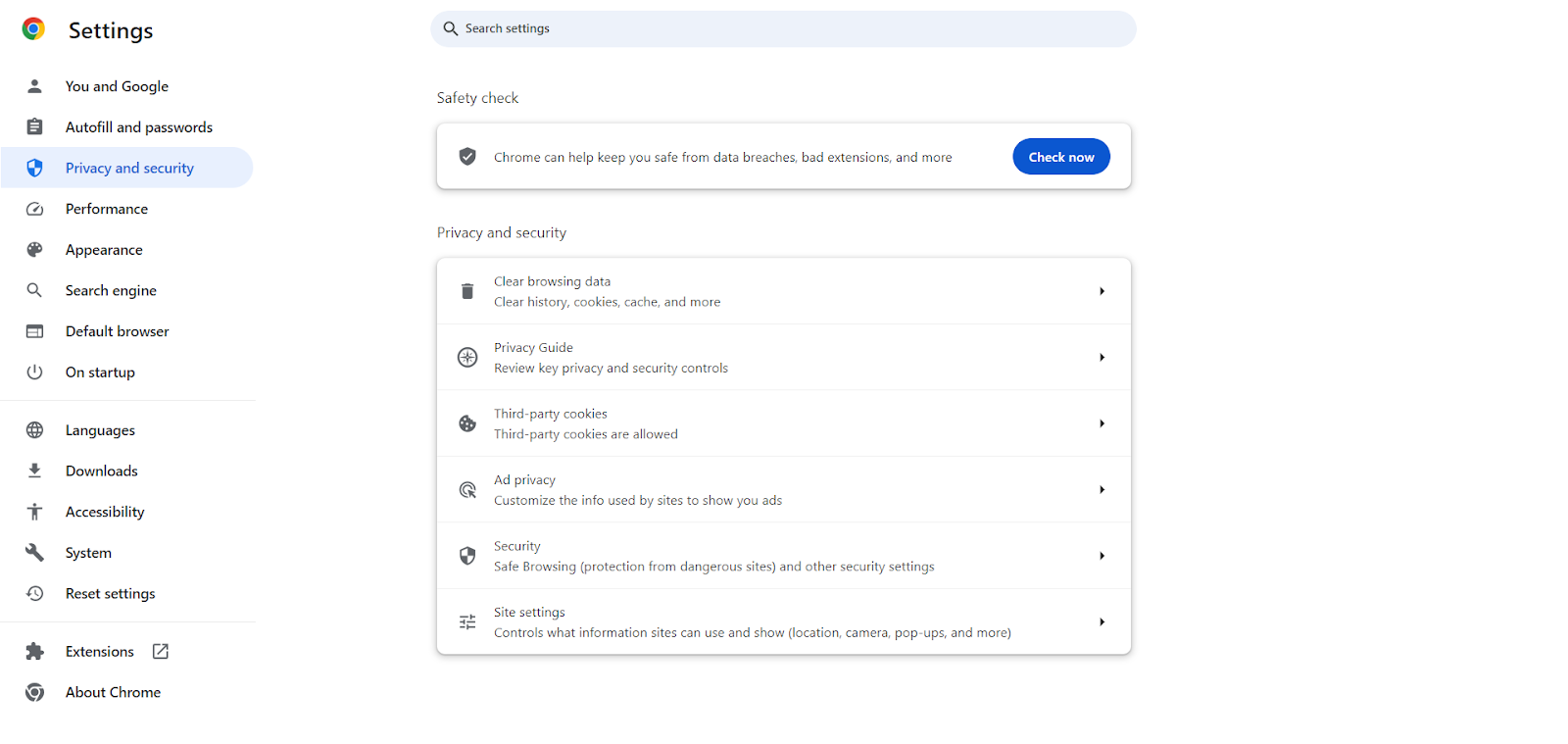
Your web browser is a gateway to your online activities, and it often collects a significant amount of information about you. Adjusting your browser’s privacy settings is a critical step in minimizing and erasing your digital footprint.
On Chrome, enable ‘Do Not Track’ requests, disable third-party cookies, and regularly clear your browsing history and cache. Consider using privacy-focused browsers or extensions that offer enhanced features to protect your privacy online.
4. Ask Google to Remove Search Results About You (Right to Be Forgotten)
When pondering the question “what does Google know about me?”, you might be astonished at the extent of information it holds, especially evident when you search for yourself online. In certain regions, you possess the legal right to ask for the removal of your personal data from search engine results, a privilege commonly referred to as the Right to be Forgotten.
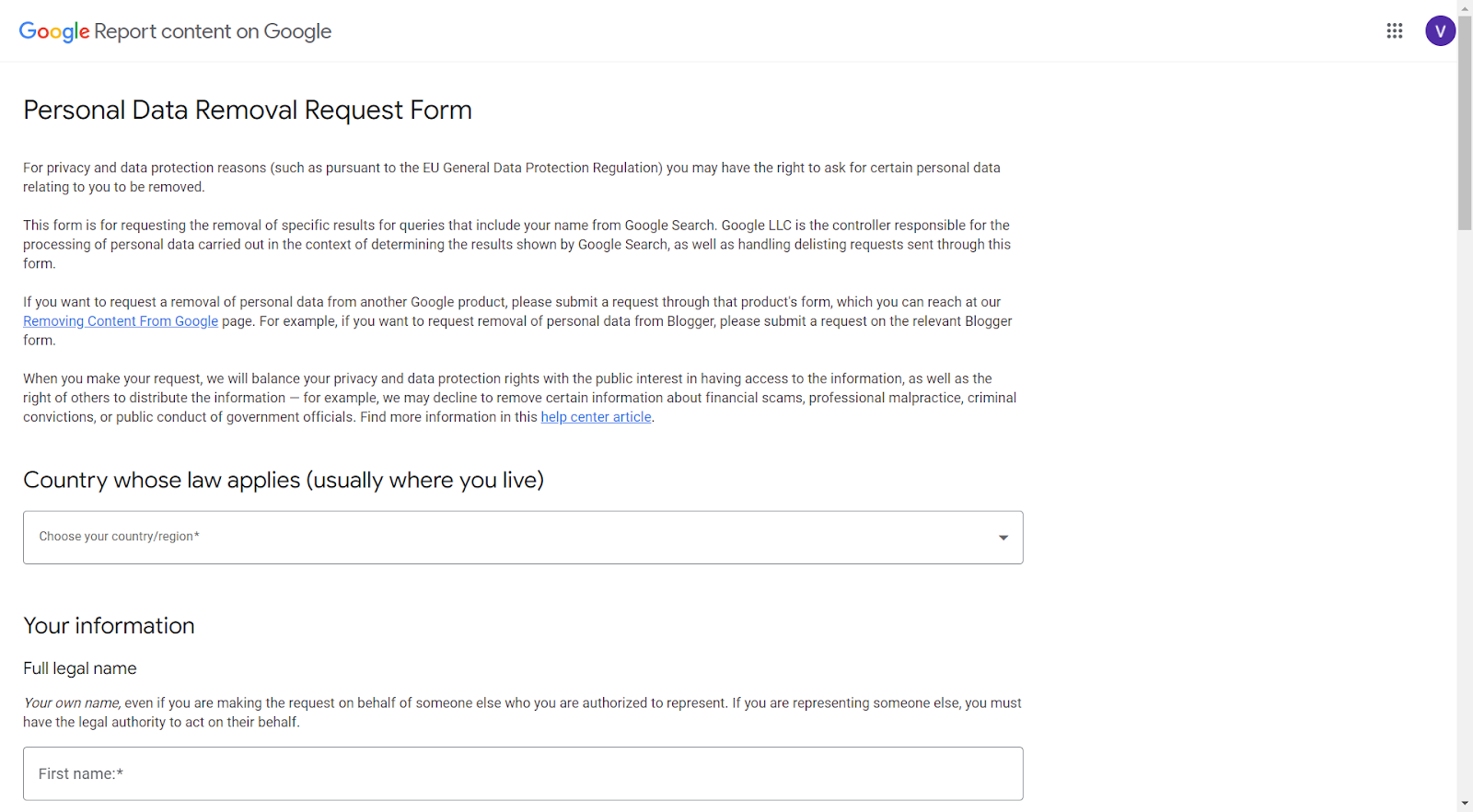
If outdated or irrelevant information about you appears in search results, you can file a request with the search engine provider to have it removed. While this process doesn’t erase the information from the internet, it makes it less accessible.
To request the removal of specific search results associated with your name from Google, you need to complete the Personal Data Removal Request Form. Here’s what you should include in your request:
- URL(s) of the Content: List the exact URL(s) of the content you wish to have removed from Google’s search results.
- Content Description and Relation to You: Provide a detailed explanation of the content at each URL and how it pertains to you. Explain why this content should be removed from Google’s search listings.
- Specific Search Query: Mention the search term, such as your full name, under which this content appears. If applicable, you can also request the removal of content that appears under alternate names or nicknames.
- Contact Email Address: Include an email address where Google can contact you for any follow-up or clarification regarding your request.
5. Manage the Location Settings on Your Phone
Smartphones constantly collect and transmit location data. To minimize this aspect of your digital footprint, scrutinize the location settings on your phone. Review the permissions for each app and disable location access for those that don’t need it to function. Also, consider turning off location services when they are not in use.
6. Use a VPN
A Virtual Private Network (VPN) is a powerful tool for maintaining anonymity online. It masks your IP address and encrypts your internet connection, making your online activities more private. Use a VPN whenever you are online, especially when connected to public Wi-Fi networks, to protect your data from prying eyes.
Read More: Do VPNs Block Ads?
7. Block Trackers via Poper Blocker
Trackers collect data about your online behavior, compromising your privacy. Poper Blocker can protect your privacy with its tracker blocker feature. This not only enhances your privacy but also contributes to faster website loading times.
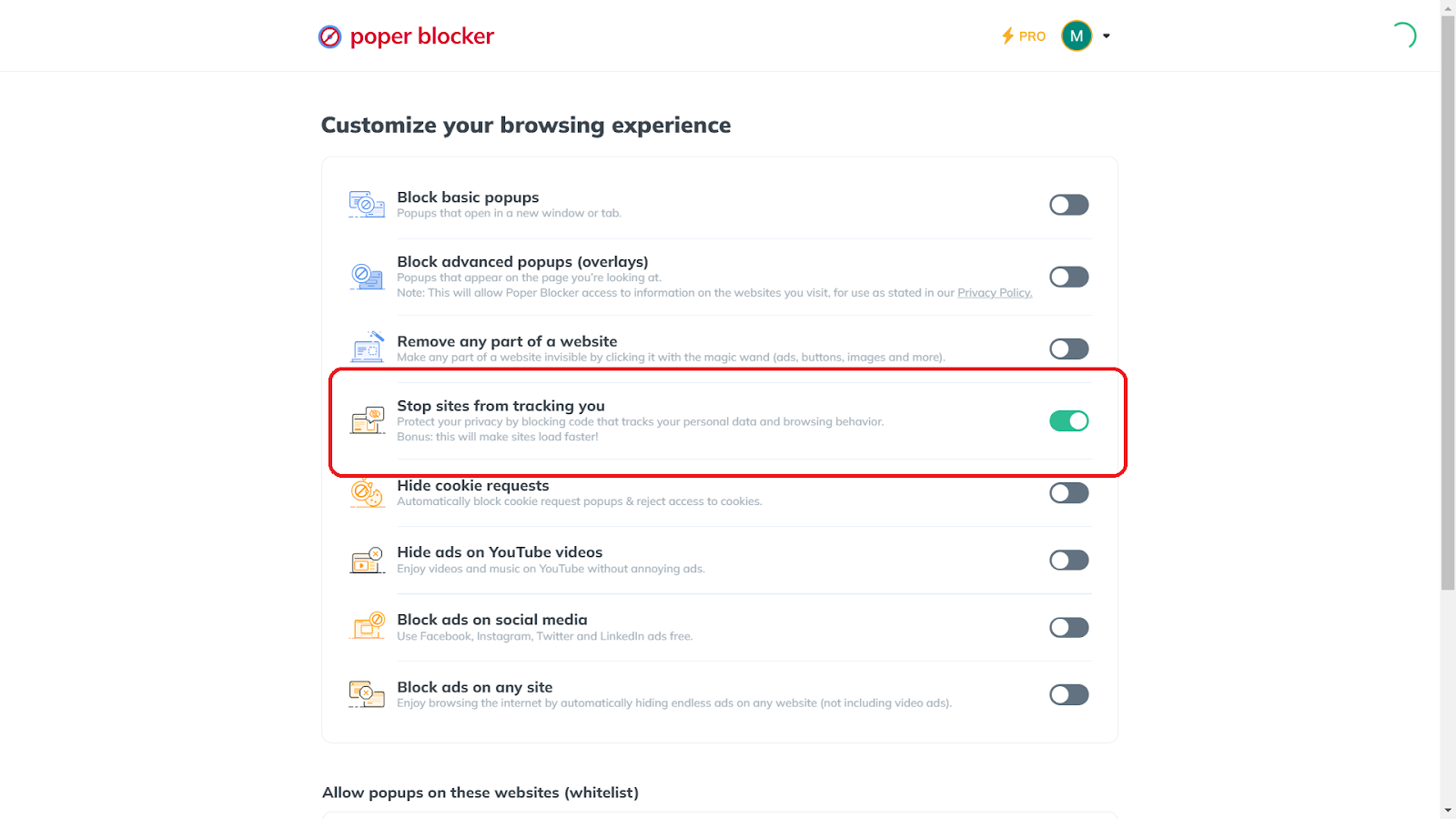
To activate this feature, open Poper Blocker, go to Advanced Settings, and enable “Stop sites from tracking you.”
8. Block Cookie Consent Messages with Poper Blocker
Websites use various types of cookies to track your online activities and preferences. Poper Blocker can automatically block cookie consent popups and reject access to cookies, further safeguarding your online privacy.
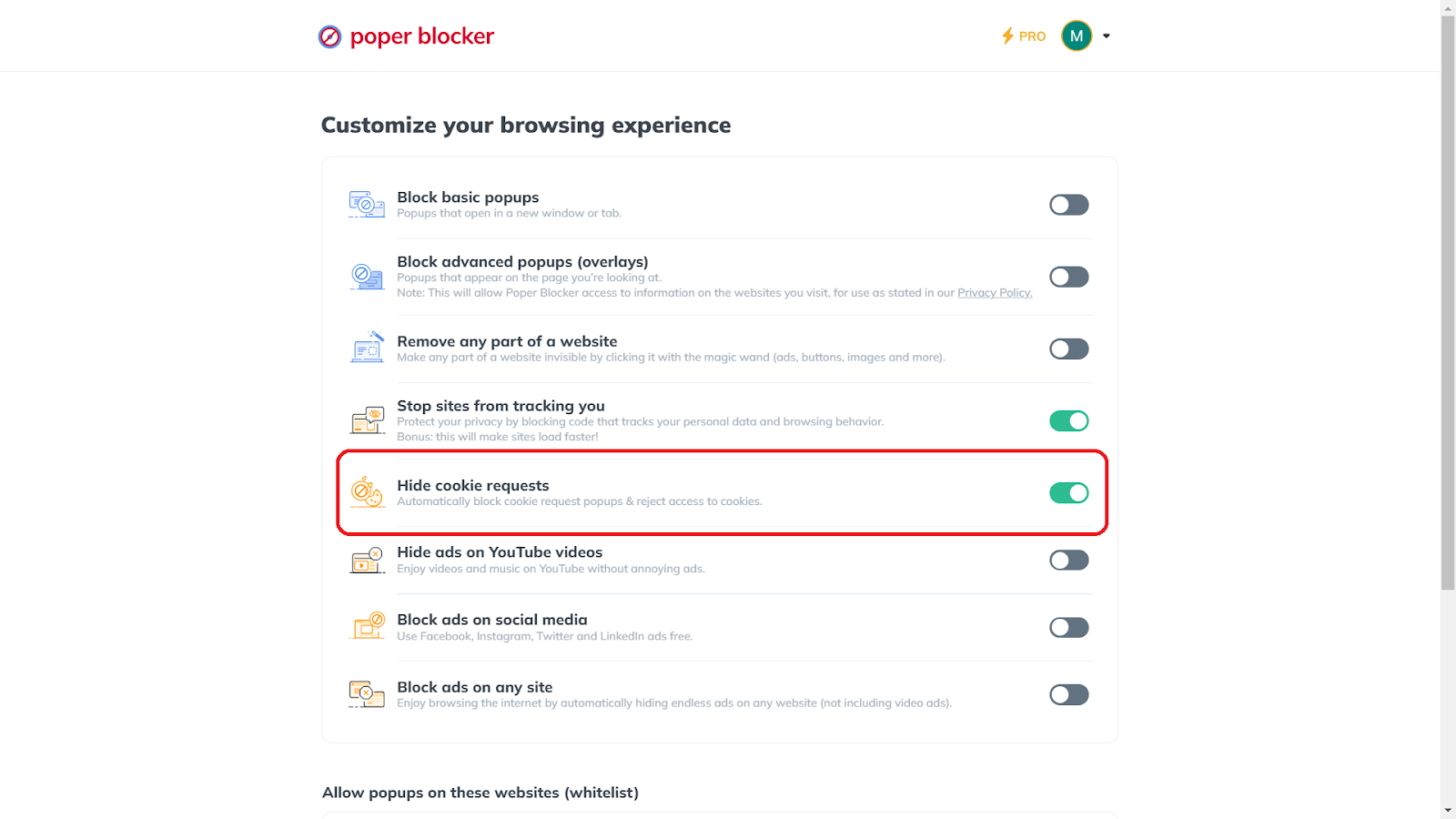
To use this cookie-blocking feature, open Poper Blocker, navigate to Advanced Settings, and turn on “Hide cookie requests.”
9. Block Ads and Pop-Ups Using Poper Blocker
Ads and pop-ups are not only annoying but can also be a source of web tracking and malware. Poper Blocker efficiently blocks these ad-tracking tactics, enhancing both your privacy and browsing experience. It has the power to block pop-ups, which can be in basic and advanced forms.
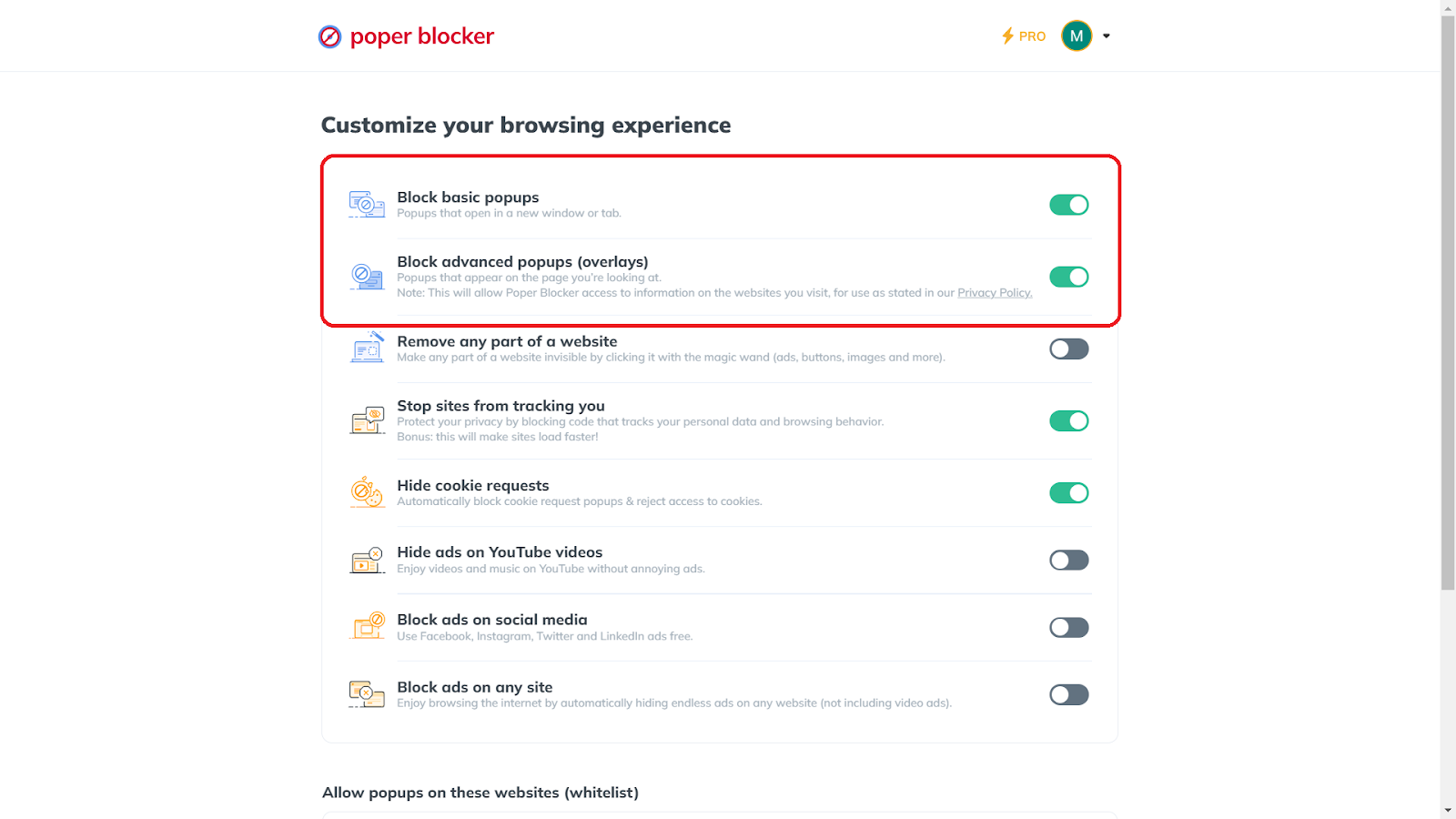
To activate this ad blocker feature, open the app, click on Advanced Settings, and enable “Block basic popups” and “Block advanced popups (overlays)” for comprehensive protection.
Erase your tracks online – Make Poper Blocker your browsing partner
Mastering Your Digital Footprint: A Final Word
Managing your digital footprint is an ongoing process that demands vigilance and proactive steps. By regularly auditing your online presence, utilizing tools like Poper Blocker, and being mindful of your online activities, you can significantly reduce your footprint. This not only safeguards your personal information but also shapes how you are perceived in the virtual world.
Remember: The key to a secure online experience lies in your hands. Every action you take towards minimizing your digital footprint is a step towards a safer, more private online life. Take control of your online narrative today, ensuring it reflects the best version of yourself.
Reduce your online footprint effortlessly – Poper Blocker is the solution
FAQs
What is the impact of a digital footprint on personal security?
Your digital footprint can significantly impact your personal security. Every piece of information you leave online can potentially be accessed by cybercriminals. This data can be used for identity theft, phishing scams, or even physical threats. By managing your digital footprint, you reduce the risk of your personal information being misused.
How often should I audit my digital footprint?
Regular audits of your digital footprint are crucial. Ideally, conduct a thorough check every three to six months. This includes reviewing your social media posts, checking privacy settings, and ensuring that no sensitive personal information is publicly available. Frequent audits help you stay on top of any changes and address potential privacy concerns promptly.
Can deleting social media posts retroactively improve my digital footprint?
Yes, deleting old social media posts can positively impact your digital footprint. It helps in removing outdated or potentially harmful content that doesn’t represent your current views or status. However, remember that some content might have been shared or saved by others, so it’s best to be cautious about what you post online from the start.
What are the risks of not managing my digital footprint?
Neglecting your digital footprint can lead to several risks, including compromised privacy, increased susceptibility to cyberattacks, and potential damage to your reputation. Unmanaged footprints can also affect your professional opportunities, as many employers review online profiles as part of their hiring process.
How effective are browser extensions like Poper Blocker in maintaining digital privacy?
Browser extensions like Poper Blocker play a significant role in enhancing digital privacy. They help by blocking unwanted ads, preventing trackers from monitoring your online activities, and automatically rejecting cookie requests. These features contribute to minimizing your online presence and protecting your personal data from being collected and misused.
Start your journey to digital anonymity – Install Poper Blocker now
