
 Chrome Web Extension
 Edge Web Extension
 Android App


Browse the web and you’ll most likely be assaulted from all sides by pop-up scams of every shape and size. Behind the façade of a supposed warning or offer, the apparent benefit is always a ruse intended to trick the user into surrendering personal data, and typically also to download some nasty malware. In other words, the web is full of dangers, and you must know how to spot and deflect them whenever you’re online. How do you protect yourself from such perils?
What are pop-up scams?
Pop-up scams are advertisements or alert windows that appear on the browser while surfing. Scammers make users submit their personal information, download malware, or buy fake software. They design fake pop-ups that look authentic, which seem to come from antivirus software companies or tech support services.
How do pop-up scams work?
Scammers use pop-up phishing and other scam pop-ups via short alerts or fake ads that fool users into thinking they are legitimate. Examples of this strategy include any generic types of pop-up ads with words that make it sound like a genuine alert or computer software warning such as:
- ‘Your computer is at risk’
- ‘Your system is infected, click here now’
When you click, you’re taken to a fake phishing site designed to steal your personal data or trick you into downloading malware.
Other deceptive pop-ups mimic ransomware, falsely claiming your computer is locked and demanding payment to fix it. These scams rely on fear and urgency to make users doubt their instincts.
For instance, phishing pop-ups may display warnings about viruses or suspicious activity, urging you to contact fake tech support. Once you call, scammers pressure you into sharing sensitive information or making unnecessary payments. By understanding how these schemes work, you’ll be better prepared to spot and avoid them, ensuring a safer online experience.
Tips to identify fake pop-ups
You can recognize fake popups if you know what to look for and how to protect yourself. Pop-up scams don’t always look like scams. They are often very convincing. However, there are a few telltale signs you can look for:
Watch for urgency and threats
Scammers normally use hyperbolic language to promote a sense of immediacy. Legit companies rarely (if ever) employ scare tactics to communicate with users.
Check for poor spelling and grammar
Most malicious pop-ups contain grammatical or spelling errors. Genuine warnings from reliable sources often use correct language and formatting.
Compare them with legitimate notifications
Learn how genuine alerts about viruses and malicious downloads from your antivirus software appear. Fake ones often have a different feel and fall short in certain technical details.
Look for unprofessional images
To trigger our alarm bells, fake pop-ups use terrible logos and images. Genuine alerts will have high-resolution graphics and match a company’s branding.
Verify the phone numbers
You can verify the contact before calling any of the pop-up numbers by using a search engine, or by contacting a government department or company. If the contact pops up as legit, they should provide (on their homepage) any official phone number, address, postal address, or email address you might need.
Attempt to close or minimize the browser
If you are not able to close or minimize the browser, it’s most likely a pop-up scam trying to freeze your screen.
How to remove fake pop-ups
These steps will assist you in removing fake pop-ups and in making sure that they don’t return. They will also help to strengthen your digital defenses by doing so.
Use Task Manager to close the browser
You can press Ctrl+Alt+Del and then close the browser in Task Manager. That way, it’s being closed on the operating system itself, which has not been given to the pop-up to control.
Disconnect from the internet
You can also help take steps to stop your computer or laptop from continually transmitting data to scammers if you temporarily disconnect it from the internet.
Reboot into safe mode
The trick is to restart the computer in Safe Mode, which loads only essential operating system files and prevents the malicious new files from running.
Delete temporary files
From your Start menu, access the Disk Cleanup tool and delete temporary files. You’ll minimize the risk of infectious malware in temporary storage.
Run a virus scan
If you choose to use anti-virus software, download and install a good one. Perform a full scan and delete or quarantine (if possible) any files detected as being malicious.
Change compromised passwords
If you think one or more accounts could be at risk, you should change every related password as soon as possible.
Install and use Poper Blocker
Install an ad-blocking extension such as Poper Blocker and stop pop-up scams before they appear. This browser extension will remove the annoying intrusive pop-ups, overlays, and fake ads for you, giving you complete peace of mind as you browse online.
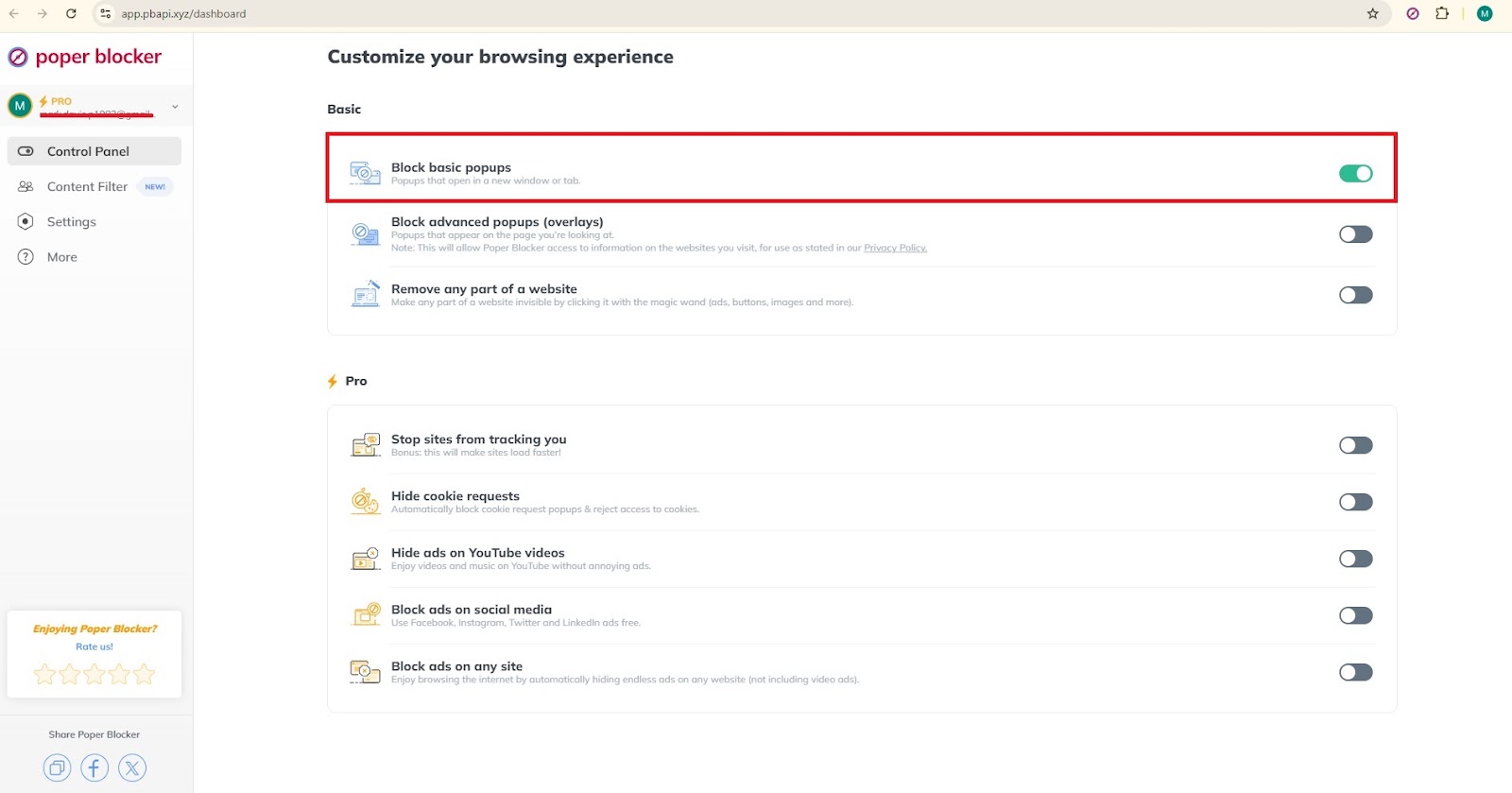
Stay protected from pop-up scams
So, for the love of your personal info, be proactive in your effort to outsmart pop-up scams. Learn how to spot fake pop-ups and use Poper Blocker to make the web a safer place for you. If anything about your experience raises red flags, know what to do, and do it, fast. The entire point of pop-ups is to hijack your computer. Don’t let them – stay safe by beefing up your online privacy tonight.
FAQs
What are the risks of falling for pop-up scams?
People who fall for pop-up scams risk having their personal information stolen, their identities stolen, or their bank accounts emptied. Pop-up scams are designed to deceive, and they are ultimately meant to separate users from their money.
Can pop-up scams install malware on my computer?
Yes, following the instructions in such pop-ups would immediately install malware in your computer, which could cause data or information leakage, spy on your operations, and even completely shut down your computer.
How can I report a pop-up scam?
If you’ve been hit by a pop-up scam, you can report it to consumer protection bureaus, your internet service provider, or the local authorities. In this way, you might deter others from falling for the same scam.
Is it safe to call the phone numbers on pop-up warnings?
No, you must run the phone number through an official database to check if it is genuine before making a call. Fraudsters will most likely give you a fake number and ask for your account information or require a payment from you.
What measures can I take to prevent pop-up scams?
Get antivirus software from a source you can trust, keep your software up to date, use pop-up blockers, and avoid clicking on suspicious pop-ups. Being aware of the most prevalent rip-off methods can also get you off their radar.
Social media has penetrated every walk of life today, firmly rooting itself in every detail of daily routine. Where otherwise it is a good platform that has brought connectivity across the world, its constant bombardment can take a heavy toll on a person’s mental health. A social media detox is needed to get away from this digital mess. Turning away from these online platforms can give people a chance to heal their minds and concentrate on more fruitful things, getting back into real life. Let’s take a closer look at what a social media detox entails, its benefits, and how to effectively conduct it.
A report in the Independent cited a study conducted by Iowa State University in which it was found that students who restricted their daily dosage of social media to merely 30 minutes a day had way fewer instances of feelings of loneliness and depression. This research cements the growing consensus that social media detoxes offer a real psychological benefit. Another study published in the National Library of Medicine archives showed that teens who used social media less frequently were more likely to be happy and gain social skills. These statistics underline the rising need for careful consumption of social media. Certainly, one sure way of making headway toward a much healthier digital space and a more balanced life is by conducting a social media detox.
What is social detox?
A social detox, or social media detox, generally describes a voluntary break from all social media platforms or selected ones for a specified amount of time. This awareness is tailor-made to aim at decreasing exposure to that endless chain of notifications, updates, and so on which keep rushing in. One can also divert much of this energy that would have gone into virtual activities into the real world. Social detox periods vary from one individual to another depending on personal needs, goals, and circumstances. A well-structured social media detox plan allows for a balanced life without pressure or distraction from instant gratification, which arises with frequent online validation.
It doesn’t have to mean going completely cold turkey with digital interactions. Some smaller, more manageable steps can include things like turning off notifications or setting specific slots for when to check in on social interactions. Slowly, this often leads to the rediscovery of latent interests and hobbies that had been put on the shelf by the overwhelming virtual activities. Social detox practices are not only limited to keeping off from social media; in an actual sense, these practices help maintain conscious consumption and set up determined boundaries that guard mental health. The practice can greatly improve the quality of life because most of them put profound interactions at precedence and not superficial online communication.
Benefits of social media detox
Going on this form of detox can have many kinds of positive results on mental, emotional, and even physical health. Among the biggest advantages are:
Reduced anxiety
The constant comparisons and pressure to keep up with people on social media can add up to more anxiety. Taking a break allows you to regain some of that confidence and self-worth without such undue stress from virtual validation.
Social detoxing reduces feelings of inadequacy increased by social comparisons, according to studies. Often, it turns out that life experienced without the perpetual scroll is in a more peaceful and centered state of mind.
Improved sleep
An extended period of screen exposure disrupts sleeping patterns and the capacity to rest deeply, especially when this occurs close to bedtime hours. Social media detox helps to improve an individual’s hygiene related to sleep, critical to their well-being.
Positive correlations have been established between decreased time in front of screens before bedtime and better sleep quality and duration. Other findings stated that with an altered sleep cycle, positive benefits on cognitive functions, mood, and physical health will all follow.
Increased productivity
Social media can turn into an enormous disturbance, constantly drawing attention away from duty and personal work. Detoxing from these platforms helps people to concentrate more on their aim and achieve it more effectively.
Without the frequent need to check updates, you get to enjoy more free time to spend on more useful tasks or personal development. Improved focus and work time without disturbance are direct benefits that can optimize your daily efficiency to a great extent.
More personal connections
By limiting screen time, there is more valuable face-to-face interaction that leads to deeper and more rewarding relationships. Face-to-face interaction is richer in depth when the superficiality of online interaction does not overshadow it.
The more time you spend with your family, friends, and colleagues, the more solid support systems are built. Whereas social media offers a chance to interact, in reality, the real deal is often compromised in the process.
Better mental clarity
The volume of information one encounters on social media can easily result in mental fog and decision fatigue. A digital detox clears the mind and allows focus and clarity to heighten. Many users will report having better decision-making skills and a clearer sense of purpose. Creating space from social media often can spark creativity by giving you the mental space that you need for innovative thinking and problem-solving.
A social media detox can have enduring upsides when it comes to helping users regain their ability to control their online habits. People often report feeling less overwhelmed and more in control of their lives. This new mental clarity allows for deeper engagement with their surroundings and activities, leading to improved well-being. These periodic breaks can build your resilience against the socially deleterious effects of social media on your ongoing mental and emotional health.
Tips on how to detox from social media
Starting a social media detox can be overwhelming, but practical measures make the process both feasible and rewarding. Here are some detailed tips on detoxing from such platforms effectively:
Set clear goals
Decide how long your detox will last—whether it’s a week, a month, or more. A set time frame keeps you focused and helps you track your progress. Clear goals for your detox will help you stick to the plan and get results. Think about what you want to achieve and picture the positive changes.
Do gradual decluttering
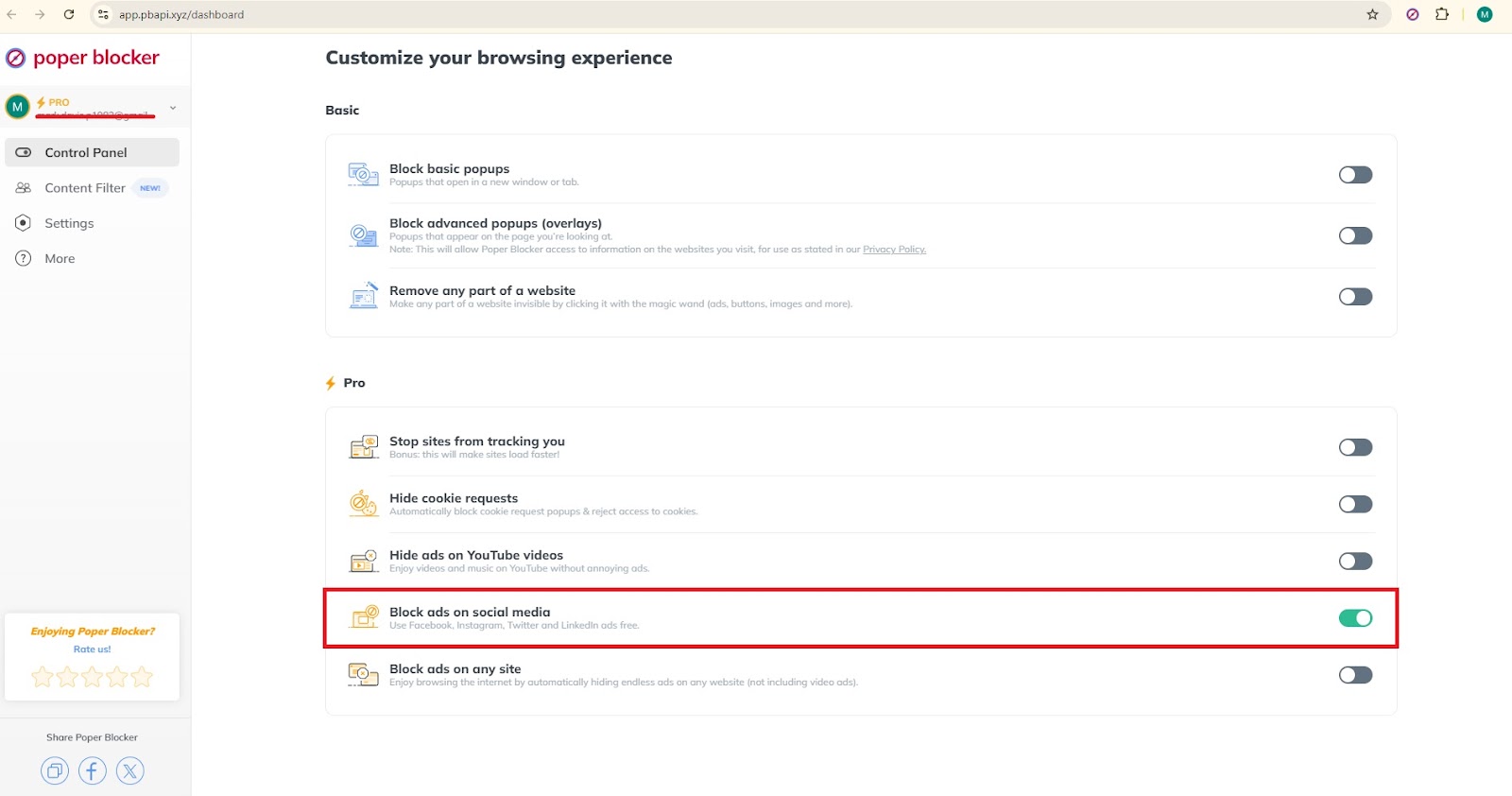
If a full social media detox feels overwhelming, start by cleaning up your social media feeds. Tools like Poper Blocker (available for Chrome and Edge) can block annoying ads and mute posts with certain words on Facebook, Instagram, Twitter (X), and LinkedIn.
Turning on “Block ads on social media” under the Pro section of Poper Blocker’s dashboard helps to create a cleaner feed with fewer distractions.
Switch on “Hide social posts that contain a specific word” in the “Content Filter” section. Via this social media filtering setting, you can mute social media posts that contain those words, and focus your social media feed on content you actually care about. This gradualness will help you get into a full detox easily.

Establish tech-free zones
Assign tech-free zones within your home, including the dining room or bedroom. This helps create habits that minimize reliance on digital life. Set aside a special area where this will not disturb the more sacred spaces, ensuring that their usage does not come with various distractions the online life might pose. Enjoy undisturbed meals or restful nights by keeping these areas free of social media interruptions.
Find alternative activities
Replace social media time with hobbies or activities that give one fulfillment. Engaging in offline interests such as reading, exercising, journaling, or learning a new skill means you’re doing something productive and rewarding. Turning back to passion and spending time doing meaningful things mostly brings about improved satisfaction and growth. Consider taking up a hobby you have ever wanted to do, or make some time to volunteer and give back to society.
Use a real alarm clock
Avoid using your phone’s alarm feature. This will only tempt you to check up on your social media accounts as soon as you wake up. An old-school alarm is a must if you need to establish a more positive morning routine. You will naturally fall asleep without the urge to scroll through updates in the morning. This can set the stage for a more mindful and peaceful start to your day. Consider developing a reading, meditation, or exercise morning ritual that puts you on the right path each day.
By adopting these strategies, you can achieve a successful detox and develop a much healthier relationship with social media. Besides extensions like Poper Blocker, such practices also help keep your digital space organized and distraction-free so you can enjoy a much more focused and balanced time spent offline. These tips can be incrementally added into your day-to-day routine to help make long-lasting habits and continue to extract the benefits of social media cleanse.
Take the first step towards a healthier digital life
Reclaim your well-being by making a conscious decision to log off from social media. This kind of detox will also help you find again the joys of being offline and enable you to be more focused on personal development matters. Use tools like Poper Blocker to block distractions and clean up your online space of clutter. Now is the time to take the first step toward a balanced life for your mental and emotional wellness.Taking this first step helps to reduce anxiety, improve sleep, and foster closer personal relationships. This practice, which aims to organize your digital life, gives way to improved productivity and clearer minds. Do your detox now and discover the transformation of reduced exposure to social media. Take control of your life online today and change your world into a much healthier and more enriching existence.
FAQ
How long should a social media detox be?
That is relative to individual inclinations and intentions. Most people find a week or a month-long detox brings in enough benefits for them. You can start small so you are just committed to the process, and based on the changes that you see, increase the time frame further.
Will a social media detox hurt my social life?
Though it may sound as if you would truly be very cut off, it can improve your social life by deepening real-life connections. If your friends and family know that you are detoxing, then they can continue to reach out in other ways, and really important communication won’t be impeded by social media.
Can a social media detox help with mental health?
Yes, several studies have already proven that reduced consumption of social media can help reduce anxiety, depression, and inadequacy due to constant comparisons and information overload. The clean-up break from social media creates mental space, thereby improving your emotional well-being and a better outlook.
How do I deal with professional responsibilities during a social media detox?
If your professional life calls for you to have social media, confine it to work hours and avoid it for personal uses during after-work hours. You also may be able to delegate tasks concerning social media to a colleague or schedule them in advance so that your professional duties are taken care of while you are detoxing. Create distinct boundaries regarding work and personal use.
What if I miss updates from my favorite accounts?
You could also plan alternative ways through which you can get updates from your favorite accounts by subscribing to newsletters, RSS feeds, or other sources. You may also decide on specific times when you would check social media in case a detox is completely unfeasible. Otherwise, find a middle path that keeps you updated without constant distraction.
Why so much talk about pop-ups on websites? Is it a helpful element or should it be avoided? Pop-ups can be very powerful elements for lead conversion and user interactions. On the other hand, if pop-ups are badly managed or placed, they could ruin the experience of your users.
Google has reacted to pop-ups by potentially penalizing websites that use pop-ups in a bad way on mobile devices so that it directly impacts those websites’ search engine ranking.
A HubSpot survey showed 83% saying that they don’t like all ads, just the really annoying ones, and 77% saying that they’d rather filter ads than block them. In other words, pop-ups are becoming a necessary part of the experience, as long as they’re performing in a way that improves, rather than damages, it. We want to go a little deeper at the intersection of pop-ups, SEO, and website performance in this article, and look at the effect that strategies for incorporating pop-ups have on user experience and SEO, offering advice and actionable insight for website owners.
Are pop-ups bad for SEO?
Poorly executed pop-ups can harm your website’s performance, especially in terms of SEO. Intrusive interstitials—those that appear right after a user lands on a page and cover much of the content—are particularly damaging. Google’s algorithms are designed to penalize sites using these tactics, as they disrupt the user experience and make it difficult for visitors to access your content naturally. Even if you implement pop-ups with good intentions, pop-up blockers like Poper Blocker can block them, further reducing their effectiveness.
For example, when you add a new window pop-up, not only are you interrupting the flow of your visitors’ browsing experience, but you’re also increasing your bounce rate, and this can negatively impact your ranking in search engines.
There is also the use of full-page interstitials, which pop up over the entire screen so that the user cannot even see what he or she intended to. These users can be put off completely and go away, with an exasperated gesture costing the site a missed conversion and a higher bounce rate.
When executed properly, pop-ups can enhance user value instead of detracting from it. Overlays that appear after a user has spent time on the page or are triggered by exit intent are far less likely to incur search engine penalties. They maintain the user’s initial experience and sustain engagement—both vital for SEO.
Alternatively, consider using subtle notification bars or slide-ins that don’t obstruct content. These less intrusive formats allow users to interact with your site seamlessly, preserving user experience while still helping you collect leads or share important information effectively.
SEO best practices for pop-ups
When used strategically, pop-ups and SEO can work together to do wonders for your website, as far as user engagement and conversions are concerned. It’s undeniable that strategically placed pop-ups can help improve your site’s conversion rates. But as with any great thing, the key to successfully using pop-ups on your site requires you to follow best practices to evade SEO penalties. Here are a few quick tips for ensuring that content on your site isn’t marred by SEO issues as a result of pop-ups.
Timing matters
Do not make pop-ups visible upon page load. Instead, show them after the user has spent some time engaged with the page, or based on user actions like scrolling. This preserves the user’s first impression of the page and supports more valuable user behaviors.
Size regulations
Keep them small, and non-intrusive (ideally under 15% of the screen), and make sure the core content is still accessible. The less user frustration, the better.
Exit intent strategy
It also makes sense to launch a pop-up the moment a user shows intent to leave the page. This offers minimum interruption, with the pop-up landing right as the user intends to go.
Easy dismissal
Make sure that pop-ups contain close buttons that are easy to find and click on so that users aren’t puzzled by how to dismiss them.
Appropriate triggers
Triggers set correctly – after, say, 20 seconds, or when the user scrolls halfway down a page – can catch the eye without disrupting the flow.
Mobile considerations
As Google has rolled out a mobile-first indexing policy, so pop-up notifications on mobile devices should be even more low-key. Stick to smaller, easier-to-dismiss formats on mobile.
Take action for optimized pop-ups
Developing a pop-up strategy in line with SEO means striking a balance between providing useful and enjoyable content for your users, and making your website available for search engines crawling your pages. The best practices that have been mentioned here can help you avoid penalties and keep your place at the hint of a search engine.
What you are striving for is to continue to prioritize the user experience while also achieving certain marketing goals. The use of pop-ups that are well-cultivated can help to enhance your click-through rates and maximize lead generation, ultimately optimizing the effectiveness of your site as well as your outreach to search engines.
FAQs
How do timed pop-ups benefit user engagement?
Timed pop-ups (those that appear after the user has been on the page for a given time) minimize the initial disruption, keeping users on the site longer so that they’re less likely to bounce and more likely to spend time on the site, which, in turn, can positively influence SEO.
Are all full-screen pop-ups bad for SEO?
No: not all pop-ups that take up the entire screen are bad. If they are showing legal requirements, for example, consent to the use of cookies, or age verification – they are generally OK. Pop-ups that block content without providing users with crucial information are a no-no. They may lead to fines and a bad user experience.
What strategies can improve the effectiveness of exit-intent pop-ups?
Exit-intent pop-ups are triggered by users’ actions indicating their intent to leave the page. Make sure the offer or message is something extremely compelling for the visitor to hang around or do something you want them to do.
How can businesses use pop-ups on e-commerce sites without affecting SEO?
Pop-ups are indispensable on e-commerce sites. They offer discounts, push for upgrades or subscriptions to free emails, or promote new products. But pop-ups can annoy users, and they should not intrude into their browsing space. They should be easy to close and must be relevant and timely. Users appreciate helpful and timely pop-ups.
Can small notification bars be a substitute for pop-ups?
Yes, pop-ups can often be replaced by small notification bars, which give important information while not compromising the main content and usability of a website. This makes the experience for the user smoother. They are often used for announcements, deals, or cookie consent.
