
 Chrome Web Extension
 Edge Web Extension
 Android App


In 2023, marketers across the globe spent a combined total of around $720 billion on digital ads according to a report by DataReportal. The good news is that ad blockers are helping users avoid these intrusive and distracting advertisements online.
So, how does an ad blocker work? Let’s understand the mechanisms behind these tools and know their benefits so you can make informed decisions about which one to use and how to customize its settings for the best browsing experience.
How do ad blockers work?
Ad blockers operate through several mechanisms, each contributing to their ability to disable ads effectively. Here’s a deeper look into how they achieve this:
Filter lists
Filter lists are at the core of ad blockers. These lists are collections of rules that dictate what should be blocked on a webpage. They include URLs, scripts, and various elements identified as sources of advertisements. Maintained by communities of volunteers and developers, filter lists are continuously updated to combat new advertising techniques.
Each filter list targets specific types of content. When you visit a webpage, the ad blocker checks the page’s elements against these lists and if an element matches a rule in the filter list, it is blocked from loading.
Machine learning
Machine learning optimizes traditional ad-blocking techniques by enabling ad blockers to identify and block ads more intelligently. While filter lists rely on predefined rules, machine learning models can analyze patterns and behaviors associated with ads. This capability allows ad blockers to adapt to new advertising methods that might not yet be covered by existing filter lists. For instance, machine learning can be used to recognize the visual and functional characteristics of ads, even those that try to disguise themselves as regular content.
Blocking third-party requests
Blocking third-party requests is another crucial function of ad blockers. Many ads are served by third-party domains that are separate from the content provider’s website. Ad blockers intercept these requests and prevent the ads from being downloaded and displayed. Third-party servers often have ad tracking to analyze user behavior across multiple sites for the purpose of gathering data for targeted advertising. Blocking these requests helps protect your privacy as it reduces the amount of data collected by advertisers.
Collaborative Efforts
The development and maintenance of ad blockers benefit greatly from collaborative efforts. Communities of developers and users work together to update filter lists, identify new ad-serving techniques, and share knowledge. Open-source projects rely on this collaborative model, which allows anyone to contribute to the improvement of the ad blocker. This also extends to the sharing of user reports. When you encounter unblocked ads, you can report them to the community so developers can update filter lists and refine the ad-blocking algorithms.
User-Defined Rules
Ad blockers offer you the ability to create your own rules. These are particularly useful for blocking ads that are specific to certain websites or for adjusting the ad-blocking behavior to suit your preferences. To add a custom rule, you just need to access the ad blocker’s settings and specify the elements you want to block. This might include particular scripts, images, or iframes associated with ads.
Block ads with Poper blocker
Poper Blocker is a highly effective browser extension for Chrome and Edge, that’s designed to eliminate annoying ads and provide a smooth browsing experience. With its user-friendly interface and powerful features, you can enjoy your time online without constant interruptions from advertisements. Here’s a detailed look at how you can block different types of online ads and customize your ad-blocking preferences through its Control Panel:
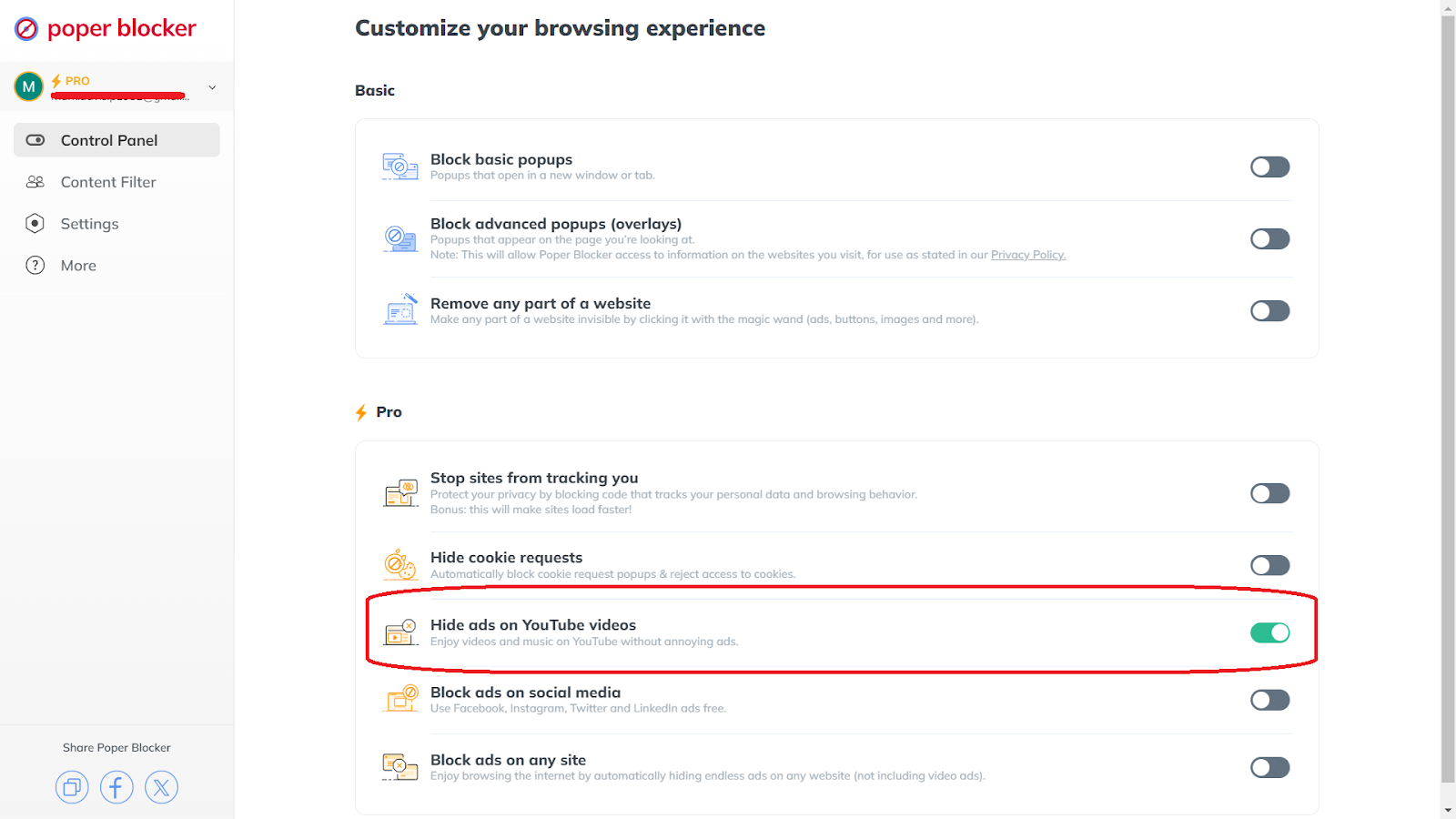
Hide ads on YouTube videos
YouTube is one of the most popular platforms for video content, but it’s also known for its frequent ads that can disrupt viewing. Poper Blocker offers a feature to block YouTube ads so you can enjoy your favorite videos and music without interruptions. To enable this, simply go to the Control Panel and toggle the button for “Hide ads on YouTube videos”.
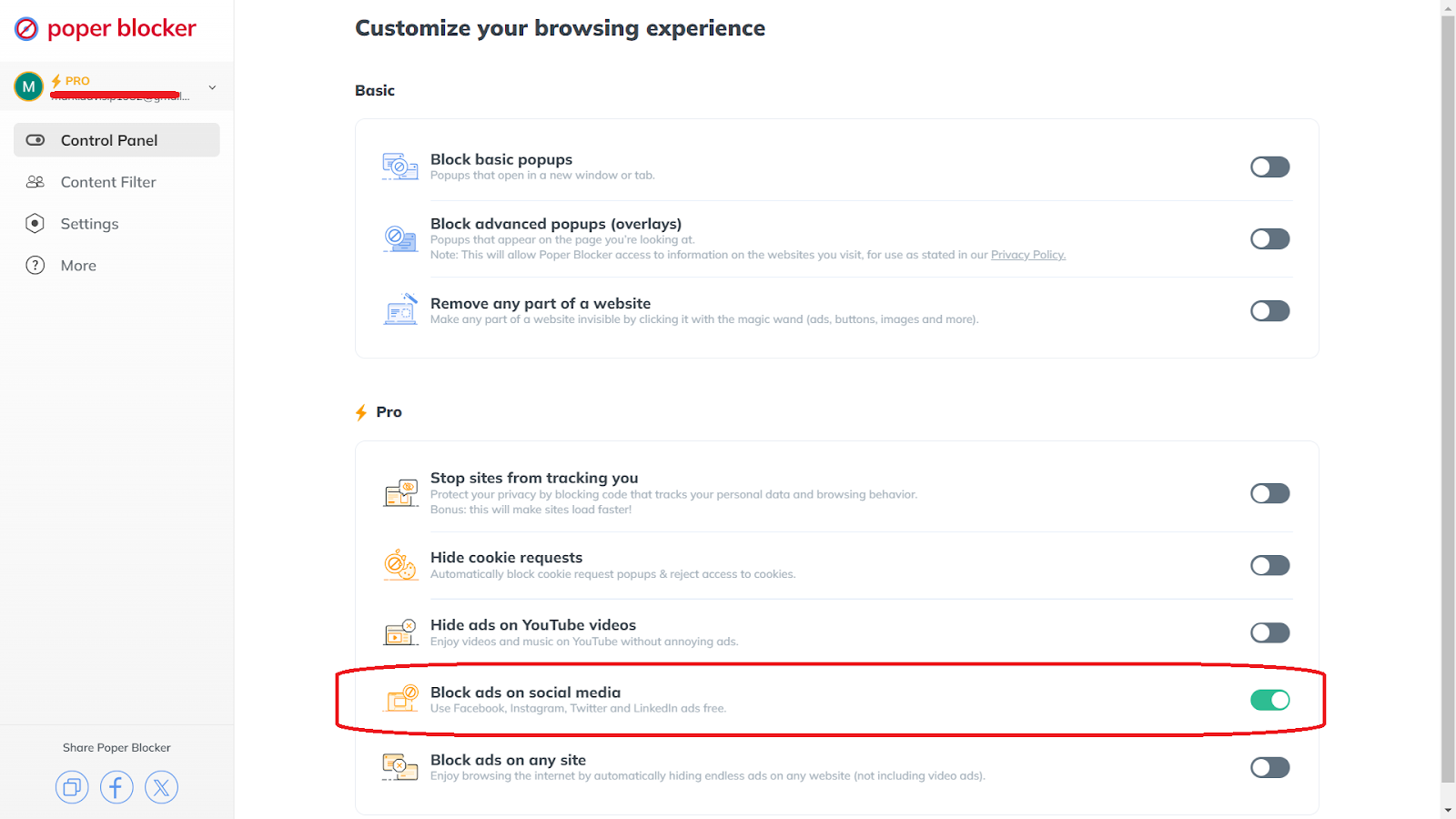
Block ads on social media
Social media platforms like Facebook, Instagram, Twitter, and LinkedIn are filled with ads that can clutter your feed. Poper Blocker identifies ad content on these platforms and blocks it from displaying. This includes sponsored posts, banner ads, and video ads that appear in your feed. To do this, find the “Block ads on social media” under the Control Panel and enable the feature.
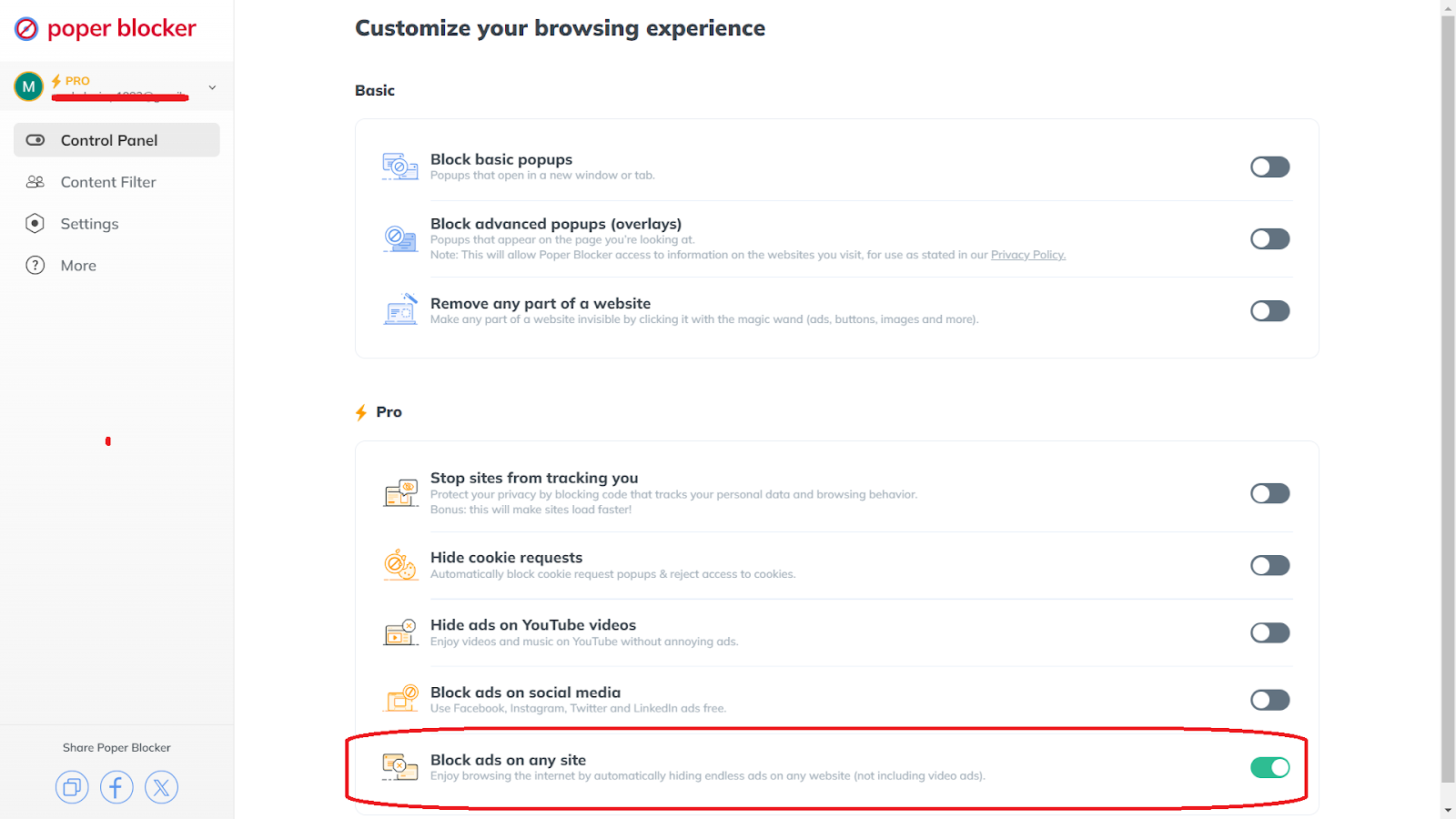
Block ads on any site
For a comprehensive ad-blocking solution, Poper Blocker allows you to block ads on any website you visit. It basically scans each webpage you visit for ad elements and blocks them according to predefined rules. To turn this feature on, access the extension’s Control Panel and enable the button for “Block ads on any site”.
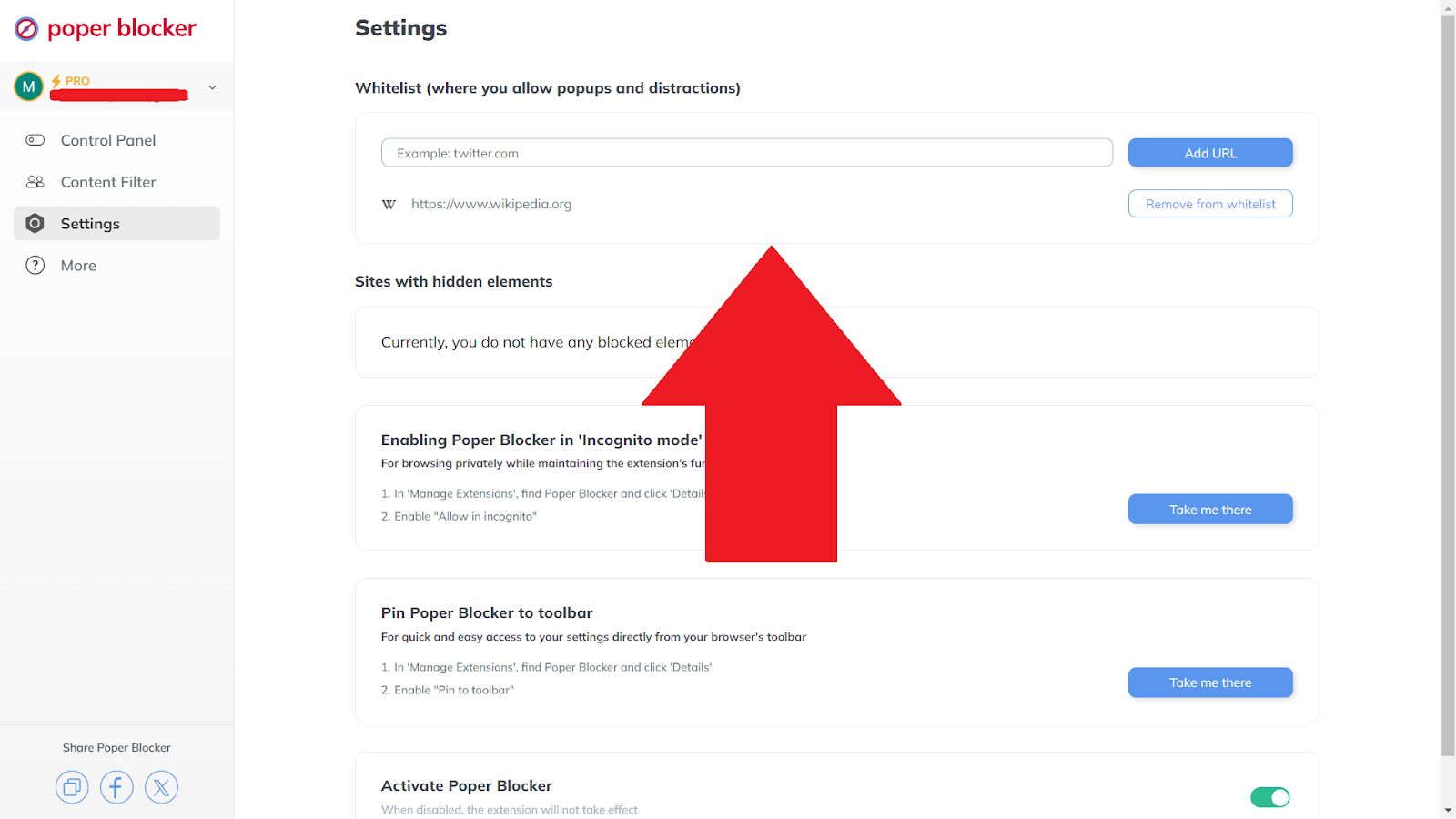
Whitelisting sites
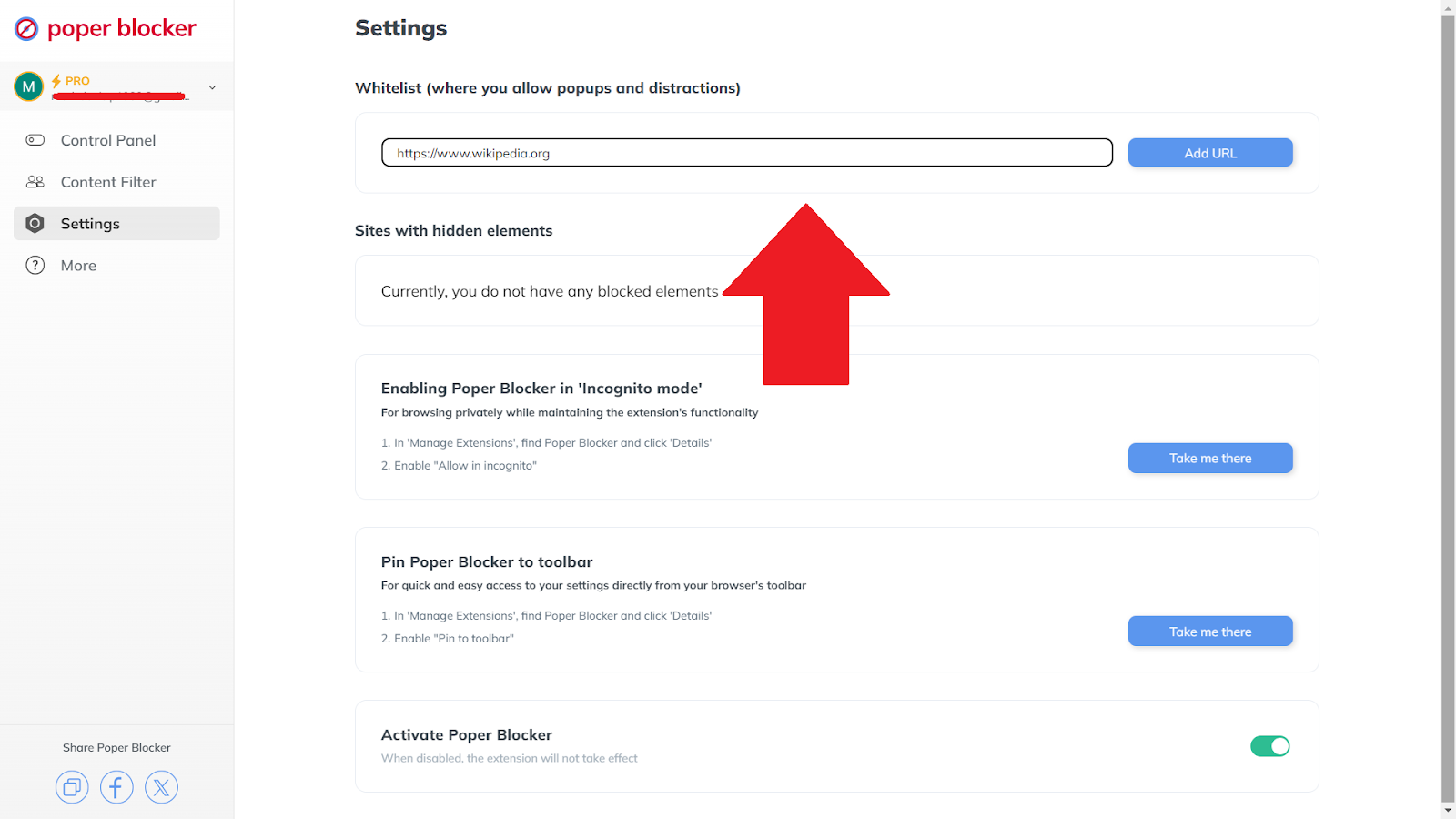
While blocking ads is beneficial, there might be certain websites you want to access or support by allowing ads. Poper Blocker’s whitelisting feature gives you control over which sites can show ads. To do this, go to the Poper Blocker Control Panel and click on Settings. At the Whitelist section, add the URLs of the sites or pages that you want to allow to support.
The Future of Ad-Free Browsing
Ad blockers have become an indispensable tool for many internet users, offering a seamless and uninterrupted browsing experience. Poper Blocker provides comprehensive ad-blocking capabilities tailored to various needs. With features like blocking YouTube ads, social media ads, and ads across any site, this browser extension significantly improves user satisfaction. Additionally, its easy-to-use whitelist feature allows users to support their favorite websites without compromising on the benefits of ad blocking. By choosing Poper Blocker, you can enjoy a cleaner, faster, and more enjoyable online environment.
FAQs
What are filter lists in ad blockers?
Filter lists are important components of ad blockers. They contain rules that identify and block ad content on web pages. These lists are regularly updated by communities and developers to stay effective against new ad-serving techniques. The lists work by specifying URLs, scripts, and other elements that should be blocked.
How does machine learning improve ad blocking?
Machine learning optimizes ad blocking by analyzing patterns and behaviors associated with ads. Traditional filter lists rely on predefined rules, which can be circumvented by sophisticated ad technologies. Machine learning models can identify new and emerging ad formats by understanding their characteristics.
Can ad blockers speed up my browsing?
Yes, ad blockers can significantly speed up your browsing experience. Ads often include heavy multimedia content such as videos, animations, and large images that increase page load times. Ad blockers reduce the amount of data your browser needs to download by blocking these elements and this leads to faster page rendering. Additionally, blocking ads can decrease CPU usage and memory consumption.
What is the impact of ad blockers on websites?
Ad blockers can have a significant financial impact on websites that rely on advertising revenue. Many free online services and content providers depend on ads to fund their operations. When users block ads, these websites lose a primary source of income, which can lead to reduced content quality, fewer updates, or even the closure of the site.
How do I whitelist a website in an ad blocker?
Whitelisting a website in an ad blocker like Poper Blocker allows ads to be displayed on that specific site. This method supports the content creators you want to help. To whitelist a site in most ad blockers, go to the settings or preferences section, look for a whitelist or allowlist option, and add the URLs of the websites or pages you want to support.
Overlays, those annoying interruptions that pop up on websites, can be incredibly frustrating. They come in different forms, such as a newsletter sign-up, an exit ad, or something else. These can easily disrupt your browsing experience and make it harder for you to focus on the content that you care about.
What are overlays?
Overlays are intrusive elements that appear on top of a webpage’s content, which often blocks the view and demand user interaction. Unlike traditional pop-ups that open in separate windows or tabs, overlays are embedded within the webpage itself. They trigger automatically when you enter or leave a website and will ask you to take an action such as:
- Subscribe to newsletters
- Accept cookies
- Answer a survey
- View special offers
These elements are designed to capture your attention and often don’t have an easy-to-find close button, which makes them particularly disruptive.
For example, when you visit a blog, you might encounter a “subscribe to our newsletter” overlay that covers the screen, and it will require you to either subscribe or find the hidden close button. Overlays can also appear when you attempt to leave a site and it presents exit-intent ads to entice you to stay or make a purchase.
What’s the difference between a regular pop-up and an overlay?
Since overlays are not classified as traditional pop-ups, most browsers don’t automatically block them, which is why you’ll need to use specialized tools. Both of these basically serve as tools for capturing user attention, but they function in distinct ways and require different strategies in order to be disabled properly.
Pop-ups: separate windows or tabs
Pop-ups are external windows or tabs that open automatically when you visit a website. They are often triggered by actions such as clicking a link or simply visiting a page. These pop-ups often display:
- Advertisements
- Sign-up forms
- Promotional content
Because they open as separate entities from the main browser window, they can be easily identified and blocked by most modern browsers or ad-blocking extensions which are capable of disabling different types of online ads.
Overlays: embedded within web pages
Overlays, on the other hand, are elements that appear within the same browser window, overlaying the webpage’s content. These can be:
- Sign-up forms
- Special offers
- Exit-intent ads
Unlike pop-ups, overlays are part of the HTML structure of the webpage and are designed to blend seamlessly with the site’s design. This makes them harder to block with traditional pop-up blockers, which is why you’ll need specialized tools like Poper Blocker to manage them effectively.
How to block pop-up overlays with Poper Blocker
Blocking pop-up overlays can greatly improve your browsing experience, and Poper Blocker (Available for Chrome and Edge) makes it easy. Here’s a step-by-step guide to using this tool:
1. Open the extension
Once installed, click on the Poper Blocker icon in your browser toolbar. This will open the extension’s main interface where you can manage its settings and preferences.
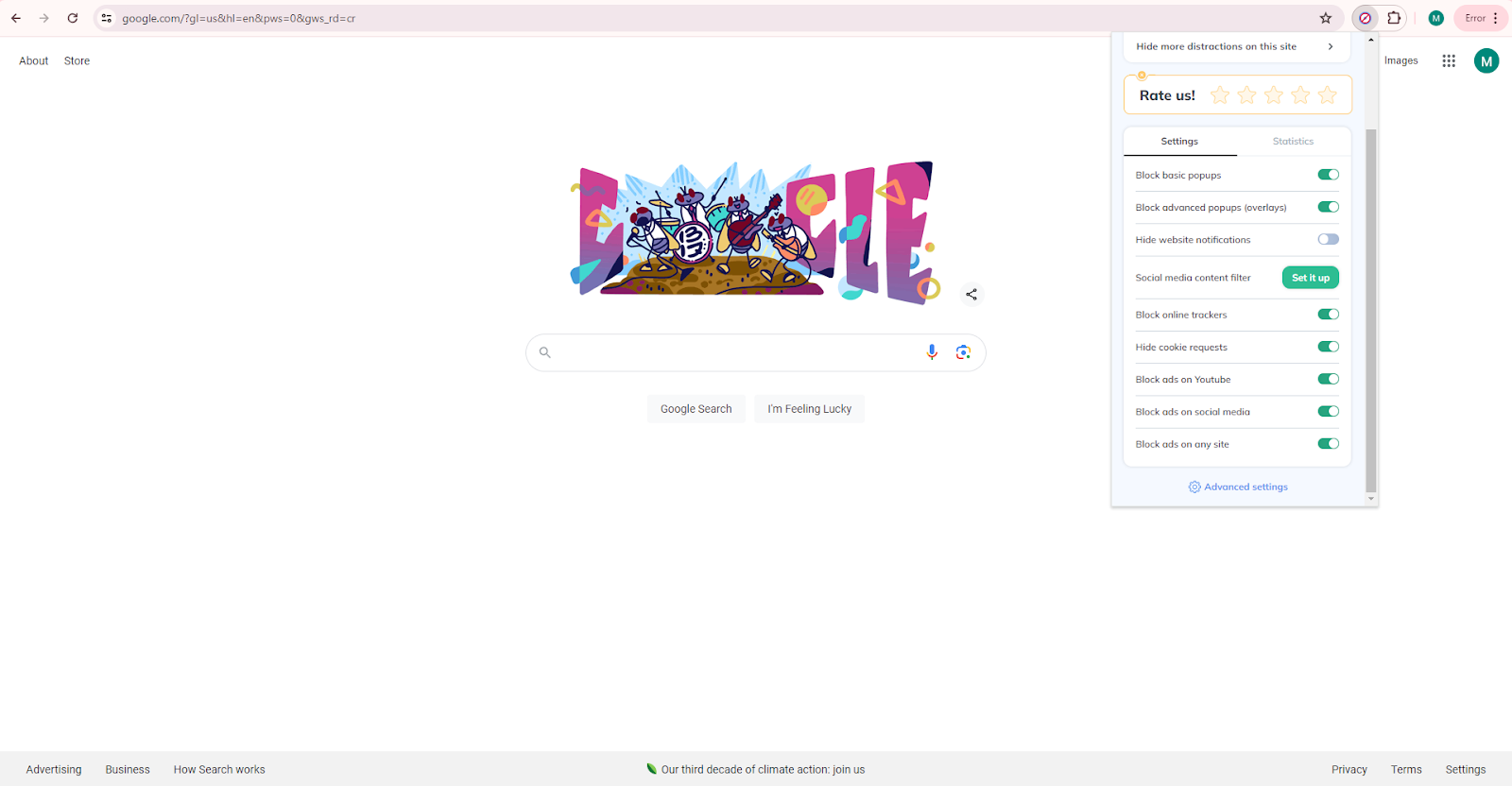
2. Access the Control Panel
Go to the Control Panel by clicking the “Advance settings”. This is where you can customize how the extension handles different types of pop-ups and overlays.
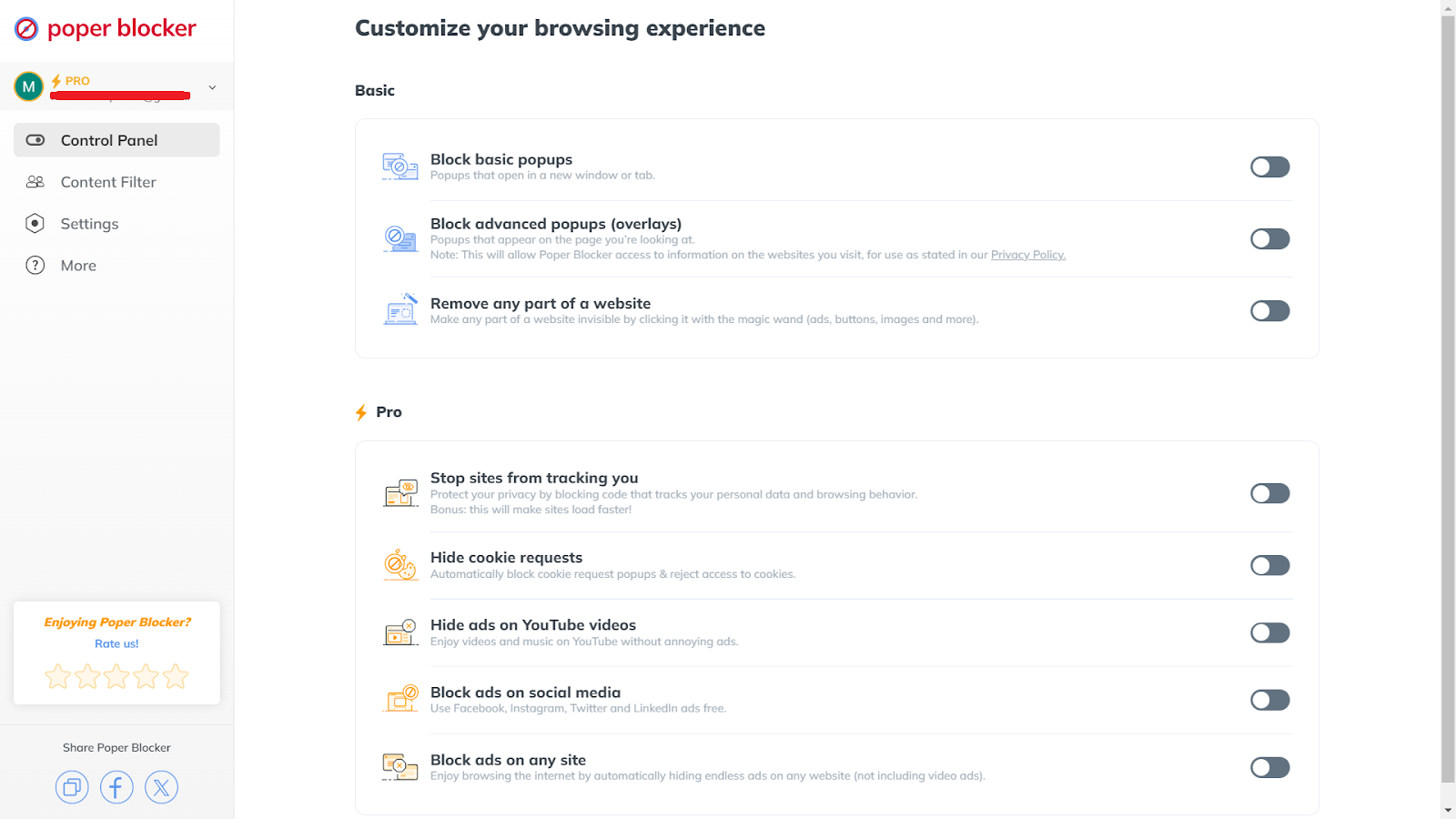
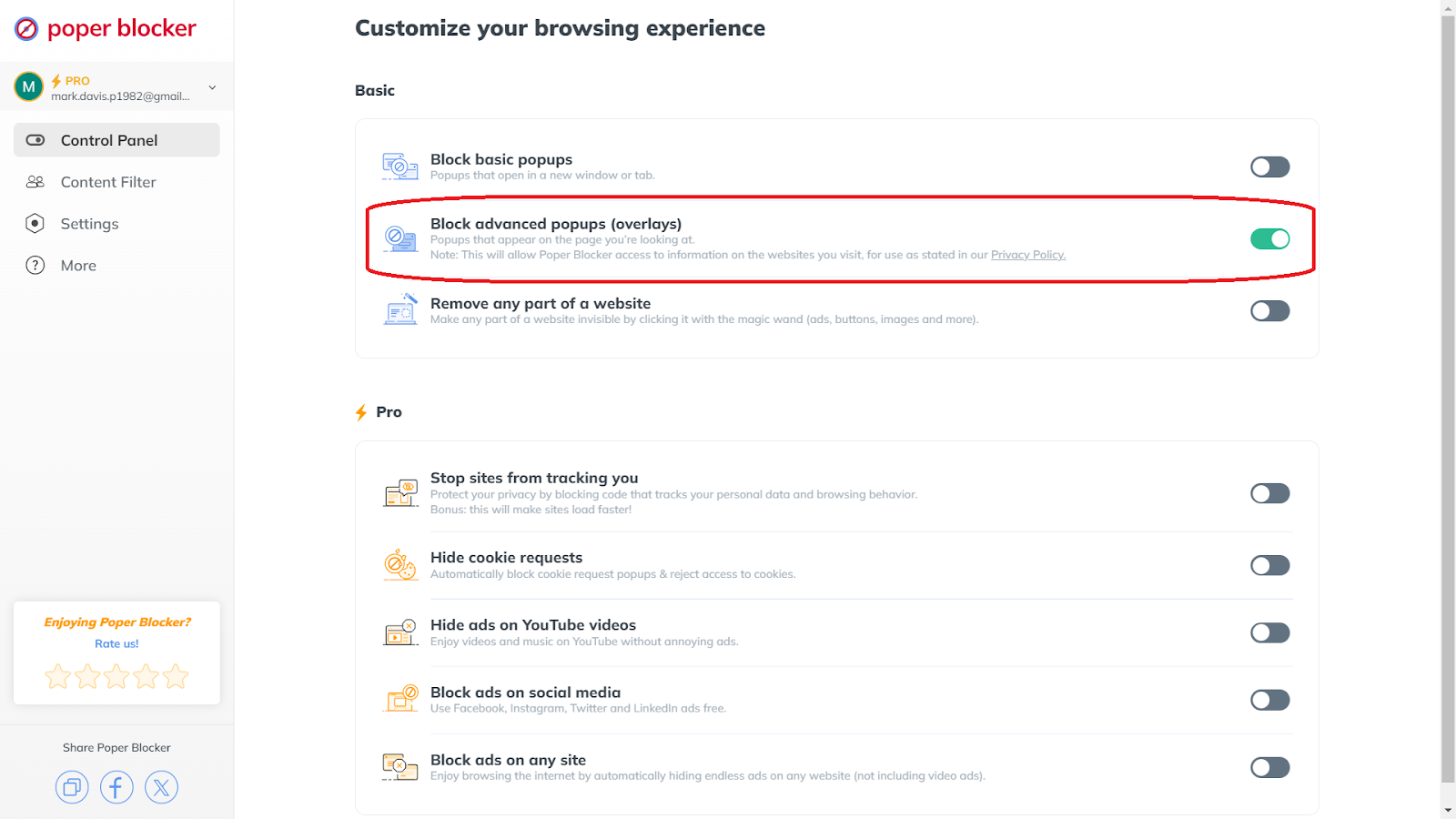
3. Enable overlay blocking
Turn on the “Block advanced popups (overlays)” button. This one specifically does the job to block overlay ads that appear on the web pages that you visit and prevents them from obstructing your view and disrupting your browsing.
4. Adjust the settings as needed
This extension offers additional settings to fine-tune your ad blocking preferences. You can whitelist certain sites or adjust the level of blocking to suit your needs.
Wave goodbye to annoying overlays
Blocking overlays allows you to enjoy content without unnecessary interruptions. When you use Poper Blocker, you can effectively eliminate these intrusive elements and browse through websites seamlessly. The process is straightforward: install the extension, access the control panel, and enable the overlay blocking feature. With this browser extension, you’ll enjoy faster load times and a cleaner interface. Say goodbye to frustrating overlays and hello to a smoother, more enjoyable time online today!
FAQs
How do overlays affect user experience?
Overlays can significantly disrupt the user experience by covering important content and demanding immediate attention. These interruptions can lead to user frustration and cause visitors to leave the site prematurely. It can also slow down page loading times and make the browsing experience less enjoyable. In some cases, they may even interfere with accessibility features, which complicates navigation for users with disabilities.
Are overlays used for malicious purposes?
While most overlays are designed for legitimate marketing and informational purposes, some can be used for deceptive or malicious activities. Malicious overlays might trick you into clicking on harmful links or downloading malware. They can disguise themselves as legitimate prompts, like system updates or critical notifications. It’s important to be cautious and use trusted tools to block these potentially harmful overlays.
Can overlays slow down my browser?
Yes, overlays can contribute to slower browser performance. Many overlays are resource-intensive. They contain heavy scripts, animations, or high-resolution images that require significant processing power. And when multiple overlays load simultaneously, they can consume a substantial amount of system resources, which leads to slower page loading times.
Do all websites use overlays?
No, not all websites use overlays but they are prevalent on many commercial and content-heavy sites. Websites often use them to capture leads, promote offers, or deliver additional information to their users. However, the frequency and intrusiveness can vary significantly between sites. While some use them responsibly, others may use aggressive overlay tactics that may become disruptive.
Can I manually close overlays without an extension?
In some cases, you can manually close overlays by clicking the close button or an ‘X’ in the corner of the overlay. However, many of these are designed to be persistent and difficult to manually dismiss. Either they don’t have a visible close button or are positioned in a way that obscures important content until you interact with them. Using a dedicated ad overlay blocker like Poper Blocker provides a more reliable solution to automatically block and remove these interruptions.
