
 Chrome Web Extension
 Edge Web Extension
 Android App


Try browsing major websites without ad-blockers – it’s like taking off your seatbelt and navigating a crowded motorway on a motorbike without a helmet.
The rise of online ads
Advertising on the internet has seen a lot of changes since the days of the early static, unobtrusive banners that were posted on the first commercial websites. These ads remained stationary, and seamlessly integrated into the layout of the page. Nowadays, when user engagement has grown significantly, businesses try to make advertising more effective and interesting by employing advanced ad formats: from animated banners to personalized messages, to interactive ads. Tracking technologies revolutionized online advertising by allowing marketers to monitor users’ online behavior and show relevant ads to various target audiences.
The world of intrusive advertising today is bigger than ever. Now it can be invasive in a variety of ways:
- Incessant pop-ups
- Autoplay videos and overlays that ask a user to engage with the ad to see the content
- Ads that hog bandwidth and slow down page load times
Algorithms allow those advertisers and their targeting to be far more precise and narrowed to very specific demographics. Given this constant (and sometimes irrelevant) shower of ads, we are not surprised that users are asking where they can go to help keep their experience a little smoother, and somewhat less intrusive.
Imagine a typical browsing experience without ad blockers
Using the World Wide Web without an ad blocker is a pain because it is filled with so many ads. Here is an overview of the impact of advertisements on user experience on different websites:
News websites
Visit any news website without ad-blocking, and your experience is likely to be horrendous. Instead of being able to read the headline, you are bombarded with pop-up sign-up forms to receive newsletters and join membership schemes before you can read a thing. You are greeted with auto-play videos that you didn’t ask for. The site is littered with banners and sidebars that compete for your attention, and you are left wondering what was even there when you started reading. But then you notice it: a headline, an image, a story you know you want to read. But first, you have to tick five boxes to subscribe and unsubscribe from newsletters and membership schemes you know you don’t want.
Read more – How to Block Ads on News Sites and Stop Distractions
Social media platforms
Social media is virtually unnavigable without ad blockers: feeds are clogged with sponsored posts and video adverts that break the organic flow of user-generated content, showing photos and videos while interrupting the feed with unsolicited content from brands. Banner ads, prompts asking for cookie consent, and pop-ups pushing in-app purchases or suggesting products dominate the interface, crowding out what is important and detracting from the social experience. The need to interact with ads makes it harder to engage with the things that brought you there in the first place.
Streaming services
Streaming entertainment services without ad-blockers can turn any viewing experience into a frustrating chore. Even before a show or movie starts, viewers must sit through multiple unskippable video advertisements. Periodically, within the content, additional ads for premium memberships or special offers further disrupt the experience. These distractions make it difficult for users to get settled into the content. What should be a leisurely activity has turned into a series of frustrating pauses.
Read more – How to block pop-ups on movie streaming sites
E-commerce sites
Buying things on e-commerce websites is frustrating without ad blockers, too. Pop-ups often offer email sign-up or newsletter subscription discounts that interrupt the shopper’s purchasing journey. Banner ads and sidebars (often using ad personalization) are used to push further products based on browsing behavior on a site itself, making the page even more cluttered. Promotional overlays presenting the latest discounts can cover part of the screen, distracting from shoppers’ key goals and making shopping more difficult than fun.
The role of ad blockers
Ad blockers allow users to take back control of what ads appear on the screen and they provide numerous benefits beyond stopping pop-ups and other all-too-common and obnoxious online intrusions:
Improved privacy and security
Ad blockers block ad-tracking scripts that might collect sensitive personal information without your consent. This increases your online privacy and potentially limits your exposure to malicious ads or infections by ad-driven malware.
Faster load times
Along with filtering out all the heavy, time-consuming, and frequently malicious advertising that clots up bandwidth, blocking ads makes for quicker, more efficient loading times
Enhanced browsing experience
You will experience more fluid browsing with reduced interruptions, free of pop-ups and banners. And no pesky ads.
Reduced bandwidth usage
By rejecting bandwidth-intensive adverts, users with poor data connections will be able to browse more efficiently and economically with their data resources.
With ad blockers like Poper Blocker, you can eliminate creepy pop-ups and overlay ads, thus improving user experience. You can even filter social media content to remove certain keywords, so you can customize your digital environment with minimal effort.

With the help of ad blockers, you can read more of the content you want, hassle-free, without annoying ads getting in the way.
Take control of your browsing experience
Change the way you experience the internet by having total control over your web experience. Increase privacy, and benefit from faster, ad-free internet browsing. Stop unwanted ads from hindering your online activities. Having a fast and secure browsing experience just got a whole lot easier – with Poper Blocker!
FAQs
How do ad blockers improve user privacy?
By blocking advertisements, ad blockers make it more difficult for ad-tracking scripts to collect your user data. That means that advertisers will have a more challenging time tracking you across websites and that third parties won’t be able to harvest your personal information to be used in ways you haven’t authorized.
Do ad blockers save bandwidth?
Yes, they do. Adblockers not only cut down on page loading times by preventing the transmission of ad content (often consisting of huge images and videos) but also by reducing the amount of data transmitted to a user. These are especially helpful in areas where bandwidth is limited (such as using your mobile phone as a hotspot) or in situations where a user has a limited or limited-time data plan.
Are there any downsides to using ad blockers?
In some cases, ad blocking might break a website – especially those where ads are the primary part of the business model. But most modern ad blockers try to find a middle ground between ad removal and providing a decent experience to users, sometimes allowing unobtrusive advertisements that want to support the work of content creators.
Can ad blockers protect against malware?
Ad blockers can also prevent malware by blocking ads that contain malicious scripts or links to infected sites. They aren’t a replacement for dedicated antivirus software but can prevent some consumers from inadvertently falling victim to malicious content.
How do ad blockers affect cookies and tracking tools?
A common side benefit of most ad blockers is that they prevent ad-tracking and web-tracking scripts. These scripts are used to track user activity, browsing habits, and preferences, and help businesses deliver targeted advertising. Most ad blockers explicitly prevent web tracking from stealing that data and reselling it to third parties.
You’re in the middle of your research project or getting into that streaming session, and you get hit with a bunch of unwanted ads. Most of us have been there, and many more when using Google Chrome in Incognito mode. Although Incognito is superb in matters concerning privacy and preventing ad-tracking, it doesn’t inherently block ads. This makes the need for an effective ad blocker much more pressing. According to statistics, 73% of consumers reported they did not like pop-up ads (source: HubSpot); on the other hand, the best pop-ups reach up to a 60% conversion rate (source: Campaign Monitor)—thus showing that pop-ups are at the same time a real nuisance and an effective marketing tool.
Why do ad blockers have issues with Incognito mode?
Ad-blockers face many challenges in Incognito mode, some of which could be due to the following:
Privacy restrictions
Commonly, extensions are denied access to data by default, guaranteeing that private browsing sessions remain just that—private. But these very same permissions that turn off access to your history and search data could turn off ad blockers, leaving users subject to some really bad ads.
To properly use ad blockers, you must allow access to Incognito mode manually by going into the settings for the extension—a territory that many users may not be comfortable or familiar with.
Manual activation
Manual activation would involve going to the browser’s settings, then into the menu for extensions, and toggling the correct options on and off in each ad blocker. This can get very confusing for people who are not tech-savvy to enable their ad blockers.
Also, different browsers and versions layout and word these settings differently, which further maximizes the possibility of misunderstanding. While this is easy once familiar, for new users, it feels like wading through technical jargon and maze-like options.
Extension compatibility
The reason for these compatibility problems is that ad blockers are designed and updated individually. Some ad blockers do not update frequently, so they lose their compatibility with new browser versions and the respective Incognito settings.
You see, browser developers are constantly changing privacy policies and this may affect the functionality of extensions. Suddenly, users realize that their favorite ad blockers don’t work the way they should, making people frustrated. Continuous updating of browsers could mean that ad blocker developers need to update similarly to preserve functionality, which can result in intermittent failures and inconsistent ad-blocking performance.
How to enable Poper Blocker’s ad blocking in incognito?
Poper Blocker leads the space in blocking all types of annoying ads, pop-ups, and overlays right down to Incognito mode. Here’s how to turn it on:
The long way – Via Chrome’s settings
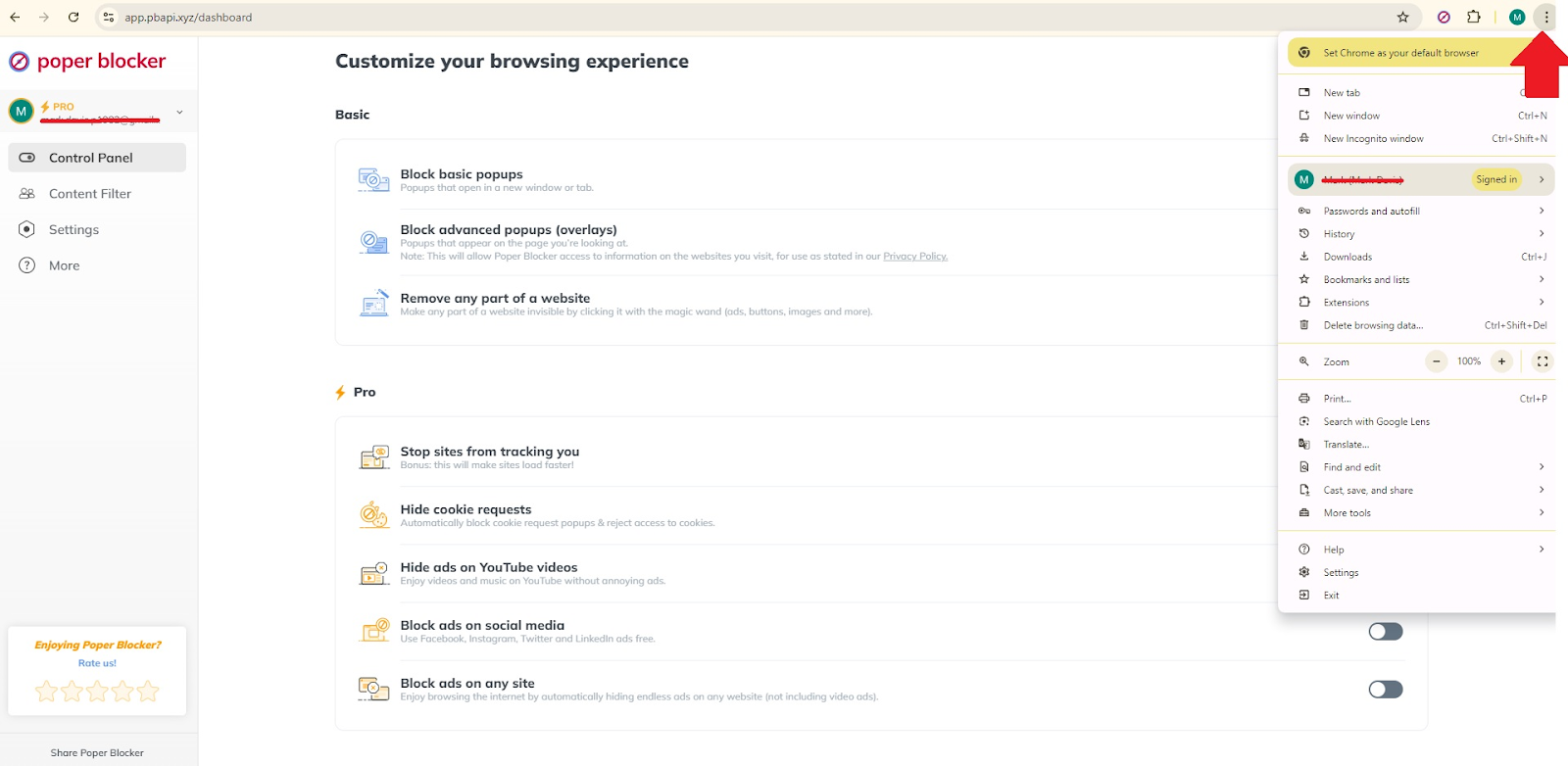
1. Open Chrome and navigate top-right to open the three-dot menu option.
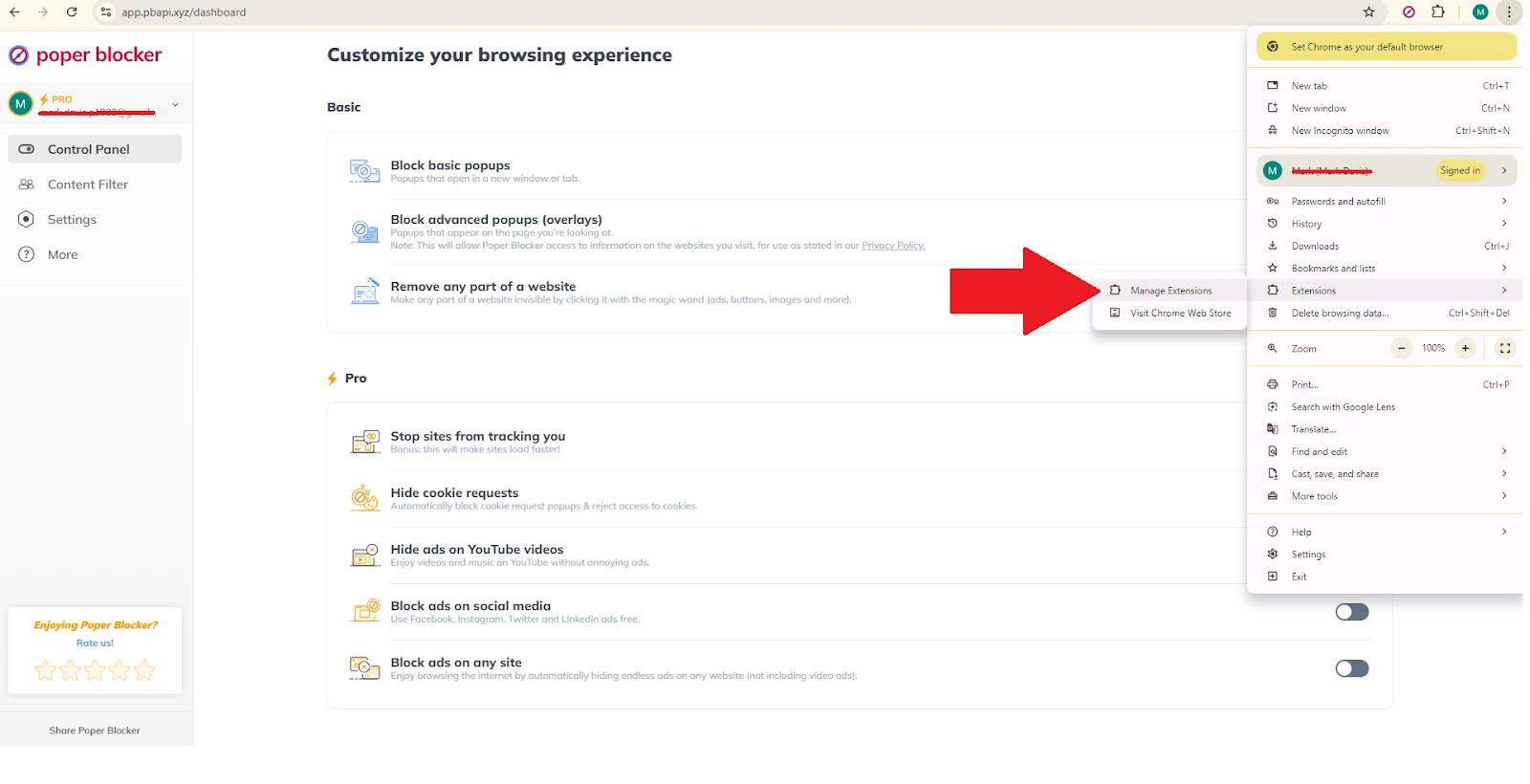
2. Access the extensions that you have installed by clicking on ‘Extensions’ and then ‘Manage Extensions’.
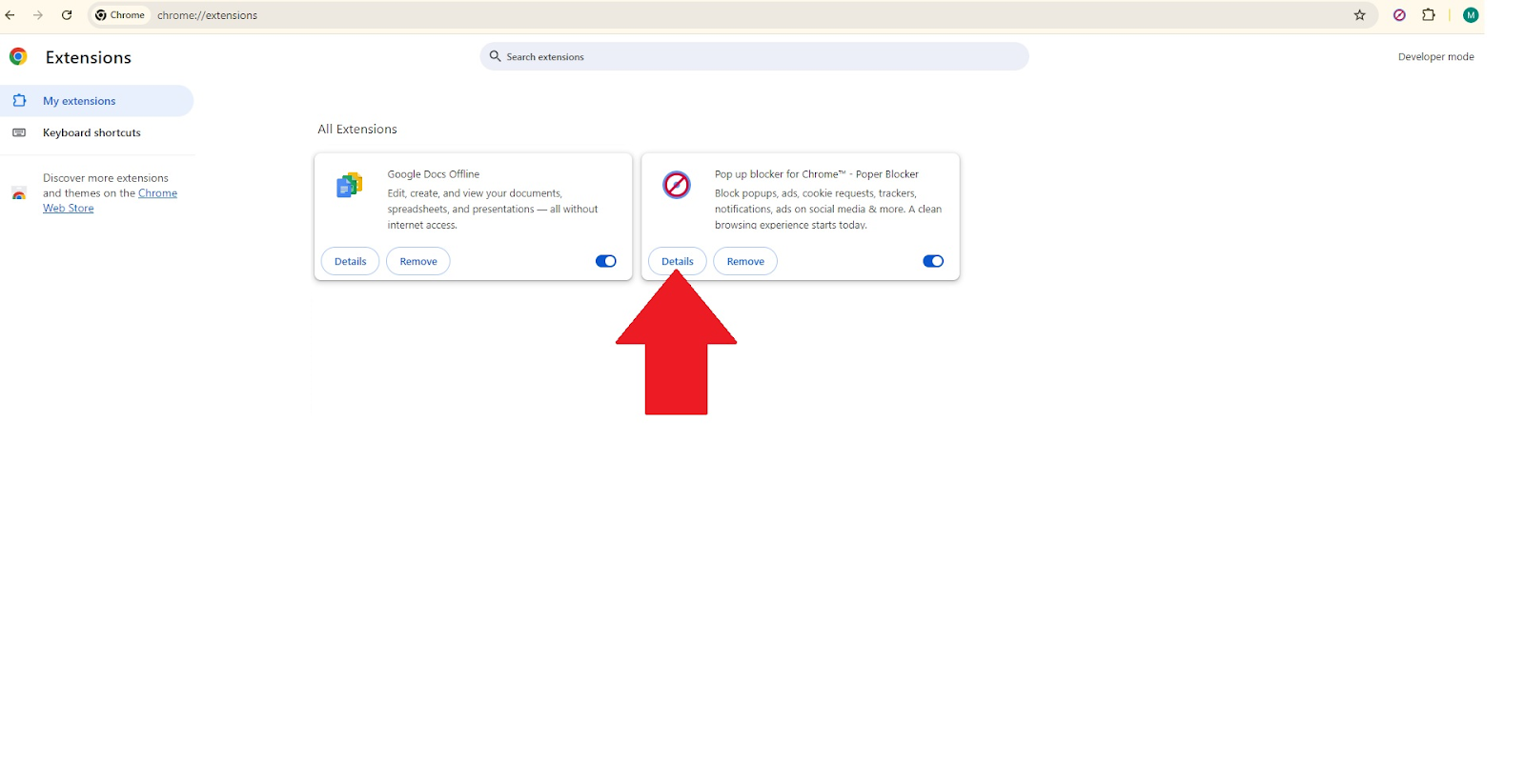
3. In the list, find Poper Blocker and then click on Details.
4. Turn on the ‘Allow in Incognito’ switch.
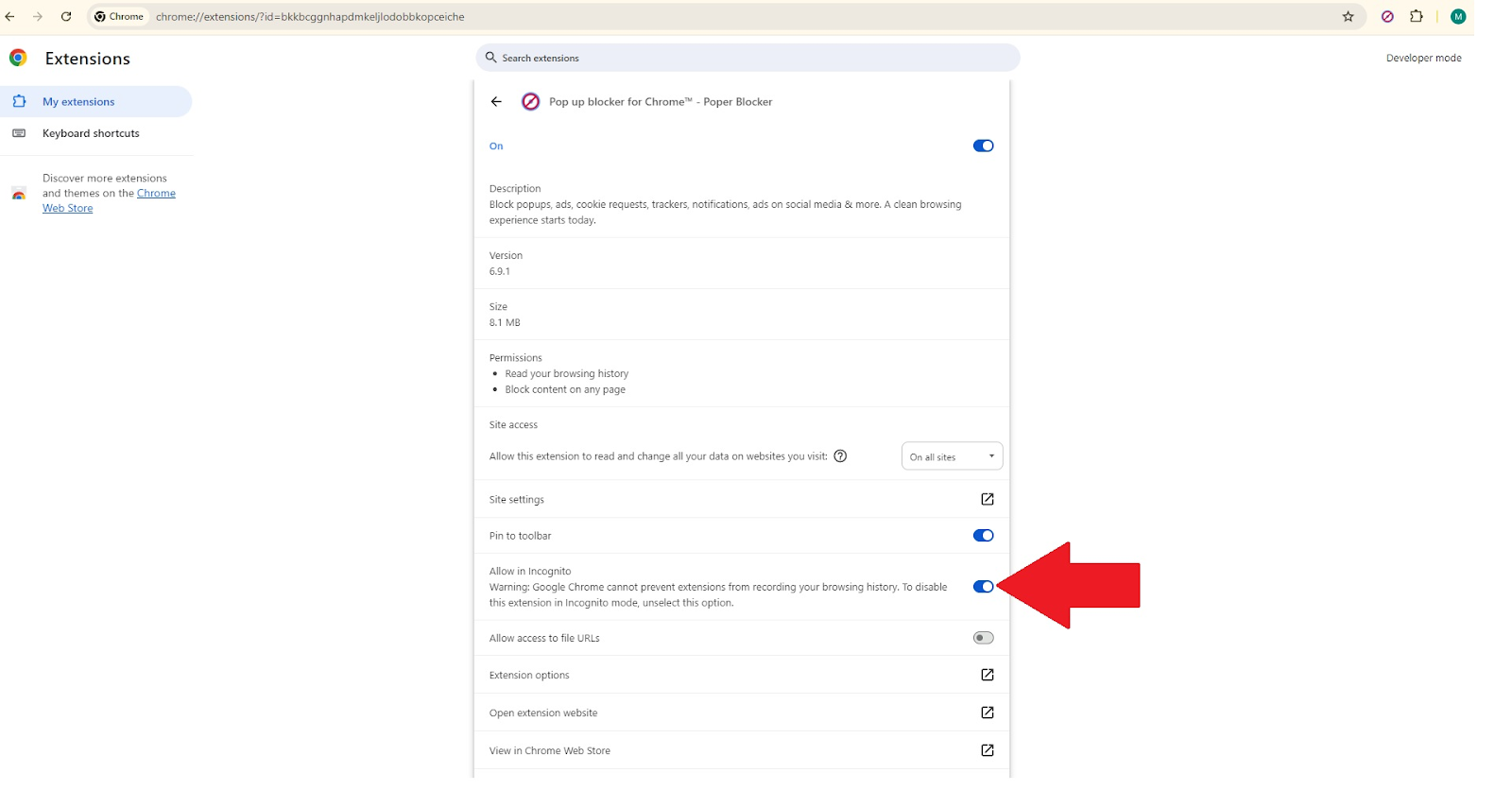
These steps will make Poper Blocker much more potent during your Incognito browsing sessions, skipping most of the disruptive ads and making your time online much more pleasurable.
The short way – Via Poper Blocker’s dashboard
Alternatively, you can enable this adblocker in Incognito mode directly from the Poper Blocker dashboard:
- Open the Poper Blocker dashboard.
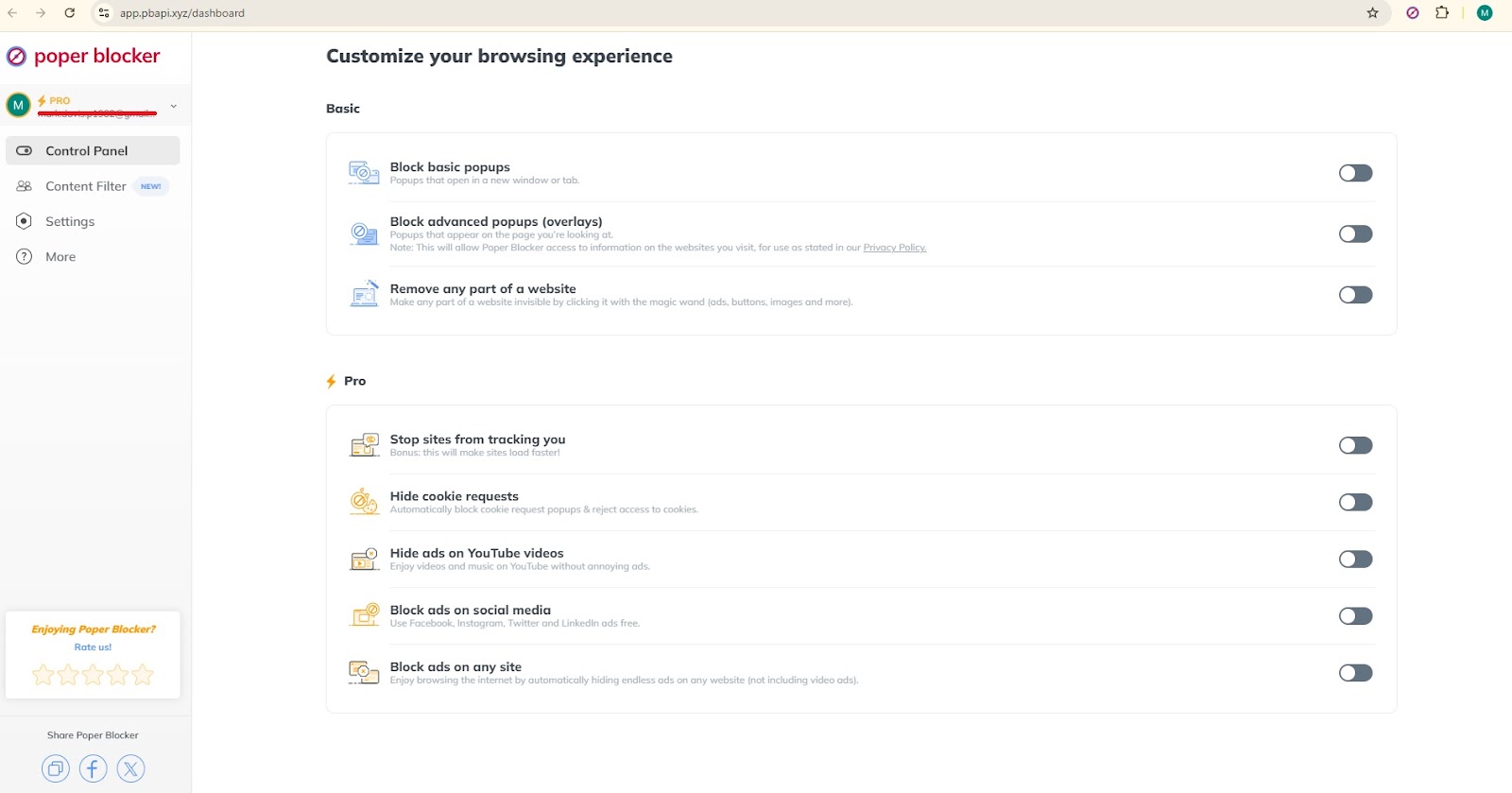
- Click on Settings and locate the section “Enabling Poper Blocker in ‘Incognito mode’”.
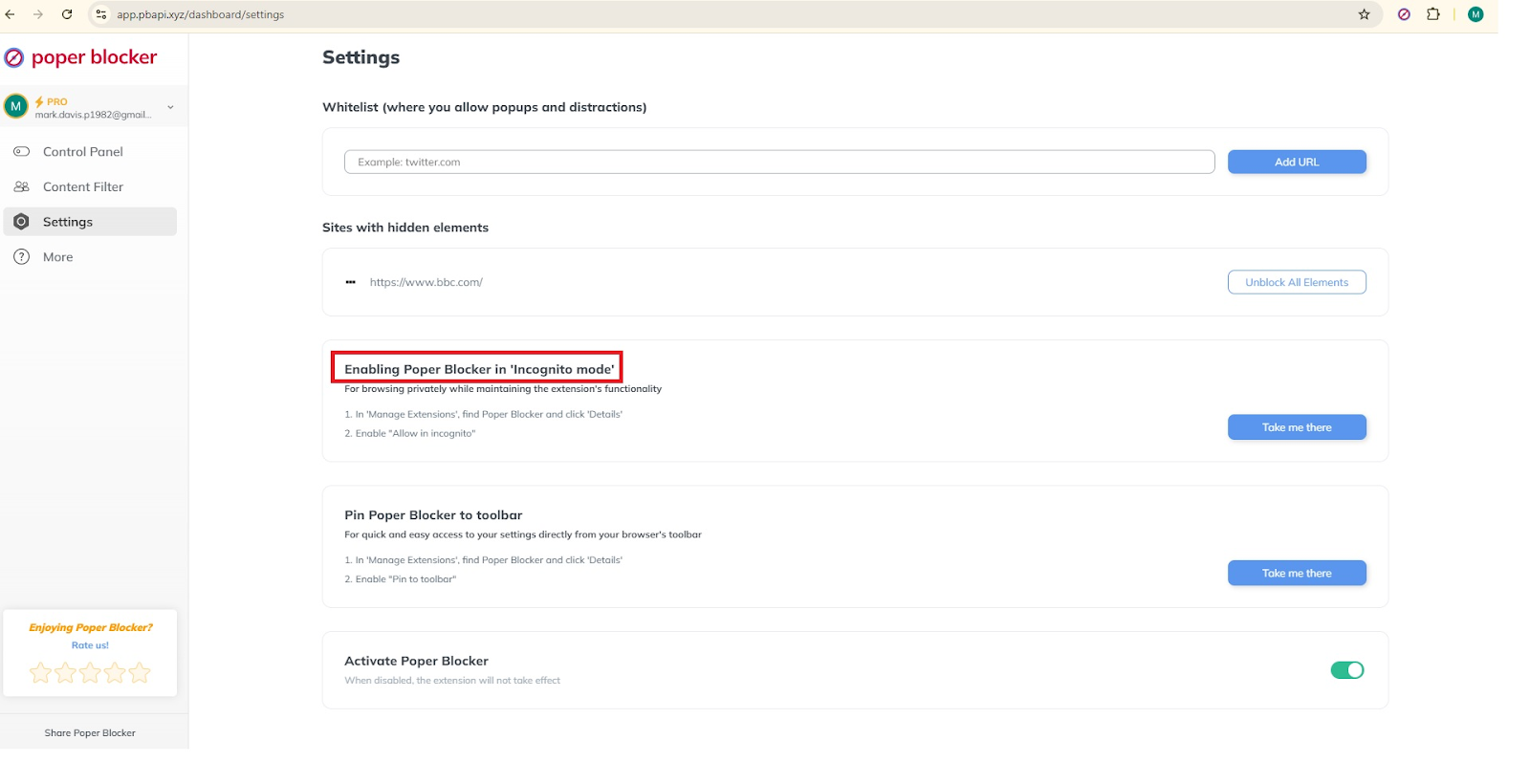
- Click the “Take me there” button to be directed to the settings to switch it on for Incognito mode.
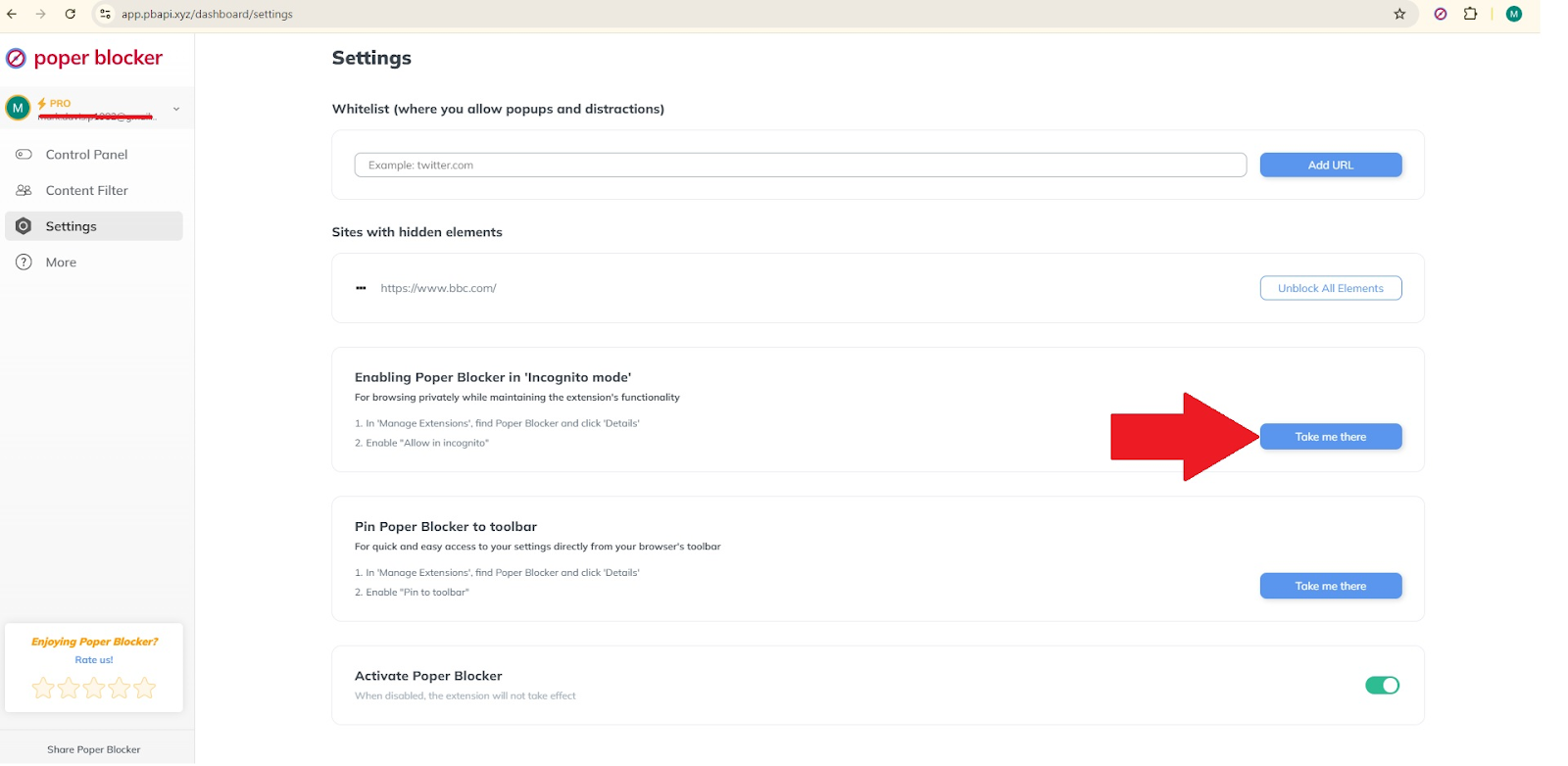
This is especially helpful for those users who would like a more guided method or those who might not know much about the settings of their browser. The fact that all this is available through a setting directly on the dashboard of the extension itself makes it easier to enable ad blocking during private browsing sessions. That way, you will not miss out at any time on any full range of capabilities this extension has to offer. Having all settings needed in one single dashboard reduces the need to move around the menus in the browser
Get in charge of your browsing experience
Turn on your ad blocker for incognito for a smoother and much more private way to browse. Tools like Poper Blocker offer not only effective ad-blocking features but also significantly improved security and performance. Such settings can be highly beneficial in refining your online activities since they remove distracting and probable threats. Don’t let anything ruin your online experience—enable your Incognito ad blocker and see the difference in web browsing.
FAQs
Will ad blockers affect my device’s performance?
Ad blockers block ads using additional processing of their own. Sometimes this could slow down your device’s performance. Nevertheless, most up-to-date ad blockers, such as Poper Blocker, are optimized not to affect performance so you can still enjoy a smooth browsing experience.
What should I do if an ad blocker turns off some vital content on a website?
In case an ad blocker interferes with necessary functionalities on the website, you can whitelist the site. This allows advertisements on specific sites but retains most of the protective measures. Always make sure the website is safe before whitelisting.
How do private browsing modes increase my privacy?
Private browsing modes, such as Incognito, do not save your history of browsing, cookies, or site data. This feature helps ensure your privacy on shared computers and minimizes the chances of web tracking.
Why do some websites require visitors to turn off ad blockers?
Mostly, websites run on the revenues out of advertisements. Sometimes, it becomes the core or the sole source of income that sponsors the content and services given. When ads are disabled, this may limit the website’s revenues and this is why users are asked to turn off ad blockers.
Want those pesky ads and popups removed from your web pages? Improving your browsing experience means ridding yourself of the distractions often plastered across your favorite websites, whether ads, pop-ups, or any other pesky element. But is this really possible? Then make sure to take advantage of this tutorial on how to delete unwanted elements of web pages most easily.
Why remove web elements?
One of the most basic expectations of users from their browsers is to have a smooth hassle-free web browsing experience. That’s constantly disrupted by quite a few undesirable elements that standard ad-blockers may let pass through. They include intrusive ads, fixed menus, distracting GIFs, and animated slideshows. Now, let us delve deeper into the details of these common annoyances:
Ads missed by your ad-blocker
Quite often, ads slip through the net of your main ad blocker. These can be intrusive and get in the way of being able to focus on what matters to you. The good news is that Poper Blocker can be your second line of defense to catch those ads that tend to be sneaky.
Fixed menus
Some menus remain fixed at the top or on the sides of a page and it can cover content that a user is trying to read. These kinds of fixed menus may make website navigation rather inconvenient and often very annoying on smaller screens. Turning them off frees up some very valuable screen space and makes content readability much easier.
Distracting GIFs
Animated GIFs can be catchy in a flashy sense but they can also be pretty distracting. They just loop endlessly and could divert your focus away from the primary content. Turning those off provides a more focused, calmer situation for browsing and reduces the visual noise.
Overly animated slideshows
The case of auto-playing slideshows comes down to slowing, either at load times or as an annoyance to those who like their browsing experience not moving around so much. Turning these animated slideshows off can boost your page load times and generally enhance your focus and productivity when browsing.
The thing is that some even get through quite sophisticated ad blockers. These disruptions annoy many users and kill productivity, not to mention enjoyment while surfing. But the good news is that an efficient solution is at hand to make your online experience more pleasant and productive as well.
How to remove any web element in one click
The “Remove Page Elements” function from Poper Blocker is an excellent element killer, destroying web irritants with a click. From the most annoying ad down to an impeding pop-up, this tool can hide it from view. The best thing about this cool feature is that it comes in the free version of Poper Blocker and works with Chrome and Microsoft Edge browsers.
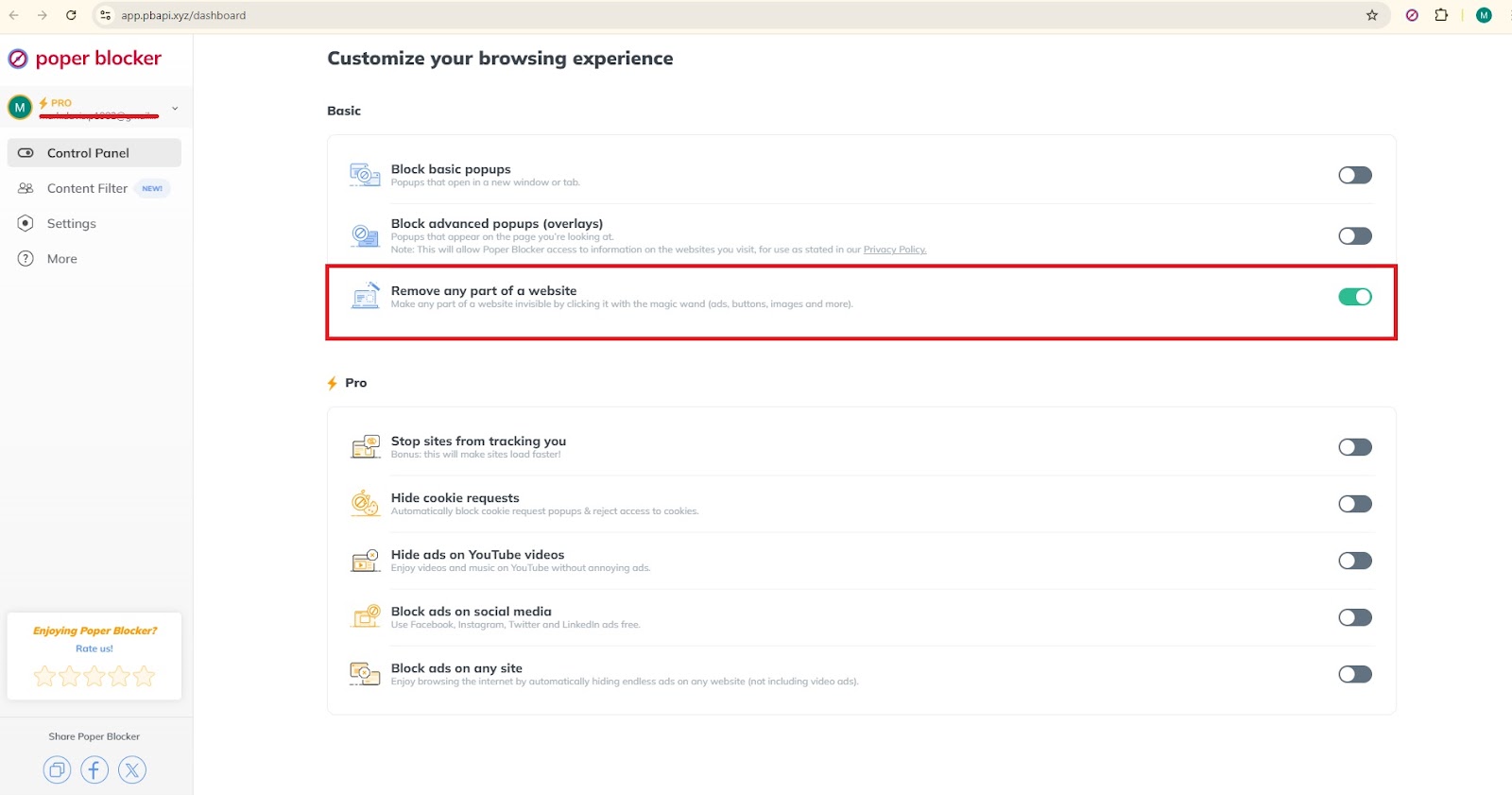
Imagine a distraction-free, ad-free browsing experience, with no fixed menus and other elements on any site. With Poper Blocker, you can efficiently declutter web pages in a way that brings clean and distraction-free web use. You no longer have to handle disruptive elements on your own. This element remover takes care of them all automatically to improve your browsing experience.

Other than hiding unwanted page elements, Poper Blocker has a lot of other features. It blocks popups, and cookie requests, and hides ads across sites like YouTube and social media channels. These complete abilities ensure more streamlined time to browse around and, therefore, ease of focus on whatever matters in content.
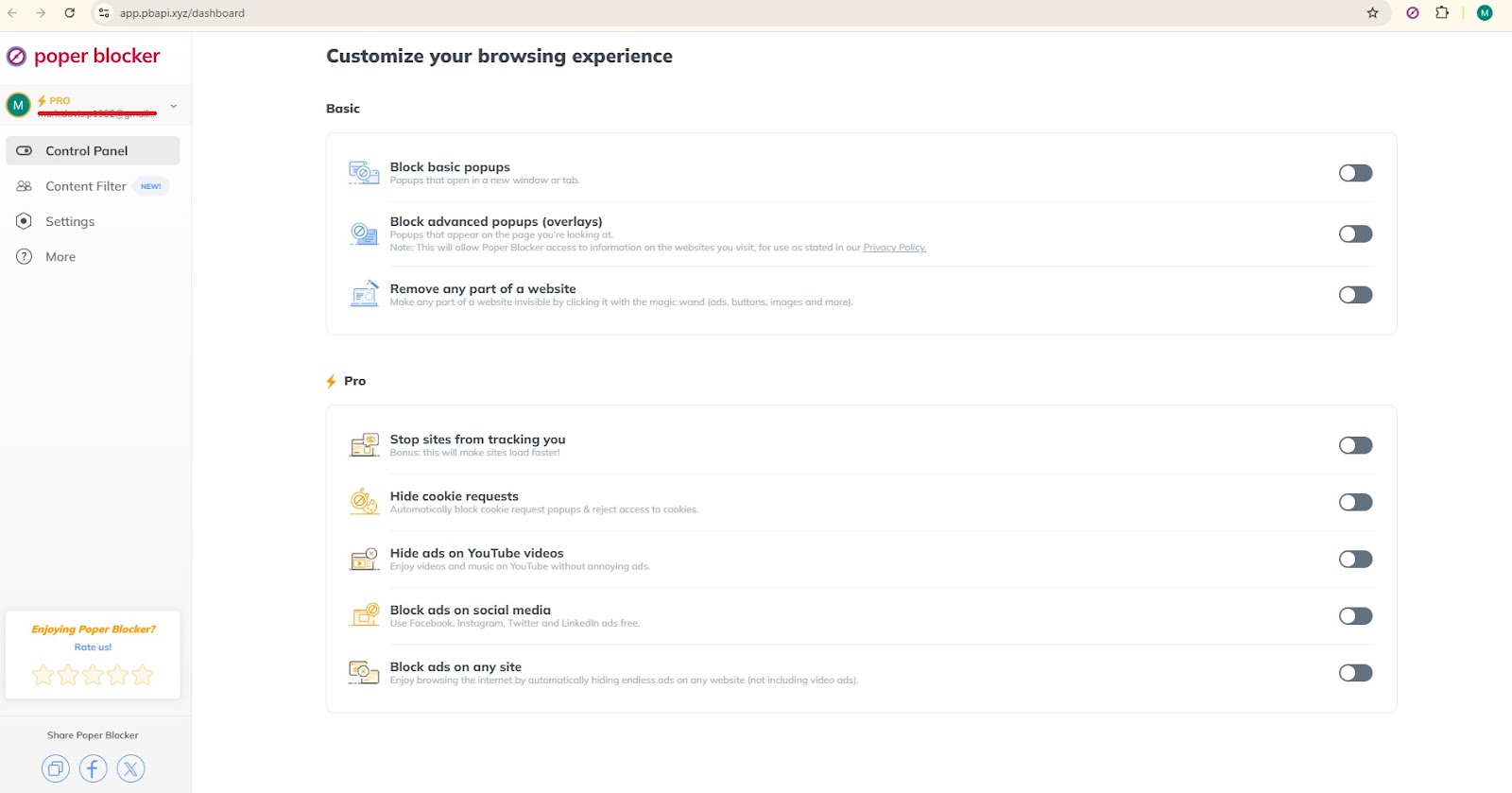
Take back control of your web browsing experience
The online world at times can be very crowded and noisy. Intrusive ads, unsolicited pop-ups, and other distractions can be in your way when you are enjoying a web browsing experience. Poper Blocker offers something a little more different: a much cleaner, serene web environment for you to enjoy. With fewer elements to load, web pages can load much faster.
You can customize your settings to hide specific content so that only what interests you is displayed. Improve concentration and productivity by erasing components of distractions. Shave off some load time and bandwidth with this reliable extension to remove elements (and much more!)
What are you waiting for? Download and install Poper Blocker, and optimize your online experience now. Then you will be able to easily scroll up and down the pages on the internet with no kind of disturbance or possible distracting elements. A much cleaner interface may make a great deal of difference when researching, working, or simply browsing for fun.
FAQs
Is it safe to use extensions for removing web elements?
Yes, if you download the extension from approved sources only, for example, the Chrome Web Store. Make sure that you read the reviews from users and their ratings to check for their reliability and safety.
Can I customize the elements that should be removed?
Yes, tools like Poper Blocker are available for targeting specific elements. You can customize your experience and select what will be removed so that your browsing can be as smooth and seamless as possible.
Are there any limitations to hiding web elements?
Although most unwanted elements can be easily hidden, some JavaScript-based components might still be working in the background and, therefore, cause a minor impact on performance. It is, however, possible to keep most of these static or visibly disruptive elements at bay.
Are there performance impacts when using Poper Blocker?
Poper Blocker is designed in such a way that it doesn’t influence memory and performance as much as possible. Being able to delete unwanted elements efficiently, won’t slow down your browser for a seamless and efficient browsing experience.
