Chrome Web Extension
 Edge Web Extension
 Android App
 iOS App


Have you ever been immersed in an online article, only to be jolted out of your concentration by a sudden video ad? It’s a common frustration shared by many internet users today. Video ads, while a crucial part of the digital marketing ecosystem, can often be intrusive and disruptive to our online experience.
Why Should You Block Video Ads?
Video ads are more than just a minor annoyance; they can significantly hinder our online experience. They consume valuable data, slow down page loading times, and can be particularly intrusive when they play sound automatically. Blocking these ads isn’t just about avoiding irritation; it’s about reclaiming control over your digital environment.
The staggering reach of online videos, with 92.3% of internet users worldwide engaged, underscores the pervasive nature of video content, including ads. However, this extensive engagement, coupled with the fact that people are spending an average of 17 hours per week watching online videos, can lead to a saturation point where video ads become more annoying and disruptive.
This overexposure to video content, especially ads, risks overwhelming users, potentially leading to ad fatigue and a negative user experience.
What Built-in Options Do Browsers Have to Block Video Ads?
The good news is that major browsers like Chrome, Firefox, Safari, and Edge have stepped up to offer built-in options for blocking video ads. These features are designed to enhance user experience by providing more control over content visibility and reducing unwanted interruptions.
Let’s dive into how each of these popular browsers equips you with the tools in order to have a smoother, ad-free online journey:
Google Chrome: Built-in Tools for a Cleaner Browsing Experience
Google’s Chrome offers several built-in features to block video ads. Users can mute individual tabs or adjust site settings to prevent autoplay videos. However, these solutions sometimes require manual intervention for each site, which can be time-consuming.
Mozilla Firefox: A User-Friendly Approach to Ad Blocking
Firefox provides an intuitive interface for blocking autoplay videos. Through its settings, users can easily control autoplay permissions, offering a more seamless way to manage video ads. Firefox’s focus on user privacy and control makes it a strong contender in the ad-blocking arena.
Apple Safari: Streamlined Ad Blocking for Mac Users
Safari’s approach on how to block video ads is straightforward and effective. Users can mute tabs or adjust autoplay settings in the Preferences menu. Safari’s integration with macOS also ensures a smoother ad-blocking experience for Apple enthusiasts.
Microsoft Edge: The New Contender in Ad Blocking
Edge has made significant strides in offering user-friendly ad-blocking features. Its settings allow users to limit or disable autoplay videos, providing a more pleasant browsing experience, especially for Windows users.
Poper Blocker: The Ultimate Solution to Stop Video Ads
The Poper Blocker extension seamlessly integrates with your browser, offering an effortless way to block video ads. It enhances your browsing experience by eliminating disruptive advertisements, ensuring a more streamlined and uninterrupted online experience across a wide range of websites.
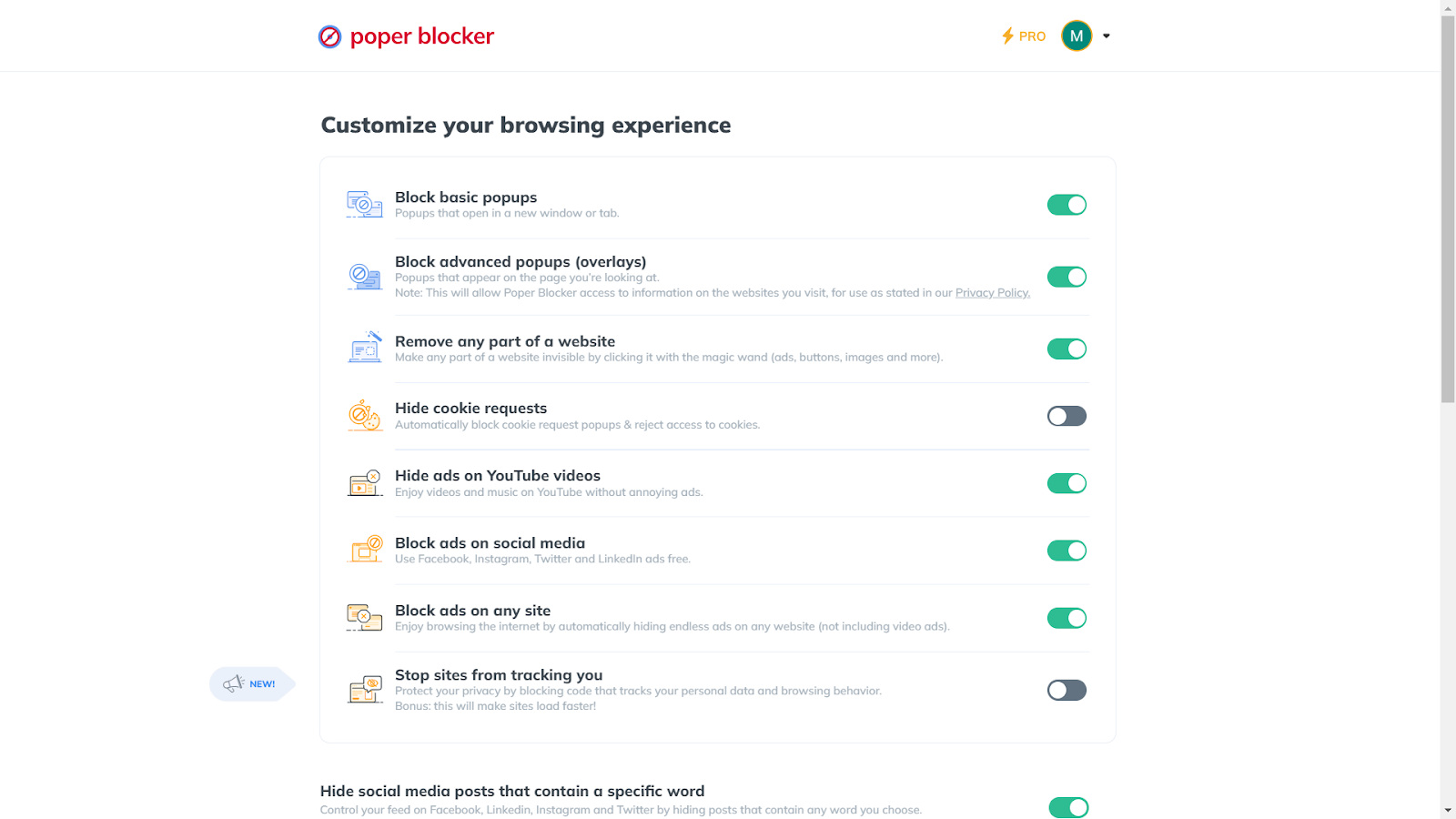
How to Stop Video Ads with Poper Blocker
Poper Blocker stands out as a comprehensive solution for blocking video ads across these browsers. Its ability to remove sponsored content on social media platforms and also hide ads on YouTube videos makes it a versatile tool for a distraction-free online experience.
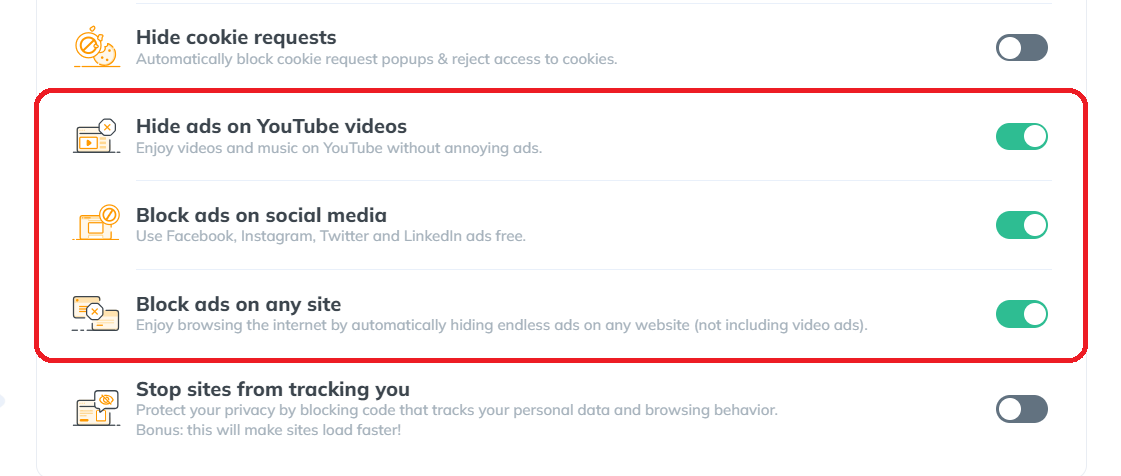
The Benefits of Using Poper Blocker
- Effortless Integration: Poper Blocker easily integrates with your browser, providing a hassle-free setup.
- Comprehensive Ad Blocking: It effectively blocks video ads across various platforms.
- Enhanced Browsing Experience: This tool effectively targets and removes ads from various websites, ensuring a smoother and more uninterrupted browsing experience.
Reduced Online Distractions: By eliminating frequent ad interruptions across different websites, Poper Blocker helps users stay focused on the content, enhancing productivity and the overall quality of their online activities.
Embrace a Cleaner, Faster, and More Enjoyable Online Experience
The power to control what you see and how you interact with content is more important than ever in today’s fast-paced online environment. Video ads, while a part of the online landscape, don’t have to be a disruptive element in your browsing experience.
By embracing ad-blocking solutions like Poper Blocker, you’re not just avoiding unwanted interruptions; you’re crafting a more personalized and efficient online journey. This tool doesn’t just remove distractions; it enhances your engagement with the content that truly matters to you.
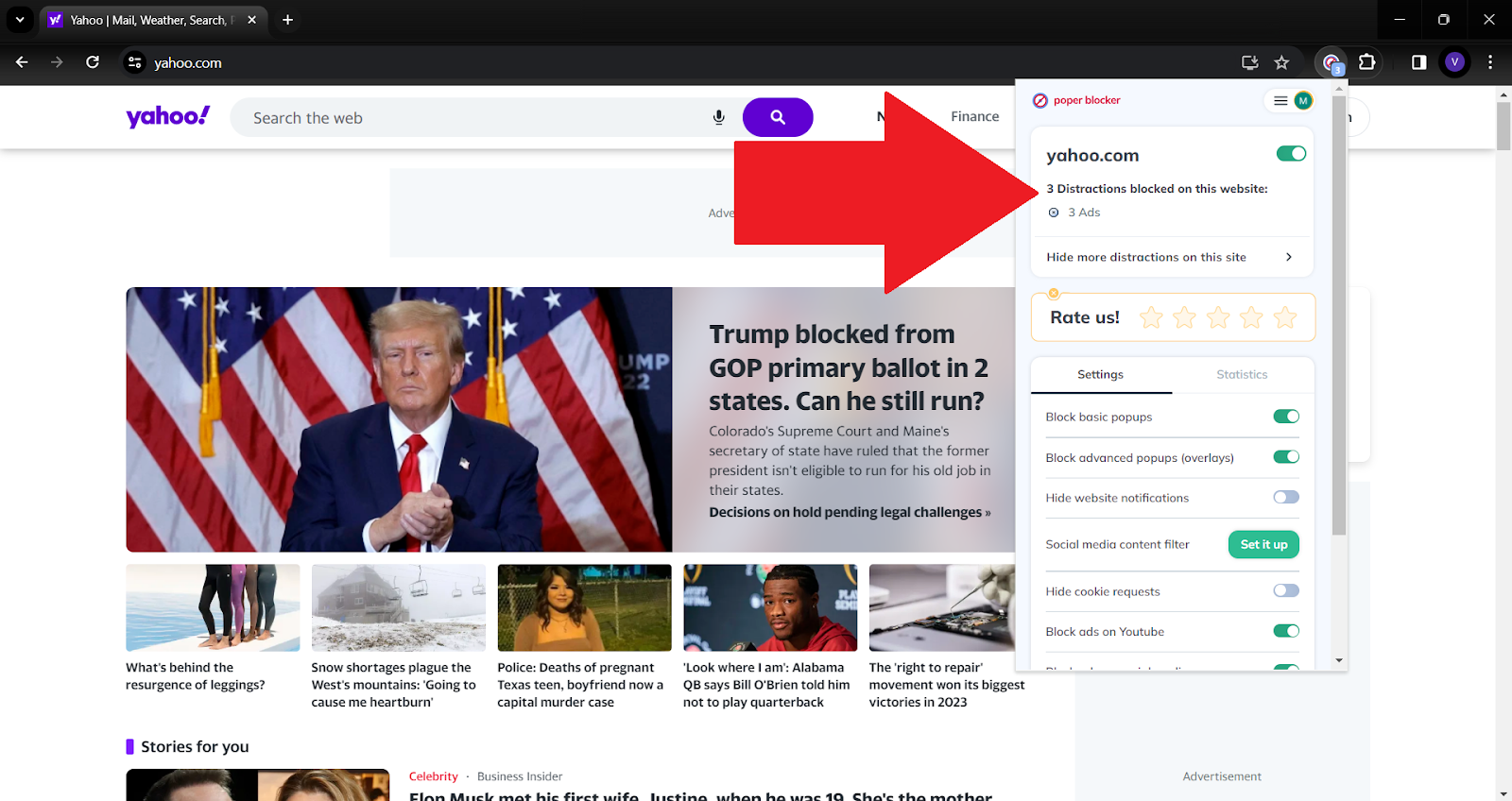
Imagine a world where every online session is smooth, uninterrupted, and tailored to your preferences. That’s the reality Poper Blocker offers. It’s not just about blocking unwanted content; it’s about reclaiming your time and attention for a more enjoyable online experience.
Remember that your browsing experience is yours to shape. With tools like Poper Blocker, you’re equipped to make every online interaction more meaningful and rewarding. Embrace this change and experience the web like never before!
Upgrade to an ad-free browsing experience with Poper Blocker – Download here!
FAQs
What are the benefits of blocking video ads?
A video ad block significantly enhances your online experience. It reduces page loading times, saves bandwidth, and eliminates the annoyance of unexpected audio and video interruptions. This leads to a more focused and enjoyable browsing session, especially when reading content or watching videos online.
Can blocking video ads improve browser performance?
Yes, blocking video ads can positively impact browser performance. Video ads consume additional resources, including CPU and memory, which can slow down your browser. By blocking these ads, you free up these resources, resulting in faster browsing and more efficient device performance.
Is it legal to block video ads?
Absolutely. Blocking video ads is a legal practice. It’s a user’s choice to control what content they want to see on their browsers. A video adblocker like Poper Blocker simply provides a tool to filter out content that users prefer not to see, such as intrusive video ads.
Will websites know if I’m using a video ad remover?
Some websites can detect the presence of ad blockers and may request that you disable them to access their content. This is because many websites rely on ad revenue. However, advanced ad blockers like Poper Blocker are designed to be discreet, minimizing the chances of detection.
How does Poper Blocker differ from other ad-blocking tools?
Poper Blocker stands out due to its user-friendly interface and effectiveness in blocking a wide range of ads. It’s designed to offer a more comprehensive ad-blocking experience, removing not just video ads but also pop-ups and sponsored content on social media platforms. Its seamless integration with various browsers makes it a convenient choice for users seeking a distraction-free online experience.
Streaming movies online should be simple. You hit play, lean back, and let the movie run. Instead, a new tab pops up. A banner covers the screen. Another site loads out of nowhere. If you are looking up how to block pop-ups on movie websites, you are not the only one. Free and semi-free streaming platforms rely heavily on interruptions that push clicks, not comfort.
A lot of people try to block pop-ups from movie sites using basic browser settings. That helps a little, but not for long. Autoplay ads, stacked overlays, and forced redirects add up fast. Latest reports suggest that the average person sees between 6,000 to 10,000 online ads each day, which explains why streaming rarely feels smooth anymore.
Here, we’re going to explain how to block pop-ups on streaming sites without overcomplicating things. We will cover why these ads show up, where browsers fall short, and how Poper Blocker fits in as the best option built for movie and TV streaming.
Why do movie and streaming sites have so many ads and pop-ups
If a movie or streaming site lets you watch without paying, advertising is mainly behind it.
Most of these platforms have no real subscription model. That means every visit needs to generate revenue somehow. The easiest way is ads. Lots of them.
Not the polite banner kind either.
To squeeze out clicks, many sites rely on aggressive formats that push far past what most people expect. A single click can trigger classic pop-ups. Another opens a pop-under, hiding behind your active tab. Start a video, and an overlay may drop straight on top of the player. Auto-play video ads fire up without warning. Some sites send you through redirect chains that bounce you across several pages before landing you somewhere completely unrelated.
All of this falls under the wider mix of types of online ads that dominate free streaming platforms.
The problem is not limited to irritation.
These ads interrupt playback, slow your browser, and can trigger fake virus warnings designed to panic users into clicking. Many of these pop-up scams mimic security alerts, update notices, or download prompts. One wrong click and you are off to a risky site you never intended to visit.
But why is it so hard to escape?
Many free movie sites run scripts designed to slip past standard browser protections. Built-in blockers struggle to keep up. That explains why people searching for how to stop pop-ups on streaming sites often feel stuck. Without a real fix, the same cycle repeats every time you press play.
What built-in browser blocking can (and can’t) do
Chrome and Edge both ship with a basic pop-up blocker and some light ad filtering. In theory, that should help clean things up. In practice, it only goes so far.
Yes, these tools can stop the most obvious pop-ups. The cheap ones. The single new tab that opens out of nowhere. For everyday browsing, that is usually enough. Once you hit streaming sites, the limits show up fast.
Built-in blockers focus on simple triggers. They are not built to deal with the layered tactics used by movie platforms. Things like rapid tab launches, background redirects, and ads injected directly into video players often slip straight through. That is why people still search for how to stop pop-ups on movie sites, even when browser protection is switched on.
Overlays are another weak point. Floating banners, sticky video frames, and click-based redirects usually survive default settings. You can tweak site permissions or block pages one by one, but that gets tedious quickly. Miss one rule and the ads are back.
Browser tools help at a surface level. They were never built to block overlays or control player-level ad behavior that dominates modern streaming sites.
Use Poper Blocker to block streaming pop-ups & video ads
Poper Blocker is built for various jobs, and one very specific job is stopping the ads that ruin streaming. It is a focused extension made for Chrome and Edge users who spend a lot of time watching movies and TV shows online. Instead of trying to catch every ad on the internet, it targets the behaviors that interrupt playback and break the viewing experience.
That focus matters. Streaming sites use aggressive formats that behave differently from standard display ads. They trigger on clicks, load in layers, and often hide behind the player itself. Poper Blocker is designed around those patterns, which makes it behave less like a generic tool and more like a purpose-built solution for video-heavy pages.
Video streaming ad blocker
Once installed, the video streaming ad blocker starts working automatically. It blocks video ads that cut into movies and episodes mid-play. It removes floating overlays that sit on top of the player and steal clicks. It stops pop-unders that quietly open behind your browser window. It also prevents tab redirects that fire when you hit play, pause, or full screen. The result is a cleaner player that stays focused on the video.
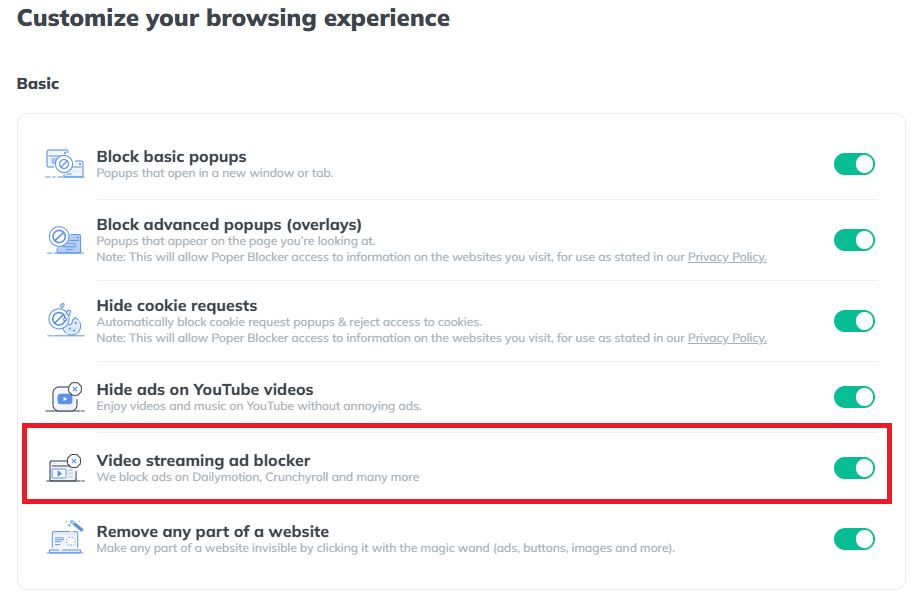
This is also where Poper Blocker tends to succeed when other extensions fall short. It can block ads on Crunchyroll, block ads on Dailymotion, and get rid of ads on Tubi, along with many similar platforms that rely on stacked scripts and deceptive triggers. These sites are known for slipping past standard blockers, but Poper Blocker is tuned to recognize and stop those specific behaviors.
The setup is pretty straightforward. There are no filter lists to manage and no advanced settings to adjust. You install the extension, turn it on, and continue streaming normally. It does not require constant tweaking or testing across different sites.
If you are searching for how to stop pop-ups on streaming sites without causing playback issues or browser slowdowns, this is the best technique. It focuses on the ads that matter most during streaming and leaves the rest of your browsing untouched.
Try Poper Blocker and watch movies without constant pop-ups
Watch without Interruptions: block streaming ads for good
Streaming should be simple. Click play, sit back, and enjoy the show. Instead, pop-ups, sketchy redirects, and loud autoplay videos pull you out of the moment. Built-in browser blockers help a bit, but anyone who streams regularly knows they barely scratch the surface.
That’s where Poper Blocker shines. It targets the ad formats that actually disrupt movie and TV sites. Overlays, pop-unders, and video ads are blocked automatically, with no tuning or tech work required.
Add Poper Blocker to Chrome or Edge. Then stream without interruptions so you can put your full attention on what you came to watch.
Install Poper Blocker on Chrome or Edge now
FAQs
What’s the best ad blocker for streaming sites?
When it comes to streaming, generic ad blockers usually fall short. They do a decent job with banners, but streaming pages play by different rules. Video players load their own overlays, pop-unders, and redirects that standard extensions often miss. That’s where a tool built specifically for streaming pages makes a difference. Poper Blocker is designed to deal with player-level ads, fake buttons, and annoying layers that show up right when you hit play.
Does Poper Blocker work on every streaming site?
No blocker can promise full coverage across the entire web. Streaming sites change layouts constantly, and new domains appear all the time. That said, Poper Blocker handles the most popular free and semi-free movie platforms very well. It looks at the patterns that are used by ad-heavy streaming pages, which means fewer interruptions on the sites people actually use.
Will it slow down my browser or affect video quality?
Short answer: no. Poper Blocker is lightweight and tuned for streaming environments. It doesn’t mess with the video player itself, and it doesn’t interfere with playback speed or resolution. You watch the same video, just without the noise around it.