
 Chrome Web Extension
 Edge Web Extension
 Android App


Have you ever been deep into reading an article online, only to have your flow disrupted by a sudden window popping up out of nowhere? That’s a pop-up for you, the internet’s way of catching your eye, for better or for worse.
OptiMonk’s insights has revealed that the average conversion rate for popups stands at 11.09%. It just goes to show how much of an effective tool they are for advertisers, which is why they are not likely going away anytime soon.
What Is a Pop-up, and What Is Its Purpose?
In its simplest form, a pop-up is a website user interface element that suddenly appears and demands immediate attention from a viewer. It gets its name from this sudden appearance, mimicking the act of popping up unexpectedly. Its primary goal is to quickly capture the users’ attention and encourage action. This action might include:
- Subscribing to newsletters
- Claiming discounts
- Taking part in surveys
- Notifying the user about the most recent updates or offers
Is It Pop up, Pop-up, or Popup?
When discussing online terminology, it is important to understand the distinct differences between “pop up”, “pop-up”, and “popup” for clear communication.
As a verb, “pop up” refers to the action of appearing suddenly. This phrase is most commonly used when describing any moment that something comes into view without warning and isn’t exclusive to the internet.
On the flip side, “pop-up” can be used as both an adjective and a noun. When used as an adjective, it describes anything that appears unexpectedly such as a pop-up ad or pop-up window on a website. As a noun, it just refers to the thing itself like in the phrase “a pop-up.” This version is more grammatically proper and often considered correct in formal writing or technical descriptions.
Despite its lack of grammar prowess and shortcomings in formality, “popup”, with no space in between letters, is actually the most widely used spelling. Its popularity across informal settings, especially in online conversations, reflects society’s preference for brevity and convenience.
Why Are Pop-ups Important?
Online ecosystems cannot do without pop-ups since they are a great help in many ways than just advertising:
Lead Generation
This is among their main functions. By capturing visitor information through forms, pop-ups enable businesses to grow their email lists and nurture leads through targeted marketing campaigns. This direct method of gathering contact details is efficient and effective, allowing for a personalized approach to follow-up communications.
Promotions
Additionally, content promotion and special offers are some of the reasons why advertisers might consider using pop-ups. They offer an opportunity to highlight discounts, new products, or exclusive content directly to their audience.
This immediate visibility increases the likelihood of conversions as offers are presented at a point in time when the user is already engaged with the site. The strategic placement and timing of these internet pop-ups can significantly enhance their effectiveness making them a valuable tool for boosting sales and engagement.
Feedback
Pop-ups also act as a means for collecting feedback from people visiting websites. At certain moments during the users’ journey through a website, businesses can present surveys or feedback forms that yield useful insights about their target audience.
It contains essential information that helps in understanding their behavior on websites, upgrading goods or services, and improving the overall experience of users on their platforms.
User Guidance
These dialogs are also an excellent medium for user guidance. Whether it’s browsing through a website, highlighting new features, or offering assistance, pop-ups can enhance the visitor’s user experience, so that they can find what they’re looking for and might even be encouraged to explore further.
Pop-up Examples
There are various types of pop-ups used for specific purposes. Every form serves a purpose ranging from building relationships with users to maintaining compliance with legislation requirements:
Subscription Invites: Sign up for newsletters or updates
Subscription prompts commonly appear on the screen when a user is deeply involved in the content. In many instances, such pop-ups propose something valuable. It can be a discount or an exclusive article that can only be accessed by giving your email address.
Consequently, in this way, other than increasing the number of subscribers to the mailing list, this can be a means for a company to apply a one-to-many marketing strategy.
Discount Offers: Grab a code for a sweet deal
Another category of pop-ups is discount offer prompts that give users instant incentives for purchases. This approach thoughtfully creates a sense of urgency by presenting time-limited discounts or special offers to compel users into acting immediately. This strategy comes in handy mainly in e-commerce platforms regarding savings being able to alter buying decisions significantly.
Exit-Intent Surveys: Share your thoughts before you go
Exit-intent surveys intend to comprehend user behavior and preferences. They tend to emerge each time a visitor seems likely not interested in staying on that web page anymore to receive feedback or give them reasons why they should reconsider their decision to leave the page.
In any case, where one wants an opinion about improving websites or quick last-minute proposals, these exit-intent surveys can be very enlightening and reduce bounce rates.
Age Verification: Confirm you’re old enough for the content
The regulatory function of age verification pop-ups is to ensure appropriate access to content. Age confirmation requests by these pop-up windows help websites adhere to legal obligations and guard minors from accessing unsuitable things. Such a type of pop-up is crucially important for websites trading age-restricted goods or those featuring adult materials to have a responsible online environment.
Pros and Cons of Using Pop-ups
The Pros
Effective for capturing attention and driving action
Pop-ups can remarkably improve user engagement and conversion rates if applied correctly. Primarily, they have the advantage of being attention-grabbing. By springing into view for users, they easily command attention and are therefore great tools for promoting special offers, collecting emails, or giving important information.
Versatile in use, from marketing to feedback collection
Another advantage is that pop-ups are versatile. They can be programmed differently – timing, content, trigger events – based on specific user journeys on the site. This personalization can make content more relevant thereby increasing the chances of positive feedback.
The Cons
Can be seen as intrusive, disrupting the user experience
One disadvantage is that they may disrupt the overall user experience. Sometimes pop-ups seem annoying since they might appear intrusive thus breaking one’s line of thought which leads to frustrations. This is especially disruptive if the pop-up cannot be easily dismissed or continues appearing frequently as it deters visitors from further accessing your website services.
Risk of being blocked by pop-up blockers
Additionally, the wider use of a pop-up blocker is likely to hamper the effectiveness of pop-ups too. Many online users resort to using these tools to enhance their browsing experience by preventing interruptions. Consequently, some well-designed ones may never reach some segment of targeted recipients hence reducing their efficiency.
Hate Pop-ups? Use Poper Blocker
Pop-ups occur in several forms, including ads coming out of the blues, subscription forms, or confirmation of your age, and can annoy many end users.
This is where Poper Blocker comes in handy as it offers an effective pop-up blocker for a less cluttered browsing experience. The first line of defense in stopping a pop-up window from appearing on your computer while you are browsing is this browser extension, which works perfectly with Chrome and Edge.
Here’s how to use it:
1. Installation
Start by adding Poper Blocker to your browser. Chrome users should visit the Chrome Web Store, while Edge users should go to the Microsoft Edge add-ons page.
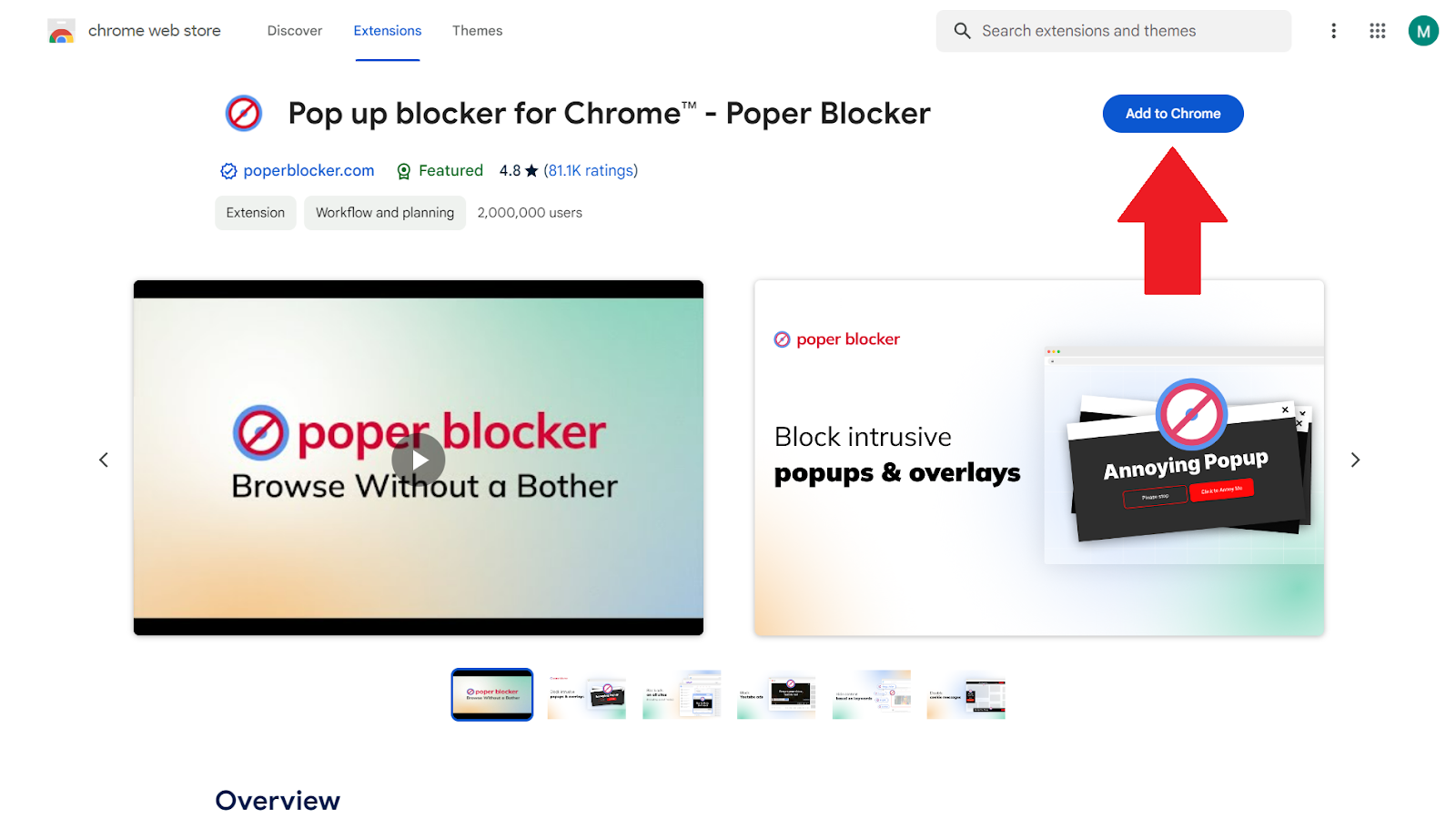
Look for Poper Blocker then click ‘Add to Chrome’ or ‘Get’ if you are using Chrome or Edge, respectively. Following this, the plugin will seamlessly integrate into your browser thereby enabling a pop-up free browsing experience.
2. Activation
Once installed, locate the Poper Blocker icon at the top right corner of your browser. This button opens up possibilities for a personalized online environment. Upon clicking on it, the control panel shall show up and here, the settings can be modified.

3. Blocking Basic Pop-Ups
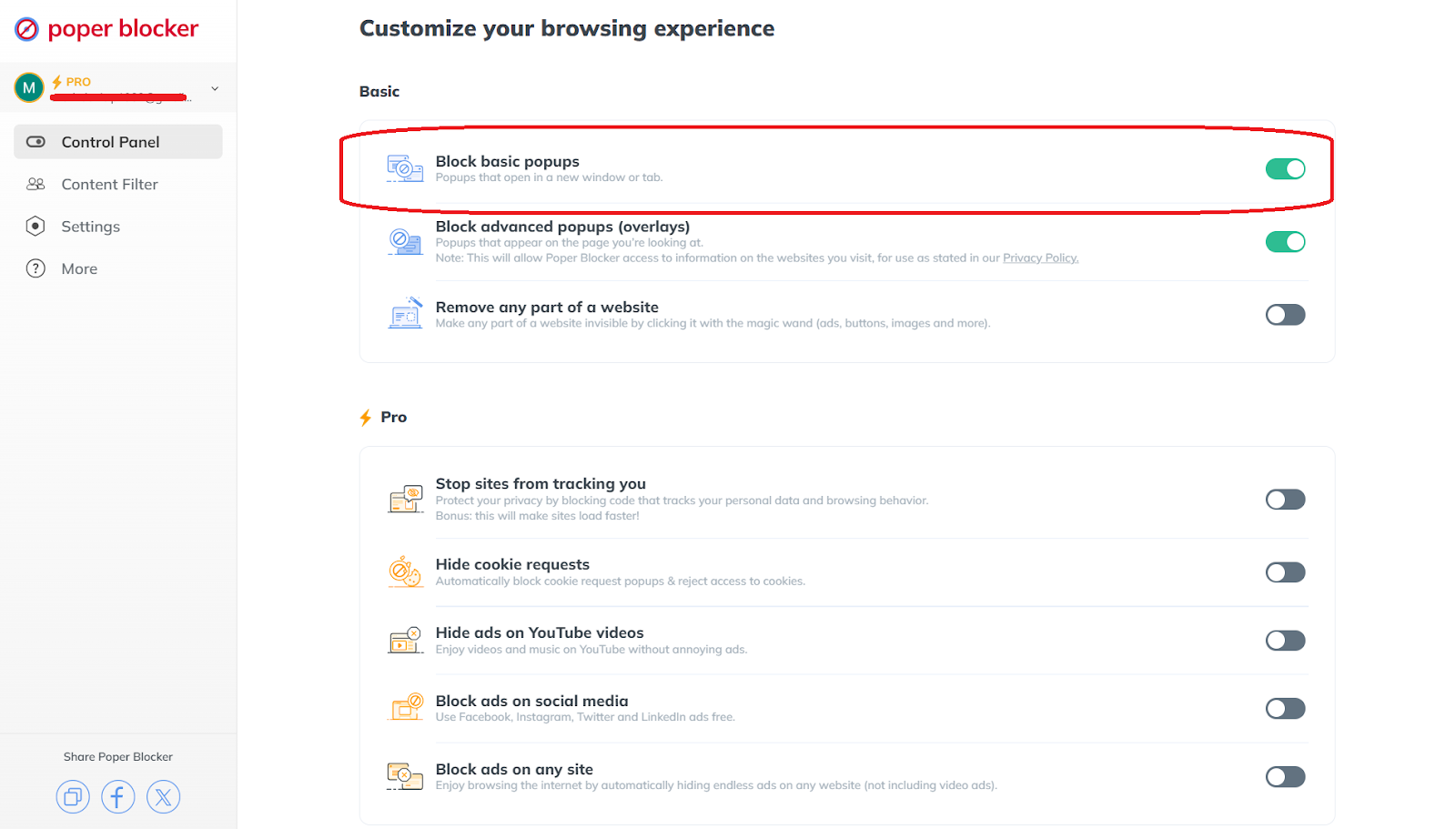
To disable pop-ups that open in new tabs or windows, activate the ‘Block basic popups’ option. This is a quick fix that deals with the most prevalent types of pop-ups, therefore giving immediate relief against disturbances like this one.
4. Blocking Advanced Pop-Ups (Overlays)
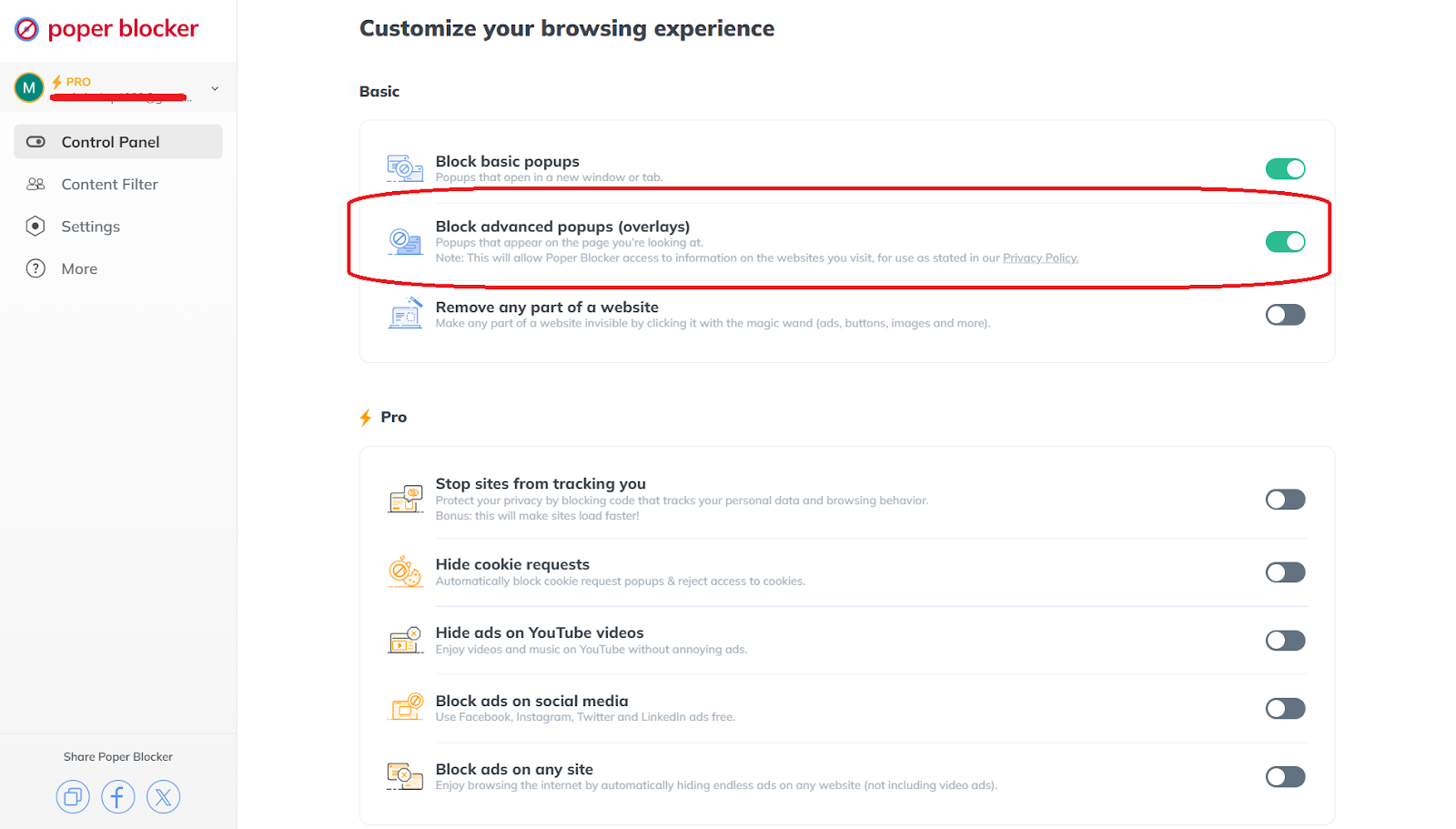
For aggressive and persistent dialogs that usually appear on the same screen, switch on the ‘Block advanced popups (overlays)’. This feature was specifically developed to stop pop-up ads that tend not to close easily, from annoying you.
A Cleaner Browsing Experience Awaits!
One should have a smooth internet experience without being interrupted by pop-ups. Whether it is reading the latest news, extensive research, or catching up on your favorite blogs, one thing you do not need is an intrusive pop-up distracting you from your train of thought. Here comes Poper Blocker, with its smart responses to bring back your peace and tranquility online.
With this powerful extension you’re not just blocking annoying spam pop-ups, you’re also customizing your web surfing experience. So start filtering out the noise and focus on what truly matters to you. This is more than just an ad blocker, this is your trusted online guardian that keeps out all unwanted advertisements for uninterrupted browsing.
FAQs
Are pop-ups of any use to users?
Yes. Pop-ups, if developed with the user in mind, can do more than just promote something. Some of these may alert you on exclusive discounts, others offer valuable resources such as eBooks and guides that require very little information in return, while some even send you crucial updates or alerts. If they are relevant and timed perfectly, such pop-ups add to your browsing experience rather than interfering with it.
What is the distinction between a pop-up and a banner ad?
The two are ways of getting attention but occupy different spaces within your browsing view. Online pop-ups act like unexpected guests who appear over the content you have been viewing asking for your immediate attention, whereas banner ads are the residents of the web page where you are on; they live inside its layout either at its top, bottom or sides and try to catch your eye as you scroll or navigate through the site. Pop-ups can be dismissed, while banner ads remain visible as long as you stay on that page.
How do websites understand when to show an exit-intent pop-up?
It is a smart technology called exit-intent. It observes your interactions on a website by monitoring your mouse movements. Rapid upward movement across the screen towards browser tabs and close buttons positioned near the top is taken as an indication that a user intends to leave, triggering an exit-intent pop-up, and asking users to stay longer either via special offers, intriguing content, or questionnaires.
Can pop-ups affect website loading speed?
Yes. Pop-ups may cause additional load time for a web page, slowing down their full display time considerably. Therefore, marketers and web designers should ensure that every popup is optimized for fast loading speeds. Techniques include compressing images, reducing the usage of excessive scripts, and making sure that the pop-up does not interfere with the main pages’ performance by loading it asynchronously.
Do all pop-ups contain ads?
Not at all. Most of them, however, are made for advertising purposes but they can be used in various non-commercial scenarios as well. Age verification on sites with age-restricted content, gathering feedback via short surveys, providing navigation assistance, or updating the users about some important information are just a few examples of the many other uses to which they can be put. Their flexibility has seen them used beyond mere adverts to add functionality and user engagement to a site.
Every day, an internet user is bombarded with an average of 5,000 ads (source G2 Learning Hub). This overwhelming flood of advertisements spans across various platforms, from social media to search engines, making it nearly impossible to avoid them. But what if you could browse through this ad-laden online landscape more smoothly?
What are Online Ads?
Online advertising works in a similar way to billboards. Its aim is to catch your attention and make you interested. Online ads can be found in different formats that all communicate messages or promote products, services, or brands. These ad-tracking tactics utilize the extensive reach of the internet and target specific audiences with precision by using data about browsing habits, interests, and even geographical locations to deliver content that is relevant.
The core goal of online ads is to encourage traffic and conversions i.e., moving users from being curious to taking action. Each ad does this differently by asking users to click through a website, buy something, or even sign up for a newsletter as long as there’s an interaction happening between the ad and the user. The beauty of online ads lies in their ability to be measured and adjusted in real-time so they remain effective throughout their time on the web also providing advertisers with performance insights. This dynamic nature allows strategies to be refined for maximum impact making online advertising an incredibly powerful tool for marketers.
Despite its many advantages, being constantly bombarded with too many ads could have a negative effect on people who seek cleaner, more focused experiences while surfing the web. That’s why tools have been created to do just that: filter out unwanted ads and block distractions so you only see what matters most!
Types of Internet Ads
The world of Internet advertising is always in flux and complex, with a variety of ways to reach consumers. Each serves a different purpose and meets customers at different points in their journey, from not knowing what they want, to hitting that “add to cart” button. Below are the different types of online ads:
Search Engine Ads
You’re probably most familiar with these ads. They pop up on search engine results pages when you look up something specific. Their use is pretty self-explanatory — they aim to connect people with products and services they’d like that match up with their search terms. They operate on a pay-per-click basis, which means brands only have to pay for ads when users actually click on them. It’s a much more effective way of using marketing budgets than paying for impressions or views, since if someone is interested enough to click through, the chance they’ll purchase goes up too.
Social Media Ads
Social media has become one big fat ad space (when you’re not just looking at cute puppy pictures). Platforms use our personal data to tailor ads specifically for us based on our interests and behaviors. Facebook, Instagram, Twitter, and LinkedIn all offer unique ad options for businesses trying to target different types of users. Whether it’s a sponsored post or a carousel ad doesn’t matter — each option gets brands’ messages across in different ways and engages users as much as possible.
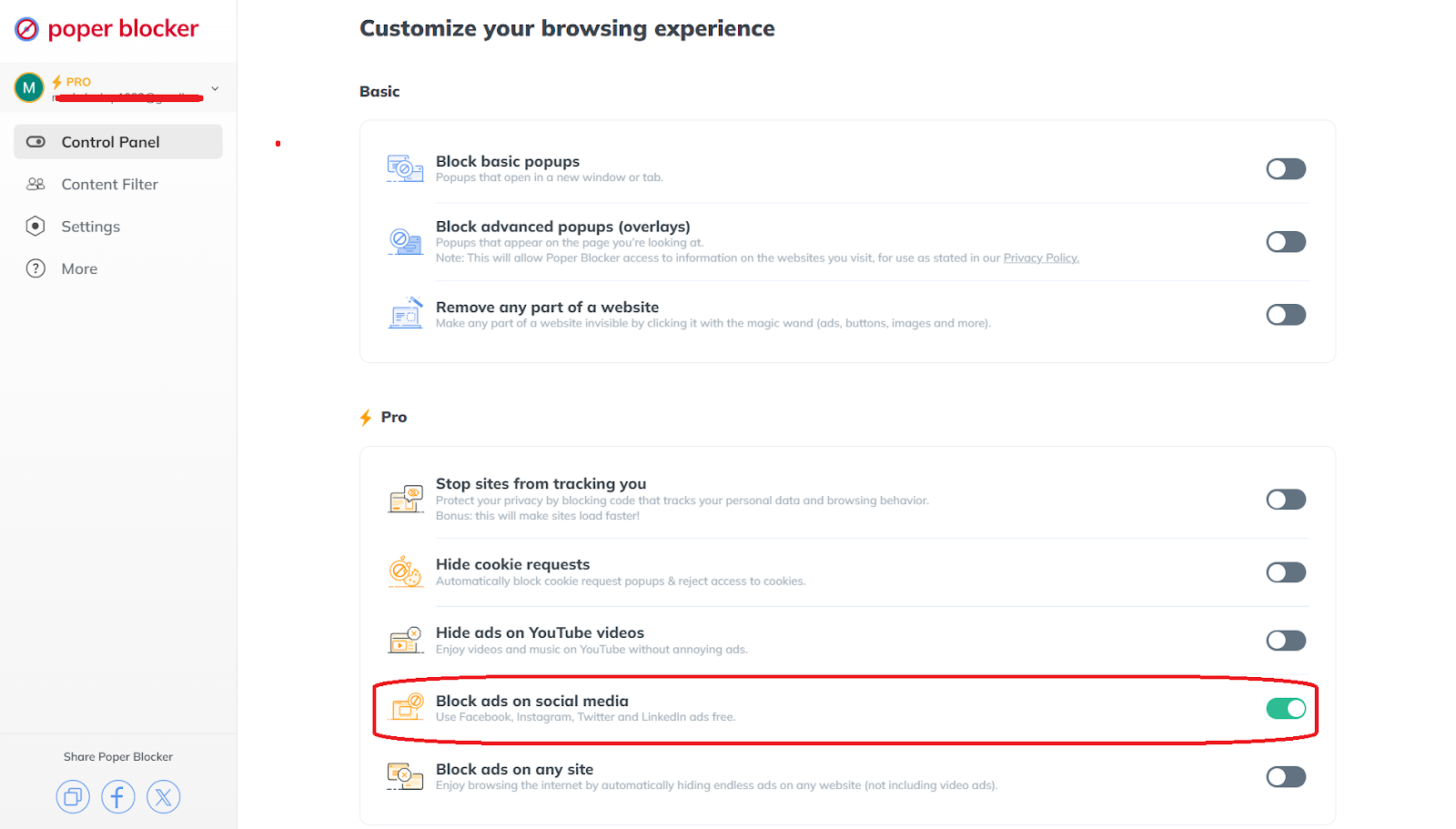
With the help of Poper Blocker, you’ll be able to manage your exposure to these ads, so that you’ll have a cleaner, more focused social media experience by blocking unwanted content.
Banner and Pop-Up Ads
Think back to early 2000s web design — that’s where you might remember banner ads. Ad spaces appear as rectangles around website content instead of taking over an entire page like pop-ups do. While both formats are great for increasing visibility, we’ve come to hate them due to how obnoxious some can be (especially those that refuse even after we hit the exit button three times).
The rise of ad blockers helps prevent these from popping up while we’re trying to read an important article. When designing future banners or pop-ups, companies are pushed to make them engaging enough to entice clicks without making users want to throw their computers out of a window.
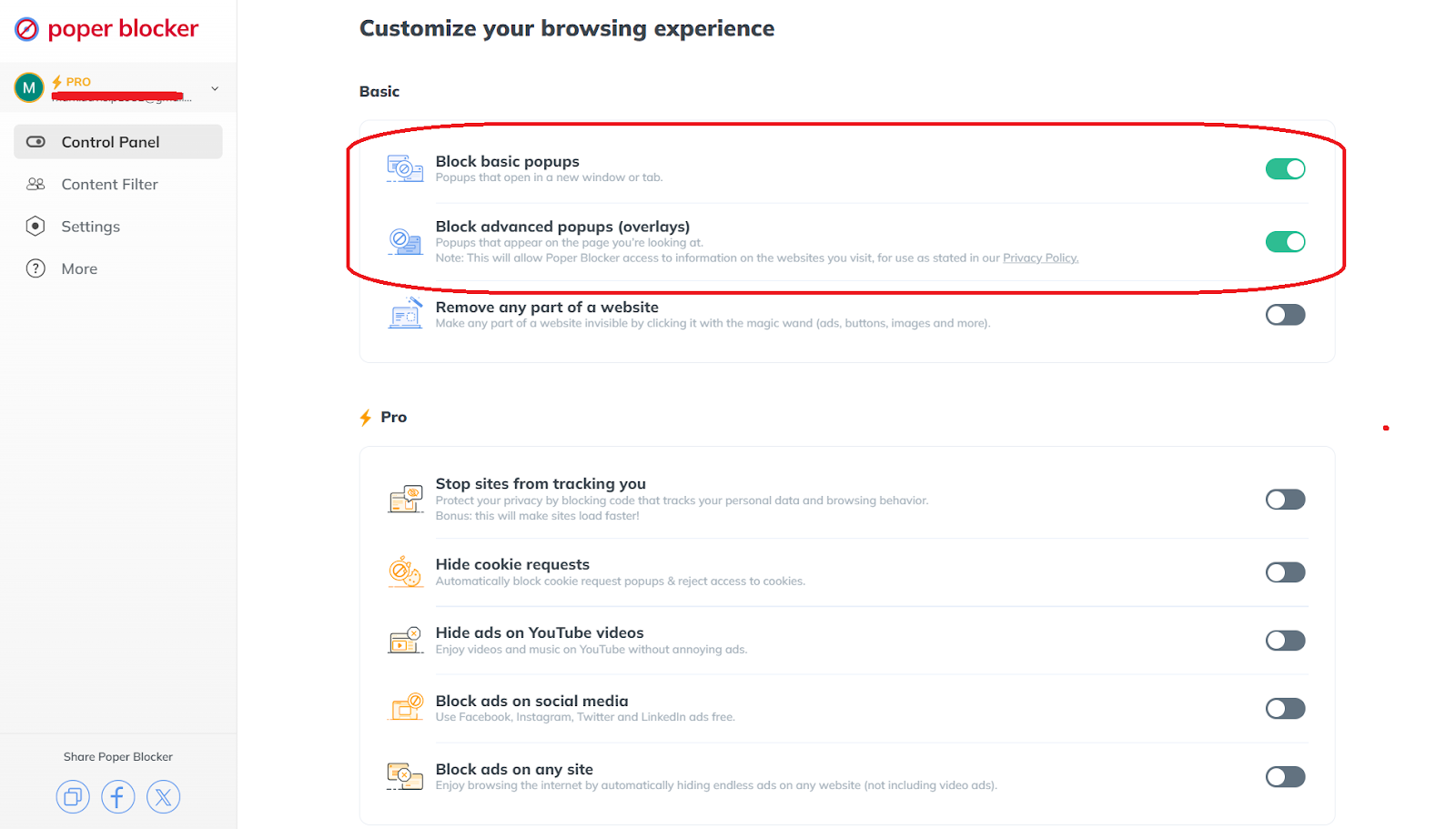
Poper Blocker addresses this challenge head-on, as it has advanced features to block both basic pop-ups and advanced overlays so you can have a smoother browsing experience. With this browser extension’s capability of stopping pop-up ads, you’ll be able to engage with content without interruption.
Video Ads
With faster internet and infinite streaming services, videos have become the go-to ad format for many brands. They can tell a story or evoke an emotion in a way that simple text or static images just won’t do. YouTube offers skippable and non-skippable options for advertisers, providing plenty of versatility in how they deliver messages. These include pre-roll ads that play before a video begins, mid-roll ads that interrupt content midway, and post-roll ads that appear after the video ends. Such a variety makes it more frustrating for viewers to block YouTube ads. And they’re not just confined to video platforms, you’ll see them across social media and other websites as well.
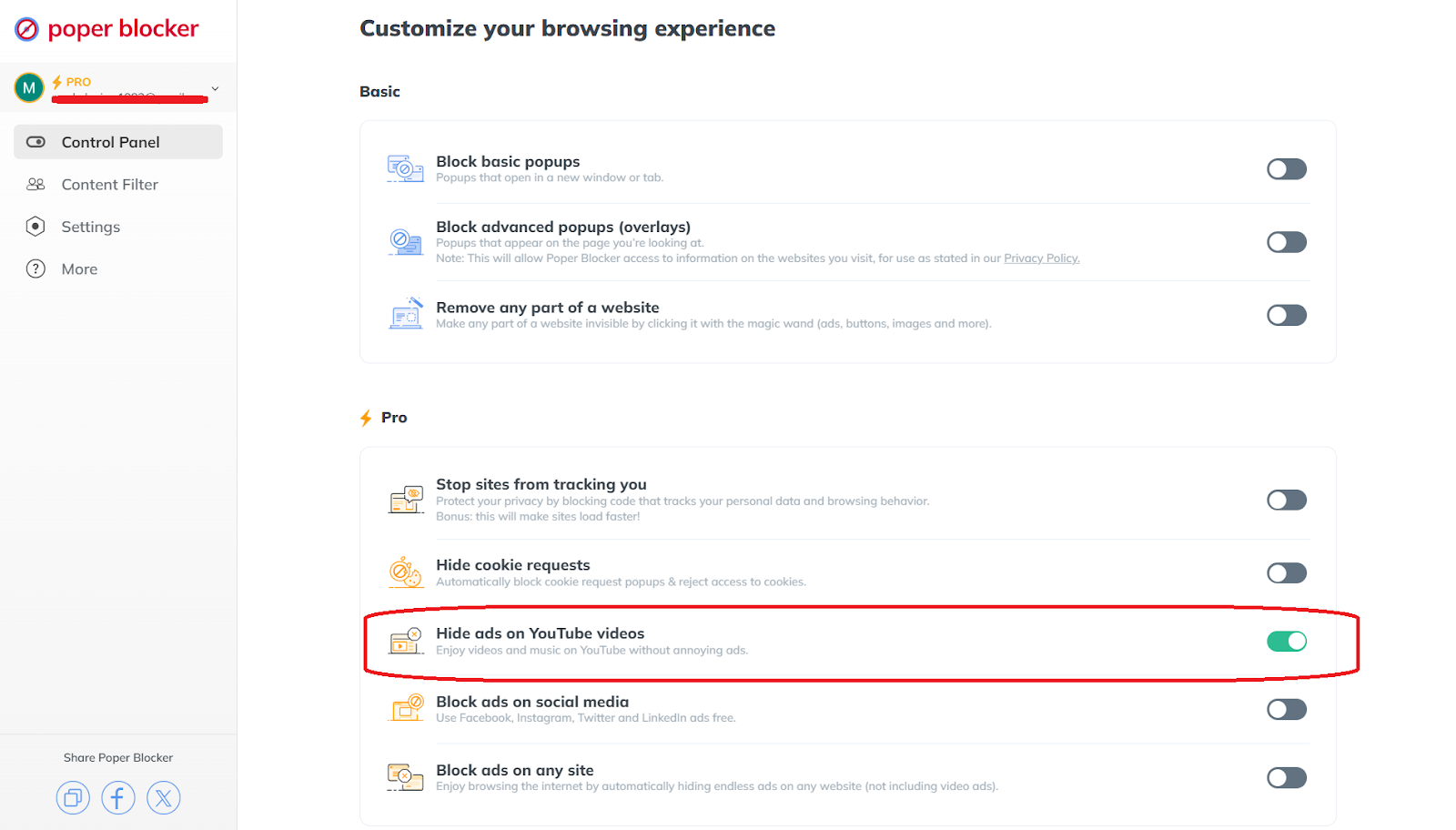
For those who don’t want their favorite cooking show or any important videos interrupted, tools like Poper Blocker exist to help block video ads on certain platforms, such as YouTube and social media where they run rampant.
The diversity in which ads are presented on the internet shows the creativity and adaptability found within online marketing. Advertisers have an extensive set of tools they can pull from, allowing them to finely target their audience and make real-time adjustments based on performance data. But with the rise of ad-blocking technology comes an increasing desire among internet users for more control and less intrusion. This trend challenges advertisers to find new ways to engage their audience while also preserving the user experience.
A Seamless and Uninterrupted Browsing Awaits
The quest for a seamless and uninterrupted browsing experience is paramount. With the proliferation of different types of internet ads, tools like Poper Blocker can be your primary tool in seeking solace from the relentless ad barrage. By empowering users to take control of their online environment, Poper Blocker not only improves the browsing experience but also redefines the relationship between content consumers and advertisers.
As we move forward, the balance between effective advertising and user satisfaction will continue to evolve, with innovative solutions like Poper Blocker leading the charge. This evolution promises a future where online spaces are tailored to the preferences of each individual, offering a cleaner, more enjoyable way to explore, engage, and connect online.
FAQs
How do online ads influence buyer behavior?
Various types of Internet advertising can greatly impact a buyer’s behavior by gaining brand visibility, influencing perception, and driving purchases. Well-targeted ads can introduce new products or services to a receptive audience, encourage exploration of a brand’s offerings, and ultimately lead to conversions. The key is making sure these campaigns are relevant; and if they resonate with viewers’ interests or needs more positively.
Can ad blockers affect website revenue?
Of course! While there are benefits of using an ad blocker, they have been able to hinder site revenue for years now especially since those websites rely so heavily on ad income. Simply put; when users use ad-blockers, they won’t see any ads, which means the website doesn’t earn money from those views or clicks thus leading them to seek alternative ways of bringing in money.
What’s the future of online advertising?
The future of online advertising isn’t certain, but we do know that technology will always play a major role in shaping it over the coming years – along with regulatory laws and consent changes from consumers as well. In terms of ideas though, personalized ads will definitely become much more common in everyday life as algorithms improve and reach their peak efficiency levels.
How do personalized ads work?
This type uses collected data about a user’s online activities (such as browsing history, search queries, social media interactions, etc.) all aimed at displaying way more engaging and relevant ads to their interests and needs. This strategy is designed to maximize the likelihood of conversion by aligning ads with a user’s current interests. It’s safe to say that it requires sophisticated algorithms and data analysis tools to accurately match ads with potential customers, but once it gets going… there’s just no stopping it!
