
 Chrome Web Extension
 Edge Web Extension
 Android App


The Ad-Free Edge Experience: Why It Matters
On the web, ads are everywhere. They can be distracting, intrusive, and sometimes, a gateway to malware. But what if you could browse the web on Microsoft Edge without these annoyances?
Imagine an ad-free experience where your focus remains undisturbed, and your online journey is safer. Isn’t that an internet experience worth striving for?
Why Microsoft Edge?
1. A Growing Force in the Browser Market
Microsoft Edge has quickly risen as a major player in the browser market, achieving a significant global market share. Recent browser market share data from Similarweb places it right after Chrome, surpassing browsers like Safari, Firefox, and Opera in popularity.
Furthermore, with its integration into the widely-used Windows platform, the Microsoft Edge browser has amassed nearly 286 million users, as reported by MSPoweruser.
This rise in prominence reflects its growing appeal among users who prioritize quick, secure, and efficient web browsing. The expanding community of Edge users highlights the browser’s dependability and the favorable response it garners from those who use it.
2. Enhanced User Experience
Edge is recognized for its user-friendly interface, featuring a clean and intuitive design complemented by a range of features that enhance user interaction. The browser’s layout is designed for simplicity and efficiency, facilitating easy navigation for all users, regardless of their technical expertise.
This emphasis on a seamless user experience is key to Edge’s appeal, as it effectively caters to a diverse audience with varying technological skills.
3. High-Performance Browsing
Performance is a key factor in Edge’s popularity. Built on the Chromium engine, it offers fast loading times and smooth performance, even with multiple tabs open. This efficiency is crucial for users who multitask or require a browser capable of handling extensive browsing activities without lag or slowdowns.
4. Advanced Security Features
Security is paramount in today’s online environment, and Edge addresses this with robust security features. It includes enhanced protection against phishing and malware, safeguarding users’ data and privacy. These security measures are continuously updated to combat new threats, providing users with peace of mind as they navigate the web.
5. Compatibility and Extension Support
Edge’s compatibility with a wide range of web standards and its support for Chrome extensions make it a versatile choice for users. This compatibility ensures that websites and applications run smoothly, and the extensive library of available extensions allows users to customize their browsing experience to suit their individual needs and preferences.
Built-in Ad & Pop-up Blocking Features of Microsoft Edge
Microsoft Edge, with its built-in ad and pop-up blocking capabilities, offers users an initial layer of defense against intrusive online advertisements. These native features are designed to enhance user experience by having the ability to block distractions and minimize potential security risks posed by unwanted ads and pop-ups.
1. Activate the Pop-up Blocker
Edge’s popup blocker is a fundamental tool in the fight against intrusive ads. To activate it, navigate to the browser settings, specifically under “Privacy, search, and services”. Here, you’ll find the option to toggle on the pop-up blocker.
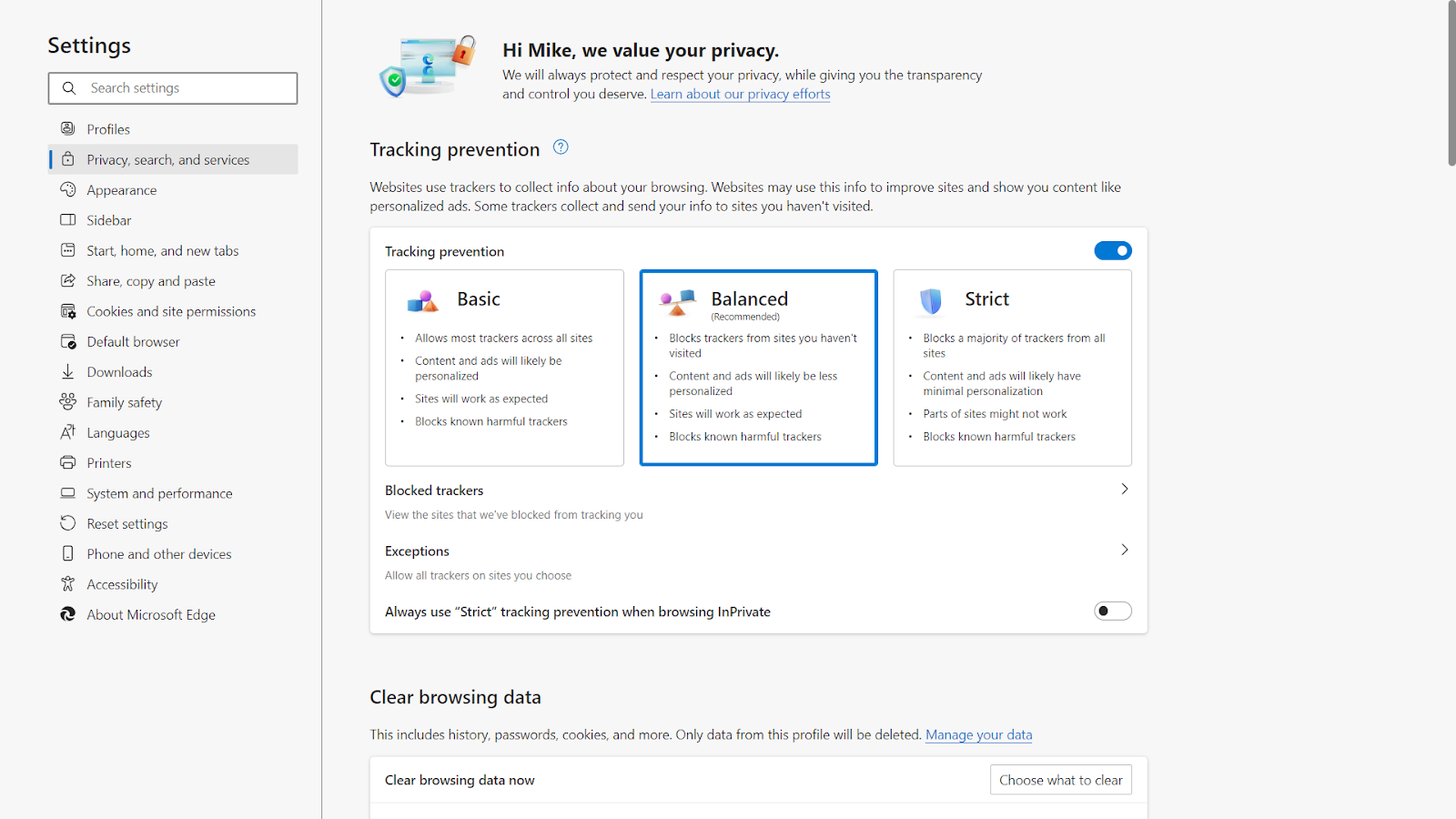
This feature prevents new windows or tabs from opening automatically, which are often used by advertisers to display pop-ups. It’s a straightforward yet effective way to maintain a cleaner browsing space.
2. Adjust the Tracking Prevention
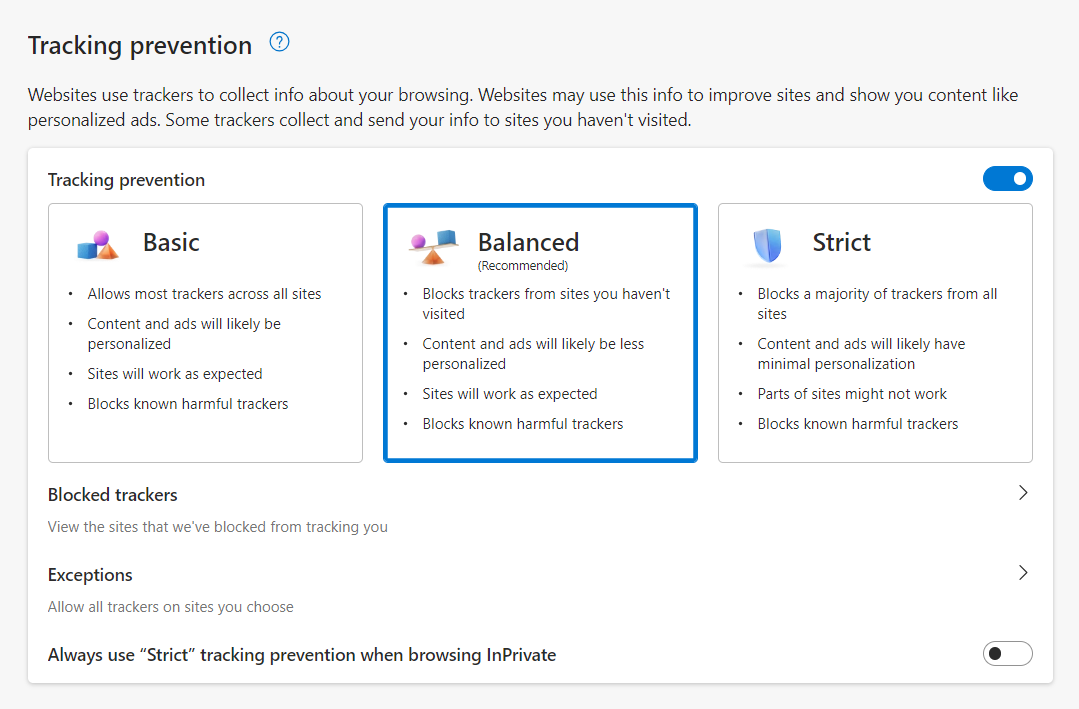
Another significant feature of Edge is its tracking prevention capability. This function not only blocks certain types of ads but also prevents trackers from monitoring your online activities. By default, Edge offers different levels of tracking prevention:
- Basic
- Balanced
- Strict
Each level provides a varying degree of protection against trackers, with the Strict setting offering the most comprehensive defense. Users can customize this setting based on their privacy preferences and browsing needs.
3. Manage the Exceptions
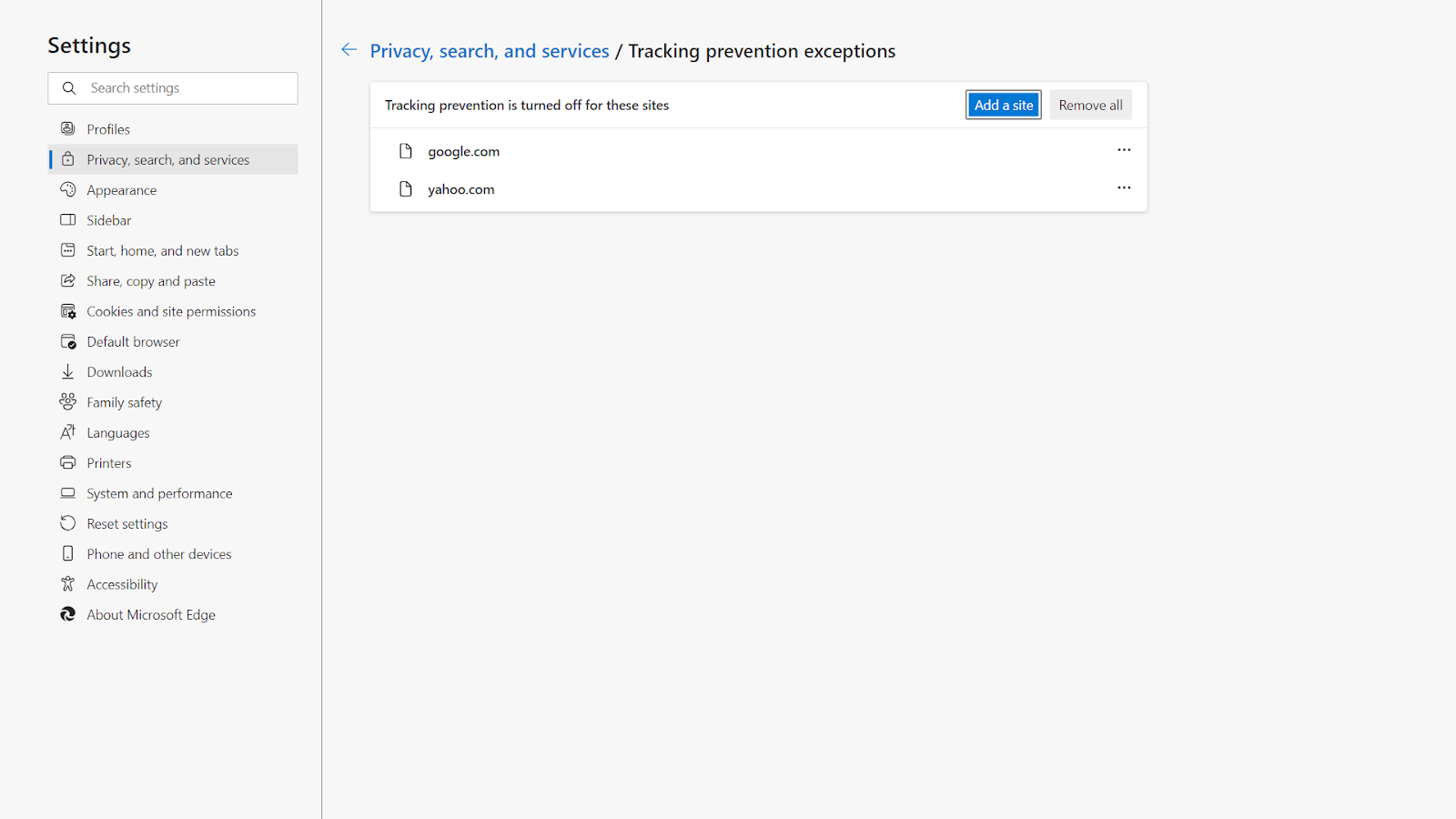
Edge allows users to manage exceptions in ad blocking. This means you can choose to allow ads and pop-ups on specific websites that you trust or require them for full functionality. This feature is particularly useful for sites that rely on pop-ups for essential services or user interactions.
4. Configure the Site Permissions
Within the browser settings, Edge provides a section dedicated to site permissions. This area allows users to fine-tune their control over what content is allowed or blocked on specific websites.
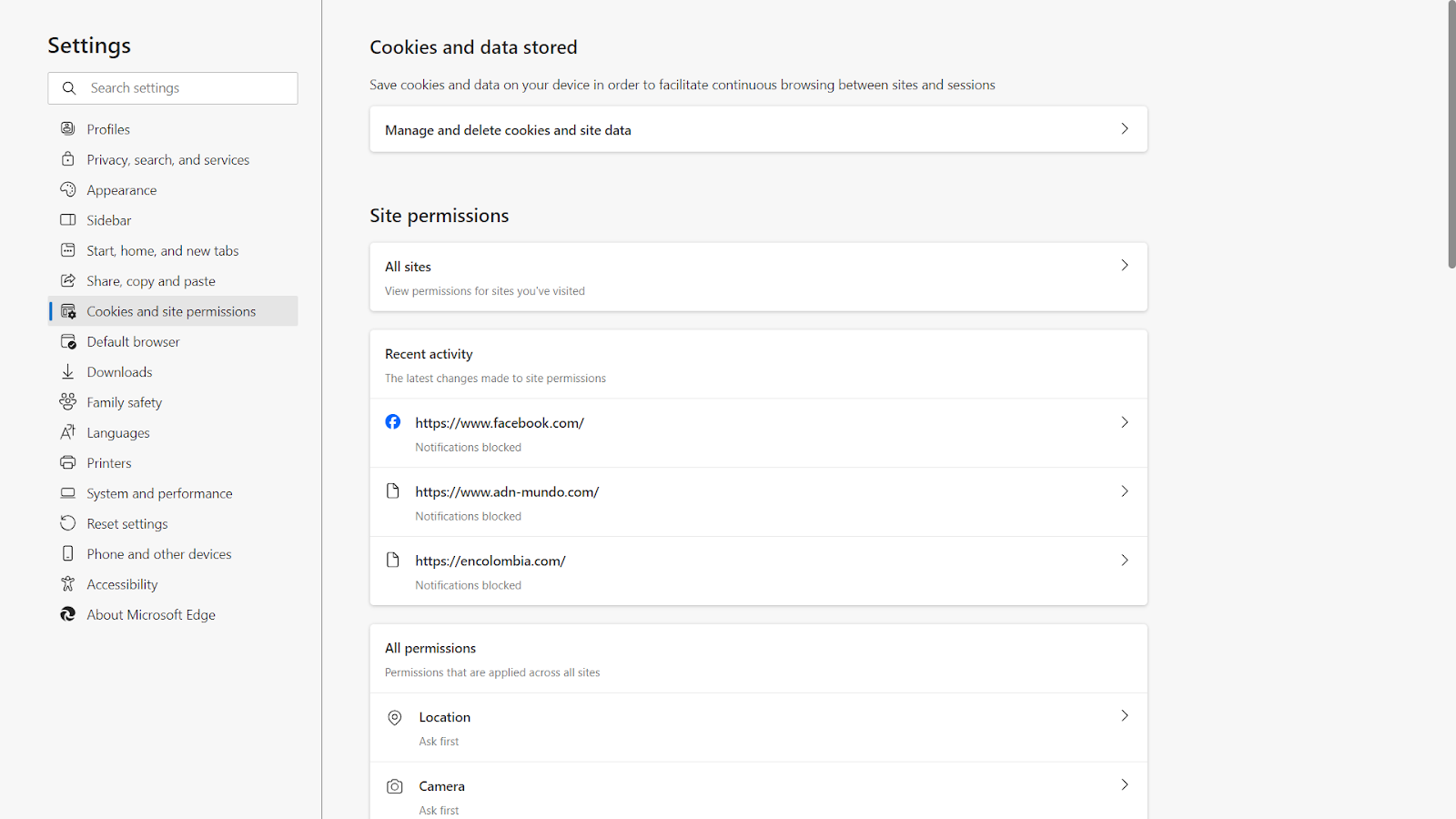
Users can set permissions for cookies, images, JavaScript, and more, giving them a higher degree of control over their browsing experience.
How to Block Pop-up Ads on Edge Browser Using Poper Blocker
1. Install Poper Blocker
The first step in transforming your Microsoft Edge browsing experience is to install Poper Blocker. This process is straightforward and user-friendly. Simply visit the Poper Blocker website or the Microsoft Edge Add-ons store.
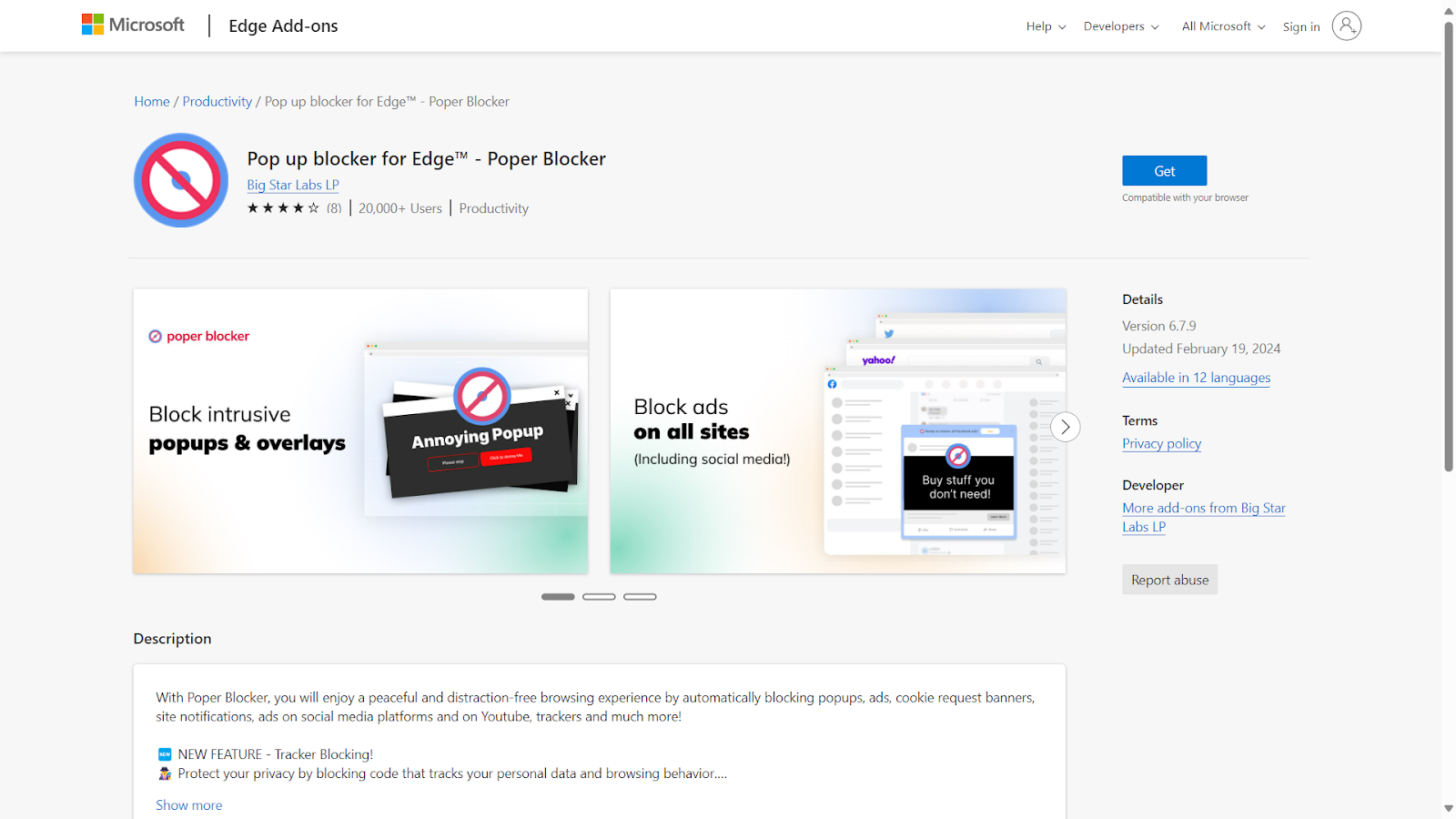
Click on the ‘Get’ or ‘Add to Edge’ button, and the extension will seamlessly integrate with your browser. This initial step is crucial as it lays the foundation for an enhanced, ad-free browsing environment.
2. Create an Account with Poper Blocker
Once Poper Blocker is installed, the next step is to create an account. This is a quick process that unlocks the full potential of this popup blocker. By creating an account, you gain access to advanced features and customization options.
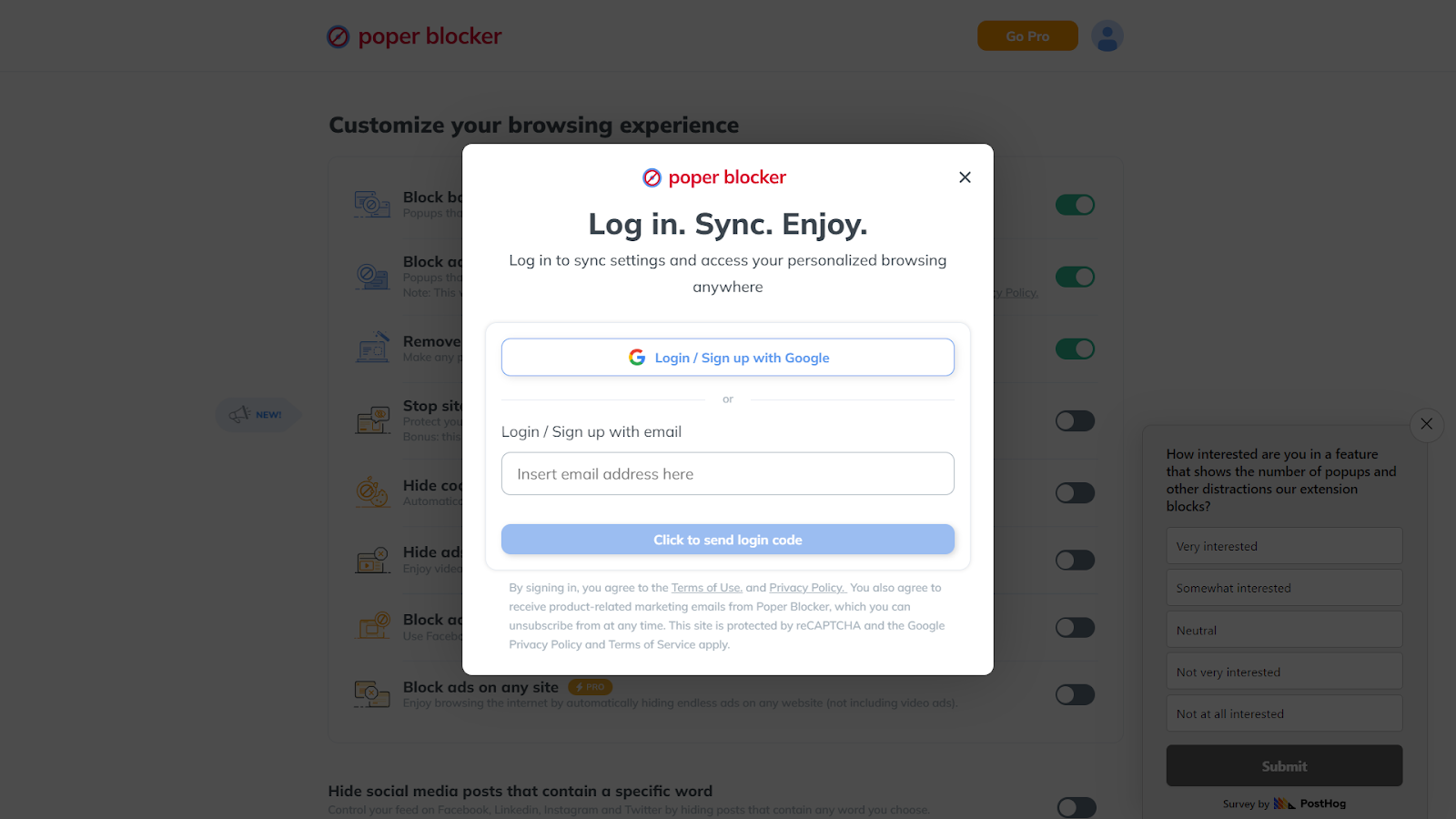
This personalization allows you to tailor the ad-blocking experience to your specific needs and preferences, ensuring that your browsing is as efficient and enjoyable as possible.
3. Launch the App and Navigating to Advanced Settings
After setting up your account, open the Poper Blocker app within Edge. Here, you’ll find a user-friendly interface where you can navigate to the ‘Advanced Settings.’
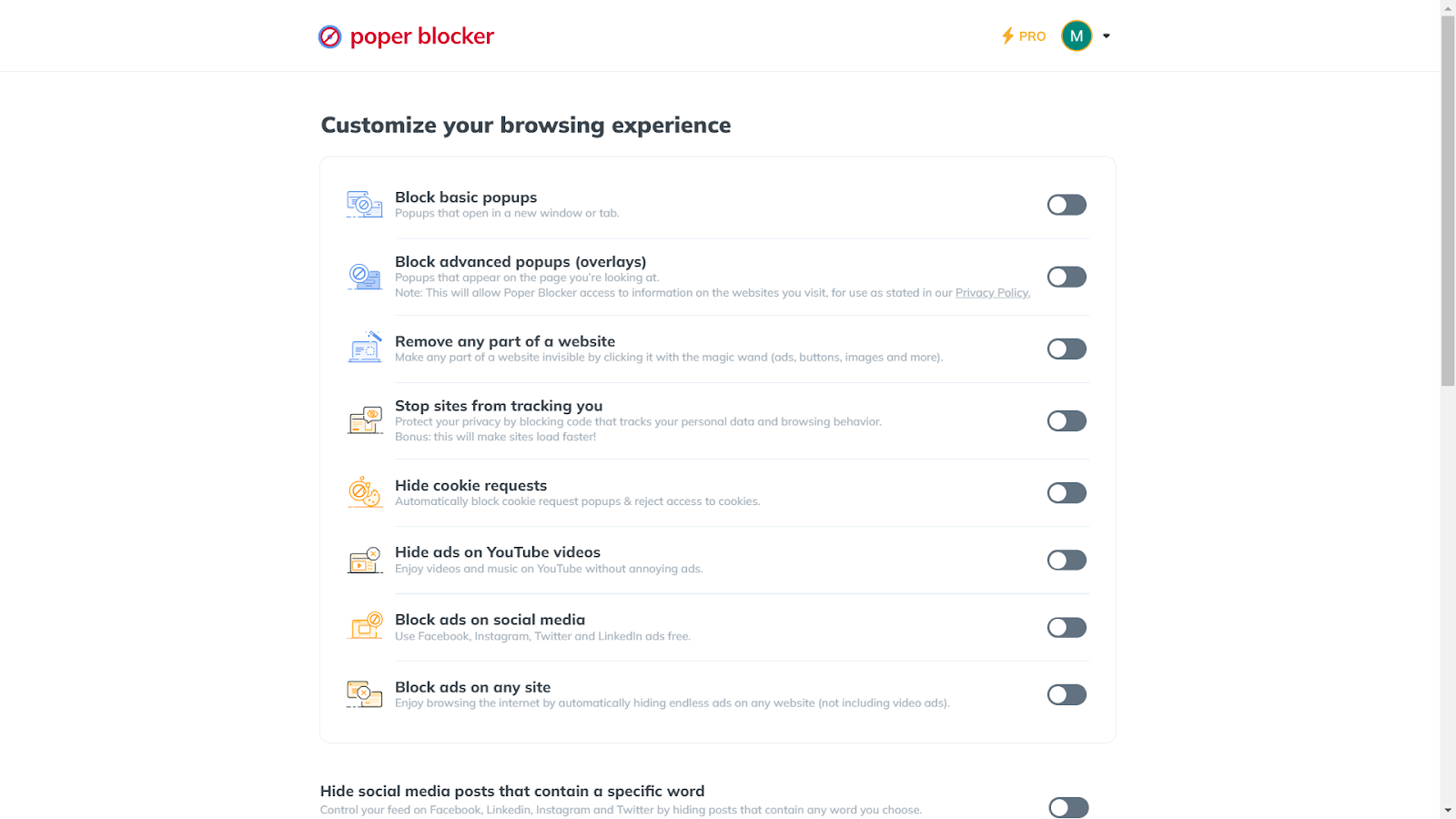
This section is where the magic happens. You have the power to adjust the settings of the ad blocker to suit your browsing habits, giving you control over what gets blocked and what doesn’t.
4. Activate the Ad Blocking Features
In the Advanced Settings, you’ll find options to enable different levels of ad blocking. The ‘Block basic popups’ feature is essential for stopping pop-ups that open in new windows or tabs. For a more comprehensive blocking experience, turn on ‘Block advanced popups (overlays).’
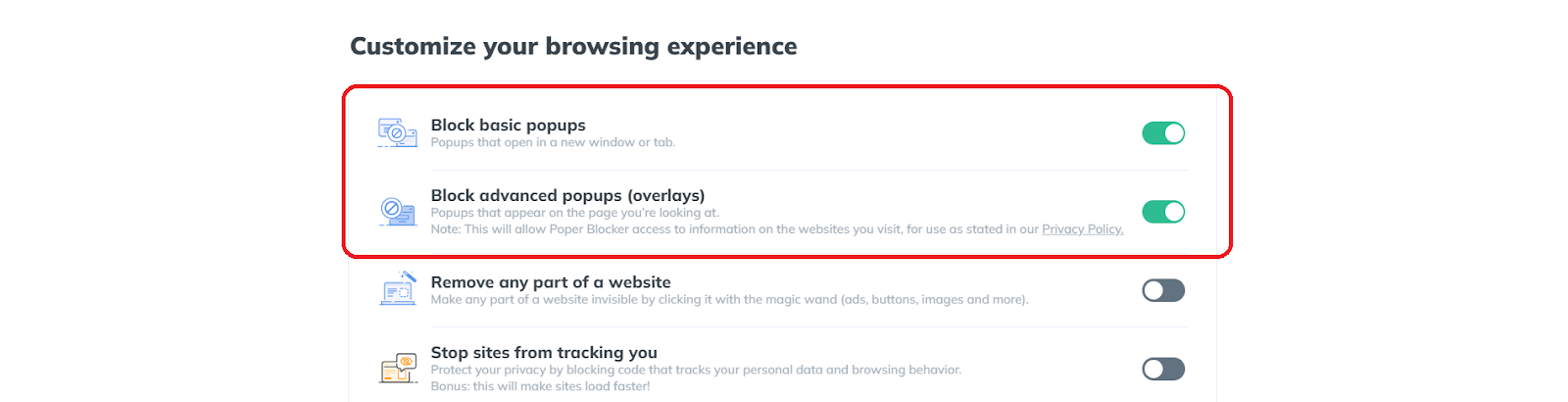
This feature is particularly effective at blocking those pesky pop-ups that appear over the page you’re currently viewing, providing a cleaner and more uninterrupted browsing experience.
5. Tailor Your Experience
Poper Blocker’s strength lies in its flexibility. You can choose to block all ads and pop-ups or customize the settings to allow certain types of content.

This means that if there are websites where you don’t mind seeing ads or require pop-ups for functionality, you can easily adjust the settings to accommodate these preferences. In fact, you can even block pop-up ads on streaming sites and social media as well.
A New Chapter in Browsing with Microsoft Edge
Adopting the ad-free capabilities of Microsoft Edge, enhanced by tools like Poper Blocker, signifies a major change in your online interactions. This move goes beyond just avoiding the irritation of pop-ups and banners; it’s a deliberate choice for a more focused and streamlined web experience. With the power to block unwanted ads and pop-ups, you gain not only speed and clarity but also an additional layer of privacy and security.
The path to a cleaner, more efficient browsing environment is both simple and rewarding. By enhancing Microsoft Edge with these effective ad-blocking tools, you’re not merely customizing a browser; you’re elevating your entire online experience. It’s a decision that underscores a commitment to quality, safety, and an uninterrupted digital lifestyle.
Looking to block ads on Chrome?
Read – How to Block Ads on Chrome: Effective Strategies
Transform Edge into an ad-free zone – Get Poper Blocker now!
FAQs
Can ad blockers speed up my browsing on Edge?
Absolutely! Ad blockers play a crucial role in enhancing browsing speed. By filtering out ads, these tools reduce the amount of data loaded on each page, resulting in quicker load times and a smoother browsing experience. This efficiency is particularly noticeable on websites heavy with advertisements, where ad blockers can significantly cut down on digital clutter and loading delays.
Are there any risks to using ad blockers on Edge?
Generally, ad blockers are safe, especially when sourced from reputable providers. However, caution is advised. A small number of them might have security vulnerabilities or privacy concerns. It’s essential to research and choose an ad blocker known for its reliability and commitment to user safety. Reading user reviews and checking the credibility of the developer can guide you in selecting a secure ad blocker.
Can I customize ad-blocking settings on Edge?
Yes, customization is a key feature of most ad blockers for Edge. These tools often allow you to tailor their functionality to your browsing habits. You can choose to block all ads or select specific types of ads to filter. Additionally, one of the benefits of using an ad blocker is that you’ll have the option to whitelist your favorite websites, ensuring that you continue to support the sites you trust and enjoy while blocking ads elsewhere.
Do ad blockers on Edge block all types of ads?
Most ad blockers like Popoer Blocker are quite effective at filtering a wide range of advertisements, including pop-ups, banners, and video ads. However, some sophisticated or non-standard ads might occasionally bypass these filters. Ad blockers are continually updated to address new types of ads, ensuring a high level of effectiveness over time.
Will using an ad blocker on Edge affect website functionality?
In some instances, ad blockers may inadvertently block elements that are crucial for website functionality. This can lead to issues like broken web pages or disabled features. However, this is not a common occurrence and can often be resolved by adjusting the settings of your extension or app. Most ad blockers allow you to disable blocking for specific sites, ensuring that you can fully access and enjoy websites that might have compatibility issues with ad blocking.
According to a HubSpot study, a significant 73% of consumers express a dislike for online pop-up ads. While this sentiment may not be surprising, the persistence of these ads in the digital landscape is noteworthy. As reported by OptiMonk, pop-up ads maintain an average conversion rate of 11%, with the most effective ones achieving a remarkable 42% conversion rate.
This stark contrast highlights the ongoing relevance and impact of pop-up advertising in the online world. These unexpected digital guests often disrupt our online activities, leading to frustration and decreased productivity. So how can you stop pop-up ads, and can they truly be blocked? Continue reading to discover the answer.
Why Block Pop-up Ads?
1. Eliminating Unwanted Interruptions
Pop-up ads are more than a minor annoyance; they are a significant disruption to your online activities. These ads can appear unexpectedly, interrupting your workflow or leisurely browsing. They often cover essential content on the screen, forcing you to pause and find a way to close them. This constant interruption not only hampers productivity but also detracts from the overall enjoyment of your online experience.
2. Safeguarding Against Security Risks
Beyond being a source of irritation, pop-up ads can pose serious security risks. Some of these ads are designed to mislead users into downloading malware or falling victim to phishing scams. Clicking on a seemingly harmless pop-up could inadvertently lead to the installation of harmful software that compromises your device’s security and your personal information. Blocking pop-ups is a proactive step in safeguarding your online security.
3. Improved Page Loading Speed
Pop-up ads consume additional data and can slow down page loading times. This is particularly noticeable on websites with multiple pop-ups or devices with limited processing power. By blocking these ads, you can enjoy faster browsing speeds, making your online experience smoother and more efficient.
4. Enhanced User Experience
Websites cluttered with pop-up ads can be visually overwhelming and detract from the content you’re trying to access. Blocking distractions brought by these ads leads to a cleaner, more organized display of information, allowing you to focus on the content that matters to you without constant annoyances.
5. Reduced Data Usage
For users with limited data plans, pop-up ads can be a hidden drain on data resources. These ads, especially those with multimedia elements, can consume a significant amount of data. Blocking them helps conserve your data usage, which is particularly beneficial when browsing on mobile devices or in areas with limited connectivity.
6. Protecting Children from Inappropriate Content
Pop-up ads don’t discriminate in their audience. When children are using the internet, they can be exposed to inappropriate or harmful content through these ads. Blocking pop-ups helps create a safer online environment for children, ensuring that they are not exposed to content that is not age-appropriate.
How Do I Stop Pop-up Ads with Poper Blocker?
Poper Blocker is an exceptional solution for those wondering how to stop pop-up adverts. This browser extension, effortlessly downloadable and installable, empowers you to swiftly block those pesky ads. Here’s a quick guide on how to harness the capabilities of this popup blocker:
1. Install the Poper Blocker Browser Extension
Initiating your journey towards a pop-up-free browsing experience begins with a simple installation of the Poper Blocker extension. This process is straightforward and user-friendly, ensuring that even those not tech-savvy can easily enhance their browsing experience.
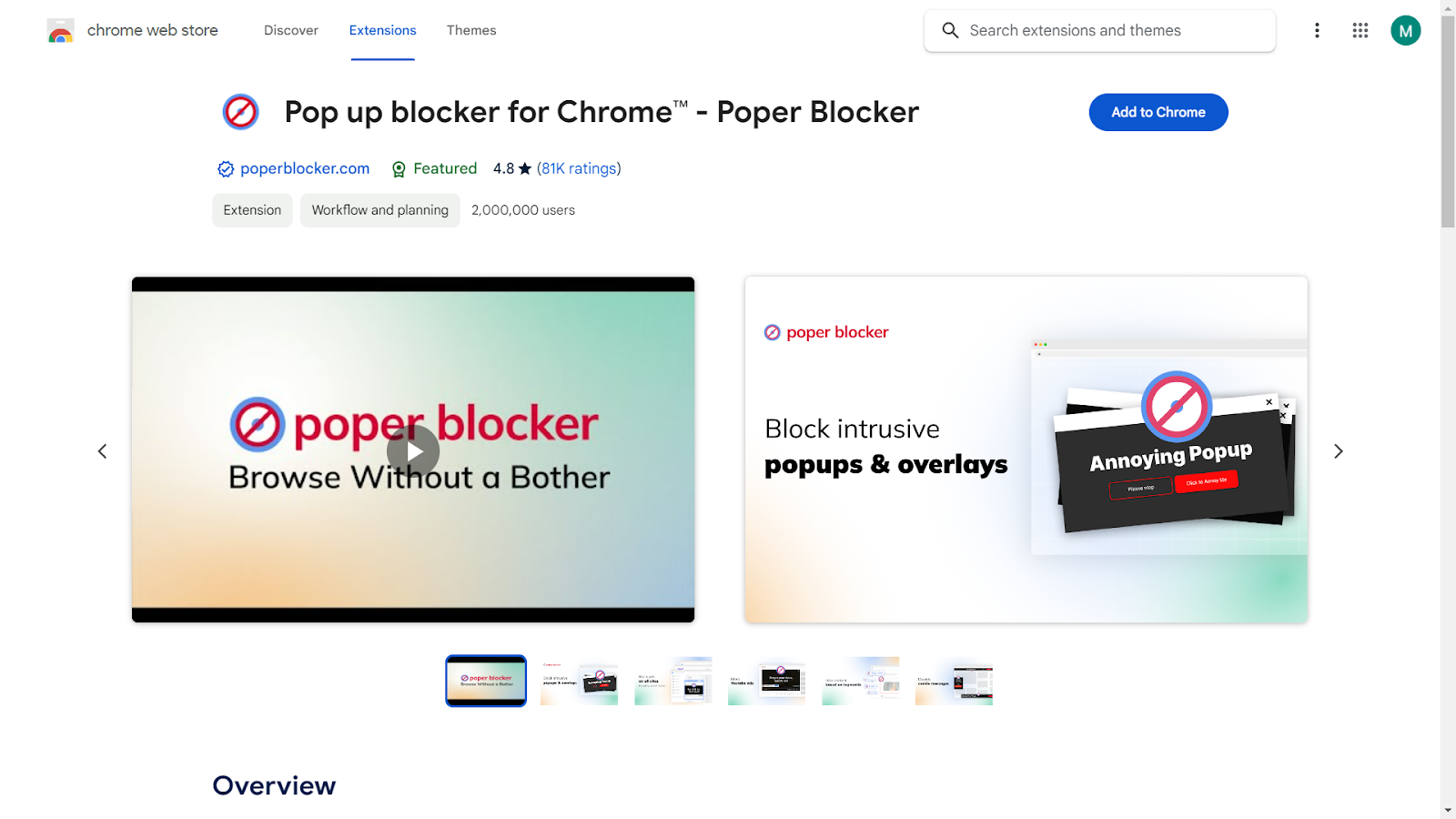
Start by visiting your browser’s extension store and searching for Poper Blocker. With a single click, you can add this powerful tool to your browser. Once installed, the extension integrates seamlessly, requiring no complex setup or configuration.
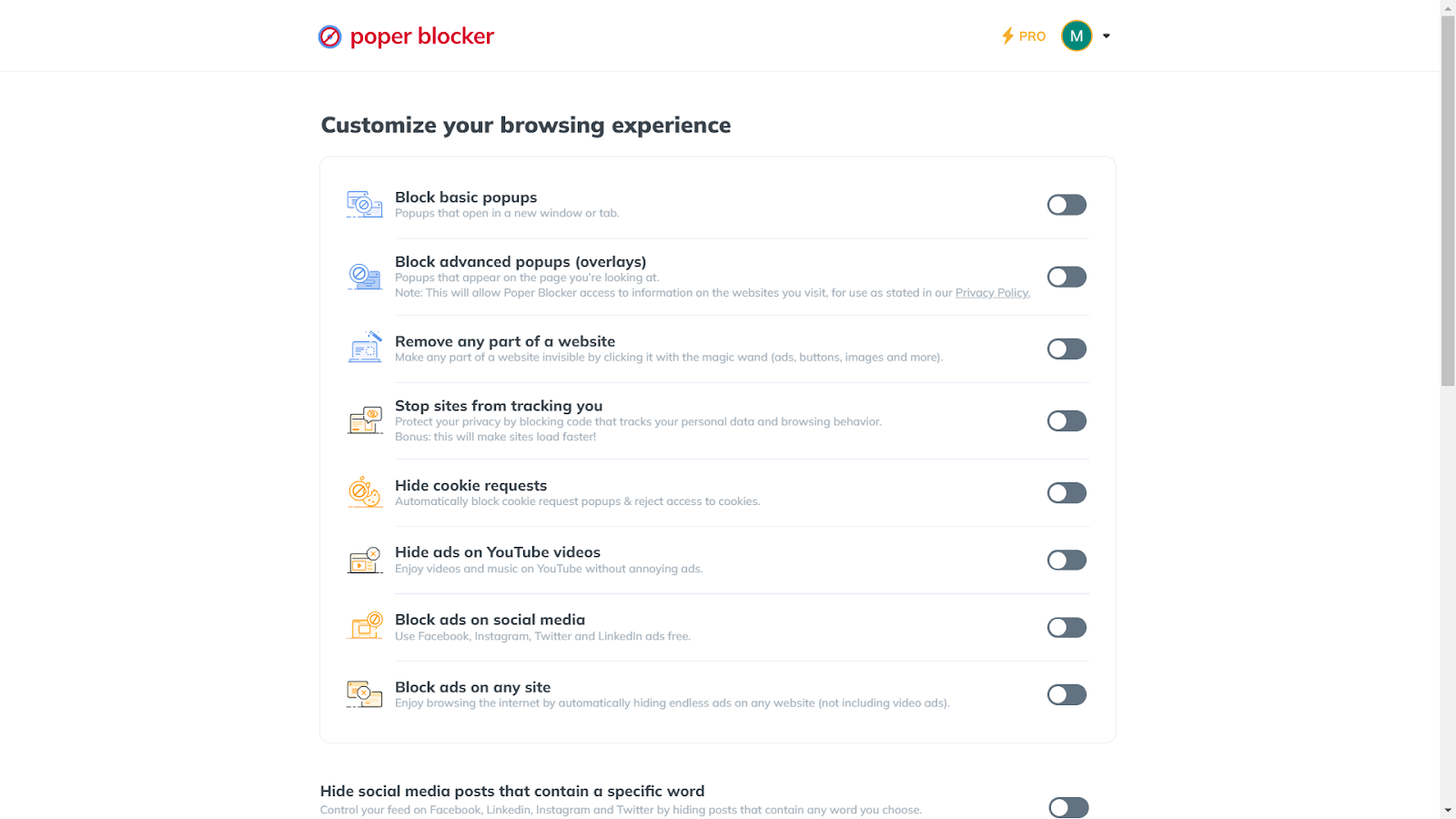
2. Access the Advanced Settings
Poper Blocker stands out with its customizable features, allowing you to tailor your browsing experience according to your preferences. Upon opening the app, you’ll find the ‘Advanced Settings’ section, a control center for managing pop-ups.
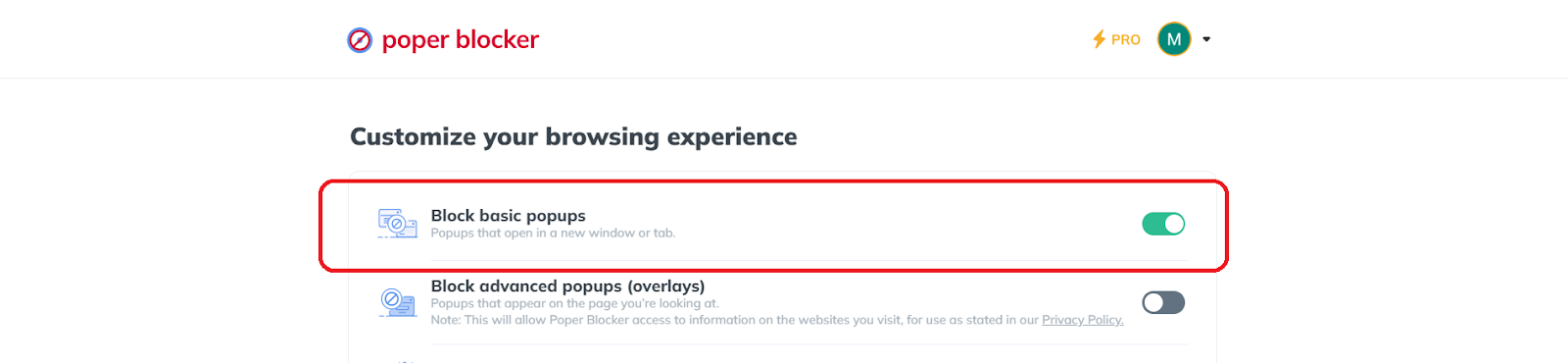
3. Turn on “Block basic popups”
Here, you can activate ‘Block basic popups’, which stops pop-ups that open in new windows or tabs. This feature is crucial for maintaining focus and avoiding disruptive advertising tactics.
4. Turn on “Block advanced popups (overlays)” for a more refined blocking
For those seeking an even more robust solution, turning on ‘Block advanced popups (overlays)‘ is the way to go. This feature targets pop-ups that appear directly on the page you’re viewing, providing an additional layer of protection.
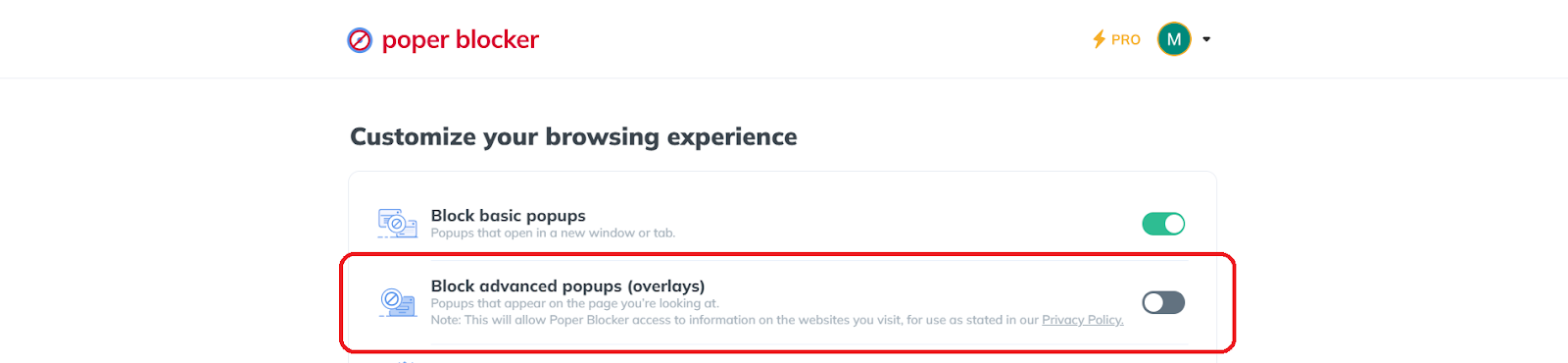
It’s particularly useful for blocking those pesky overlays that can hinder your reading or shopping experience on websites.
Tip: Incognito Browsing with Poper Blocker
Poper Blocker’s versatility extends to incognito mode, offering the same level of protection even when browsing privately. To enable this feature, navigate to your browser’s ‘Manage Extensions’ section. Locate Poper Blocker, click on ‘Details’, and then select ‘Allow in incognito’.

Here’s a trick: Via Poper Blocker’s dashboard, there’s an “Enabling Poper Blocker in incognito” section. This is a shortcut to access this setting and all you need to do is click the “Take me there” button.
In addition to its primary function, this extension offers a range of valuable features. Notably, you can block pop-up ads on streaming sites such as YouTube, effectively hide ads on social media platforms, and much more, enhancing your overall online experience.
A Cleaner, Safer Browsing Journey Awaits
Stepping into a world free from the annoyance of pop-up ads is not just about enhancing your browsing experience; it’s about embracing a safer and more focused online environment. With tools like Poper Blocker, you gain control over what appears on your screen, ensuring that your online activities remain uninterrupted and your personal information stays secure. This proactive approach to managing online content not only minimizes distractions but also fortifies your defense against potential cyber threats hidden in pop-ups.
As you utilize these powerful tools and enjoy the benefits of using an ad blocker, remember that the key to a cleaner, more enjoyable online experience lies in the choices you make about how you interact with the digital world. By choosing to block unwanted pop-ups, you’re not just avoiding annoyance; you’re taking a significant step towards a more efficient and secure online presence.
Ready for an ad-free journey? Install Poper Blocker today!
FAQs
What are the risks of disabling pop-up blockers?
Disabling pop-up blockers can significantly increase your exposure to intrusive advertisements and potentially harmful content. Without these blockers, your browsing experience can be disrupted by frequent and unwanted ads. More importantly, some pop-ups may contain malicious software or phishing attempts, which can compromise your personal information and computer security. It’s crucial to weigh the need for certain site functionalities against these potential risks when considering disabling your popup blocker.
Can pop-up blockers affect website functionality?
Yes, in some cases, pop-up blockers can interfere with the functionality of websites that legitimately use pop-ups for essential features. This includes scenarios like logging into a site, completing web forms, or accessing interactive content. If you trust the website and require these functionalities, you may need to disable the ad blocker temporarily or add the site to an exceptions list. However, it’s important to do this selectively and only for websites you trust completely.
Are all pop-ups harmful or malicious?
Not all pop-ups are designed with harmful intent. Many websites use pop-ups for legitimate purposes, such as displaying login forms, providing additional information, or even alerting users to important updates. It’s the context and source of the pop-up that often determines its safety. Pop-ups from reputable and trusted websites are generally safe, whereas those from unknown or suspicious sources should be treated with caution.
How do I differentiate between safe and unsafe pop-ups?
Identifying the safety of a pop-up often comes down to recognizing a few key indicators. Safe pop-ups typically originate from trusted sources and are relevant to the content or activity on the website. They don’t ask for personal information or prompt you to download unknown software. Unsafe pop-ups, on the other hand, may feature aggressive advertising, request sensitive information, or warn of a nonexistent virus on your device. They might also appear randomly and not be related to your current web activity.
Can pop-up blockers block all types of pop-ups?
While modern pop-up blockers like Poper Blocker are highly effective, some sophisticated pop-ups might still slip through. These blockers are designed to stop most types of pop-ups, including those that open in new windows or tabs and overlays that appear on the current page. However, some pop-ups, especially those intricately embedded in website scripts or triggered by complex user interactions, might not be consistently blocked. Regular updates to pop-up blocking software and browsers can help in addressing these evolving challenges.
Are you tired of relentless ads disrupting your online experience? Many share this frustration. With the digital landscape bombarded by advertisements, finding peace while browsing can seem like a distant dream.
Here’s the latest:
- According to a report from Economy Middle East News, Google Chrome has initiated a block on third-party cookies, but this is currently limited to just 1% of its users across both desktop and Android platforms.
- Wired reports that an estimated 20 to 60 percent of internet users employ ad blockers while browsing online.
Given these concerning statistics, you might be wondering, how do you block ads on Chrome? Rest assured, this guide is designed to show you exactly how to reclaim your online space from intrusive ads on Chrome.
Why Block Ads in Chrome?
Ad blocking in Chrome has emerged as a vital method for enhancing the online browsing experience, effectively tackling numerous critical issues that users encounter daily. Here are some compelling reasons why blocking these annoying ads is important:
1. Improved Browsing Speed and Efficiency
One of the most immediate benefits of ad blocking is the noticeable improvement in browsing speed. Ads, especially those that are media-rich or animated, consume significant bandwidth and processing power. This can lead to slower page loading times, affecting the overall efficiency of browsing. By blocking these ads, users enjoy faster and more streamlined access to content, making their online activities more productive and less frustrating.
2. Enhanced Online Privacy
Ads are not just visual clutter; they are often embedded with trackers that monitor user behavior across the web. This tracking can lead to privacy concerns, as it involves the collection and analysis of:
- Personal data
- Browsing habits
- Preferences
Ad blockers play a crucial role in safeguarding privacy by preventing these trackers from collecting data, thus giving users more control over their personal information and digital footprint.
3. A Cleaner and More Focused Browsing Experience
Ads can be distracting, pulling attention away from the actual content. They can disrupt the aesthetic and functional flow of a website, making it difficult to focus on the information or entertainment being sought. Useful tools should clean up web pages and effectively block distractions, allowing for a more focused and enjoyable browsing experience.
4. Protection Against Malware and Security Threats
Some ads can be malicious, containing malware or leading to phishing sites. This poses a significant security risk to users. Ad blockers provide an additional layer of protection by blocking these potentially harmful ads, thereby reducing the risk of encountering online security threats.
The necessity of ad blocking in Chrome is underscored by its multifaceted benefits. It not only enhances the speed and efficiency of browsing but also plays a vital role in protecting user privacy, ensuring a focused browsing experience, and safeguarding against online security threats.
Does Chrome Have a Built-in Ad-Blocker?
While Chrome’s built-in ad blocker marks a significant step towards a cleaner browsing experience, it often falls short of user expectations in several key areas.
Limited Blocking Capabilities
The primary limitation of Chrome’s built-in ad blocker is its scope. It targets only those ads deemed overly intrusive or misleading, as defined by the Better Ads Standards. This means many ads can still appear during your browsing sessions, including the following:
Users often find that ads slip through this filter, resulting in a browsing experience still cluttered with unwanted content. Additionally, there’s a possibility that using this method may not effectively block notifications on Chrome.
Lack of Comprehensive Privacy Protection
Another aspect where Chrome’s ad blocker could be more robust is in privacy protection. While it does block certain types of ads, it doesn’t offer the same level of tracker blocking that dedicated ad blockers provide. This means that while some ads are blocked, your online activity might still be tracked by other means used by advertisers, such as:
- Cookies
- Digital fingerprinting techniques
Minimal Customization Options
Chrome’s ad blocker provides limited customization options. In contrast to third-party ad blockers, it doesn’t allow users to personalize their ad-blocking experience according to their preferences. The inability to whitelist specific sites or ad types can be a notable limitation for those seeking greater control over their browsing.
While Chrome’s built-in ad blocker is a step in the right direction, it often doesn’t meet the comprehensive needs of users looking for a completely ad-free and private browsing experience. This limitation highlights the benefits of using an ad blocker, offering a more tailored and controlled online experience.
Block Ads on Chrome with Poper Blocker
Poper Blocker emerges as a top-tier solution for those searching for an effective method on how to stop ads in Chrome. This browser extension goes beyond merely eliminating unwanted advertisements; it’s about enhancing and transforming your entire online experience.
Effortless User Experience
Poper Blocker stands out for its user-friendly approach. Installation is a breeze, appealing to both tech-savvy users and novices alike.
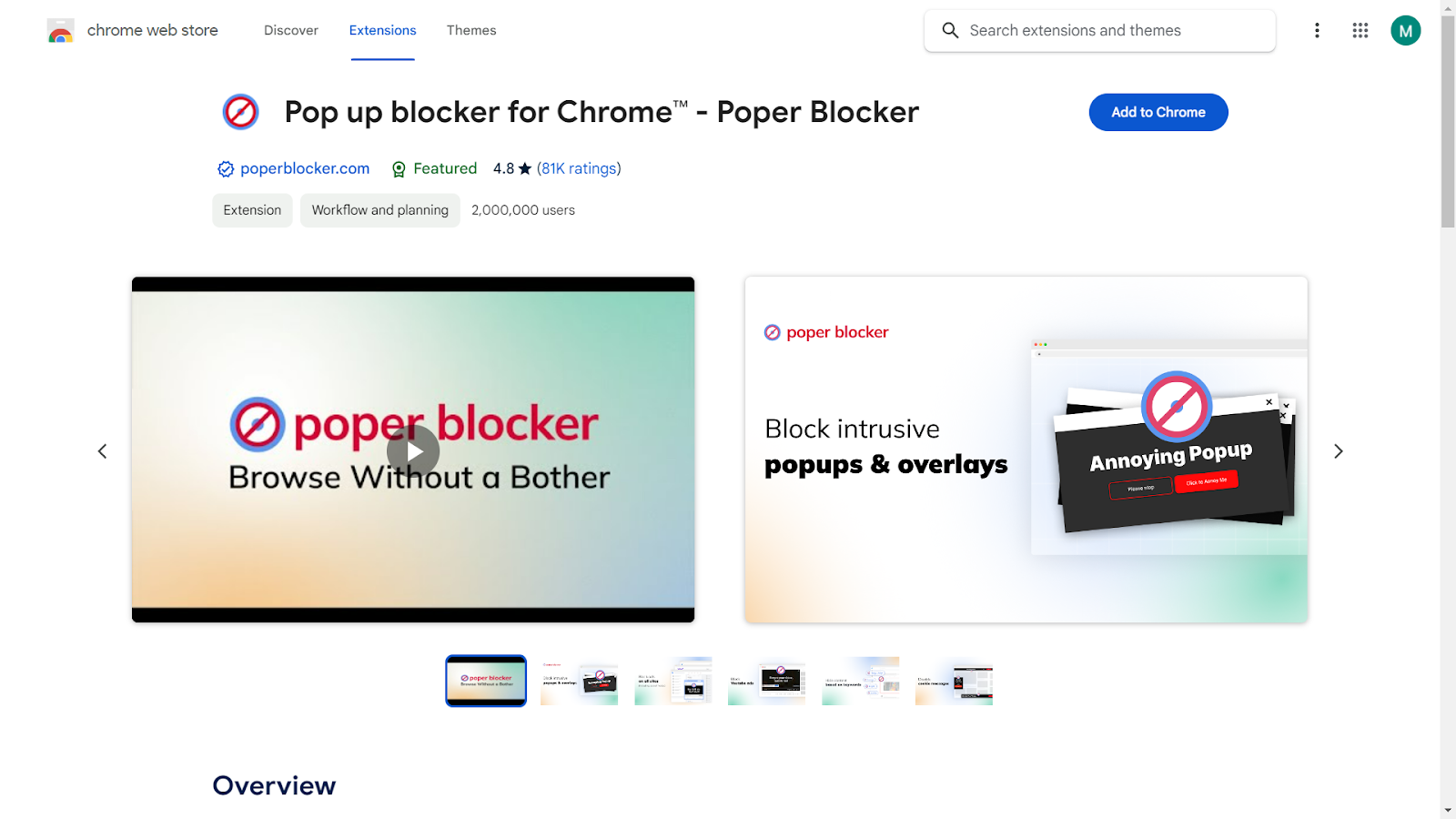
Once added to Chrome, it blends seamlessly into your browsing experience, functioning quietly and efficiently without any need for constant interaction or management.
Comprehensive Ad Blocking
The core strength of Poper Blocker lies in its ability to block a wide array of ads. For annoying pop-ups, it has an effective popup blocker solution. In fact, it can even block pop-up ads on streaming sites or data-consuming banner ads. This tool handles them effortlessly.
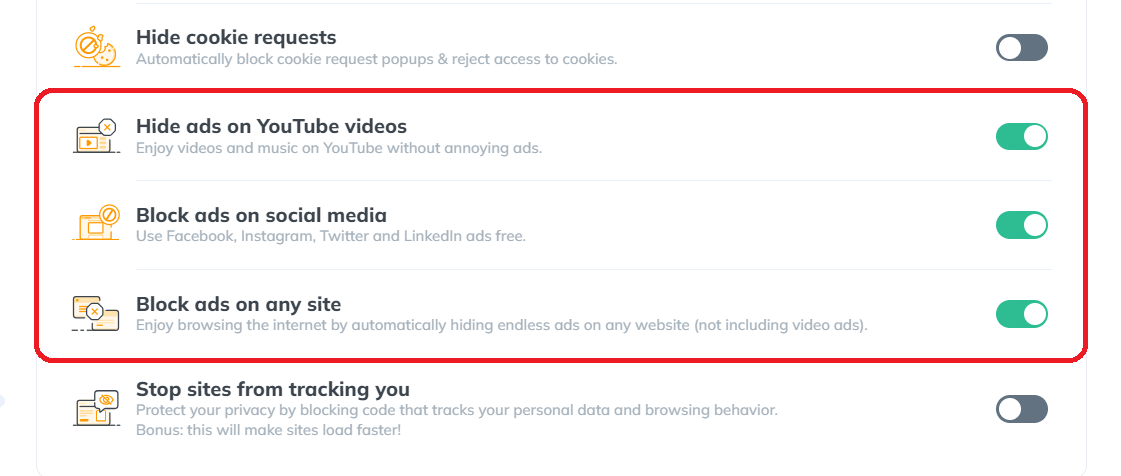
This not only cleans up your browsing experience but also enhances the speed and efficiency of your internet usage.
Privacy Protection
Online privacy concerns are increasingly prevalent, and Poper Blocker addresses this by blocking trackers in ads. This tool not only assists you in learning how to stop the ads in Chrome but also ensures that your browsing habits and personal data stay private, protecting you from unwanted digital tracking and data collection.
Read More: What Does Google Know About Me?
Customizable Control
Poper Blocker doesn’t adopt a one-size-fits-all approach. It allows you to tailor your browsing experience according to your preferences.
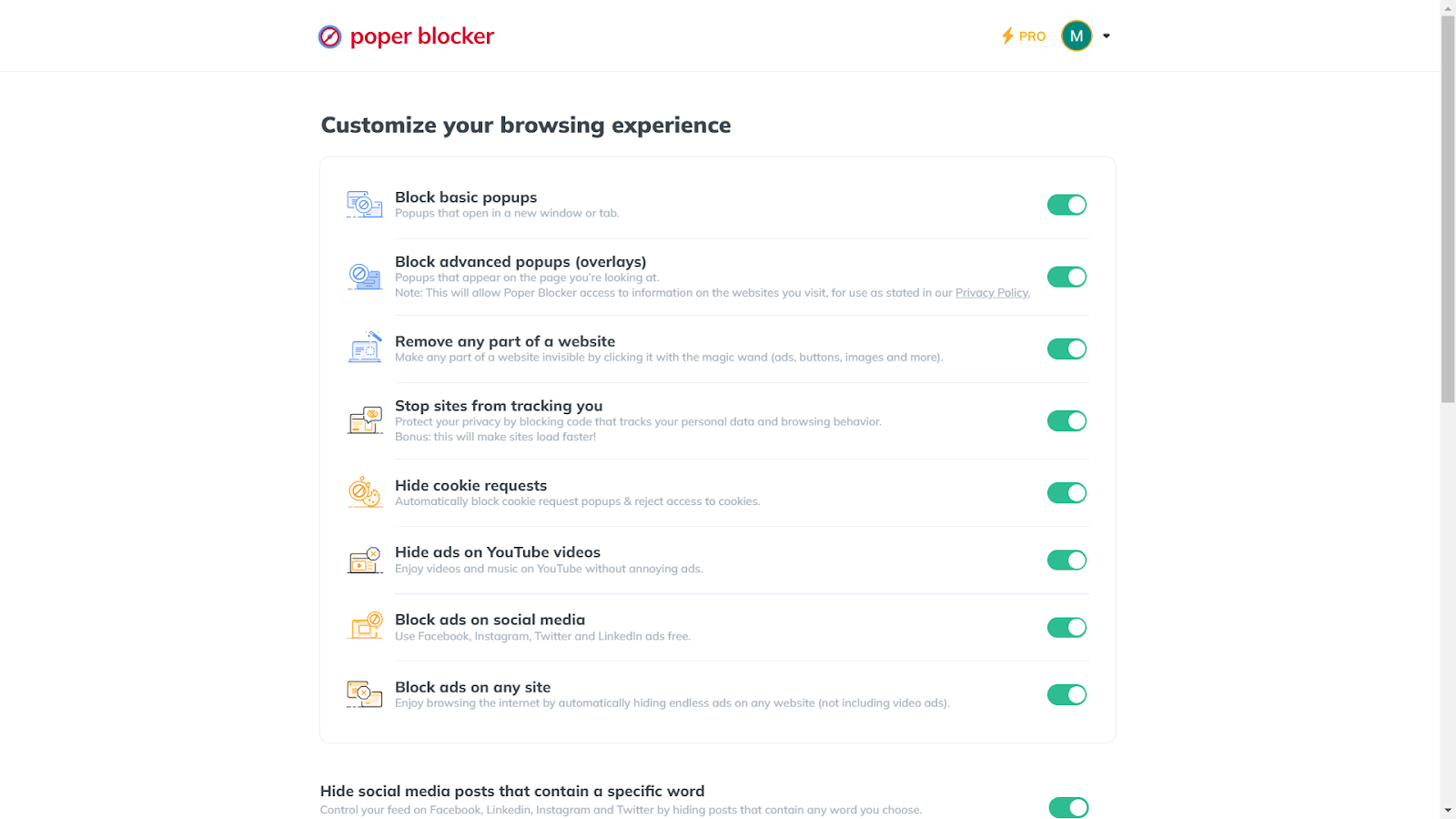
With its customization options, you can whitelist sites you support or specific ads you find acceptable, striking the perfect balance between a clean browsing experience and supporting your favorite websites.
Upgrade your Chrome experience – Get Poper Blocker today!
A World Without Ads: The Ultimate Browsing Utopia
Imagine a world where your online journey is uninterrupted by annoying pop-ups and intrusive banners. That’s the world Poper Blocker promises. With its user-friendly interface and efficient ad-blocking capabilities, it transforms your Chrome browsing experience into a seamless and enjoyable adventure.
This tool not only eliminates the digital clutter of unwanted ads but also enhances your browsing speed and protects your online privacy. It’s more than just an ad blocker; it’s a gateway to a cleaner, faster, and safer digital environment. By choosing Poper Blocker, you’re not just blocking ads; you’re taking a stand for a more enjoyable and secure online experience. Welcome this change and step into a cleaner, ad-free virtual world where your browsing is uninterrupted and your focus is undivided.
Read more:
FAQs
Can ad blockers speed up my browsing?
Absolutely! Ad blockers like Poper Blocker can significantly speed up your browsing. By blocking ads, they reduce the amount of data your browser needs to load. This means web pages open faster, providing a smoother online experience. Poper Blocker efficiently handles various ad formats, ensuring that your browsing isn’t just ad-free but also faster.
Are ad blockers safe to use?
Yes, using reputable ad blockers like Poper Blocker is safe. They enhance your online security by blocking potentially harmful ads that might contain malware or phishing attempts. Poper Blocker prioritizes your safety, ensuring that the ads it blocks don’t compromise your device’s security or your personal information.
Will ad blockers affect website functionality?
Sometimes, ad blockers might inadvertently block elements that are crucial for a website’s functionality. However, Poper Blocker offers a nuanced approach. It allows you to easily whitelist sites where you want to support ads or need full functionality, giving you control over your browsing experience without compromising website usability.
Can I customize my ad-blocking preferences?
Customization is a key feature of Poper Blocker. You can tailor your ad-blocking preferences to suit your specific needs. Whether it’s allowing certain types of ads or whitelisting your favorite websites, Poper Blocker provides flexibility and control, making it a user-friendly choice for diverse browsing preferences.
Do ad blockers block all types of ads?
Most ad blockers, including Poper Blocker, are designed to block a wide range of ads. This includes pop-ups, banners, and video ads. Poper Blocker stands out for its ability to tackle even the most stubborn ads, ensuring that your browsing experience remains uninterrupted and enjoyable.
