
 Chrome Web Extension
 Edge Web Extension
 Android App


Online ads are everywhere. From spam popups that interrupt your video binge-watching to banners that crowd your favorite websites, the digital space seems cluttered with advertising. But why has it reached the point where there are just too many ads, and more importantly, why are these so annoying?
Studies reveal a stark reality: a whopping 70% of internet users find digital ads annoying, and a similar percentage report a negative impact on their perception of brands due to poor ad experiences. This sentiment is echoed across various platforms, with users lamenting the intrusion of ads into their online activities.
Why are ads so annoying now?
Advertisers are finding it harder to reach their audience online because the landscape has changed. Below is an examination of some of the core factors behind the increased frustration:
Interruption and Distraction
The basic intention behind advertising is to be noticed but in more recent times, this has become increasingly invasive. These days, ads burst out right in the middle of videos abruptly interrupting what is happening.
It is not just a minor disturbance but also a huge obstacle to internet content enjoyment. Imagine getting into an article or video only to be jerked out by an ad; this is tiring and does not make one enjoy online spaces anymore and it’s one of the reasons why users want to find ways to block distractions.
Irrelevance
Another major issue is irrelevance. Given the amount of intelligence technology these days has reached, you would think there should be relevant targeted ads. However, they often miss the mark. Advertisements for things that users have no interest in keep coming up on their screens thereby making them feel spammed with billboards nobody would ever buy.
Overload
The number of ads being posted has gone beyond the limits that most people can handle. Websites are flooded with banners, sidebars display recommendations while videos start after commercials which cannot be skipped.
This saturation makes it challenging to find the actual content one is looking for. Navigating through this online maze becomes even more frustrating leading to feeling lost among countless advertisements.
Privacy Concerns
There are fears about privacy as a result of targeted ads that intrude on people’s lives too much. The realization that one’s online activities, preferences and at times personal information are being monitored with the aim of generating ads might be quite unsettling for many individuals out there. This breach of privacy adds insult to injury since it appears as if one’s personal space has been invaded upon by others without consent. This reaction against ad tracking shows how sensitive people have become over use and protection of private data in cyberspace.
These elements combined raise questions about whether or not advertising today is more irritating than before. The interruption of content, irrelevance of the ads, overwhelming presence, and privacy concerns combine to create a user experience that is far from ideal, pushing many towards seeking solutions to block or limit these advertisements.
Where do people encounter online ads the most?
The internet is awash with too many ads, each trying to commandeer the user’s attention. These ads are not randomly placed; they are carefully placed where they will be most noticed and engaged with. Here is a closer look at the types of online ads and where they dominate:
News and Media Sites
Advertisers love these platforms. The moment users visit this site for the latest updates, their eyes are overwhelmed by countless ads on it. That means top-of-page banner ads, videos that play before content, etc.
It’s simple: high traffic means more visibility. Nonetheless, in many cases this results in an overbearing user experience that pits news against advertisements for space and attention resources to avail a distracting environment from the main objective of delivering news.
Read More: How to Block Ads on News Sites and Stop Distractions
Social Media
Facebook, Instagram, Twitter, and LinkedIn as examples have become ad-heavy environments. These platforms collect massive data on their users enabling them to have highly targeted adverts. The sheer number can be daunting though this may make adverts more relevant.
On social media platforms like feeds, stories or even as sponsored messages, there are a lot of adverts making them one of the most saturated areas online. Given their personal nature, these spaces may feel invasive, blurring social interactions with commercial solicitations.
YouTube
For many users, video ads on YouTube remain controversial issues till date. Such an ad could be a pre-roll, which plays just before the video you are about to watch or mid-roll interruptions or other forms of interruption that come up during your viewing session thereby significantly causing interference to smooth the viewing process.
But YouTube has found a way of tailoring its ads according to viewer’s interests thanks to its algorithm-driven approach. This does not mean that they are less irritating either way you put it. With an extensive audience base and engaging video content availability, advertisers find it attractive hence leading to overabundance of adverts on this platform.
Streaming Services
While paid streaming services often promise ad-free viewing, many free or lower-tier options come with ads. These may include short clips between episodes or full commercial breaks. Ads can be particularly disruptive when they interrupt immersive content such as movies and TV shows, because they take viewers out of the experience. With the increasing popularity of streaming, we will see more and more ads being used to monetize these platforms reaching a larger audience.
Read More: How to block pop-ups on movie streaming sites
Blogs
There are a lot of ads on blogging websites that have made them major sources of income for most bloggers. Various forms of ads appear on blogs such as:
- Banner ads
- In-text links
- Sponsored posts
Monetizing without degrading user experiences is the goal of most bloggers hence; finding the best mix is not always easy. Because they are often personal and tailored to specific subjects, blog advertisements tend to feel alien or overly aggressive sometimes, especially when there’s no good match with the page topic.
Entertainment Websites
Entertainment sites like online magazines, gaming pages, and celebrity gossip portals also come under this category that have a lot of ad support for it. These sites target various demographics making them attractive for advertisers. These adverts can be rather distracting, owing to dynamic elements like flashy animations that insistently grab attention. The fun and leisurely nature of such websites means that they distract much from what users are supposed to enjoy while on this type of web page.
Apart from these main locations, ads are found on many different platforms and services online. These advertisements can be found everywhere, from search engines to e-commerce websites.
It is obvious why certain ads are placed there: this is because it is where most of the users will be found. However, as the adverts grow more rampant and invasive, more people get irritated about their presence, forcing them to look for viable ad-blockers that will help them repossess a tidier internet without much congestion.
Use Poper Blocker to block ads, everywhere
Most web users find it almost impossible to browse the internet without encountering ads. Poper Blocker is a Chrome and Edge browser extension with an effective solution for this challenge.
By installing this tool, one can keep away from too many ads on websites, including some of the most ad-intensive platforms like social media, news sites, and video-playing services.
Ad Blocking on Any Website
One of the features that make Poper Blocker so appealing is its “Block ads on any site”, which simply means that you don’t have to be perennially bombarded with advertisements.
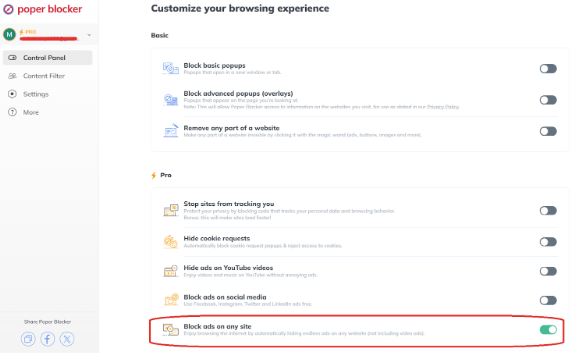
This feature works quietly in the background once activated, hiding any advertisement that may appear whilst browsing through any website visited. This includes stopping pop-up ads, those annoying banner adverts, or sidebars that clutter your screen when all you want is just to concentrate on what you are reading or watching. It is worth noting however that while this capability will be able to get rid of most types of ads, it does not block video ads.
Ad Blocking on YouTube
For many people, YouTube is a daily destination for entertainment, learning and relaxation. In such situations though, unskippable ads and frequent interruptions can really spoil the mood as well as dilute the content being viewed or listened to some extent.
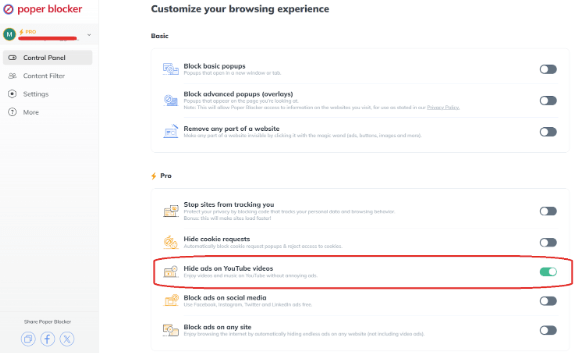
Poper Blocker has provided relief for this by introducing “Hide ads on YouTube videos”. By turning it on while using YouTube, people can now watch videos and listen to music without being bothered by advertisements hence making their experience more enhanced.
Read More: How to Block YouTube Ads on Chrome
Ad Blocking on Social Media
On social media platforms targeted advertising often results in sponsored posts clogging up people’s feeds. “Block ads on social media” offered by Poper Blocker removes advertisements from Facebook, Instagram, Twitter and LinkedIn, among other platforms thus cleaning your experience in these areas up again.
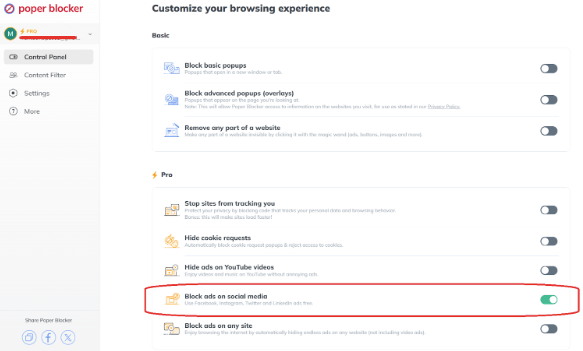
For example; what if instead of seeing unwanted ads, we only saw content from our friends and family’s pages that we actually care about?
Simplicity and efficiency are what define Poper blocker which provides a direct way of improving one’s internet experience. By addressing the primary sources of ad frustration, Poper Blocker helps users reclaim control over their online environment, making browsing a pleasure rather than a chore.
Read More:
Don’t let ads ruin your day. Get Poper Blocker today!
Take a stand for a cleaner, more enjoyable online experience
It could have been expected that the internet, having a massive number of resources and an infinite amount of information, would be a place where people can have ease while discovering new things rather than get frustrated or interrupted. However, for many users, this has become a constant battle to fight off ads that crowd their screens and disrupt the flow of information. Poper Blocker is a formidable companion in this fight against ad overload, as it offers a seamless solution to the problem.
When you add Poper Blocker to your browser, you do not just block unwanted ads; you are taking a stand for a cleaner and more enjoyable online experience. It is about regaining control over what you see and when you see it, in order to ensure that your time on the internet is spent as desired. It’s not just likely but with Poper Blocker, it’s within reach: an ad-free online browsing experience. No more too-many-ads frustration—just smooth uninterrupted browsing!
FAQs
What makes an ad effective instead of annoying?
The right advertising strikes a balance between being seen without interrupting the user’s activities on the internet. This is based on personalization; user preference-oriented ads that consider their browsing habits are more likely to be accepted. Time and context are also important factors—ads that appear in time and in sync with what users are doing may improve rather than worsen user experience.
How do ad blockers affect the economics of the internet?
While there are benefits of using an ad blocker, they have a dual role to play as far as the internet’s economic model is concerned. On one side, they pose a challenge to the conventional ad-supported model used by many websites, and this means less revenue for them because content creators and service providers rely on advertising. On another hand, such an application forces marketers and advertisers to invent new ways to get through to people that will not disturb them so much or distract their attention from what they are doing.
Can websites tell if I use ad blockers?
Yes, many sites can detect when someone has installed an ad blocker. There may be some sites asking you to turn it off before you view their content while others can offer a subscription fee for either ad-light or no ads at all. Consequently, living in an advertisement-free online environment remains under discussion between digital natives who prefer cleaner browsers and publishers aiming at sustainable earning sources.
Can using ad blockers lead to ethical considerations?
This raises ethical questions about user experience versus content monetization. However, while users are entitled to clean web browsing without interruptions, content creators also deserve monetary value for their work. The moral consideration lies in striking a balance that respects both parties’ wishes which would facilitate a transition towards unobtrusive advertisements supporting free content while maintaining user comfort.
How do advertisers adjust to increased usage of ad blockers?
Advertisers are increasingly using more advanced strategies in order to engage users amidst the increasing use of ad-blockers. This involves developing more relevant, engaging content that improves the user’s experience, incorporating native advertising and sponsorship into the platform’s content, as well as monetizing through sponsored ads or subscriptions. The objective is to create messages that resonate with the audience rather than lecturing them with intrusive ad strategies; aiming at genuine interest and interaction.
Did you notice that there are too many ads online? They are everywhere, bombarding users with unwanted distractions. It’s estimated that digital advertising spending worldwide could reach $870.85 billion by 2027. This rising number highlights the alarming growth of online ads, leading many to seek a solution.
What is Ad Blocking?
Ad blocking is a technological intervention made to improve the user’s experience by removing advertisements from web pages. This process includes identifying and stopping ad content from loading, hence providing a cleaner and more streamlined browsing environment. In other words, it aims to block distractions which are often in the form of pop-up ads, banner advertisements, or video commercials interrupting and slowing down web navigation.
What is an Ad Blocker?
So what do ad blockers do? These tools usually come as browser extensions or standalone apps, scanning web pages for elements, such as ads, and blocking them from loading. Ad blockers are built with complex algorithms that remove adverts based on user-defined filters, which ensures uninterrupted content browsing.
Their rise can be linked to people’s desire to avoid cluttered websites. Users want their visual field back and they want to minimize the mental energy consumed by irrelevant advertisements that are often imposed on them. These tools eliminate these distractions, thus making it easier for users to concentrate on what matters more while browsing, making the content smooth-flowing without any frequent pop-ups, banners and video ads vying for attention.
Is Ad Blocking Safe?
Ad blocking has gained in popularity as more people desire a neat and secure browsing experience. Whether these tools are safe enough or they are as effective, remains the question we should ask ourselves. It is apparent that ad blockers bring about multiple benefits not only to users but also to online security.
Minimizing Malicious Ads
Primarily, malicious ads risk gets minimized with the help of ad blockers. Malware is often embedded within advertisements by cybercriminals through “malvertising.” Such advertisements may look like real ones. It can automatically download malware on your device when you click on it or even sometimes without any interaction at all.
Enhanced Privacy Protection
Furthermore, enhanced privacy protection is achieved through the use of ad blockers. Many ads track what you do online taking into account browsing habits, preferences and even places visited amongst others. This data is then used for personalized advertisements, a practice whose privacy implications are profound.
Lessens Phishing Risks
There is also a safety aspect related to the decrease in phishing risks due to ad-blockers. Phishing ads resemble genuine websites or services but aim to steal sensitive details such as log-ins or financial credentials from unsuspecting users.
Improves Browsing Experience
Ad blockers play a major part in improving overall browsing performance, which indirectly contributes to safety. Ads, which are resource-heavy, especially can slow down browsers and cause system instability in general terms.
More Focused and Less Stressful Online
Using ad blockers can help to create a more focused and less stressful experience while online. Ads overwhelm people due to their innumerable presence leading to distractions and annoyance. This state of distraction might make users more susceptible to clicking on harmful ads inadvertently.
Pros and Cons of Ad Blocking
Ad-blocking technology has revolutionized internet usage by providing benefits and disadvantages. For one to make a rational choice on whether to use an ad blocker, it is important to understand its pros and cons.
Pros
Enhanced Browsing Speed
Ads consume bandwidth and processor resources, thus slowing down the load time of web pages. Blocking them leads to faster browsing speeds when ads are eliminated through ad blockers, for a smooth navigation experience as well as efficiency of online activities. This is particularly useful for people who have slow internet connections or multitask over the internet.
Improved Privacy
Many advertisements track user behavior over websites in order to create targeted ads that can be displayed to them. Ad blockers prevent these tracking cookies from running thereby safeguarding user privacy. Thus, less information is collected about an individual by advertisers because there is limited such data available and this guarantees his anonymity on the Internet.
Reduced Data Usage
Every kilobyte counts when one has a limited data plan. Ads, especially videos or high-resolution images can consume data allowances quickly. By blocking ads that are responsible for large file downloads, blockers may save users from being charged for exceeding their limits.
Better Battery Life
Loading and playing advertisements drains out battery life, most especially on mobile devices. Users can make use of ad-blocking tools to extend their device’s battery life so much so that they are ideal for those who need to use devices all day long.
Focus on Content
Ads tend to distract users from content they actually want to see. By blocking ads, it creates a clean space where only relevant information can be accessed without any interruption at all.
Cons
Impact on Free Content
Many websites depend on advertisement revenues to keep their content free of charge. When users use ad-blocking software, they may inadvertently kill off the revenue sources supporting these sites. This can lead to less content being freely accessible while paywalls might become commonplace for others.
Website Functionality Issues
Some websites employ ad-blocking detection mechanisms to block access to content once they detect an ad-blocker. Users are therefore not able to visit specific sites or use some functionalities unless they disable their ad-blockers.
Ethical Considerations
The use of ad blockers raises ethical questions about the relationship between consumers and content creators. While blocking intrusive ads enhances the user experience, it also deprives content creators of revenue. This dilemma forces users to consider the broader implications of their choice to block ads.
Block Ads with Poper Blocker
Poper Blocker is a top pop-up blocking solution where people can seek respite from the countless online advertisements. This browser extension, which works with Chrome and Edge, has been designed to give you a more satisfying browsing experience by eliminating unwanted ads. Poper Blocker’s features are designed to fit different ad-blocking needs of users so as to provide them with an advertising-free internet journey that is cleaner, faster, and fun.
It does not mean that the strength of this extension lies in removing visual clutter only; it is rather about facilitating seamless interaction with the web. Poper Blocker intelligently identifies and blocks an extensive range of adverts by stopping pop-up ads, video ads, and even the less conspicuous sponsored posts on social networking platforms.
To fully optimize Poper Blocker, follow these steps:
1. Installation
Start by adding Poper Blocker to your browser. Visit the Chrome Web Store or Microsoft Edge Add-ons page, type in Poper Blocker in the search bar then click ‘Add to Chrome’ or ‘Get’ for Edge. The extension will integrate itself into your browser automatically.
2. Activation
Once installed find the Poper Blocker icon at the right-hand corner on top of your browser, click it and this will open up its control panel.
3. Customize Your Experience
Within this control panel, there are options for customizing your own ad-blocking preferences:
Hide ads on YouTube videos: By turning on this feature you can watch YouTube videos without any advert interruption which improves the viewing experience.
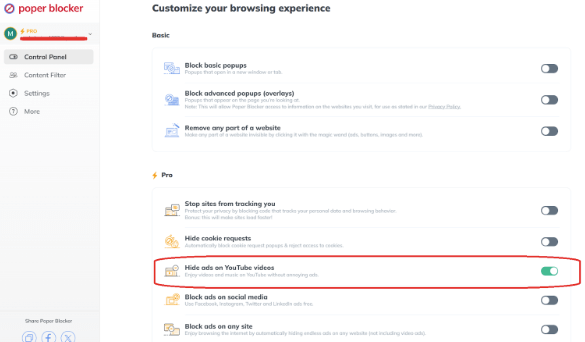
Block ads on social media: If enabled, this option allows you to browse Facebook, Instagram, Twitter, or LinkedIn without seeing sponsored content.
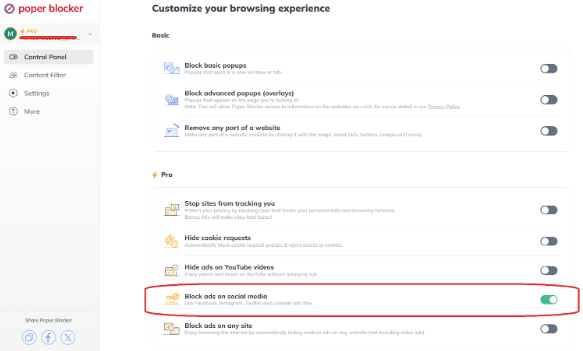
Block ads on any site: By enabling this feature you will be able to navigate through the entire internet while facing minimal distractions – making all (excluding video) ads disappear from the websites you visit automatically.
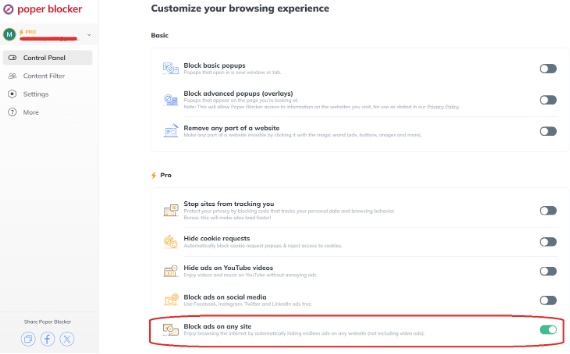
By adhering to these steps, you gain an effective tool against online advertisements. Poper Blocker’s user-friendly interface and customizable settings make it a perfect fit for those who wish to feel in charge of their online experience again. Be it your favorite YouTube channel, social media, or any other website you are researching, Poper Blocker keeps the focus uninterrupted by ads.
A Cleaner Web on the Horizon
The development of ad-blockers like Poper Blocker signifies a major transformation in the way we experience the internet. We repossess our online space through tools that make it a place for concentration, productivity, and fun. Blocking ads is a choice that is not just about irritation; it is about creating a browsing environment that centers on content while being free from junk and annoying distractions.
This improved experience is at your fingertips with Poper Blocker, available for Chrome and Edge users. You can customize your ad-blocking settings to enjoy all that the worldwide web has to offer you without compromising between supporting your favorite sites and having an uncluttered internet surfing session and keeping yourself away from digital noise.
FAQs
Can ad blockers protect against all types of ads?
An ad blocker stops you from coming across various types of online ads such as pop-ups, banners, and video ads that will make your browsing experience less cluttered and more focused. Nevertheless, some advertising, especially those that are embedded in content or dynamically generated, are not always blocked. Advertisers keep changing their tactics to outsmart the ad blockers so while they actually block most of them, there is no guarantee that they can catch every single one.
Do ad blockers affect website analytics?
Yes, it is true that ad blockers can have an impact on how website traffic and user behavior are tracked and analyzed. Many ad blockers prevent the execution of tracking scripts, which record data on page views, and session duration, among other visitor interactions. That means analytics platforms might not capture everything, thus interpreting information only partially and sometimes, distorting this essential data for purposes of making informed choices by site owners and marketers.
Are there ethical ways to use ad blockers?
It doesn’t have to be a matter of either using an all-or-nothing approach with regard to employing ad-blockers. Many users install them to get a better browsing experience but at the same time, acknowledge the importance of compensating creators and publishers as well. This entails a principled outlook in which you select certain websites or content providers who are whitelisted whereupon their advertisements are shown unlike blocking them entirely. In this manner, one gets the advantage of having an ad blocker while still helping websites generate revenue.
Can I decide what ads I don’t want to be displayed?
You’ll find this flexibility feature present in several ad blockers including Poper Blocker. You’ll be able to adjust your choices on what advertising materials you choose not to see at all times. For instance, you can either go for universal blocking with respect to all ads or use customized settings that allow certain sites or content categories to continue showing adverts. By doing this, you are able to browse according to your preferences and needs.
Will ad blocking slow my browser down?
No. In fact, one of the benefits of using an ad blocker is that it usually results in faster page load times and a more responsive browsing experience. Ads like media-rich displays or those with heavy scripts can cause serious delays in loading pages and bringing them up on screen. Blocking these ads reduces the amount of data that has to be downloaded by your browser making it more efficient.
Poper Blocker: Your solution to block unwanted ads. Get it today!
Pop-up ads are like uninvited guests at a party. They just pop up when you least expect them and demand your attention. From the sudden burst of a sale ad when you’re deep into reading an article to a subscription plea that blocks your view, pop-ups can range from mildly annoying to downright disruptive.
Did you know that pop-ups convert better on mobile than they do on desktop? This is based on a study made by Drip, highlighting that these annoying online visual elements are likely to stay. But why do they exist in such variety, and more importantly, how can you reclaim your browsing experience?
Why are there so many types of pop-ups?
The internet’s vast expanse is a cut-throat marketplace where attention rules. Websites and advertisers are always on the move, leading to the proliferation of different types of pop-ups that attract and engage users. Each kind of pop-up serves a specific purpose:
- To inform
- To persuade
- To engage in ways that content cannot
Pop-up ads differ because of the need to address diverse user behaviors and preferences. For example, some people may prefer more subtle tactics, such as scroll-triggered pop-ups which show up after users have shown an interest in content. Others, however, might need direct approaches like entry pop-up types that present a compelling offer or piece of information right from the start.
In addition to this, there has been an evolution in pop-up technology, which now allows for more sophisticated targeting and personalization. Thus, pop-ups can be contextualized for the user journey within a site making them less intrusive but far more relevant than others before them..
Different types of pop-up ads
Different forms of pop-up ads can be found across the internet, each with its own unique way of capturing attention, communicating information, or prompting action:
Click Pop-Ups
Click pop-ups are probably the simplest types of pop-ups. They appear when a user interacts with a specific element on a webpage, such as:
- A link
- An image
- A button
An action prompts the pop-up window, which may give more information about something, present a special offer, or ask for email subscriptions. Click pop-ups are not very annoying because they come up only after users have interacted with them and result in a better user experience.
Entry Pop-Ups
The moment users land on a webpage, entry pop-ups show up immediately after this happens. Quite often, it is used to immediately bring attention to special announcements, subscription sign-ups, or welcome discounts.
While they do well at grabbing immediate attention, their timing could be crucial coming too soon and they might overwhelm or irritate the visitor, which will eventually increase bounce rates.
Exit Pop-Ups
These pop-ups are made specifically to catch people who are about to exit sites. The movement of the mouse pointers helps these messages detect that someone wants to close a tab or leave it totally.
Last-minute deals reminding clients what’s in their shopping cart and feedback proposals usually characterize these pop-ups. They serve as one last chance for engagement by providing some value that might make a user think twice before leaving.
Overlays
Also called modal or lightbox pop-ups, these specific types block contents on-page, dimming out the backdrop but without opening in new tabs or windows. This might be for:
- Newsletter signups
- Special offers
- Important notifications
Overlays are particularly effective because they allow users to read the message content while still being able to stay on the page with less intrusive interactions.
Pop-Under Ads
On the other hand, pop-under ads are a form of more clandestine pop-up adverts. They open beneath the active browser window and remain hidden until the user shuts their present window. This might appear less irritating at that time, but multiple pop-under ads discovered after browsing can be frustrating for users.
Pop-under ads are often used by marketers to make an impression on viewers, hoping they will be curious and engage with the content later.
Timed Pop-Ups
Timed pop-ups are displayed after a certain amount of time has been spent by a user on a webpage. The idea behind it is to give the user enough time to interact with the content before displaying them with a pop-up.
This kind of pop-up is often employed to give more detailed information about what a person is already looking at like in-depth guides, extended trials, or exclusive content among others making them more related and potentially welcome.
Scroll Pop-Ups
Scroll pop-ups are those that appear when you move down on website pages. For instance, long-form contents that are being scrolled through may display these for specific points corresponding to the level of interest shown by readers.
Scroll pop-ups could involve features like having similar articles, subscription forms, etc. Consequently, this aims at capitalizing on demonstrated interest from consumers who have been scrolling through such materials.
Hate pop-ups? Use Poper Blocker
There is nothing worse than having to click through web pages cluttered with unwanted pop-ups. Of course, these interruptions have always been one of the biggest distractions on the internet. Poper Blocker comes in as a watchdog for your browsing peace. Available for Chrome and Edge users, this powerful browser extension helps fend off pop-ups which are so common on the web.
This tool differs from traditional pop-up blockers that may only aim at ads opening in new windows or tabs by targeting not just basic pop-ups but also overlays that come up directly on the page you are viewing so you can have a cleaner and more focused browsing experience.
For those ready to embrace a world wide web free of pop-ups, installing Poper Blocker is easy. Firstly, open the Google Chrome Web Store or Microsoft Edge Add-ons page then search for Poper Blocker. Then, press “Add To Chrome” or “Get” on edge and follow the instructions that come next before finally adding it to your browser settings.
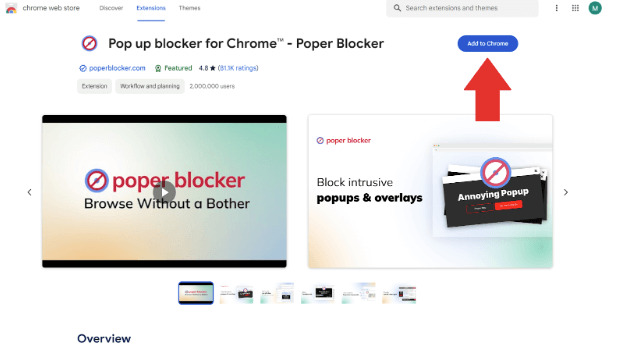
After installation, the Poper Blocker icon will appear on your browser’s upper right corner serving you as your control center against all the unwanted intrusions.

To change your protection settings, click on the Poper Blocker icon. The “Block basic popups” should be activated because it will prevent all those annoying ads that open in new windows or tabs, while enabled with “Block advanced popup (overlay)” which also stops these irritating promotional banners from appearing directly onto any webpage you’re currently visiting.
With these adjustments made according to your taste, you will go online more freely knowing that Poper Blockers has ensured there are no disturbances when engaging in any activity done online.
A World Without Pop-Ups
Think of a situation where you can concentrate on what you have chosen and minimize or entirely remove interruptions, as well as other factors that hinder your smooth browsing experience. This is not wishful thinking; this is attainable with the right tools at your disposal.
By employing a browser extension or add-on like Poper Blocker, you’re not just blocking unwanted distractions; you’re reclaiming your online space, making it yours once again. You only visit the internet for certain reasons, and this system has been created to ensure that they are met fully. Step into an online environment more controlled by Poper Blocker where you create rules for your digital self.
Block intrusive pop-ups effortlessly with Poper Blocker. Get it today!
FAQs
Why do some pop-ups still get through ad blockers?
Ad blockers are in a constant cat-and-mouse game with ad creators. Some pop-ups slip through because they’re crafted using advanced scripts that mimic non-ad content or are embedded directly within the site’s HTML, making them harder for blockers to identify without also blocking legitimate website functionality. Additionally, ad creators frequently update their methods to circumvent the latest ad-blocking technologies, leading to a perpetual cycle of updates from both sides.
Can pop-ups be dangerous?
Yes, absolutely. While many pop-ups are benign, offering promotions or subscriptions, others are more sinister. These malicious pop-ups can redirect you to harmful websites or even initiate downloads of malware or spyware onto your device without your consent. This is why it’s crucial to be cautious with pop-ups, especially those that appear suspicious or out of context with the website’s content.
Why do websites use annoying pop-ups if they know users dislike them?
Despite their notoriety, pop-ups remain a highly effective tool for websites to engage visitors. They capture immediate attention and can significantly increase conversion rates, whether for newsletter sign-ups, sales promotions, or social media follows. The key for websites is finding a balance that achieves their goals without alienating their audience. This often involves targeting pop-ups to offer real value to the visitor or using them sparingly to avoid overwhelming users.
Are all pop-ups bad?
Not at all. While pop-ups have a reputation for being intrusive, many are designed with the user’s interest in mind. For instance, pop-ups can alert you to discounts you wouldn’t want to miss or offer valuable resources like e-books or guides in exchange for your email. When used thoughtfully, pop-ups can enhance your online experience rather than detract from it.
How can I differentiate between a safe pop-up and a potentially harmful one?
Identifying a safe pop-up versus a harmful one requires vigilance. Safe pop-ups typically come from reputable sources and offer clear, relevant information or benefits without pressuring you for immediate action. Be wary of pop-ups that make extravagant promises, contain spelling or grammatical errors, ask for personal or financial information, or use scare tactics to provoke an emotional response. When in doubt, it’s safer to close the pop-up and visit the official website directly for verification.
Are you tired of endless ads cluttering your news reading experience? Well, these online advertisements won’t go away anytime soon. Integral Ad Science’s data, as reported by eMarketer, shows that 35% of American consumers are most likely to be influenced by ads on news sites suggesting that these ads will remain a staple in the foreseeable future.
But, can you imagine that there is a workable way to stop ads appearing on news sites giving you a cleaner and uninterrupted browsing experience? Find out below.
Why Do News Sites Use Ads?
All over the Internet, ads are used as a financial crutch to keep these news sites going. Here is a more detailed look at why they’re so common:
Revenue Generation
Hey, money doesn’t just grow on trees you know? News websites use them because they generate revenue. Pumping out good journalism is not cheap and comes with a bunch of expenses that include salaries for reporters and editors and buying new fancy technology. These all add up quickly and without the help of ads, there’s no way news organizations would be able to continue their operations.
Audience Targeting
Advertisers are willing to pay premium prices for some ad space on news websites because it allows them to reach specific audiences. Different news outlets attract different groups of people who may have specific interests or come from certain demographics. This makes for a perfect storm when advertisers want to promote their products or services to a particular group of people.
Content Promotion
Look beyond just direct revenue. There are other ways ads can help these news sites! So let’s say an advertisement pops up and you don’t click on it, but instead start scrolling through an article about how to get rid of fruit flies in your home. Well, now the advertiser gets access to offer you something else that might interest you by appearing the next time you’re surfing around the web. This system offers value-added content which opens additional revenue channels for these sites.
How to Remove Ads from News Articles Using Poper Blocker
Poper Blocker is a user-friendly browser extension (Available for Chrome and Microsoft Edge) that aims to improve your online experience by removing unwanted ads. Excelling in its ability to block distractions, especially on news sites, this is a valuable tool that can help you for a more focused browsing session.
Here’s a detailed guide on how to use it:
Step 1: Install Poper Blocker
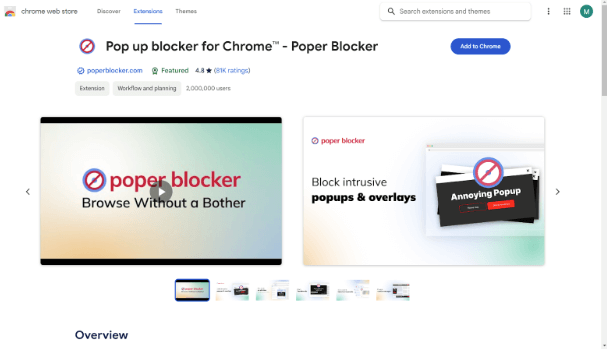
Get Poper Blocker for your browser. Go to the official website or extension marketplace of your browser, find Poper Blocker, and click “Add” or “Install.” There is no need to worry about any technicalities here; installation is direct and doesn’t require any expertise. Once installed, it automatically becomes part of your browser and starts blocking ads without you having to do anything.
Step 2: Activate the Extension
After the installation is complete, find the Poper Blocker icon in the upper right corner of your browser. Clicking on this icon will open the extension’s dashboard, which you can customize as you like for an ad-blocking experience that suits you best. But don’t worry if you prefer not to tinker with settings, most users find that the default one strikes a good balance between ad blockage and site usability.
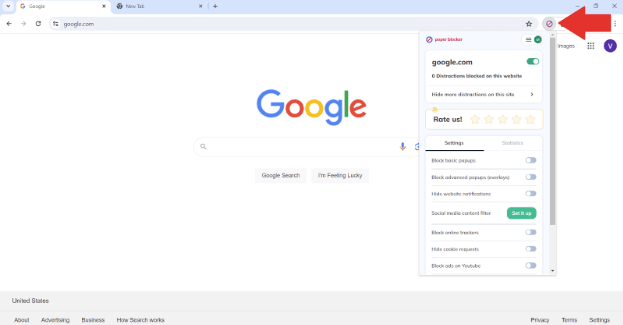
Step 3: Stop Ads on Any Page
With Poper Blocker up and running, head over to any news site you want. The extension works in the background by stopping pop-up ads, banners, and all other types of ads that could distract you from reading. For those who like things just so, there’s also an option that allows them to manually control how much they want blocked by clicking on the Poper Blocker icon and choosing “Block ads on any site.” With this setting activated, enjoying news free from constant ad interruptions boosts focus and content enjoyment.
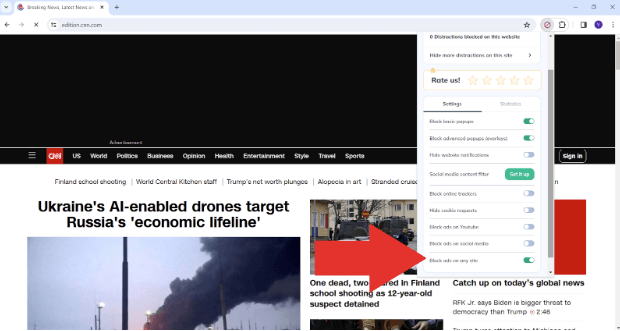
Poper Blocker operates seamlessly in order not to get in your way as you browse websites filled with cluttering ads. It runs quietly in the background, ensuring that your attention stays on what you’re interested in and off annoying promotional stuff. By following these simple steps, you can make visiting news sites a more pleasant experience that leads to increased productivity, all thanks to Poper Blocker’s efficient and effective performance.
A Cleaner Browsing Horizon
News sites are important. There’s no doubt about that. With the internet being as big as it is, you need an easy way to stay up-to-date, and that’s what news platforms provide. However, many people end up battling with ads when they’re just trying to read a story or two. This can be extremely frustrating and quickly turn into a quest for knowledge into an exhausting war against distractions.
This is where ad blockers come in handy. And it’s particularly true of Poper Blocker. By using this tool to upgrade your browser, you can start taking back control over your online environment, ridding it of all unnecessary digital clutter and focusing solely on the things that matter most — the words.
But convenience doesn’t even begin to scratch the surface with ad blocker benefits. They also prevent ad tracking (and keep them from violating your privacy), help pages load faster and save bandwidth too (which will be music to your ears if you’ve ever waited around for a slow-loading page). The bottom line? Using Poper Blocker might sound like a small step now, but in the grand scheme of things, blocking ads on news sites could lead us to a worldwide web with more focused internet usage — one that is free from constant annoyance.
FAQs
What are the main types of online advertisements?
Types of online ads come in a lot of different forms. Each one intends to captivate viewers in its own way. Banners, for instance, are graphic displays at the top or sides of web pages. They’re some of the most common ads you’ll come across. Videos that play before your video have become popular too because they’re easy to engage with. Pop-ups open new tabs or browser windows to make sure you notice them, but they can be annoyingly intrusive; just like sponsored content which looks like regular articles but subtly promotes products.
Are there any types of ads that ad blockers don’t block?
Ad blockers are extremely helpful and do a great job at annihilating almost all forms of advertisements: spam popups, banners, overlays, and many kinds of videos. However, there are still some that might sneak through their defenses. Some sneaky ones can blend into normal content like native ads or sponsored content designed to look like typical articles.
Will ad blockers mess up my browsing experience?
Nope! You don’t have anything to worry about when it comes to your website’s functionality being damaged by an ad blocker. In fact, there are many benefits of using an ad blocker. They target and remove those annoying ads without touching anything else on the website itself. But be careful though, as websites start catching onto this technology more and more each day, some will demand that you disable your ad blocker if you want full access to their stuff.
Is using an ad blocker illegal?
No way! Using an ad blocker is completely within your rights as a consumer on the internet; you get to choose what kind of content gets displayed on your screen after all. It’s worth noting though that websites do have their own set of policies in place as well; some request visitors disable their ad-blockers if they want to continue using their site.
Can websites tell if I’m using an ad blocker?
Absolutely! Many sites have the power to detect if you’re using an ad blocker. They’ve got a script that will automatically check for one as soon as you land on their page. If they find out you’re using it, they’ll probably ask that you disable it so you can still use their content or offer some kind of ad-free version through a subscription. Websites want to make money off ads, and when those get blocked, they won’t hesitate to push back against users who refuse to support their operations in other ways.
Get Poper Blocker now and block annoying news site ads easily
