
 Chrome Web Extension
 Edge Web Extension
 Android App
 iOS App


Have you ever caught yourself shutting down a pop-up ad like it’s nobody’s business, without even a quick peek? Turns out, a lot of us do that. It’s pretty normal to find pop-ups annoying, but here’s the kicker: they’re still a big deal in the marketing scene. Why? Because when they’re done the right way, they can be surprisingly effective. They can make us click on things, sign up for stuff, or even buy things we weren’t planning to. It’s like a sneaky little trick that sometimes works.
So, what’s the deal with pop-ups? They’ve got this sneaky way of grabbing our attention, even when we’re actually trying to ignore them. If they pop up at just the right moment and don’t look too shabby, we might just do what they want, like join an email list or buy something. But if they’re annoying or show up at the wrong time, they can really tick us off and make us want to leave the website faster than you can say “unsubscribe.” It’s a real tightrope walk.
Now, let’s talk about the cool brain stuff that happens when we see a pop-up. It’s like a little tug-of-war in our heads between what we want to do and what the ad is pushing for. This makes pop-ups super fascinating for people trying to figure out how we use websites. So, keep on reading to get the lowdown on pop-up psychology and learn how to use them without making people go nuts. We’re going to show you the way to use pop-ups that are helpful, not just another thing that makes you want to pull your hair out.
What are the psychological effects of pop-up ads?
Effect 1: The rush of urgency and FOMO
You know those pesky spam pop-ups that make you feel like you need to do something right away? That’s because they’re crafted to stir up a sense of urgency. They throw a little fear of missing out (FOMO) into the mix with things like countdown timers and exclusive deals that are only available for a short time. This can get you to make decisions faster than you normally would.
Effect 2: The distraction and frustration factor
On the flip side, pop-ups can be super annoying when they pop up at the wrong time. Imagine you’re just trying to read an article, and boom, an ad blocks your view. It can be pretty jarring, right? If they’re popping up all the time, it might just make you want to leave the website. And let’s be honest, nobody likes a site that’s more interruptive than a toddler asking for snacks.
Effect 3: The art of color psychology
Colors are surprisingly powerful in advertising. Research reveals that when we look at something, it only takes us about 90 seconds to form an opinion. And get this, a whopping 90% of that first impression is all thanks to the colors we see. It’s like colors are whispering sweet nothings into our brains, and we’re all just nodding along.
For example, a pop-up in red might make you feel like you need to act fast because it’s bold and demands attention. But blue can make you feel like you can trust the offer because it’s calming. The thing is, if the colors are used in a way that’s too intense or just doesn’t make sense, it can be confusing or even annoying.
Effect 4: Personalization: a double-edged sword
When pop-ups are tailored to what you’ve been looking at, it can feel like the website is speaking directly to you. Like, “Hey, you looked at that shirt for a while, want a deal?” It can be pretty persuasive and make you more likely to buy. But if it’s too personal or shows up too often, it might start to feel like Big Brother is watching, which is definitely not a good look for a brand.
Effect 5: The balancing act of trust
Some pop-ups ask for your feedback or want you to sign up for something. This can make you feel like the company cares about what you think, which is nice. But if they’re asking for your input every five seconds, it starts to feel a bit needy. It’s like they’re not giving you any space, and that can make you question how much they really respect your privacy.
Effect 6: The “oh, not another one” effect
If you see pop-ups all the time, you start to tune them out. It’s like when you hear the same song on the radio over and over again, you just don’t pay attention anymore. This is called “pop-up fatigue,” and it’s when users get so used to ignoring them that they don’t even bother looking anymore. Not great for the ads, right?
Effect 7: The brand legitimacy
While pop-ups can be handy for getting people more involved with a website, they can also make a brand seem a bit dodgy. If a website is throwing pop-ups at you like confetti, it can give off a vibe that’s not super professional. It’s like when someone’s trying too hard to be your friend – it can come across as desperate or untrustworthy.
Block Pop-Ups with Poper Blocker
Poper Blocker is a handy Chrome and Microsoft Edge browser extension that’s all about making your time online way more pleasant. It’s like having a superhero for your browser that stops those pesky pop-ups in their tracks.
Pop-up blocker
Tired of those pesky ads that jump out at you when you’re just trying to read an article? Poper Blocker’s popup blocker feature has your back. It can stop pop-up ads that appear when you’re just minding your own business, clicking around the web. So you can keep scrolling without any unwanted surprises.
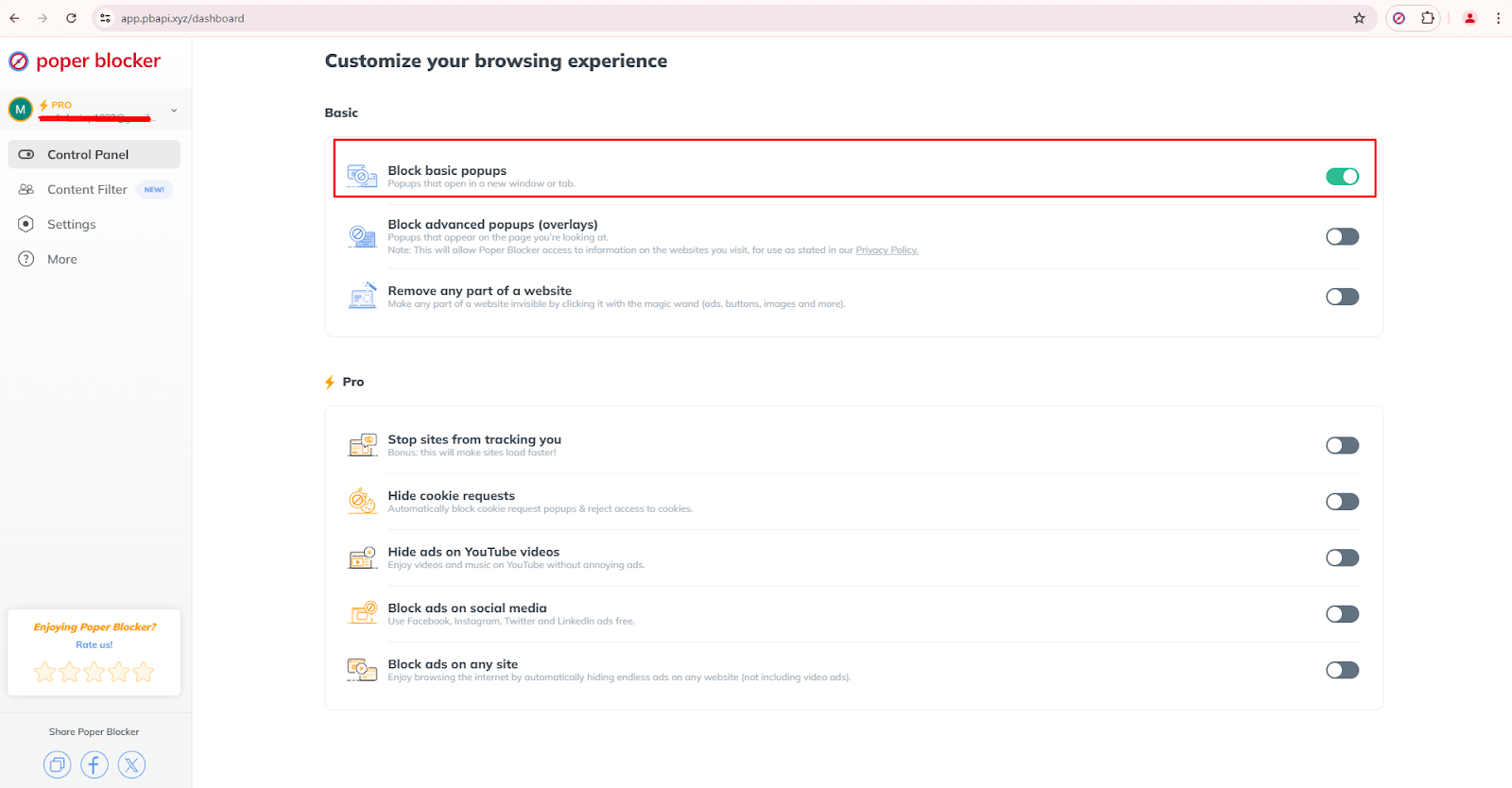
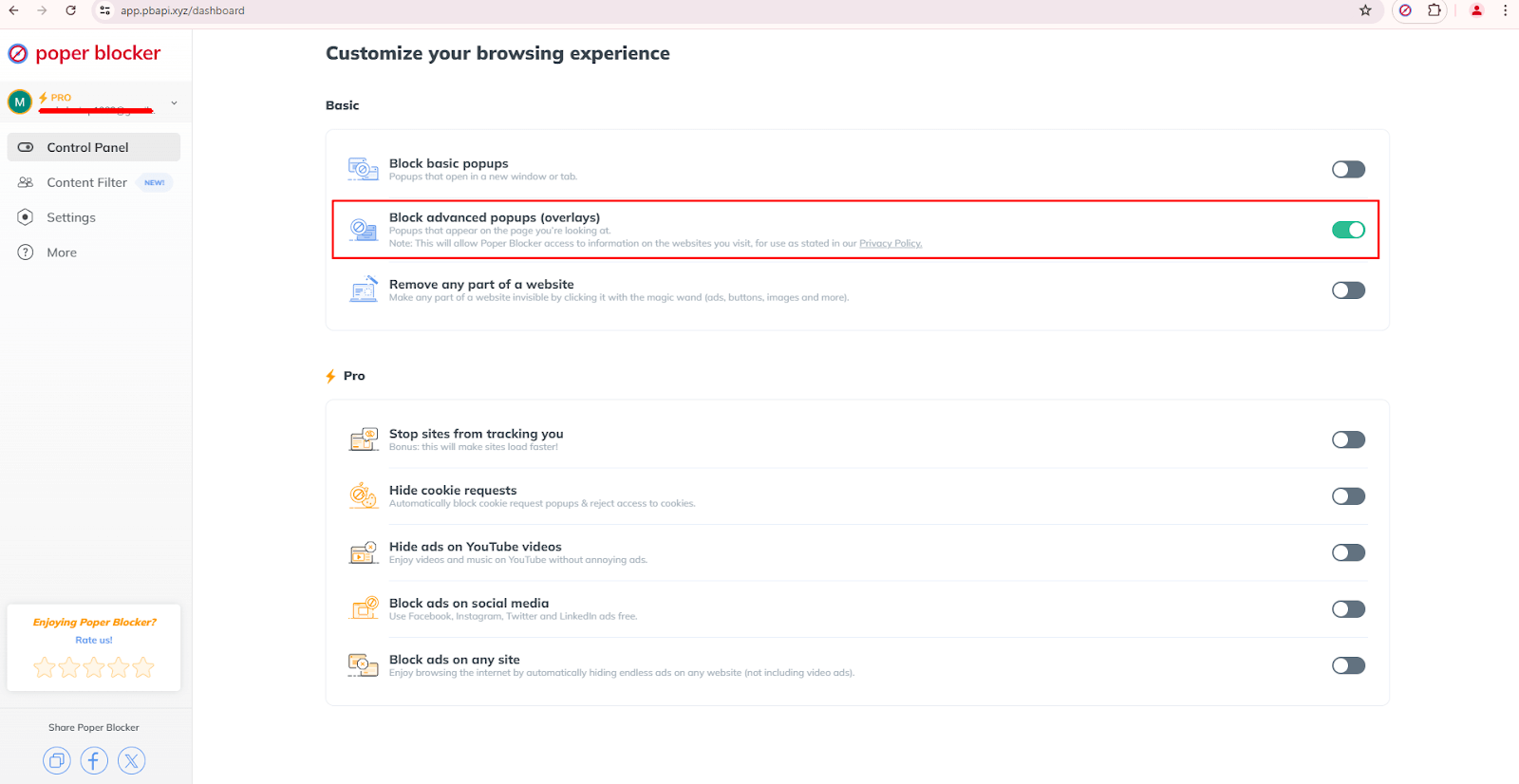
Some ads are like ninjas, sneaking onto your screen and covering everything. These are called pop-up overlays, and they can be a real pain to get rid of. But fear not! Poper Blocker is like a ninja itself, catching these sneaky pop-ups before they can ruin your day. This way, you can actually see the stuff you want to see without any extra hassle.
Whitelist
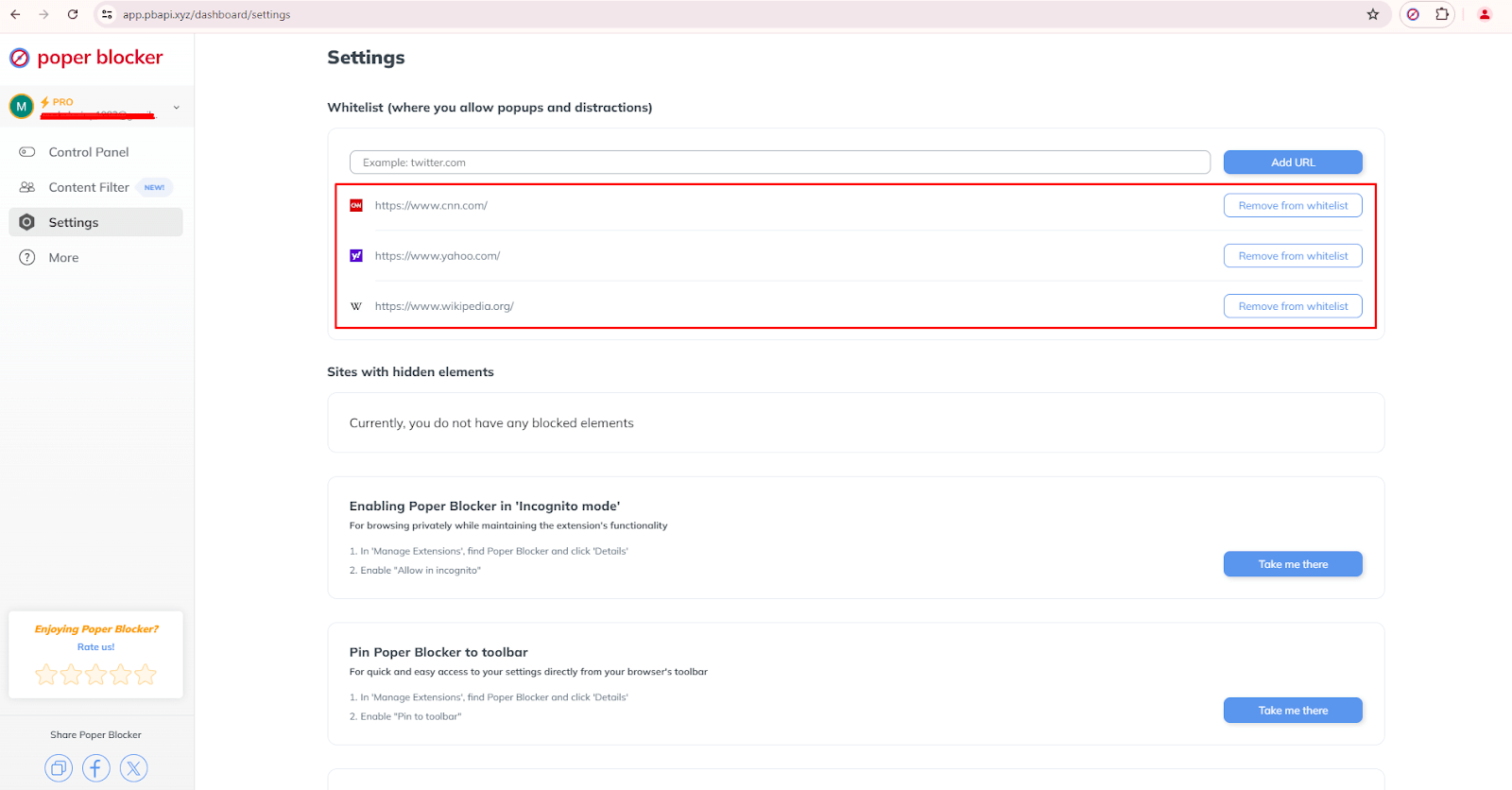
But what if there are some types of pop-up ads you actually need, like from your bank or a favorite site with important updates? No problemo! This browser extension lets you whitelist websites. So, the pop-ups you want can come through while it keeps the riff-raff out. It’s all about giving you the power to decide what pops up on your screen.
It’s time to take control
Pop-up ads, while effective, need to be implemented thoughtfully. Understanding and applying psychological principles can turn a disruptive tool into a potent marketing strategy. However, balance is crucial, and tools like Poper Blocker can give you a seamless browsing experience. So start taking control of your online interaction by using this browser extension and make a difference today.
FAQs
What makes pop-up ads effective despite being annoying?
Pop-up ads are cleverly crafted to catch your eye right away by playing on psychological cues like urgency, showing you that everyone else is doing it, and making things feel personal. This can lead to more clicks, even if they pop up when you least expect them.
Can pop-up ads be beneficial to users on websites?
Yes! When done right, pop-ups can be helpful, like pointing you to a cool newsletter or a deal that won’t last long. They can make your time on the site more productive and enjoyable.
How does color psychology influence pop-up ads?
Color psychology is a big deal! It’s like using different shades to tickle your emotions and make you do stuff. For example, red might make you feel like you need to act fast, while blue makes you trust what you’re seeing. Picking the right colors can really boost how well pop-ups do their job.
What’s the advantage of using Poper Blocker?
Poper Blocker is like your knight in shining armor for the internet. It blocks those pesky pop-ups that interrupt your browsing, but it’s smart enough to let the important ones through. It’s got cool features like blocking layers and a whitelist to keep things running smoothly.
How can feedback pop-ups build trust with users?
Feedback pop-ups are like telling users, “Hey, we care what you think!” When businesses listen to what you have to say and make changes, it shows you that they’re on your side and want to give you a better experience.
From the very first clickable banner ad on the web to today’s highly targeted, sophisticated ad campaigns, the history of online advertising is a very interesting evolution. It started with the very first banner ad on the internet, setting precedence for ads online. Now, there are too many ads, and they have become more complex over the years. Due to the distractions that they cause, technologies like ad-blockers have emerged to protect and improve the user experience. As the web grew, so did the variety and sophistication of web advertising; each phase reflecting a broader technological and social shift. The history of online advertising shows this change, marked by key moments that have thus far shaped the modern advertising landscape we know today.
This increase in ads being used online triggered further development into ad-blocking technologies like pop-up blockers, among other tools, designed to make the user experience smoother. For example, Poper Blocker (Available for Chrome and Edge) is one designed to reduce intrusive types of pop-up ads and make the browsing experience smoother. If we go back to the timeline of internet advertising, we’ll find that these developments were huge. From ad formats to technologies, each of the main milestones online advertising has reached represents a quantum leap toward further engagement, efficiency, and satisfaction of the user.
1970s: the first banner ad
The first banner ad took online advertising by storm on October 27, 1994, when it appeared on HotWired. It was paid for by AT&T at $30,000 for three months in this banner space. Carrying the text, “Have you ever clicked your mouse right here? You will”, this ad was presented in a brightly colored rainbow font, which became incredibly successful. This was exemplary for early internet ad click-through rates at 44%—much higher than today’s rate of about 0.06%. This was the very first online banner ad, marking the stake in the ground for the Internet as a credible medium for advertising. Most importantly, the banner ad proved that users were ready to interact with an ad when it was compelling and relevant.
This can be regarded as a milestone that laid the foundation on which the history of Internet advertising was built. This first internet banner ad ensured a high rate of engagement and sent its message across to businesses and marketers on the myriad possibilities that web advertising unlocked. Although click-through rates would later fall, the continued success of this initial period ensured continuous innovation and experimentation with various formats and targeting strategies. These were early efforts that paved the way for data-driven ad delivery across the sophisticated web today.
1990s: the first pop-up ads
In 1997, Ethan Zuckerman was able to develop the very first code for pop-up ads while he was working on Tripod.com. The way it was done was to display ads such that they remained out of focus of the main content. Effectively, pop-ups were able to establish a route between ad visibility and user content without direct association. This indeed made the ads more visible, but pop-ups soon became notorious for harassing users. As user frustration grew, so did the resolve to block these kinds of interruptive ads. This period in the history of online advertising shows just how delicate the balance is between ad visibility and user satisfaction.
While pop-up ads managed to hold attention at one point, being innovative in their own right, their intrusive nature gave way to a huge backlash from users. Pop-up ads bear very well the example of how something that had its promise once is severely ostracized if it interrupts the user experience too much. This feedback loop helped digital advertising formats constantly evolve to high levels of engagement while ensuring a great user experience. These implement and reject cycles for pop-up ads have helped inform best practices in web advertising toward formats that are as engaging as they are user-friendly.
2000s: social media and YouTube
Then things changed in the 2000s, with the introduction of social media sites. It was in 2006 when Facebook began to launch its targeted ads. YouTube, launched in 2005, also changed the landscape of video advertising. Facebook’s targeted ads used data on demographics and interests, and the launch of YouTube with Google acquiring it in 2006 for $1.65 marked the full throttle of video ads. These platforms allowed the brands to get to their target audience with relevant messages, heavily based on user data availability. The fact that they could run ad messages within the social media experience natively and seamlessly brought a whole new way of reaching users.
Social media has revolutionized all forms of advertising on the internet because of the ability for highly targeted, source-based ad delivery directly into users’ feeds. This more integrated approach stood out sharply against the intrusiveness that characterized earlier pop-up ads and was indicative of a trend toward a more natural-feeling, in-context advertising. For example, brands such as Coca-Cola and Nike have used these venues to construct spectacularly effective campaigns that help bridge their products with target audience segments. Their success has reinforced the fact that highly targeted, contextually relevant ad campaigns really work.
2010s: OpenRTB Protocol and GDPR
In 2010, efficiency in online advertising was boosted by the first form of automated real-time bidding through the OpenRTB protocol. That is what an open bidding standard did in terms of mechanizing the trade of ad impressions between the buying and selling sides. Back in 2018, with growing public concern over data privacy, the European Union introduced the General Data Protection Regulation (GDPR), which requires that advertisers be explicit with users on collecting and processing their data and obtaining express consent. This would ensure more ethical ad practices and help give users more control over their personal data. OpenRTB and GDPR together established a new path of engagement for the advertiser against digital marketing.
The OpenRTB protocol’s ability to steer clear and automate the ad bidding process represented quite a quantum leap in the internet advertising evolution. This technology allowed for much greater granularity in terms of ad targeting and smarter buying of ad space for better engagement rates. On the other side, data privacy under the GDPR reshaped how companies collect and process data, focusing on end-user consent and transparency. Furthermore, the GDPR pushed ethical considerations to the forefront of the agenda for advertisers, hence doing better with companies on how to handle data. The change has actually underscored one shift of strategy in advertising, focusing more on trust and user control.
2020 to present: AI and machine learning
Artificial intelligence (AI) and machine learning technologies have dramatically reshaped online advertising since 2020. Such tools set adjustments in real-time, depending on user behavior, and make ad targeting very personal. AI analyzes any size of data in a fraction of a second, thus improving the relevance and timing of ads. This makes the ads more engaging due to increased efficiency.
For example, AI can deliver specific offers to potential customers at the exact moment they are most likely to make a purchase. On top of keeping users engaged and improvising ad performance, it refines user experience. With the ever-evolving potential of AI, there is room opened for further innovations in sophisticated and more efficient online advertisement strategies.
What’s most important, though, is that artificial intelligence and machine learning only reinforce the industry’s trend toward more ad personalization and efficiency in online advertising. These technologies allowed advertisers to reach such a level of precision and optimization that they might previously have thought unimaginable. In this respect, AI-driven programmatic advertising will empower better segmentation of users, predictive analytics, and real-time bidding—thereby making the ads more relevant and effective.
The future of online advertising
With technology in constant evolution, further transformation awaits the future of online advertising. Third-party cookies, to be phased out by the end of 2024, will bring more emphasis on first-party data collection and therefore change how advertisers reach audiences. New technologies such as blockchain and Web 3.0 technologies are going to reshape ad formats and user interactions. These approaches attempt to push further in security while providing relevant ad experience adjustments to the constantly evolving landscape of privacy regulations. Advertisers have to be ahead of these trends if they want to continue to reach their audiences effectively.
The demise of third-party cookies points toward new ways in which data collection and audience targeting will be done. These transitions further underscore ongoing efforts to address privacy while ensuring the continued effectiveness of ads. The decentralized nature of blockchain technology provides transparent and secure transaction mechanisms that might revolutionize trust in online advertising. On the other side, initiatives on Web 3.0 intend to make ad experiences more intertwined and immersive. Knowing how to stay at the forefront of such trends will be very important; to this end, therefore, for advertisers to keep up, they need to change and innovate at all times.
The journey in online advertising continues
From the first clickable web ad banner in 1994 to AI-powered campaigns of today, online advertising has had a strong journey of relevance and adaptability. Major technological changes and consumer behavior kept reforming this space at every turn so expect to see more types of online ads in the future. Looking ahead, keeping ourselves updated with the trends the industry is taking is quite important in fully exploiting the online advertising arena.
FAQ
How did Facebook’s targeted ads revolutionize online advertising?
In 2006, Facebook introduced targeted advertisements by using users’ demographic and interest data to carve out highly tailored ads. This changed how advertisers hitherto approached audience segmentation and how they went about targeting their advertisements.
What changes has GDPR brought about in online advertising?
Implemented in 2018, the GDPR explicitly required transparency in data collection and user consent, forcefully pushing advertisers toward more ethical behavior. It gave users more control over their data and required more responsible management of that data.
How do AI and machine learning improve ad performance?
AI and machine learning in ad performance mean real-time adjustment against user behavior, going as far as high personalization and contextual relevance. This means better engagement and higher conversion rates.
What is the impact of the phase-out of third-party cookies?
The retirement of third-party cookies in 2024 will further drive advertisers to first-party means of data collection. All of this will mean looking for new strategies for audience targeting and personalization and adapting to changing privacy regulations.
So, pop-ups, right? They’re like that friend who keeps popping up when you’re busy scrolling through memes. They’re everywhere online and let’s be honest, they can be a real pain. But, surprisingly, they can also be super helpful for businesses trying to get noticed. Why? Because they’re basically the online equivalent of waving a giant neon sign in your face, saying “Look at me!” And you know what? Sometimes it works!
These little pesky things can actually boost the number of people doing stuff on websites, like signing up for stuff or buying things. They’re kind of like a secret ninja tactic for grabbing your attention without ruining your whole internet experience. They’re like a little surprise party, but instead of balloons, you get a cool offer.
But let’s talk stats for a sec. The average pop-up conversion rates hover around 3.09% according to BDOW! (formerly Sumo), which isn’t too shabby. But the real rockstars of pop-ups but the best can reach up to 9.28%. That’s like convincing 10 people at a party to do a dance-off with you. Not bad, right?
On the flip side, nearly half of us think pop-ups are more annoying than finding socks that don’t match. So, they’re not exactly everyone’s cup of tea. The trick is to make them just annoying enough to get noticed, but not so much that people want to throw their computers out the window.
It’s a bit of a tug-of-war between making companies happy and keeping us internet-dwellers from going bonkers. They can be super effective, but they’ve got to be used with a bit of finesse. It’s all about that sweet spot between “Oh, cool!” and “Make it stop!”
Why pop-ups are effective, and that’s the reason people hate them
1. They grab the user’s attention
Pop-ups are like those loud, flashy ads that jump out at you when you’re just trying to read something on a website. The good part is, they actually work because they grab your eyeballs and make sure you see what they’re trying to show you, like a big, shiny button you can’t ignore. This is super helpful when a website has some big deal or update they really want you to know about.
But here’s the catch: because they pop up in the middle of the screen and block everything else, they can be a real pain in the neck. It’s like someone keeps tapping you on the shoulder when you’re trying to focus on something. They interrupt what you’re doing and make you deal with them before you can get back to your business. And let’s face it, that’s pretty annoying.
And if they do it all the time, like every two seconds, it’s like that person who always has to be the center of attention. It gets old real quick. Before you know it, you’re clicking the ‘x’ button faster than you can say “leave me alone!” and you might just leave the website entirely. That’s not what they want, right?
So, marketers have to play it smart with pop-ups. They need to find that sweet spot between getting noticed and not driving everyone nuts. Because if they don’t, people might just start avoiding their site like it’s got pop-up cooties. And that’s not a good look for anyone.
2. Increased conversions
Pop-ups are like that friend who’s really good at convincing you to do stuff, but also kind of annoying. They’re effective because they jump right in your face with deals or forms that you can’t ignore. It’s like, “Hey, you want to save some cash?” or “Want to join our cool club?” And studies have shown that these little guys can get up to 9.28% of folks to take action, which is pretty darn good for businesses trying to make a buck or get people to sign up. They’re like the flashy signs that catch your eye in a store, but on the internet.
But here’s the flip side: sometimes, these spam pop-ups can make you feel like you’re being pushed into doing something you’re not really into. It’s like when they throw in a “limited time offer” or “act now” deal that makes you feel like you’re gonna miss out if you don’t click right away. Sure, it might work and you might buy something or sign up, but later on, you might be like, “What did I just do?” That’s not cool because it can make people not trust the brand anymore, and they might go tell their friends about the sneaky pop-ups.
3. Can be used for remarketing
Then there’s the whole stalker-ish vibe with pop-ups for remarketing. It’s like when you look at a pair of shoes online, and then those shoes follow you everywhere you go on the internet. It’s helpful if you actually want the shoes, but if you’re just browsing, it can get super annoying. It’s like the website won’t take no for an answer. And let’s be real, nobody likes to feel like they’re being watched all the time. It can make people feel weird about the brand and maybe even start using ad blockers or bad-mouthing them.
While pop-ups can be great for businesses looking to get more sales or subscriptions, they have to be careful not to go overboard. It’s all about finding that sweet spot between getting people’s attention and not making them want to pull their hair out. You want to keep your customers happy and make them feel like you respect their space. Otherwise, you might just be chasing them away with those pesky pop-ups.
4. They are customizable
Pop-ups are also like that friend who’s super helpful but also a bit annoying. They’re customizable, which is a big deal. This means you can make them look cool and say exactly what you want, so they match your website and don’t feel like a random stranger crashing the party. It’s like when you tailor a message for someone you know; it feels more personal and they’re more likely to pay attention.
But here’s the downside: sometimes, these pop-ups can be like that friend who doesn’t know when to leave. They might not blend in well with what you’re doing on the site, making the whole experience feel messy and all over the place. Plus, if they’re too flashy or show up at the wrong moment, they can be really distracting. Like, you’re in the middle of reading something juicy, and bam! A pop-up interrupts your flow.
And let’s not forget, if they’re too fancy with high-res images or videos, they can take forever to load, especially if you’re on a device that’s not exactly a supercomputer or your internet’s acting up. That’s super annoying and can make you wanna leave the site faster than you can say “pop-up hell.”
Why these same reasons are why people hate pop-ups
You know why a lot of internet users tend to get so annoyed with those pesky pop-ups? It’s because they’re like the sneakiest ads out there. They pop up when you least expect them, right in the middle of your favorite article or video, and they’re really hard to ignore. It’s like having someone who keeps asking you to buy something every time you hang out. The very things that make them good for advertisers, like being in your face and hard to miss, are what tick us off.
They’re designed to get you to do something, like sign up for a newsletter or buy a product, and they follow you around the internet like a shadow, which is called remarketing. This can make people feel like they’re being watched, which is super creepy. And let’s face it, when you’re just trying to read about cute puppies, you don’t want to be bombarded with various types of pop-up ads for shoes you looked at once.
These pop-ups can mess with how we feel about the whole internet ad thing. If we’re always getting annoyed by them, we might start to think all online ads are the worst. It’s like if every time you went to a store, someone jumped out at you from behind a rack trying to sell you something. You’d get pretty tired of shopping, right?
So, businesses need to be smart about how they use pop-ups. Give us a break and don’t make them pop up every two seconds. Make it easy for us to say no, thank you, and move on. And maybe, just maybe, show us some ads that actually matter to us or are at least interesting. That way, we won’t get so mad at the brand and might even give it a chance. It’s all about finding the balance between getting noticed and not driving us crazy.
Block pop-ups with Poper Blocker
If you’re fed up with those pesky pop-ups that keep ruining your online fun, then Poper Blocker has got your back. It’s like your own personal bodyguard for your browser, keeping all those annoying pop-ups, overlays, and ads at bay so you can surf the web in peace. It’s a total game-changer for anyone who wants to enjoy a smoother, less cluttered internet experience.
Pop-up blocker
Poper Blocker’s main superpower is blocking pop-ups. It’s like having a magical shield that can stop pop-up ads on any website you visit. It can also block various kinds of pop up overlays. And the best part? It works like a charm on social media too! To get this awesome feature, all you have to do is download the free extension, available for Chrome and Edge. It’s like giving your internet a much-needed cleanup!
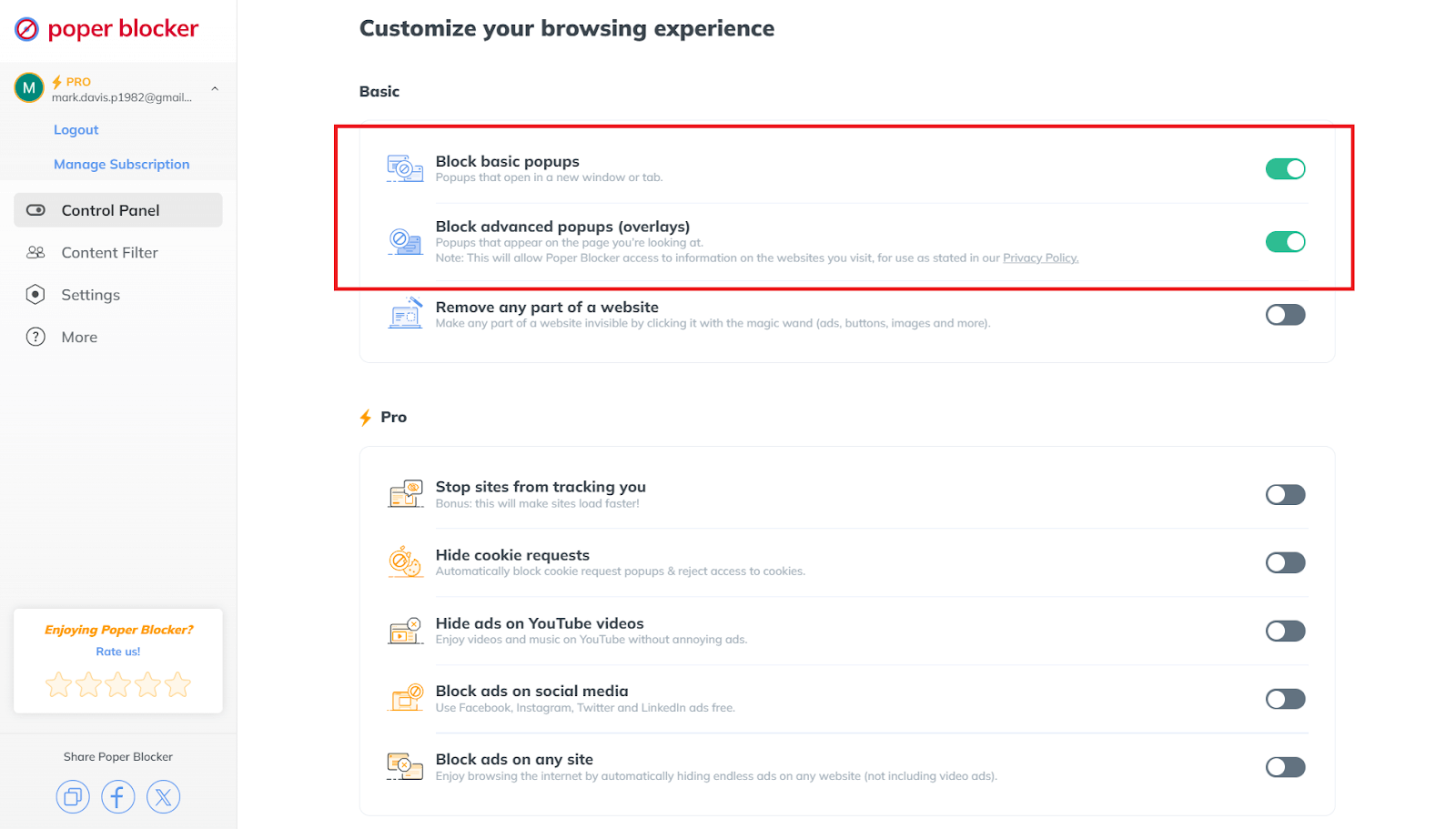
But wait, there’s more! Poper Blocker doesn’t just stop pop-ups, it’s also super smart. It uses clever filter lists to target the most annoying ads and keeps itself updated with the latest tricks the spammers are using. This means you’re protected against all kinds of sneaky stuff like malicious pop-ups that can mess with your computer. So, not only does it save you from frustration, but it also keeps you safe online.
Whitelist
Now, we know that sometimes pop-ups are actually useful, like when you’re on a site that needs them for important messages or interactive stuff. That’s why Poper Blocker has a whitelist websites feature. It lets you pick and choose the websites you trust, so their pop-ups can come through while the rest are blocked. It’s perfect for those educational or cool interactive sites where pop-ups are part of the deal.
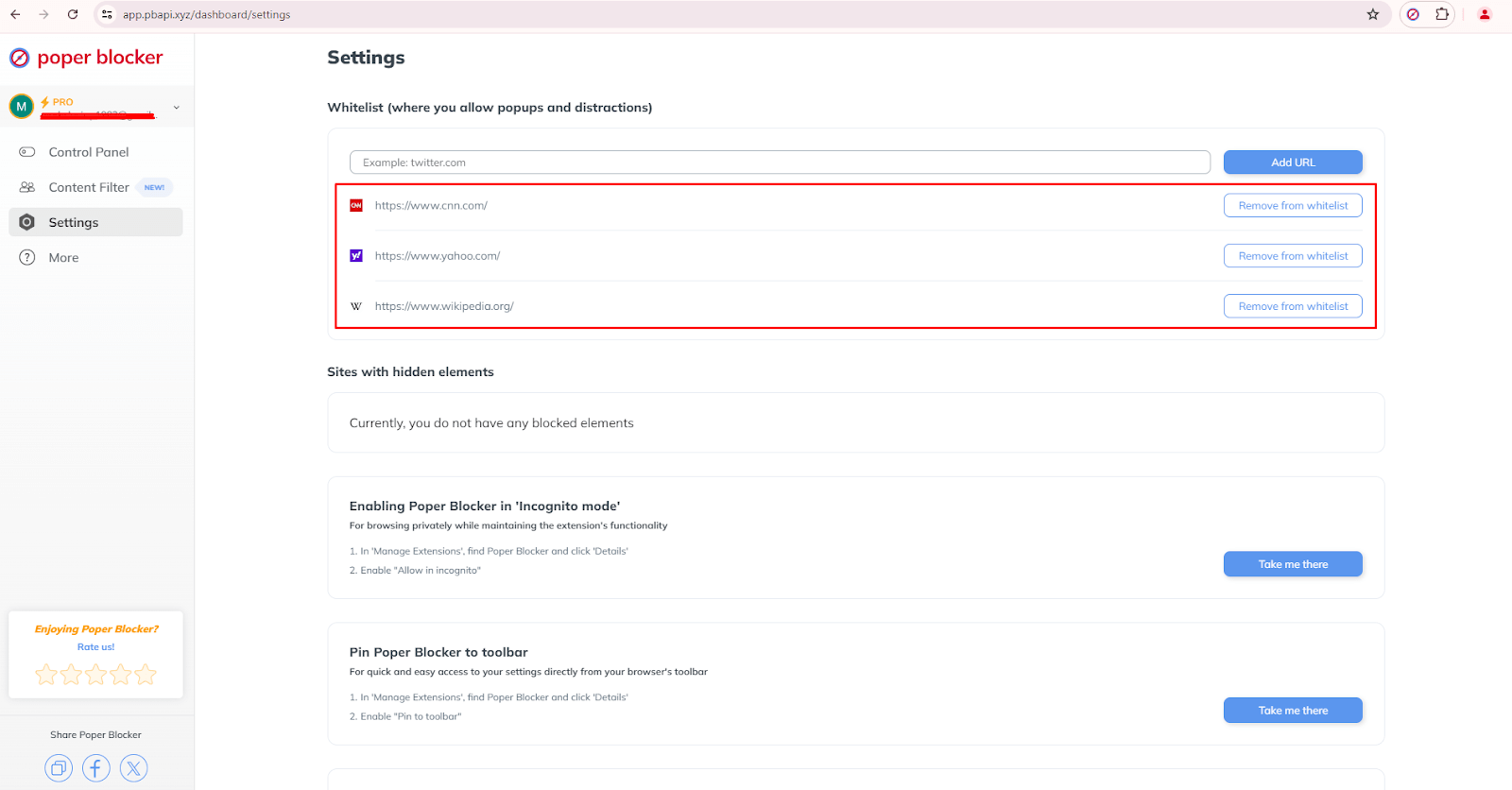
What’s great about this is that you’re in total control. You can add or remove sites from your whitelist anytime you want. So, if you need a pop-up for something important, you can just let it through. It’s all about making the internet work for you, not against you. No more pesky ads, just the good stuff you actually need.
A distraction-free browsing time is just a click away!
Poper Blocker is like the superhero for your internet adventures. It stops those pesky pop-ups and ads that love to crash the party. You can tell which sites are cool to show you some stuff, and which ones to keep on a tight leash. It’s like having your own personal bouncer for the web, keeping the riff-raff out so you can chill without interruptions.
But it’s not just about blocking, it’s about customizing your experience. This little gem lets you pick and choose what kind of pop-ups get the boot, from those annoying spammy ones to the full-on ad assaults. So, you get to enjoy the internet your way, without the extra noise.
And the best part? It’s got this user-friendly vibe going on. The setup is as easy as scrolling through your feed. You can tweak the settings to your heart’s content, so it’s like you’re crafting your own personal browsing bubble. No more annoying pop-ups, just you and the web, hanging out without any drama.
So, go ahead and give Poper Blocker a whirl. It’s like a breath of fresh air for your online world. You’ll wonder how you ever survived without it!
FAQ
How do I install Poper Blocker?
Just hop over to the Chrome Web Store or to Microsoft Edge Add-ons page, type in “Poper Blocker,” and add it to your browser!
Can I whitelist specific websites using Poper Blocker?
Yes, you can tell Poper Blocker to play nice with some of your favorite sites. It lets you whitelist certain websites, so pop-ups can still show up there. It’s like giving a VIP pass to the cool kids while keeping the pesky ads out of the party.
Does Poper Blocker support multiple browsers?
Poper Blocker currently works with Chrome and MS Edge too, so you’re good to go no matter which browser you’re using to scroll through the web.
Is Poper Blocker free to use?
There’s a free version that’s like having a wingman to keep ads at bay. But if you want some extra firepower, there’s a Pro version that’ll block even more ads.
How do pop-ups affect website performance?
Pop-ups can be a real buzzkill, slowing down how fast a page loads and making the whole browsing experience annoying. They can make people leave a site faster than you can say “close tab,” which isn’t what website owners want. So, having Poper Blocker is like having a bouncer for your browser to keep things smooth and enjoyable.
Are your social media feeds stressing you out and making you feel anxious? You’re totally not the only one! It’s like everyone’s feeds are just full of updates, too many ads, and random stuff that keeps popping up all the time. It’s so easy to get overwhelmed, right? And it turns out that 62.3% of the world’s population are on social media (source: Smart Insights) and checking them all the time can really mess with their heads. The American Psychological Association found that this constant checking isn’t doing anyone any favors, especially when it comes to our mental health.
But don’t worry, there’s a way to deal with this social media craziness. If you want to keep your sanity and make scrolling through your feeds less like a battle and more like a chill hangout, keep reading. We’ve got some cool tips to help you out.
You’ll learn why it’s a good idea to tidy up your social media and how to do it without going crazy. We’re talking about blocking those pesky ads, muting words that stress you out, and even changing how you get notifications. It’s like Marie Kondo for your digital life! And the best part? You’ll end up with a social media experience that’s way more enjoyable and less like a never-ending to-do list. So, let’s get started on making your online world a nicer place to be and giving yourself a break from the noise.
Why decluttering your social media feed is important
A social media declutter is a big deal, and it can totally boost your mood and help you get more done. Think about it, when you’re bombarded with updates, notifications, and ads all the time, it’s like having a noisy party in your head that never stops. It’s easy to get stressed and distracted, right? But when you clean up your feed, it’s like giving yourself a breath of fresh air. You can focus on the stuff that actually matters to you.
Turns out, scrolling through endless feeds can mess with your head. Studies have shown that too much social media time can lead to feeling anxious or down in the dumps. But once you clear out the junk and start the digital detox or a social media detox, you start enjoying the internet again. You know, like actually having fun conversations with people and seeing stuff that makes you happy.
How to declutter social media feeds
So, how do you tidy up this mess? Here are some must-try tips:
1. Block ads on social media platforms
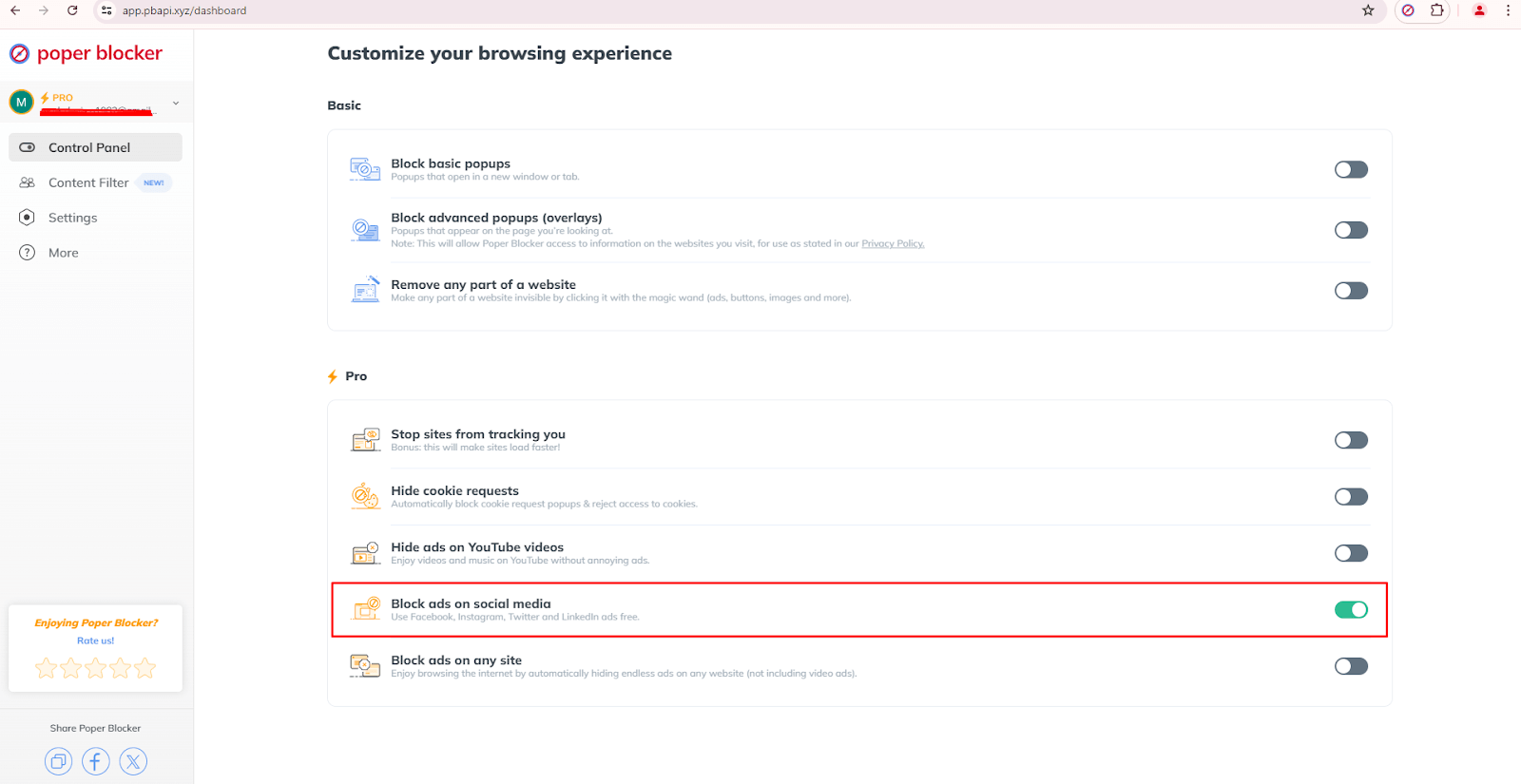
Ads are like uninvited guests at your party. They pop up and ruin your vibe. So, grab a tool like Poper Blocker (Available on Chrome and Edge) to kick them out. Just flick the switch for “Block ads on social media,” and boom, your Facebook, Instagram, X (Twitter), and LinkedIn feeds look cleaner. Plus, its popup blocker feature stops pop-ups too, so you can scroll without getting annoyed.
Read more:
- How to Stop Ads on Facebook?
- How to Block Ads on Instagram?
- How to Block Ads on Twitter (X)?
- How to Stop Ads on LinkedIn?
2. Mute words on your feed
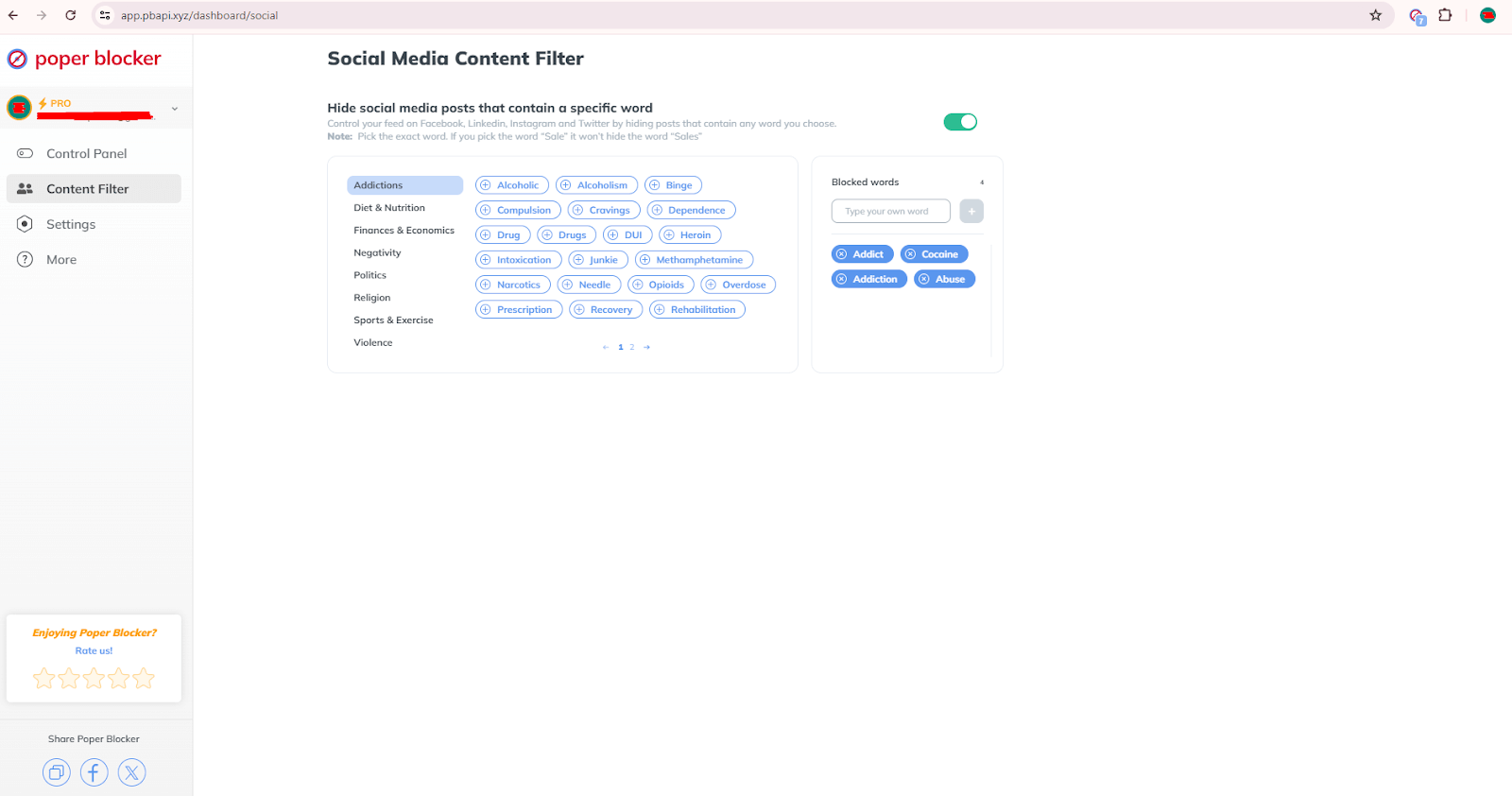
Are there certain words or topics that just bum you out? Poper Blocker can help with that. Just tell it to hide posts with those words via the “Hide social posts that contain a specific word” under the Social Media Content Filter, and voilà! Your feed is more chill. This way, you can control what you see and keep your online space all zen.
Read more:
- Can You Mute Words on LinkedIn?
- How to Mute Words on Facebook
- How to Mute Words on Instagram
- How to Mute Words on Twitter (X)
3. Mute and unfollow people
Cleaning out your ‘following’ list is also a good idea. We all have those accounts we don’t really need to see anymore. Maybe they’re from your past life or just don’t spark joy anymore. Hit unfollow or mute, and watch your feed transform into a happy place filled with only the good stuff.
4. Customize your notifications or turn them off
Those little red dots can be so demanding. But guess what? You’re the boss of your phone, not the other way around. You can do this by going to your phone’s settings and configuring the notifications. You can customize them so that you’ll only get alerts for the important stuff. That way, you’re not jumping every time your phone buzzes.
5. Consider uninstalling the apps and limiting yourself to using a PC for social media
This might seem a bit old school, but trust us, this method actually works. If you’re always on your phone, try using social media only on your computer. It’s like putting your phone on a leash. This way, you’re less likely to scroll mindlessly when you have to sit down at a desk.
6. Set specific times of the day when you use social media
Make like a bouncer and give yourself some rules for when you can hop on the social media train. Maybe you check it in the morning and evening, but keep it off-limits before bed. That way, you can keep up with the cool stuff without letting it take over your life. It takes practice but you’ll surely get used to it.
Declutter your social media and start taking control!
Want to feel better about scrolling through your socials? It’s totally possible! Cleaning up your feeds and doing a digital declutter can make your time online way more chill and enjoyable. Give these tips and tools like Poper Blocker a shot today and watch your digital world transform into a less chaotic, more “you” kind of place. It’s like Marie Kondo for your internet life, but instead of sparking joy, it’s all about keeping only what truly matters to you. You’ll love the change, and most importantly, the peace.
FAQs
How often should I clean up my social media?
You should totally give your social media a good sprucing up at least once every three months. It keeps your feed fresh and full of stuff you actually want to see, so you don’t get bored or overwhelmed.
How do I stop those pesky ads on social media?
One good way is by installing the Poper Blocker browser extension. It’s like a magical shield that blocks ads on your favorite platforms like Facebook, Instagram, Twitter (X), and LinkedIn. It makes scrolling way more chill and clutter-free.
Can I pick what shows up on my feed?
Of course. Muting certain words or topics is like telling your feed to only show you the good stuff. It’s like a social media filtering for happy vibes, so you can skip the drama and focus on what makes you smile.
What’s the deal with muting vs. unfollowing?
Muting is like putting someone on a social media time-out without actually breaking up with them. You won’t see their posts anymore, but you’re still friends. Unfollowing is like ghosting them, their posts just vanish from your feed completely.
How can I not be on my phone 24/7?
Set up some social media time slots, like a little daily rendezvous with your favorite apps. If you can, unhook the apps from your phone and use them on a computer instead. And don’t forget to enjoy some IRL stuff and use your phone’s Do Not Disturb mode to keep notifications from ruining the moment.
You’re engrossed in a really interesting news article, and an ad pops up, covering the content. Really annoying, right? That’s how basically companies set out to get your attention, but these ads usually help them collect some very valuable data. It’s sort of a love-hate relationship for many people.
A survey by HubSpot indicates that 58% of users find popups to be annoying. According to Optimonk‘s statistics, the average popup conversion rate stands at 11.09%. The stats are pretty mixed; on the one hand, they do help some businesses boost their email lists, while on the other hand, they annoy many users. Basically, pop-ups turn out to be much more efficient in comparison with regular banners, but they bring along their issues.
Pop-up ads are very attention-grabbing, owing to their very bold nature. This will go a lot toward improving the level of visibility and conversion of leads. However, pop-up ads can be extremely intrusive. Now, let’s look at the pop-up ads’ pros and cons, and weigh their benefits against the drawbacks with real data from the world.
Advantages of pop-up ads
Yes, we all grumble when some pop-up troubles us. But believe it or not, they do have some advantages for users also:
Instant attention grabber
This one pro is a biggie. It immediately grabs your attention. Say you are searching for a new coffee maker and you are just about to give up when a pop-up flashes with an amazing deal on exactly what you want. This instant attention will save you from moving through pages upon pages of search results. This really can be a godsend when time is of the essence.
Relevance factor
Then, of course, there is the relevance factor. Most pop-ups use your browsing history to throw up content that might be of interest to you. If you are a techno-freak, for instance, popping onto a site might raise ads regarding the latest gadgets. This can really hit home with the right audience in terms of matching tastes and needs.
Surprising free resources
Those one-off times when pop-ups come with nice surprises, such as free resources—think e-books, guides, and software. Those small bits of value could turn an otherwise minor annoyance into a nice little find.
Exclusive deals
Pop-ups can also sometimes remind you about special deals and limited-time events. Now, picture this: you’ve been looking to buy these sneakers, and then a pop-up lets you know there’s a flash sale. Yes, they are annoying, but sometimes they do come with something very useful.
Disadvantages of pop-up ads
It’s not hard to admit it—pop-ups also have their bad sides, and it’s quite a lot. Here are some disadvantages that make them frustrating for users:
Disruption of focus
Ever been engaged in an article, only to have a pop-up cut in? It’s infuriating and just breaks the focus completely. These unsolicited distractions will sour your whole session of browsing, and then become really hard to again gain that same engagement level and focus. Frustration can persist, tainting the overall experience of the site.
Cluttered browsing
They can also clutter your on-screen browsing experience. Have you experienced visiting a website when you tried to tap on something and then a pop-up suddenly got in your way? It is a maze to navigate with hidden traps and digital clutter, making it painful just to reach the content you came for.
Speed issues
Another downside is the speed issues; pages are really slow due to popups laden with multimedia elements. Sometimes it just gets frustrating sitting there, waiting for a page to load, feeling like you could be doing something more productive.
Negative perception
And then there is the negative perception. Sites that are bothered by pop-ups all over the place come off as spammy or sites that you can’t trust.
Privacy concerns
Furthermore, pop-ups sometimes allow for privacy issues. Some popup ads trace user activity, collecting personal information in the process without express consent. This is an invasion of privacy that can make one uneasy and untrusting, knowing his personal information might be harvested for targeted advertisement or, worse, sold to third parties.
Block pop-ups with Poper Blocker
Poper Blocker has a solution in store for you if you are just too tired of too many ads and frustrating popups. This browser extension (Available for Chrome and Edge) can stop pop-up ads—from the most annoying ones to advanced pop-up overlays—so nothing would disturb your screen and, thus, your mind. Thanks to this tool, you can stay focused on the content that you want to see by excluding annoying interruptions for a more peaceful browsing experience.
One nice touch is the whitelisting of some trusted sites so that you get to have those useful popups without the majority of intrusive ones. This will let you still benefit from important notifications or offers from your favorite sites and just be rid of unwanted advertising.
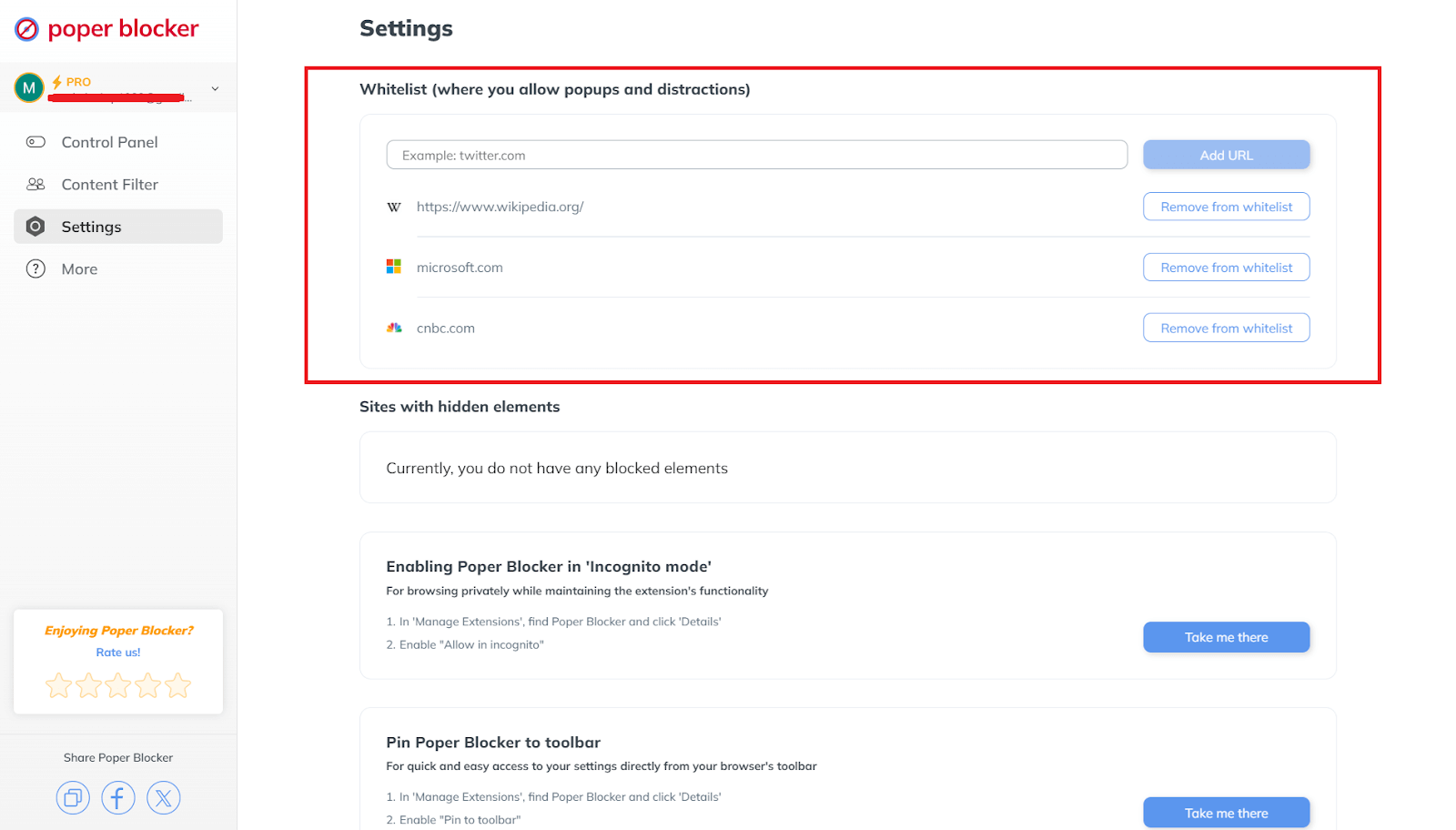
The ultimate goal is clear: to block popup ads on your screen, enhancing your online experience. By removing these distractions, this tool increases your productivity and enjoyment while being on the web.
So, why not take matters into your own hands with Poper Blocker and make a difference? You will almost immediately realize that there is a much cleaner and more fun way to browse.
FAQs
Are all pop-up blockers the same?
Not really. While most of them try to block advertisements, there are differences with regard to effectiveness and features. What makes Poper Blocker different from the rest is that it effectively blocks various types of pop-up ads while letting users whitelist websites easily.
How do I turn off pop-ups in my browser?
The process is quite simple. Most browsers come with pop-up blocking settings. Anyway, for a deeper and more solid solution, you can install Poper Blocker. This is an extension that allows filtering unnecessary pop-up windows out of your sight, bringing some additional order to your web browsing process.
Can pop-up ads be harmful to my computer or device?
Not all, but some pop-ups come with malice. They can carry malware that puts your device at risk. Using a reliable pop-up blocker can protect you from these lurking dangers.
Do pop-up ads degrade website performance?
Absolutely. Sites filled with popups are generally slow, irritating users over time. Blocking these interruptions leads to smoother and faster site performance.
Is it necessary to block every pop-up?
Not all popups are annoying. Some of them actually bring very useful information or provide exclusive deals. Make sure to turn on the customizable settings available in tools like Poper Blocker to block spam pop-ups and let through those that are useful.
Can you picture yourself waking up and not reaching for your phone first thing in the morning? Bet you can’t! Mobile devices have become an integral part of our daily routines and it has dramatically changed the way we live, work, and play. While it has given us a lot of convenience, this constant connectivity has also a lot of downsides including stress, poor sleep, and strained relationships.
Let’s talk about why taking a break from screens is so helpful and how to take control of your screen time again. You’ll find out about the benefits, the process, and useful tips for a successful break from screens.
What is a digital detox?
A digital detox is a process of taking a deliberate break from electronic devices like smartphones, tablets, computers, and social media platforms. It’s a conscious effort to lessen the screen time and reconnect with the real world. This practice encourages reflection on technology use and habitual resets to achieve a healthier balance.
Unlike total abstinence, digital detoxification can be tailored to fit individual needs. Rather than eliminating all digital interactions, this focuses on reducing harmful usage patterns. Many see this as the first step towards improving one’s well-being and mental health.
Reasons why people need a digital detox
Modern gadgets are helpful but they come with some downsides. Here are some of the reasons why many people decide to take a break from them:
1. Sadness and low mood
Spending too much time looking at screens can make people feel unhappy. When you constantly see perfect pictures on social media, you might start comparing yourself in a negative way, which can lower your mood.
2. Increased irritability and anger
The endless flow of information and online interactions can overwhelm the mind and cause frustration and mood swings. When you’re online most of the time, you tend to be more irritable and angry.
3. Poor sleep
Using screens, especially before bed messes up your sleep patterns big time. According to the Sleep Foundation, the blue light emitted by screens disrupts the body’s natural sleep-wake cycle. It slows down the release of melatonin, the natural hormone that prepares you for sleep.
4. Compulsion to stay connected
When you’re urged to constantly check your phone’s notifications, messages, and updates, it’s creating a sense of duty. This increasing need may disrupt your daily routines and affect your mental health.
Benefits of a digital detox
Taking regular breaks from technology offers many advantages and it can improve both your mental and physical health. Here are the main benefits:
Less stress
Your stress levels may likely go up if you’re always connected and getting notifications and work messages. Taking a break allows the body to relax and reduces your anxiety over time.
Better sleep
When you avoid screens before bedtime, you’re giving yourself some time to relax and this promotes better sleep. Good sleep is important for your physical health, clear thinking, and emotional stability.
More productivity
Spending less time on screens means fewer distractions. This will give you more time to focus better and work more efficiently. Not only will you achieve a sense of accomplishment, but you’ll also have more free time for activities you enjoy.
Higher self-esteem
Social media can cause unhealthy comparisons and lower self-esteem. When you pull yourself away from these perfect images online, you’ll be able to appreciate your own value more.
Stronger relationships
More face-to-face interactions help you build deeper relationships and improve your social skills. And when you’re able to establish stronger connections, you’ll have the right kind of support, especially during tough times.
Better physical health
Spending less time on screens can do a lot of wonders for your physical health. It reduces eye strain, neck pain, and posture problems, and also encourages more physical activity.
How to do a digital detox
Starting a break from technology needs careful planning and realistic goals. To make it more effective and successful, follow these steps:
1. Set clear goals
Identify why you want to take a break. Is it to reduce stress, improve sleep, or strengthen relationships? Having clear reasons will keep you motivated. Remember that knowing your “why” gives you purpose and determination.
2. Create a plan
Set a duration and strict rules for your break. For example, no screens after 8 PM or a social media-free weekend. When you set clear rules for yourself, you won’t get confused and make excuses for deviating from the plan.
3. Inform others
Let friends and family know about your plan for a digital cleanse to set their expectations and even gain some support. Those close to you will surely understand your absence from digital communication and they might even be able to help you stay on track.
4. Replace screen time
Fill the time that you would have spent on screens with other interesting activities like:
- Reading
- Exercising
- Spending time outdoors
You should find enjoyable and enriching alternatives to make the process more rewarding.
If you still need to use the internet but want to avoid distractions, consider using Poper Blocker. This browser extension (Available for Chrome and Edge) is especially useful for those who need to be online for work but want to stay focused. These are some of its features that could support your goals:
Pop-up blocker: This prevents annoying pop-ups from appearing so you can browse without any interruptions or distractions.
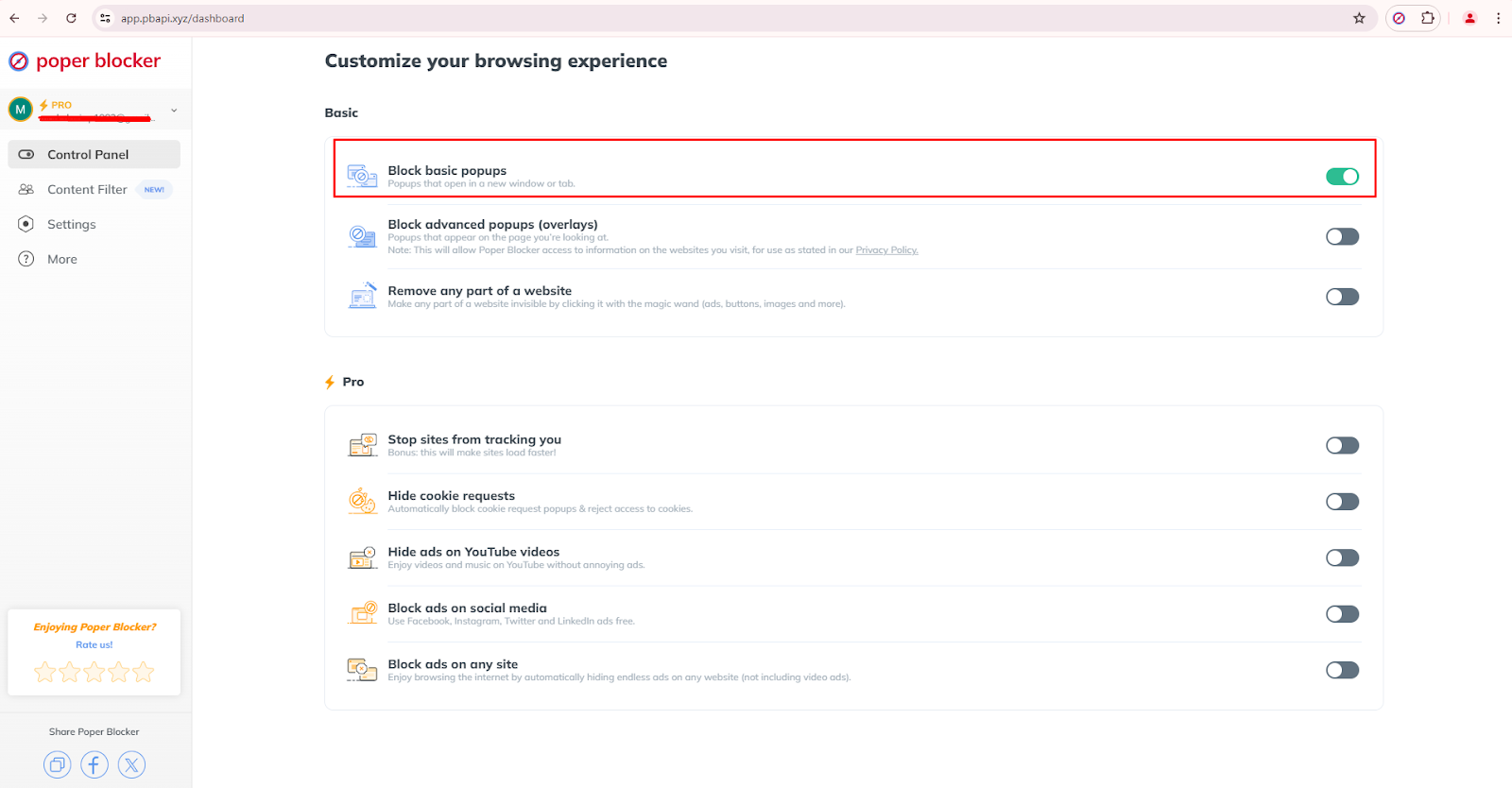
Ad blocker: This automatically removes unwanted ads from web pages. It also has optimized ad-blocking features for YouTube and social media.
Read More:
- How to Block YouTube Ads
- How to Block Ads on Twitter?
- How to Block Ads on Instagram?
- How to Stop Ads on Facebook?
- How to Stop Ads on LinkedIn?
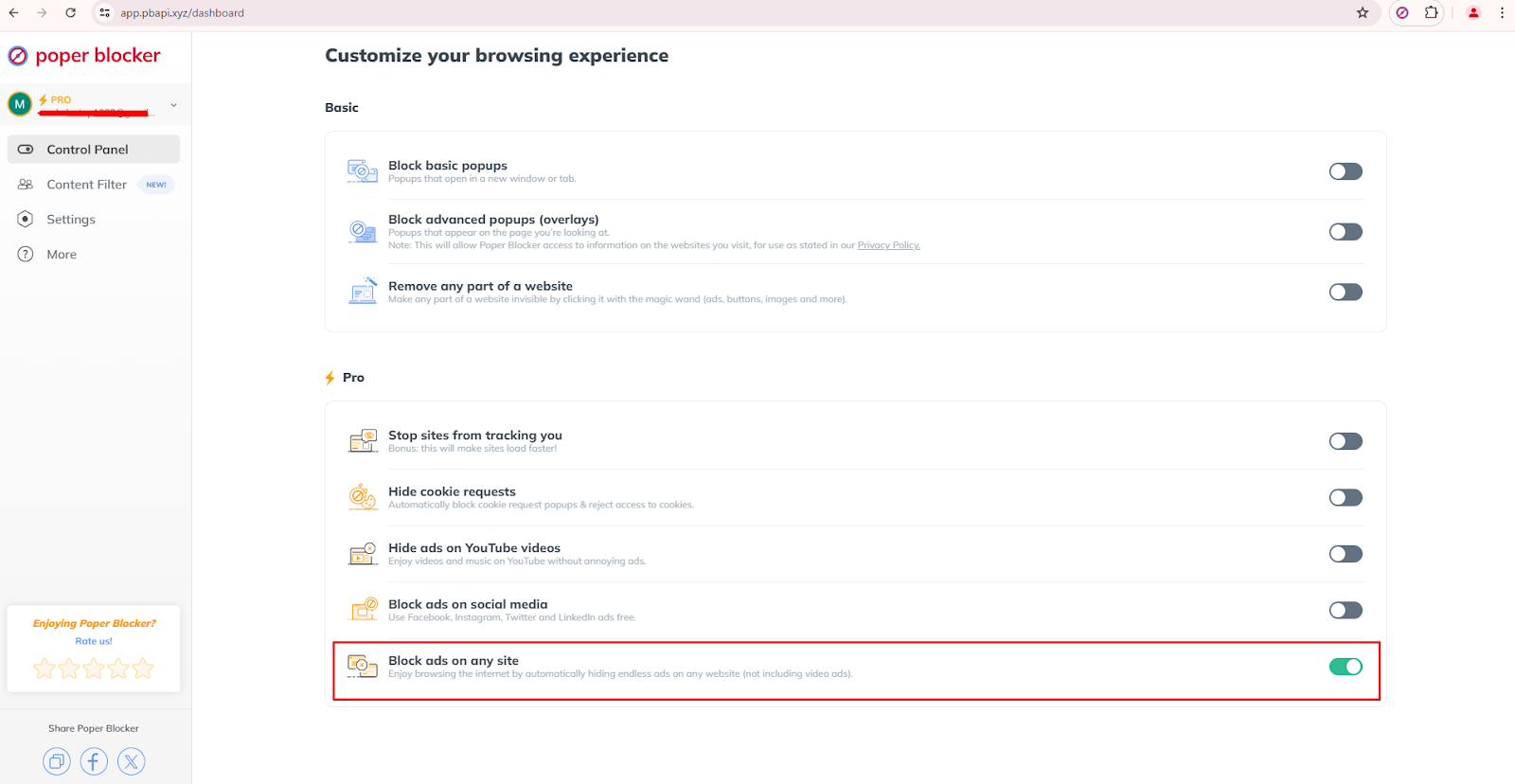
Social media filtering: This feature limits social media content by filtering out posts on Facebook, Instagram, X (Twitter), and LinkedIn that contain a specific keyword.
Setting goals and knowing when to stop
Setting clear goals helps your tech break be effective. Think about why you want to detox and set specific, measurable targets. Examples include no screen time an hour before bed or setting a social media detox but limiting your access to 30 minutes daily.
After a set period, assess your feelings to decide when to end your detox and adjust your habits to maintain a healthy balance. Knowing when to stop will help you avoid burnout and experience long-term positive changes.
Digital detox tips
Starting a tech break can be challenging, but the right strategies can make it easier and more effective. Here’s how to manage it successfully:
Start small
Begin with short breaks and gradually increase the duration. Remember, small steps make the process easier and more likely to succeed.
Create tech-free zones
Designate areas in your home where digital devices are not allowed. This can be your bedroom or the dining room. Doing this will enforce boundaries and reduce the temptation to check your devices impulsively.
Use technology mindfully
Assess and reduce non-essential screen time. Focus on quality over quantity and be deliberate about your tech use. Keep in mind that each moment online should have a purpose and not for non-essential stuff.
Discover some alternatives
Find new hobbies or revisit old ones to fill your time. This can help in reducing that urge to return to your screens. Participate in physical or creative activities for a rewarding and enriching experience, which can never be replaced with anything virtual.
A fresh start with fewer screens
Taking a tech break can greatly improve various aspects of your life. When you change your relationship with technology, you’ll be able to enjoy better mental health, improved relationships, and increased productivity. Now is the perfect time to start.
And for a more successful digital detox, use the Poper Blocker extension to block all those unwanted distractions. So, what are you waiting for? Begin today for a healthier and more fulfilling life.
FAQs
How long should a digital detox last?
The length of a digital detox varies for each person. Some find short daily breaks helpful, while others prefer week-long detoxes. Assess your needs and tech usage to decide what suits you best.
What activities can replace screen time during a digital detox?
Try various offline activities like reading, hiking, cooking, drawing, or spending quality time with loved ones. Finding fun alternatives will make the detox successful.
Can I still use my phone for essential tasks during a digital detox?
Yes, the goal is to cut down on unnecessary screen time, not eliminate it. Using your phone for essential tasks like calling, texting, or work is still fine. Focus on eliminating non-essential uses like social media.
How do I manage work-related tasks during a digital detox?
Set specific times to check emails and messages, and keep your work tasks separate from personal screen time to maintain discipline and focus during the detox.
What are the signs that I need a digital detox?
If you feel anxious without your phone, have sleep issues due to screen time, or notice strained relationships, it might be time for a detox. These signs often indicate that you have an unhealthy reliance on digital devices.
Online distractions from popups, ads, and overlays can severely affect your browsing experience. In fact, a survey has revealed that about 70% of internet users find online advertisements annoying and unpleasant. The frustration caused by too many ads is not just limited to wasting time. When you’re getting constant interruptions, it can easily break your focus, reduce your productivity, and even cause frustration. In addition to that, the dilemma of dealing with constant cookie requests can be another layer of annoyance.
But here’s an effective solution to block all these nuisances: Poper Blocker. Whether you’re dealing with pop-ups on shopping sites, banner ads on social media, or unsolicited cookie requests, this browser extension can handle all of that. It has a user-friendly interface where you can optimize your browsing environment even if you don’t have any technical experience. And the good news is that it blocks pop-ups in Microsoft Edge and Google Chrome as well. Let’s look further at the main features of this tool.
Block basic pop-ups
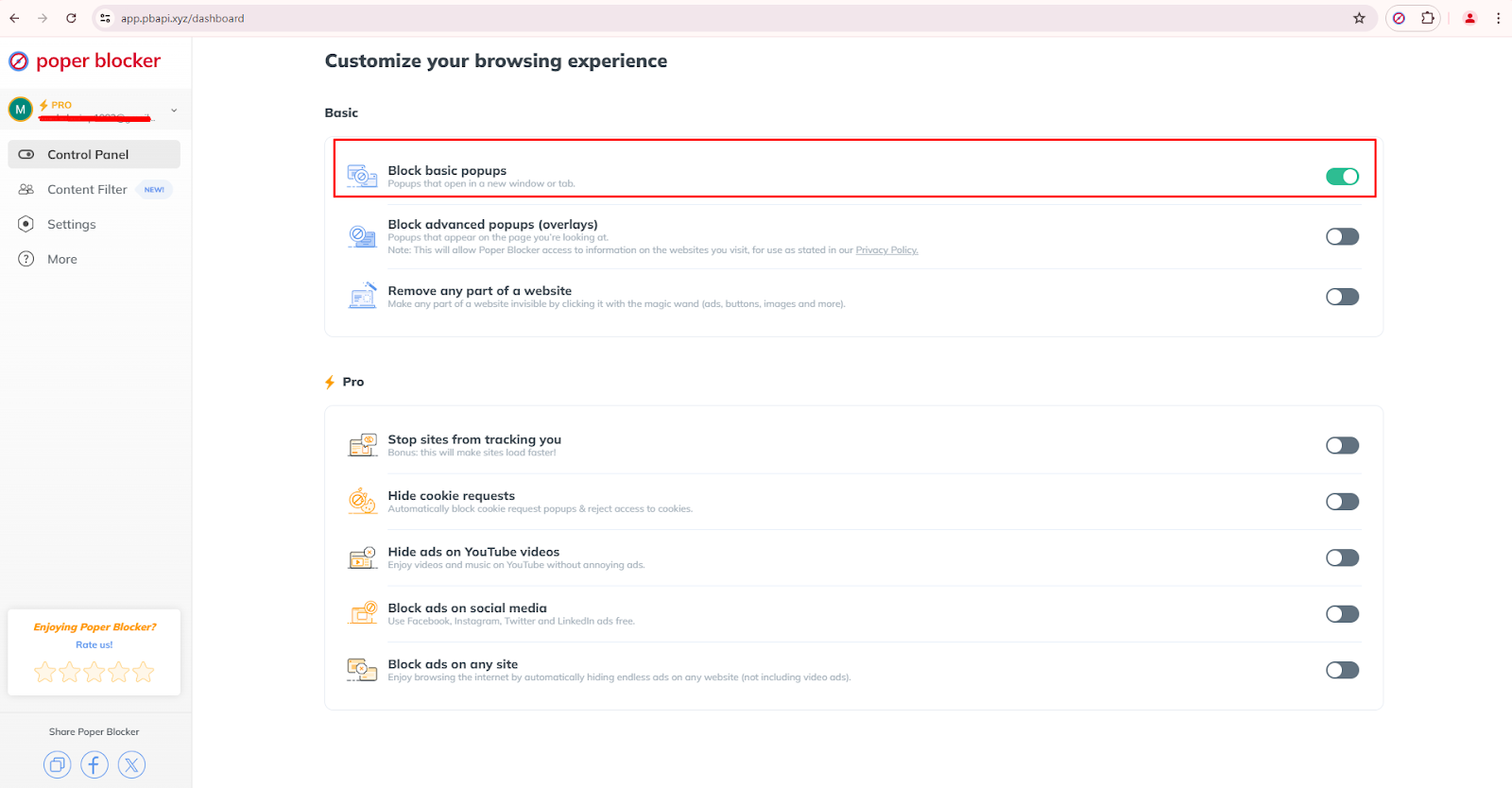
One of Poper Blocker’s features is the automatic blocking of basic pop-ups. These are usually the ones that open in new windows or tabs. This feature is available in the Basic section of the Control Panel and has the capability to minimize interruptions effectively while you’re browsing websites with less technical designs. Here is how to activate this pop-up blocker feature:
- Open the Poper Blocker Control Panel.
- Find the Basic section.
- Turn on the button for “Block basic popups”.
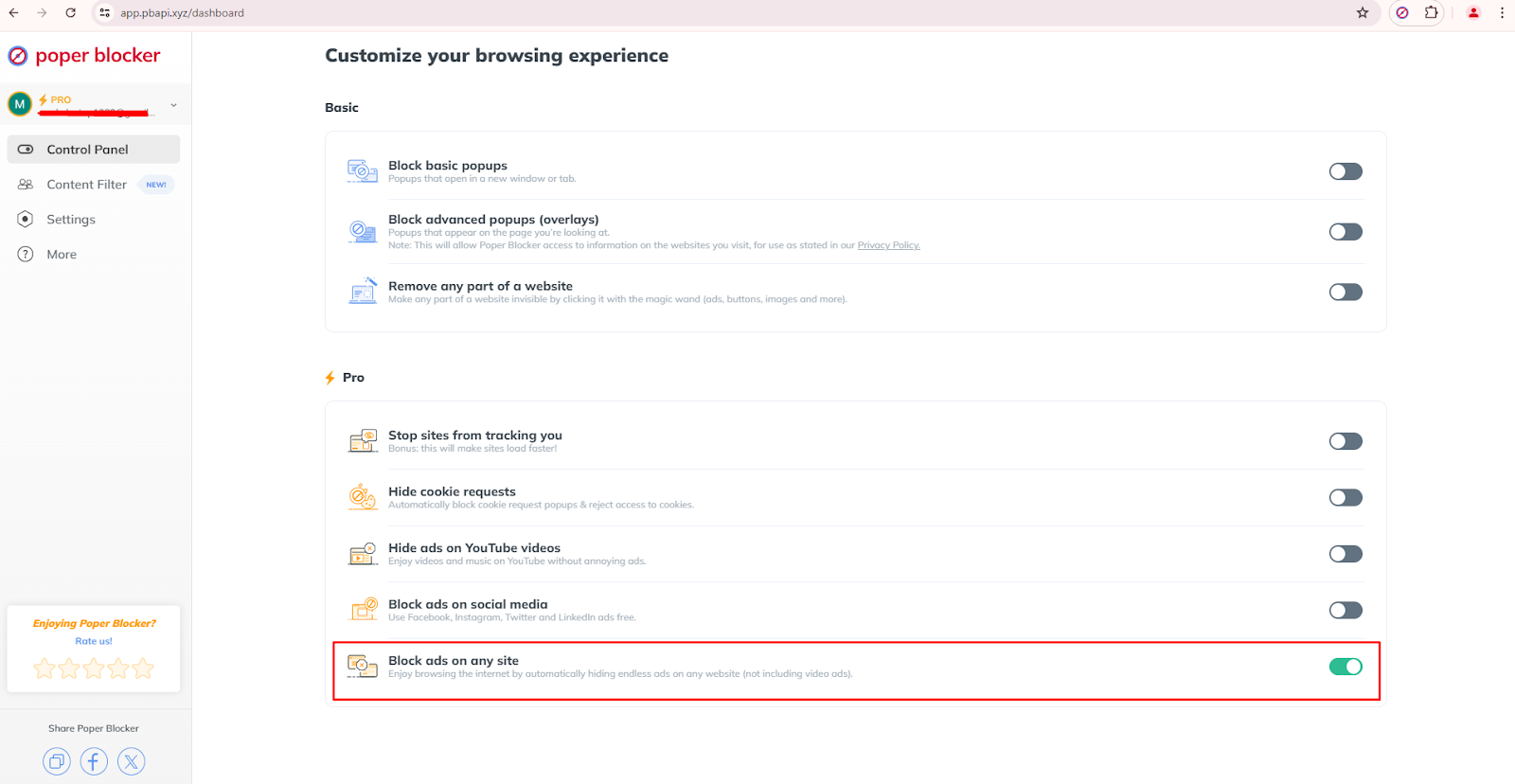
Block ads on any site
Browsing any website becomes enjoyable when Poper Blocker automatically hides endless ads. This Pro feature is highly effective in removing annoying ads (excluding video ads) across all websites. In addition to reducing distractions, it can also improve website loading times.
Follow these steps to turn it on:
- Access the Control Panel.
- Go to the Pro section.
Scroll all the way down and enable the “Block ads on any site” button.
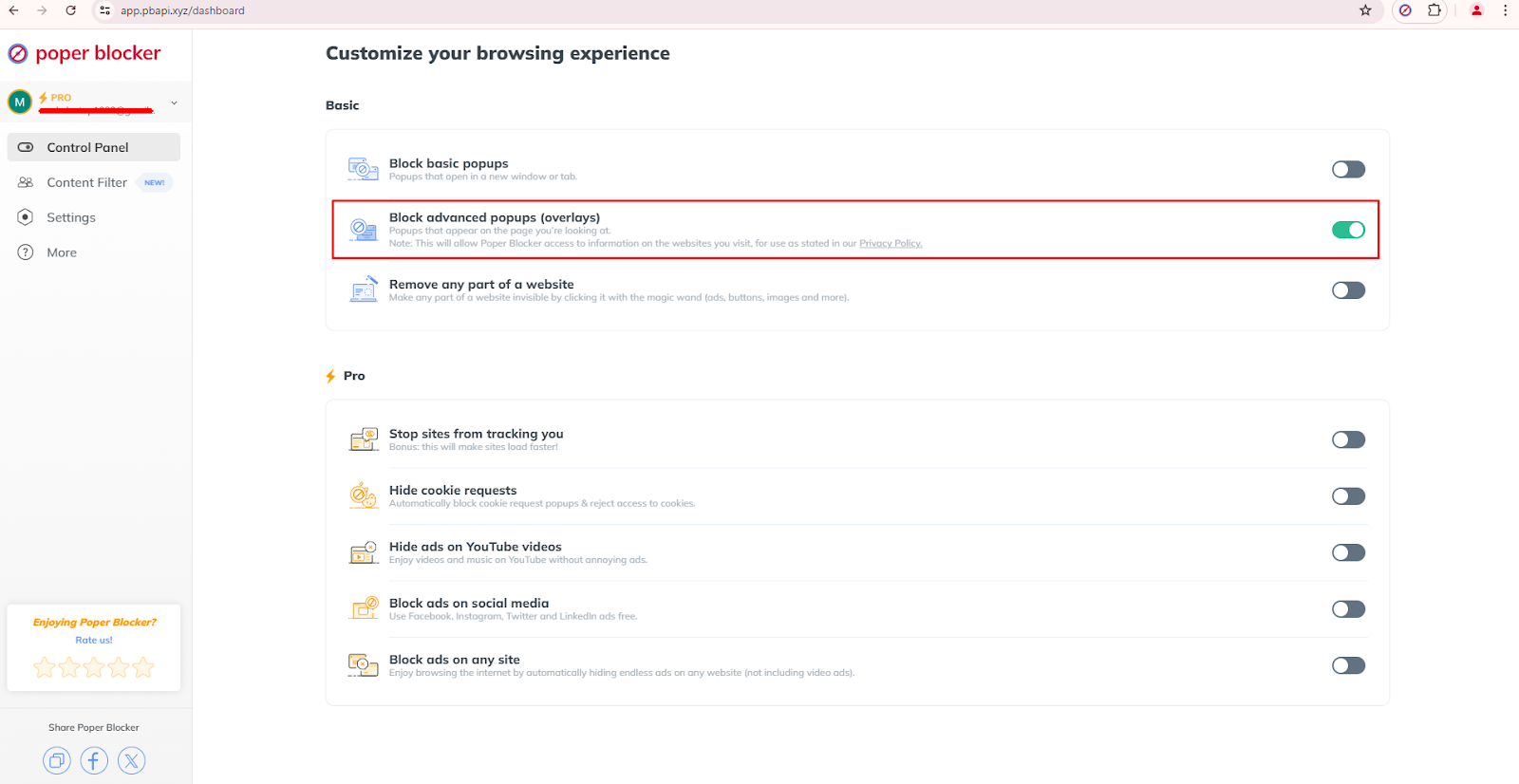
Block advanced popups (overlays)
Advanced popups or overlays appear on the page you’re viewing and this usually obscures content. The good news is that Poper Blocker can also handle these intrusive elements. Once it’s active, it will block overlays and these will no longer interfere with your browsing.
You can enable it via these basic steps:
- Access the Control Panel.
- Look for the Basic section.
- Turn on the “Block advanced popups (overlays)” button to activate this feature.
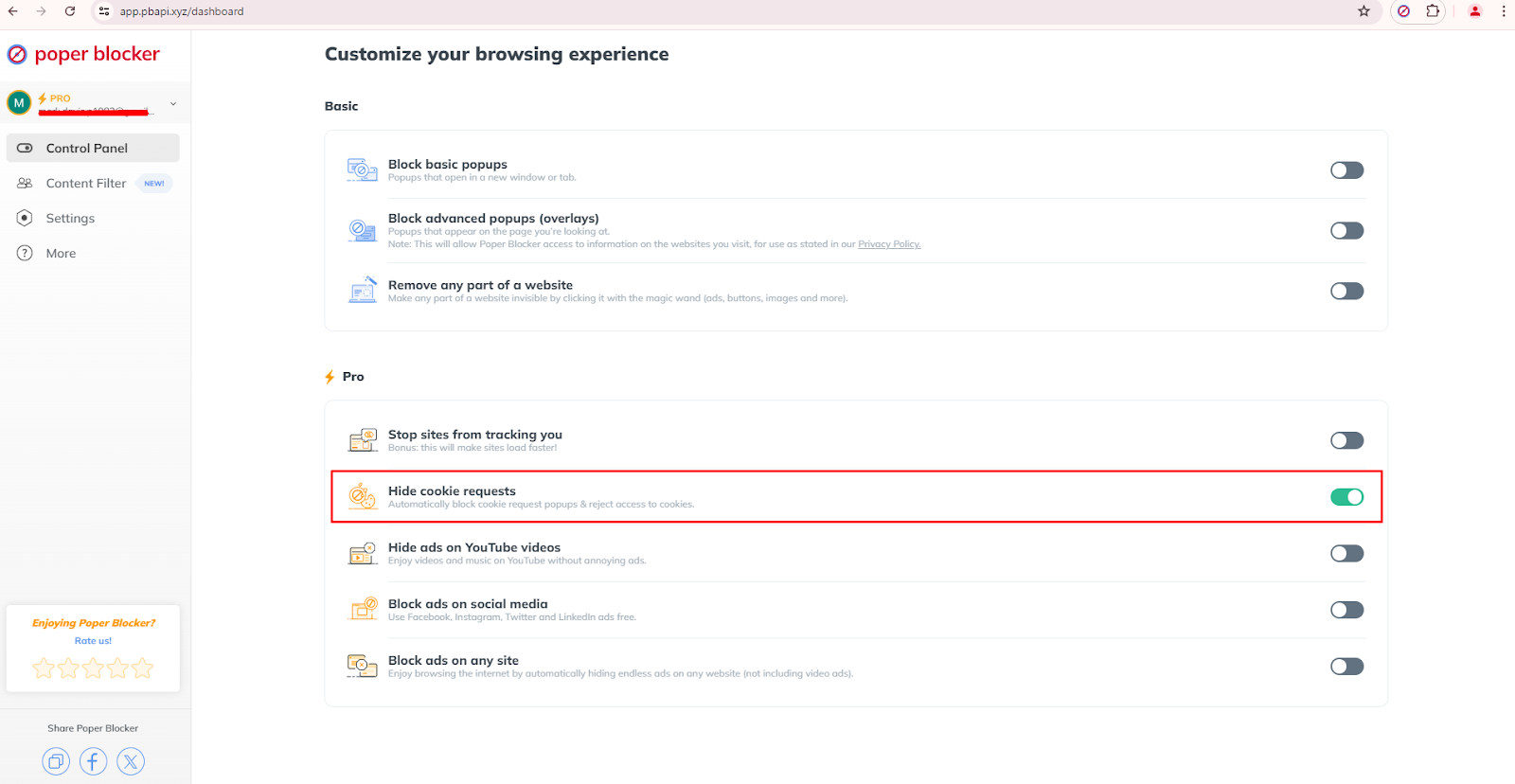
Hide cookie requests
Cookie request popups can be constantly annoying while you’re browsing several sites. With the help of Poper Blocker, you can set an automatic blockage of these requests. But that’s not all, it can also reject cookie access so you’re actually hitting two birds with one stone.
Take note: this is located in the Pro section of the Control Panel, so if you don’t want to be interrupted by continuous cookie consent prompts, then this is the feature that you need.
Want to know how to activate it? Follow these 3 steps:
- Open the Control Panel.
- Look for the Pro section.
- Enable the button for “Hide cookie requests”.
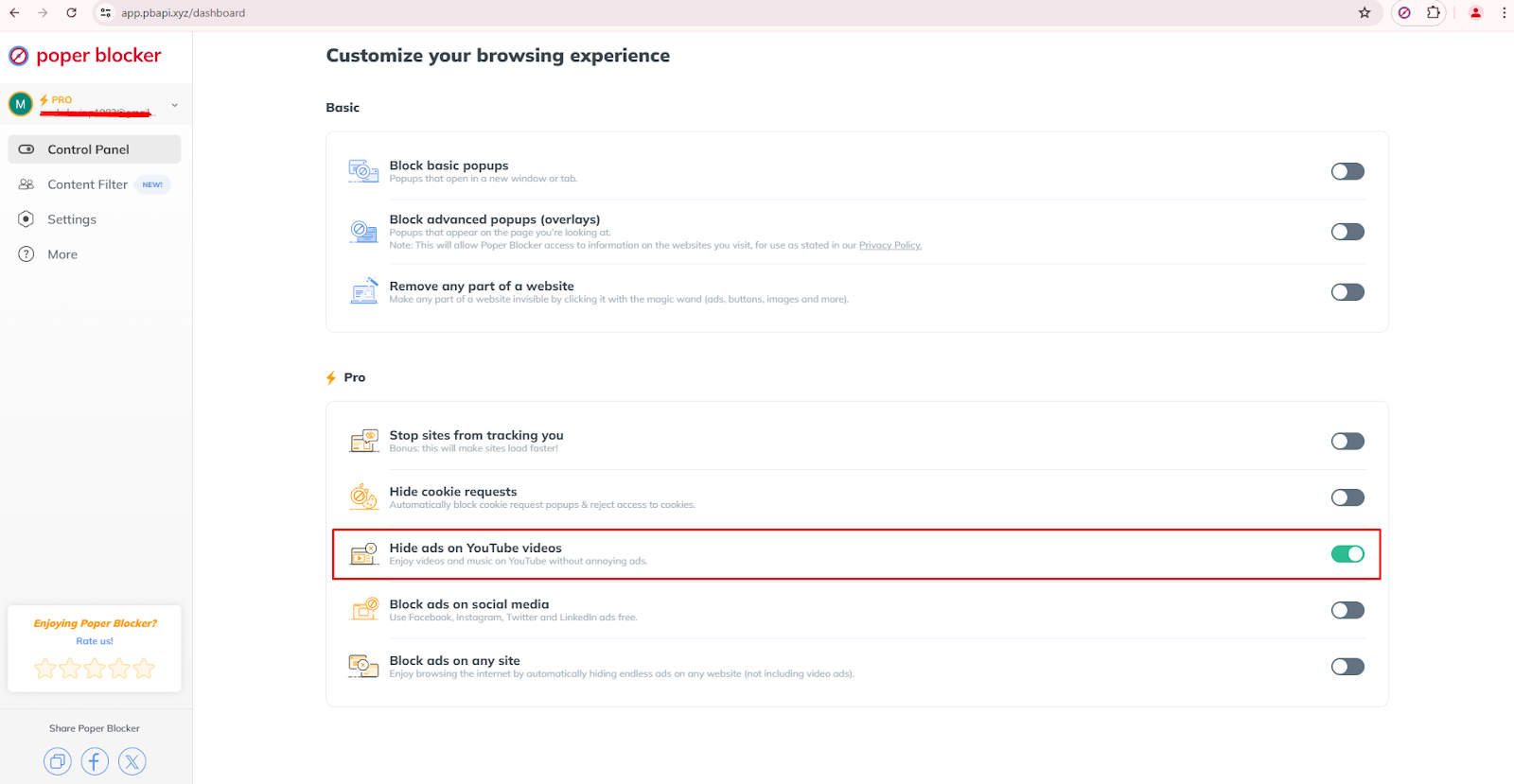
Block ads on YouTube videos
Ads on YouTube are becoming more prominent and can definitely interrupt your viewing experience. But with the help of this Poper Blocker Pro feature, you’ll be able to watch videos and listen to music without these advertisements. Whether you’re watching tutorials, music videos, or documentaries, this feature lets you enjoy an uninterrupted YouTube experience.
Here’s how to enable it:
- Open the Control Panel.
- Navigate to the Pro section.
- Enable the “Hide ads on YouTube videos” button.
Read more: How to Block YouTube Ads
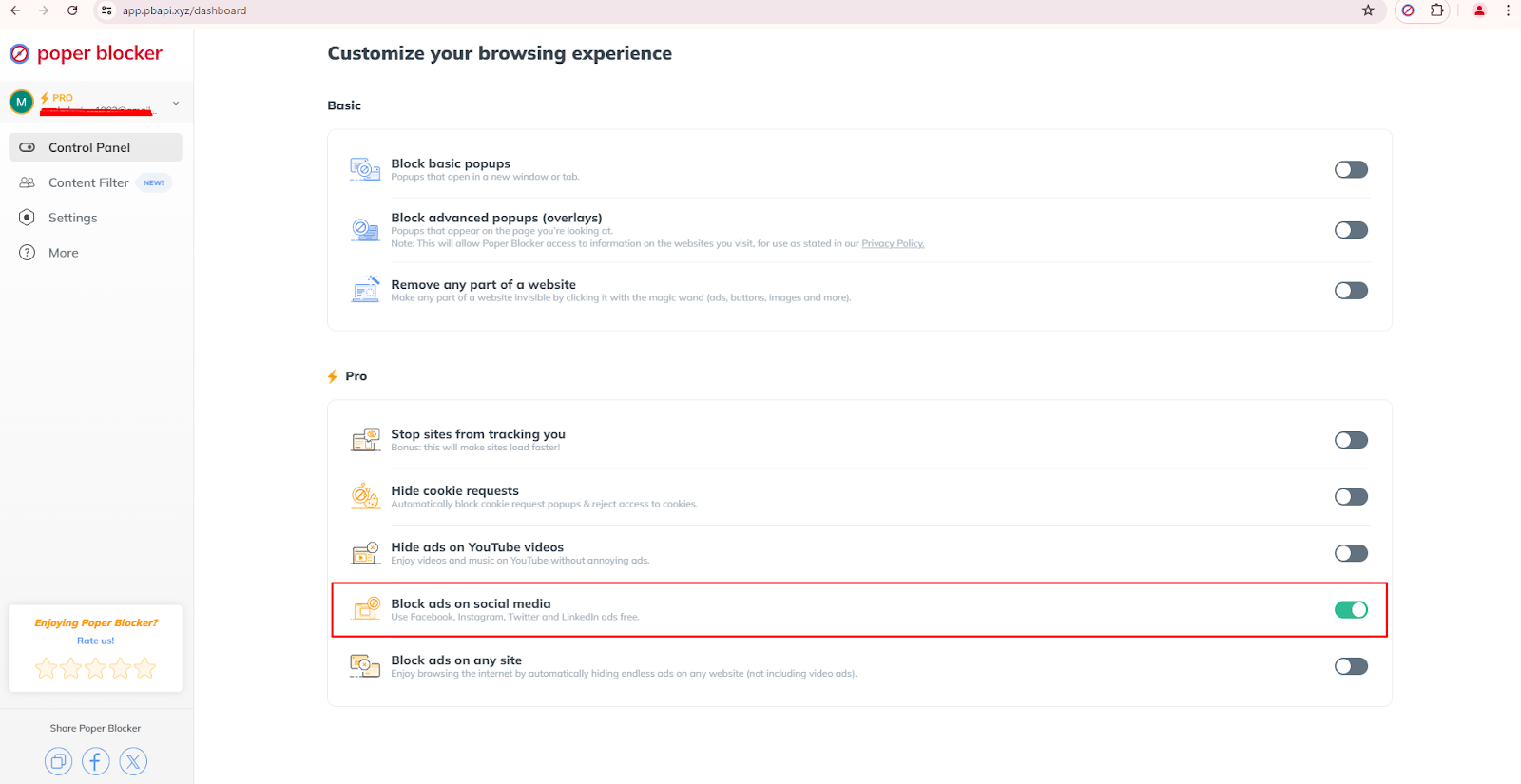
Block ads on social media
Ads on social media platforms like Facebook, Instagram, Twitter, and LinkedIn can also be blocked by Poper Blocker. This is one of the extension’s Pro features, which will allow you to see only the posts from users and pages that you are following. No more unnecessary or annoying ads when browsing on your favorite social platforms.
To enable this feature, follow these steps:
- Access the Control Panel.
- Go to the Pro section.
- Toggle the “Block ads on social media” button to activate this feature.
Social media content filter
This tool also has a powerful feature for social media filtering of content based on specific keywords. When this is enabled, you’ll have more control of your feed on Facebook, LinkedIn, Instagram, and Twitter.
Here’s how to use and customize this feature:
- Open the Control Panel.
- Go to the Content Filter section.
- Turn on “Hide social media posts that contain a specific word.”
Here’s a tip: choose the precise words for effective filtering. For instance, entering the word “sale” will not hide “sales” so take some time to use the right words to block.
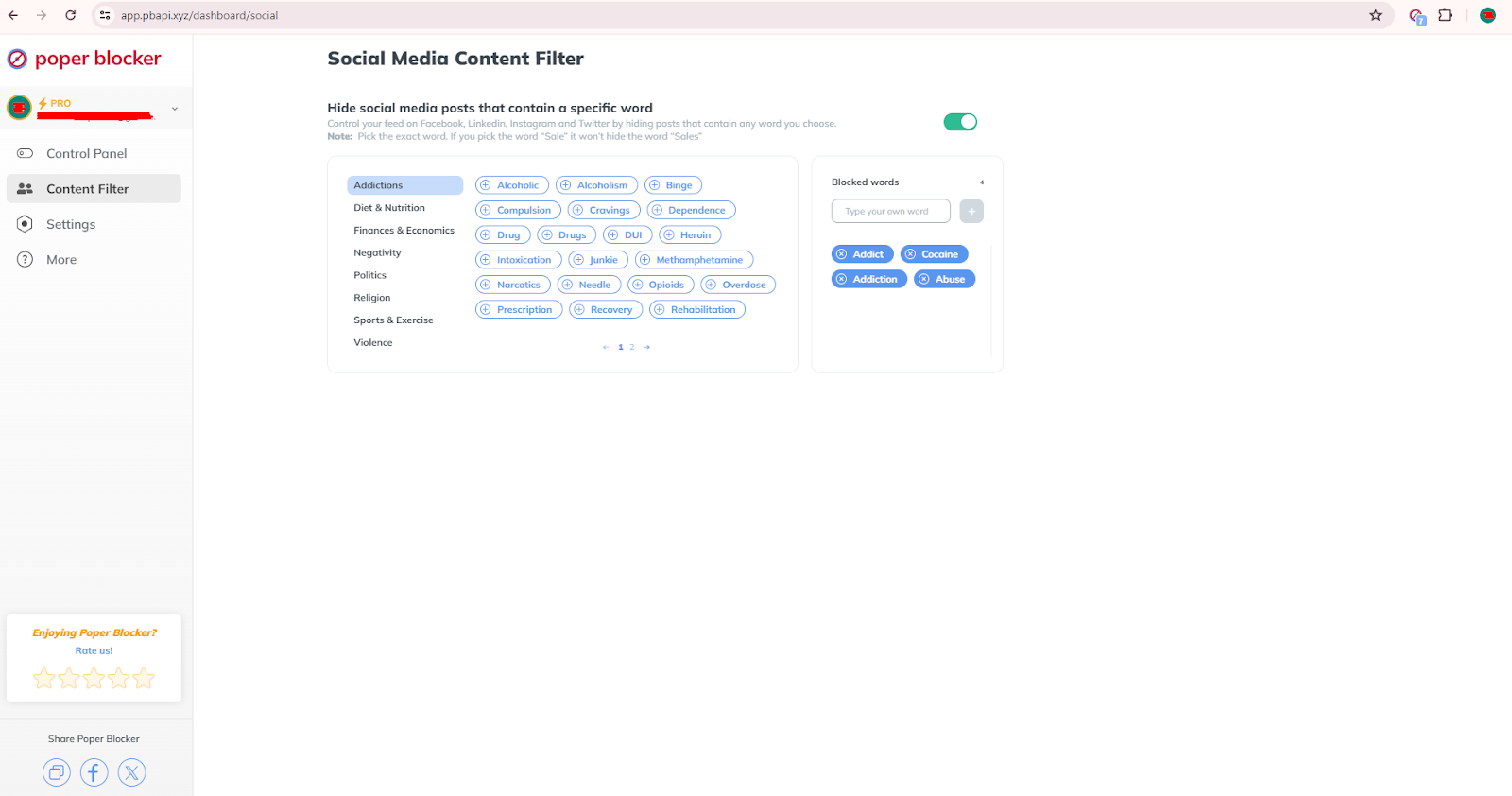
In addition, the tool also has groups categories of commonly blocked words, such as:
- Addictions
- Diet & Nutrition
- Finances & Economics
- Negativity
- Politics
- Religion
- Sports & Exercise
- Violence
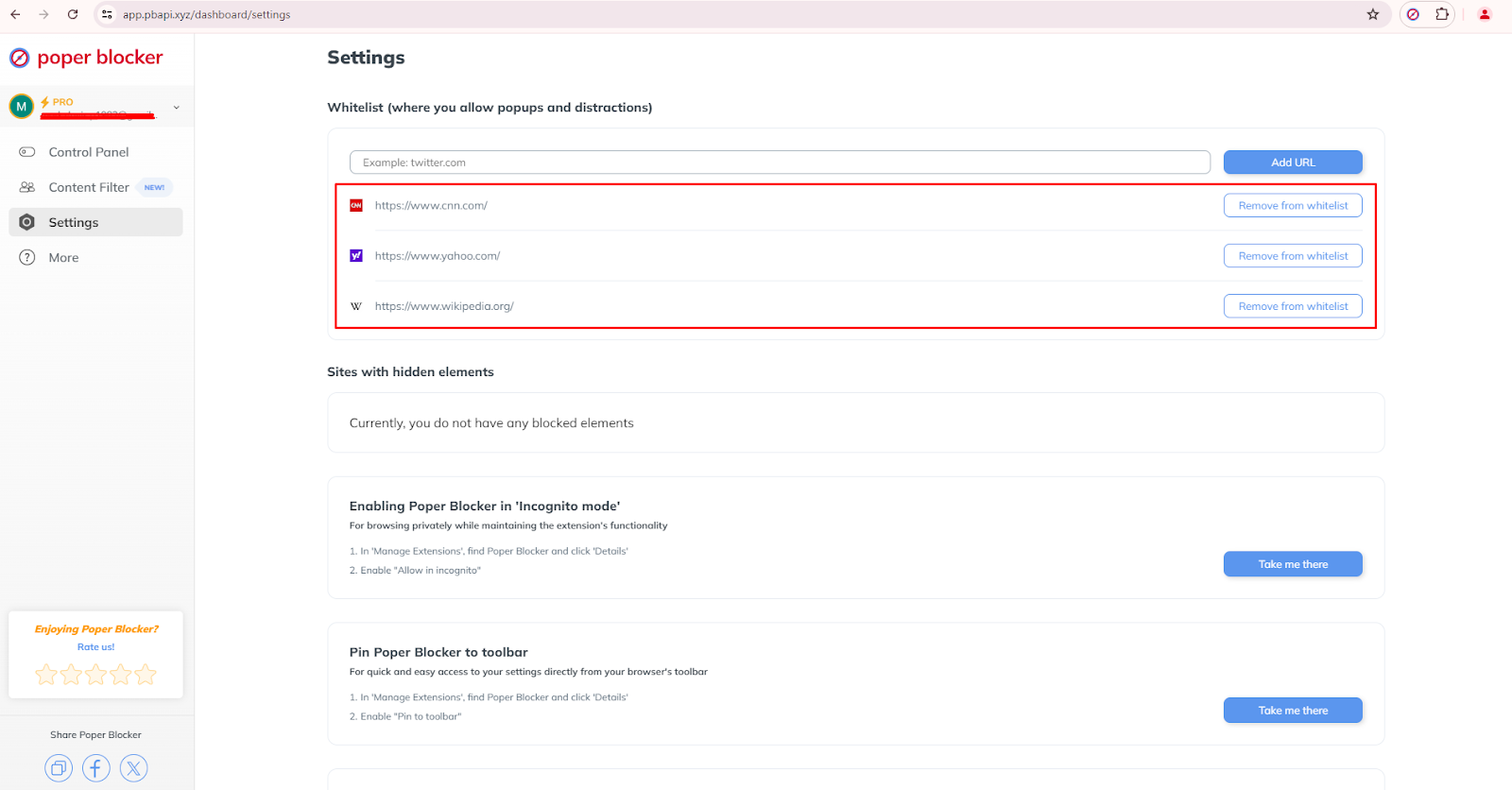
Whitelisting
In contrast to blocking, whitelisting allows certain sites to display popups as needed. You see, not all pop-ups are ads or spam. In fact, a lot of trusted sites use them for legit purposes, such as:
- Important information
- Critical warnings or updates
- Answers to questions
- Other relevant content
The whitelist feature is beneficial when you trust specific sites and do not want to miss any important notifications or features that they provide.
To use it, follow these steps:
- Open the Control Panel.
- Go to the Settings section.
- Locate “Whitelist (where you allow popups and distractions)” at the top.
- Enter the site that you’d like to include in the whitelist and then click on the “Add URL” button. Repeat this specific step if you want to add another site.
Enjoy an ad-free, seamless browsing experience!
From blocking basic and advanced popups to filtering social media content, Poper Blocker has a diversity of spam and ad-blocking solutions that you can tailor and customize according to your needs. And because this extension continuously receives updates, you’re assured that you’re receiving the best functionality.
Our users often find a noticeable improvement in their productivity and most of them have reported general satisfaction since they can now browse without any disruptions. And that’s not all. This extension also addresses specific concerns like cookie requests and social media clutter, so you’re getting more than what you deserve.
So don’t let unwanted ads and pop-ups ruin your day. Try Poper Blocker today and witness the difference!
FAQs
What browsers are supported by Poper Blocker?
Poper Blocker supports Google Chrome and Microsoft Edge. Their suite of features is optimized for each of these browsers so you get to enjoy a consistent and efficient user experience across all of these supported platforms.
How do I turn on the blocking of basic pop-ups with Poper Blocker?
You can enable the blocking of basic pop-ups by accessing the Control Panel and going to the Basic section. When this feature is activated, no pop-ups will open in new windows or tabs so you’ll experience reduced interruptions during your browsing sessions.
Can Poper Blocker filter social media content?
Yes, Poper Blocker can hide specific posts on Facebook, LinkedIn, Instagram, and Twitter by using specific keywords. This can be configured in the Content Filter section of the Control Panel. Make sure that you block the right words to maximize its efficiency..
Is there support for removing cookie request popups?
Yes, Poper Blocker automatically blocks cookie request popups and rejects cookie access. This is found in the Pro section of the Control Panel. When it’s turned on, it will block cookie consent messages.
Can I whitelist certain websites?
Yes, you can whitelist websites to allow specific popups. This option is available in the Settings section under “Whitelist.” Adding trusted URLs here allows you to get those notifications and popups from those sites that are not blocked.
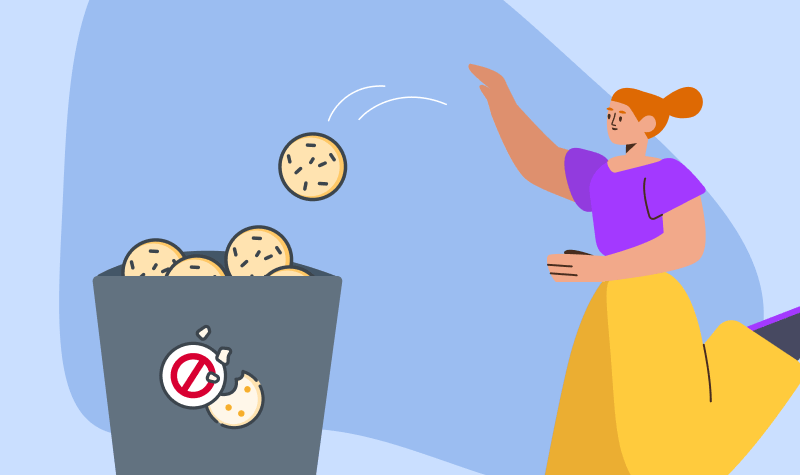
The internet runs on data exchanges, with cookies playing a big part. These small text files, stored on your device, collect information about your browsing habits, preferences, and login statuses. W3Techs reports that 41.3% of all websites use cookies. While these cookies can make websites more functional and personalized, they can also threaten your privacy and device performance if not managed properly. Keeping your browser free of old or unnecessary cookies is a simple but effective practice that everyone should follow. This guide will explain why and how to clear browser cookies.
Why should you clear your cookies?
Clearing cookies from your browser frequently is not just a technical task but an important step for both privacy and performance. You might not be aware of it, but there are actually several valid reasons why this should be done often.
Better privacy
Clearing tracking cookies greatly improves your online privacy. These files can store data about your browsing habits and these are accessible by various websites and third parties. Deleting cookies will reduce the amount of data available for ad tracking and possible data breaches.
Frees up space
Removing cookies frees up space and helps your browser to run better. Over time, cookies build up and slow down your browser, and this may cause web pages to load more slowly. With a clean slate, you can make sure that your browser works at its best.
Load the latest version of a web page
It also helps in loading the newest version of a web page. Old cookies may sometimes cause your browser to show outdated content. Clearing both the cache and the cookies will let you see the most recent information.
Resets your browser
The clearing process acts as a “reset” for your browser. It fixes problems that may be caused by corrupted cookies and improves how your browser works.
Increases security
There are different types of web cookies, and one of them is persistent cookies. They keep you logged into websites, which can be risky if your device gets stolen or lost. Removing these cookies means you have to log back in and this prevents unauthorized access. It also adds an extra layer of security.
How to clear cookies in Google Chrome
To clear cookies in Google Chrome, follow these easy steps:
- Open Chrome and click the three-dot icon in the top-right corner.
- Select “Settings” from the dropdown menu.
- Go to “Privacy and security” and then “Clear browsing data”.
- Choose a time range from the dropdown menu.
- Check the boxes for “Cookies and other site data” and “Cached images and files”.
- Click “Clear data”.
How to clear cookies in Microsoft Edge
To clear cookies in Microsoft Edge, follow these steps:
- Open Edge and click the three-dot icon in the top-right corner.
- Go to “Settings” and then “Privacy, search, and services”.
- Select “Choose what to clear” under “Clear browsing data”.
- Pick a time range.
- Check the box for “Cookies and other site data”.
- Click “Clear now”.
How to clear cookies in Safari
To clear cookies in Safari, do these steps on your Apple device:
- Open Safari and click on “Safari” in the Apple menu.
- Select “Preferences” and then click “Privacy”.
- Click “Manage Website Data”.
- Select “Remove All” and confirm by clicking “Remove Now”.
How to clear cookies in Firefox
To clear cookies in Mozilla Firefox, follow these steps:
- Open Firefox and click the three-line icon in the top-right corner.
- Go to “Settings” and then “Privacy & Security”.
- Scroll down to “Cookies and Site Data”.
- Click “Clear Data,” check the box for “Cookies and Site Data,” and click “Clear”.
How to clear cookies in Opera
To clear cookies in Opera, follow these steps:
- Open Opera and click the Menu icon in the top-left corner.
- Go to “Settings”.
- Select “Privacy & Security”.
- Click “Clear browsing data”.
- Choose a time range.
- Check the box for “Cookies and other site data” and click “Clear data”.
Block cookie consent pop-ups with Poper Blocker
Poper Blocker is a browser extension that’s compatible with Chrome and Edge. It has a feature that automatically handles cookie consent pop-ups and rejects cookies. This tool helps keep your browsing smooth and free from annoying pop-ups. It’s perfect for anyone who wants uninterrupted browsing without constant cookie consent requests.
To enable this feature, do the following steps:
Go to the Control Panel in Poper Blocker.
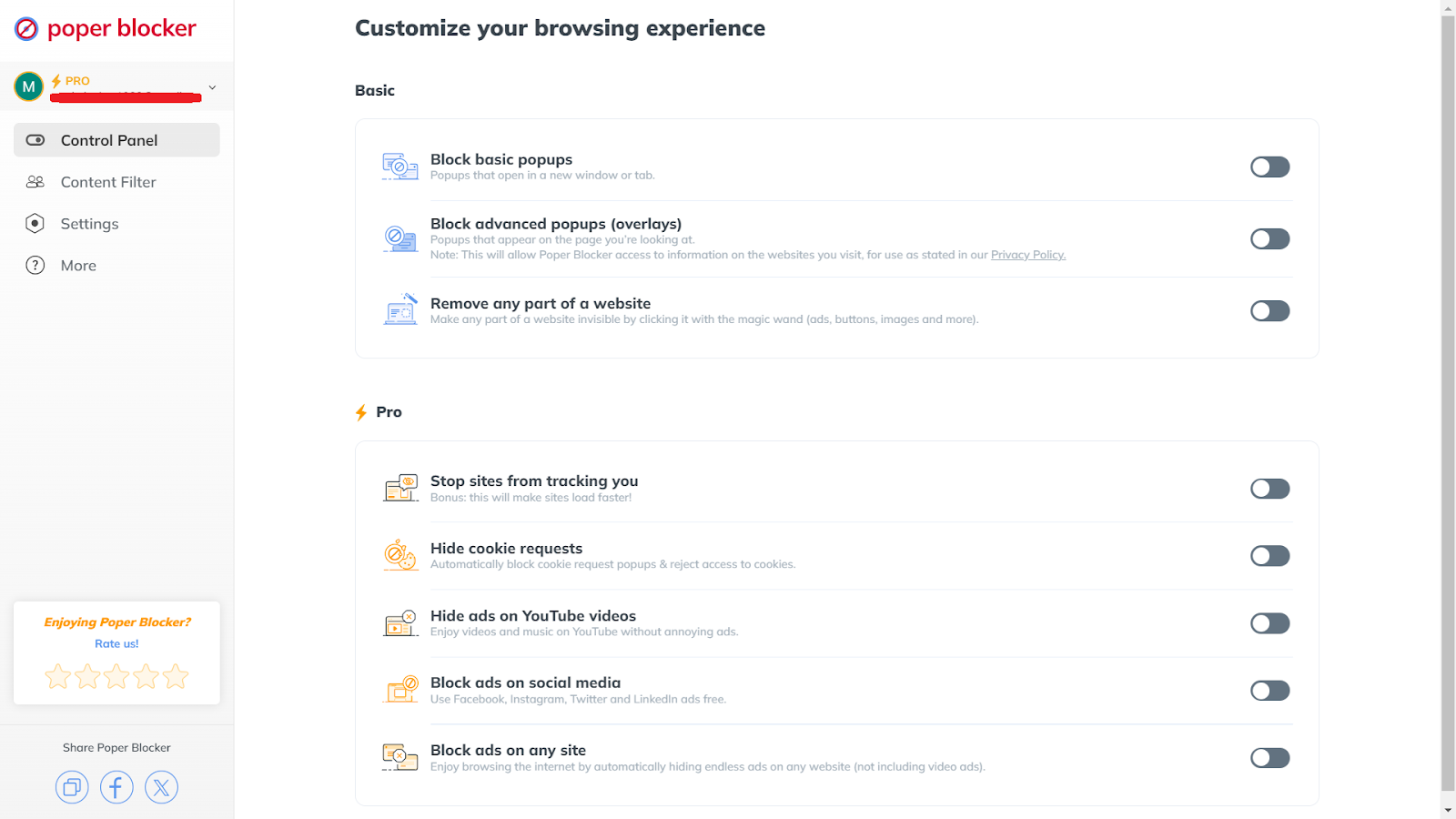
Under the Pro section, find “Hide cookie requests”.
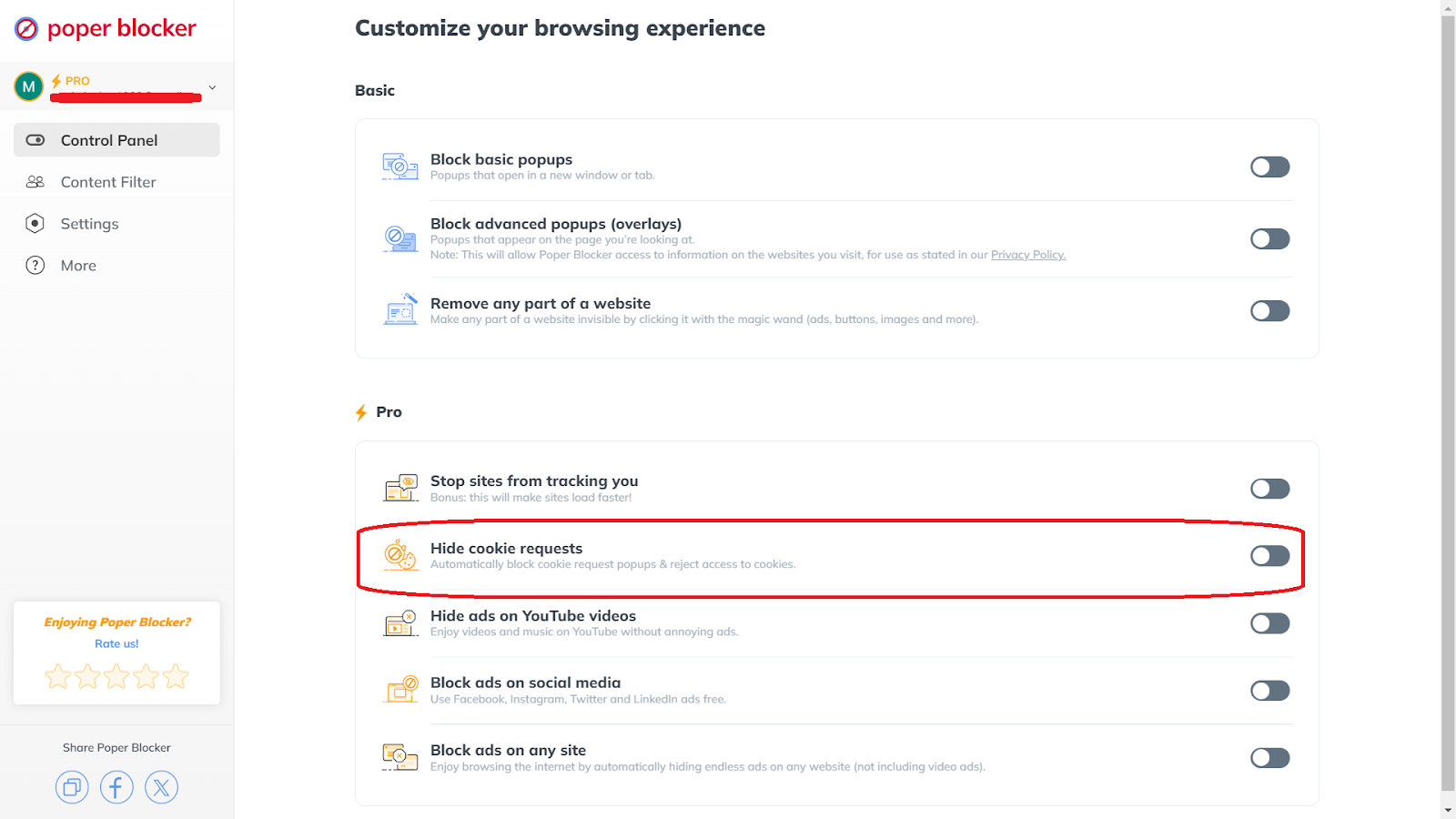
Turn on the toggle for this feature.
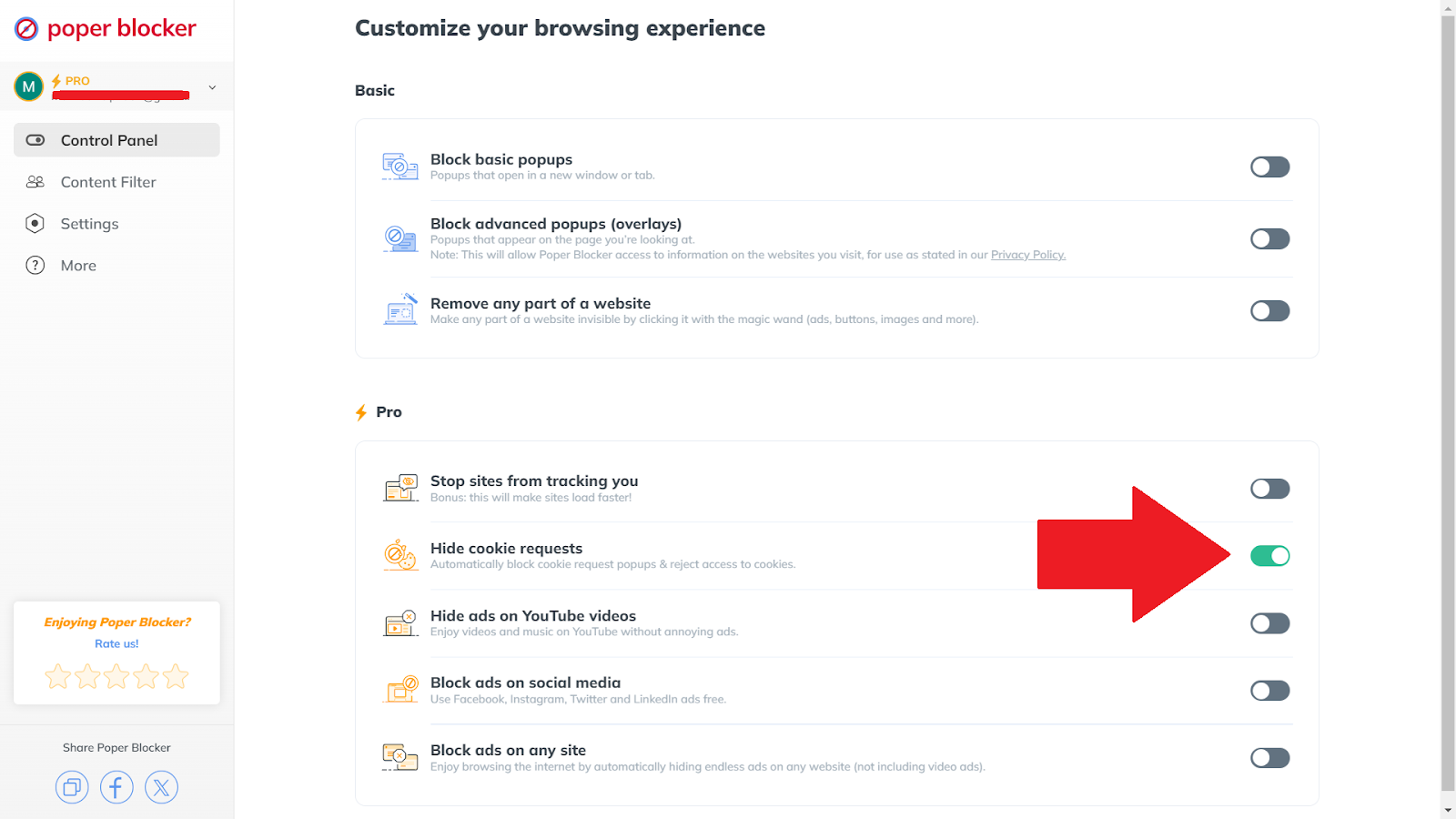
Take control of your online privacy
Knowing why and how to delete cookies from your browser is very important if you want an easy browsing experience. Regularly managing your browser’s cookies helps your browser load faster, keeps your information safer, and protects your privacy.
Taking an active approach protects your online activity and improves your time on the internet. Tools like Poper Blocker can help automate some of these tasks and give you control over what gets stored on your device.
So follow these tips, and you’ll see that managing cookies is a simple and necessary practice to keep your browser running well and safe. Start today and notice the difference it makes.
FAQs
Do cookies affect my device’s memory?
Yes, cookies take up space on your device although a few of them really won’t have any significant effect. Over time, as you browse more sites and accumulate more cookies, they can use a lot of memory and slow down your browser and device.
Are cookies a security threat?
Cookies themselves are not dangerous as they are only text files, but they can track your activity across different sites. This particular tracking data can be misused if it gets accessed by the wrong people. This is why clearing cookies regularly is needed to reduce such risk.
What are third-party cookies?
Third-party cookies are those that are set by websites other than the one you are visiting, and these are often used for web tracking and advertising. Managing these cookies is recommended if you want to improve your privacy.
Can clearing cookies improve website loading speed?
Yes, clearing all the cookies stored on your device can free up storage and lessen the load on your browser. This then makes the web pages load faster.
Is there a way to manage cookies without deleting them entirely?
Yes, the good news is that most modern browsers have settings to manage cookies. You can block cookies from certain sites, clear only those from a specific period, or set cookies to delete automatically after a session. It’s all up to you. These options give you control without needing to delete all the cookies.
Have you ever felt overwhelmed by the influx of emails, notifications, and random files on your devices? This issue is actually common. A lot of people grapple with managing their digital spaces, and this has caused them to experience stress and become less productive. This is where the concept of digital decluttering comes in. It can help you regain control of your digital life by making it more organized and manageable. But this is not just a quick and one-time task. You’ll need a structured and consistent effort if you want this to be effective.
What Is Digital Decluttering?
Digital decluttering is the process of organizing, managing, and eliminating unnecessary digital items across all your devices. These items may include your:
- Emails
- Files
- Apps
- Notifications
- Social media accounts
The primary goal here is to create a more efficient and less overwhelming digital environment by putting your focus on those that are only more important and useful.
The Effects of Digital Clutter
You might not easily notice it but digital clutter, when not managed properly, can have numerous effects not just on your productivity, but also on your well-being. Below are some of the most prominent consequences:
Hampers Focus
With multiple social media accounts and streams of information (most of which are unnecessary), you might easily lose your attention and focus. This can greatly reduce your ability to concentrate on more important tasks. In one article written by Carl Newport, he reported several cases where students got into serious trouble because of constant distractions.
Maintaining your focus becomes a real challenge when numerous tabs on your browser are open and you constantly get a buzz from notifications.
Impairs Productivity
Having an “always-on” mentality from constant notifications and digital distractions can certainly impede your daily work. Having a lot of excess clutter, such as numerous unused files and apps, will make it very difficult for you to find important information quickly. When you’re wading through irrelevant data, you’re already wasting a lot of time and this badly affects your productivity.
Increases Stress and Anxiety
Digital hoarding is characterized by the accumulation of unnecessary files, apps, and emails. This often results in stress and anxiety. It can feel overwhelming when you’re faced with a sheer volume of data, and when you’re tasked with organizing and deleting it, it may seem insurmountable.
Higher Expenses
Digital clutter isn’t just a matter of organization; it can also affect your budget. Maintaining unwanted data could result in higher storage costs, including more cloud service subscriptions or the need for additional hardware. Reducing irrelevant files could save you from these unnecessary expenses. You could even make better use of existing storage solutions.
Detracts from Personal Well-being
Hours spent managing digital clutter detract from personal activities and downtime, affecting overall well-being. It can also interfere with sleep if not managed properly. Keeping a clutter-free digital environment allows for a better work-life balance and contributes to your overall health and well-being.
Interferes with Communication
Important emails and messages can get lost in a sea of irrelevant notifications. This may result in missed opportunities and even miscommunication. When you have a cluttered inbox, it becomes difficult to keep track of critical conversations. Always sort and organize your inbox so that vital messages are not overlooked.
Compromises Security
Accumulated digital clutter, such as outdated apps and files, may cause security vulnerabilities that hackers often exploit. This is why you need to regularly update and delete unnecessary items from your device to minimize the risk of data breaches.
The Benefits of Decluttering Your Digital Life
The benefits of decluttering your digital life extend beyond tidiness. Below are some advantages that contribute to an overall better living and working experience:
Improved Focus
Reducing digital clutter helps eliminate unnecessary distractions, allowing better focus on tasks. This increased focus leads to higher productivity and more efficient work habits. Clearing your digital space of redundant information creates a clearer mental space, paving the way for better concentration and less time wasted on pointless distractions.
Enhanced Productivity
Organizing your digital environment streamlines workflows, saving time spent searching for files or sorting through emails. Efficient digital systems can lead to more productive and less stressful workdays. Clear and easy-to-navigate systems enable faster task completion, and tools like OneDrive and Google Drive enhance this efficiency by providing easy access to important files.
Reduced Stress
A clean and organized digital space minimizes feelings of overwhelm that often accompany digital clutter. This reduction in stress contributes to a healthier mental state. Regular decluttering sessions prevent the buildup of stress, creating a more manageable and calmer digital environment that positively affects your overall well-being.
Better Security
Regularly managing and updating digital items, such as apps and files, enhances digital security. Deleting outdated or unnecessary data reduces the risk of breaches and data loss. This proactive approach ensures that your digital space remains secure, minimizing the risk of cyber threats and potential data breaches.
Cost Savings
Eliminating unused files and apps frees up storage space, potentially saving on additional storage costs. Efficient digital systems can reduce the need for costly cloud services or hardware upgrades. By decluttering, you make better use of existing storage solutions, avoiding unnecessary expenses and making your systems more cost-effective.
Improved Communication
Organized inboxes and digital spaces ensure important communications aren’t lost among irrelevant emails and notifications. This improves the ability to maintain effective correspondence and stay on top of tasks. Setting up filters and categorizing emails ensures that significant messages are easily accessible, making communication smooth and unhampered.
More Personal Time
Less time spent managing digital clutter means more time available for personal activities and relaxation. An organized digital life enhances work-life balance, leading to a more fulfilling personal life. Freeing up time previously lost to sorting through clutter grants you the luxury to invest in hobbies, family time, or simply unwinding.
Enhanced Well-being
A clutter-free digital environment contributes to a calmer, more focused mind. This enhances well-being, making it easier to enjoy daily activities and achieve personal and professional goals. By maintaining a clean and organized digital space, you foster a more serene mental landscape, leading to higher levels of satisfaction and achievements both at work and in personal life.
Your Digital Declutter Checklist
Here’s a checklist that can serve as your guide to efficiently declutter and can also help on how to organize your digital life. Follow these steps and you’ll see significant improvements in the long run:
1. Audit Your Digital Footprints
The best way to start is to first assess the extent of your digital presence. Review and check all of your:
- Devices
- Accounts
- Platforms
Make sure that you identify them thoroughly. This helps in pinpointing areas to focus on during the decluttering process. You’ll be able to create a more targeted and effective decluttering strategy if you’re able to determine the full scope of your digital footprints.
2. Organize the Files and Folders on Your Computer
In order to keep your documents organized, you should create a clear and logical folder structure. Better use descriptive filenames and categorize the files according to their:
- Type
- Date
- Project
This will make it easier for you to locate the necessary files quickly. Spend a significant amount of time categorizing your files and maintain this organization with regular updates, so you’ll be able to quickly retrieve them when needed.
3. Delete Apps and Software You Don’t Use
Go through all of your devices and uninstall any apps or software that you rarely or don’t use. Doing this will not only free up storage space, but will also reduce distractions from those that are bombarding you with unnecessary notifications and updates.
Make it a habit to review the apps on your devices and remove those that are no longer serving you. You’ll be surprised to see the number of unwanted apps that your device has accumulated over time!
4. Block Pop-ups and Ads
A single pop-up or unwanted ad can be a major distraction, which is why you need to find ways to block and restrict these unnecessary interruptions. Poper Blocker, a browser extension for Chrome and Edge, excels at doing this. Here are some of its relevant features:
Pop-up Blocker
As the name suggests, the pop-up blocker prevents unwanted pop-ups from interrupting your activities and keeps them at bay.
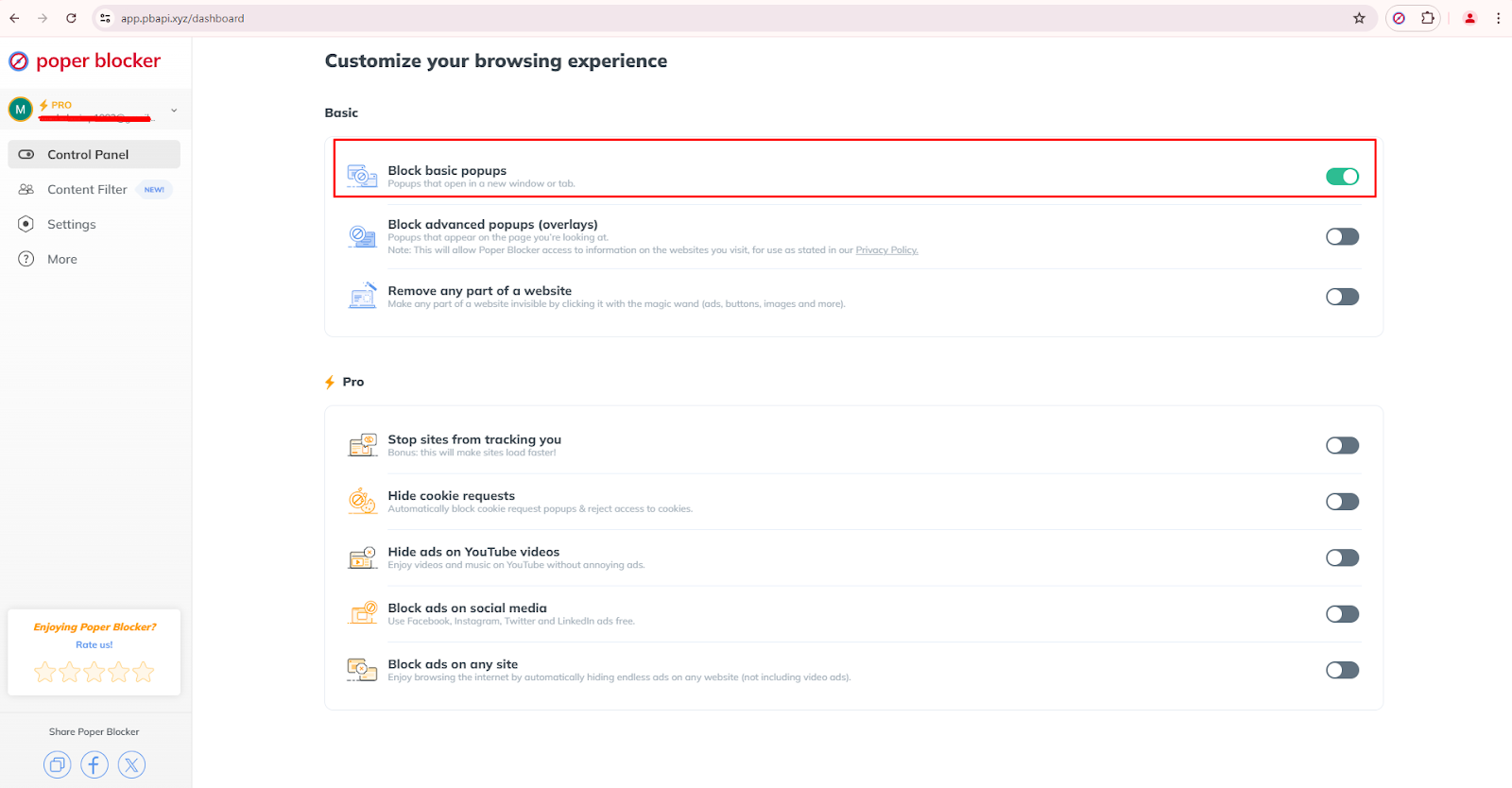
Ad Blocker
As it removes ads on websites, the ad-blocker feature can also improve your browsing speed and block distractions as well. Thanks to these ad-blocking features, it speeds up and improves the aesthetic of web pages.
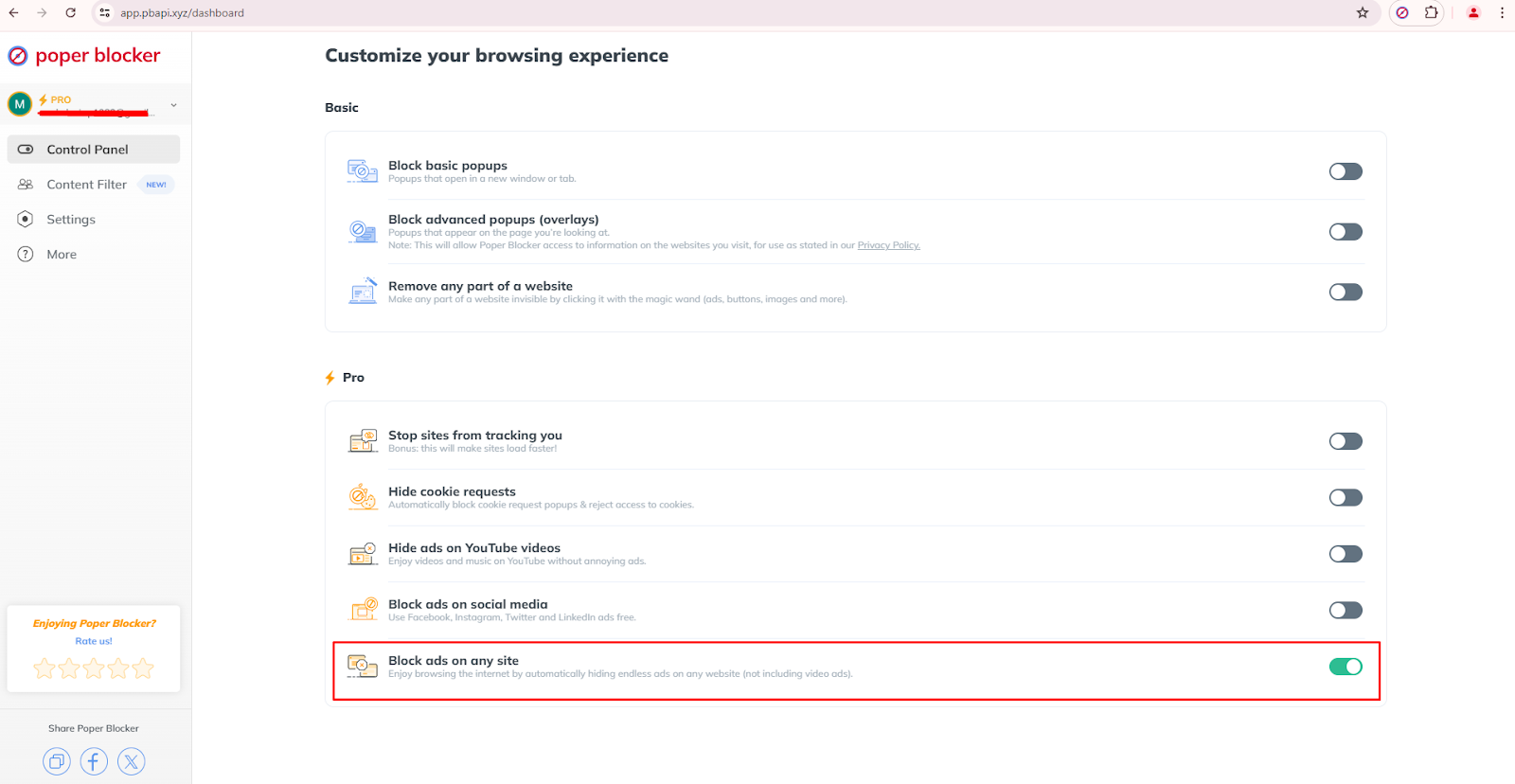
Block Overlays
This effectively stops overlay ads that often obscure content and disrupt your browsing experience. With this feature turned on, you’ll be able to stay focused on the content without these annoying interruptions.
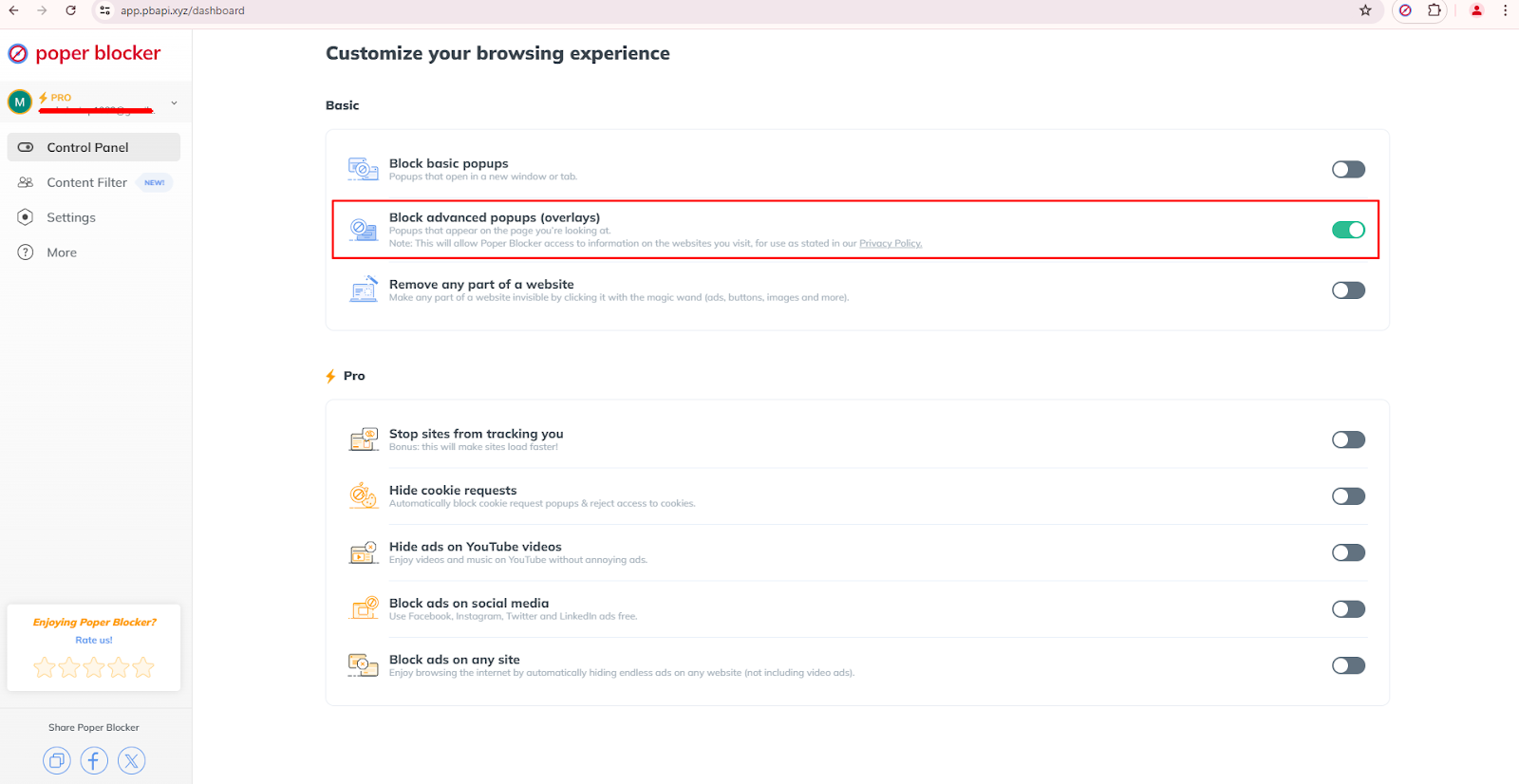
Social Media Content Filter
Social media filtering automatically mutes specific keywords to protect you from seeing unwanted content. This allows for personalized and controlled social media consumption as it filters out distracting or irrelevant posts.
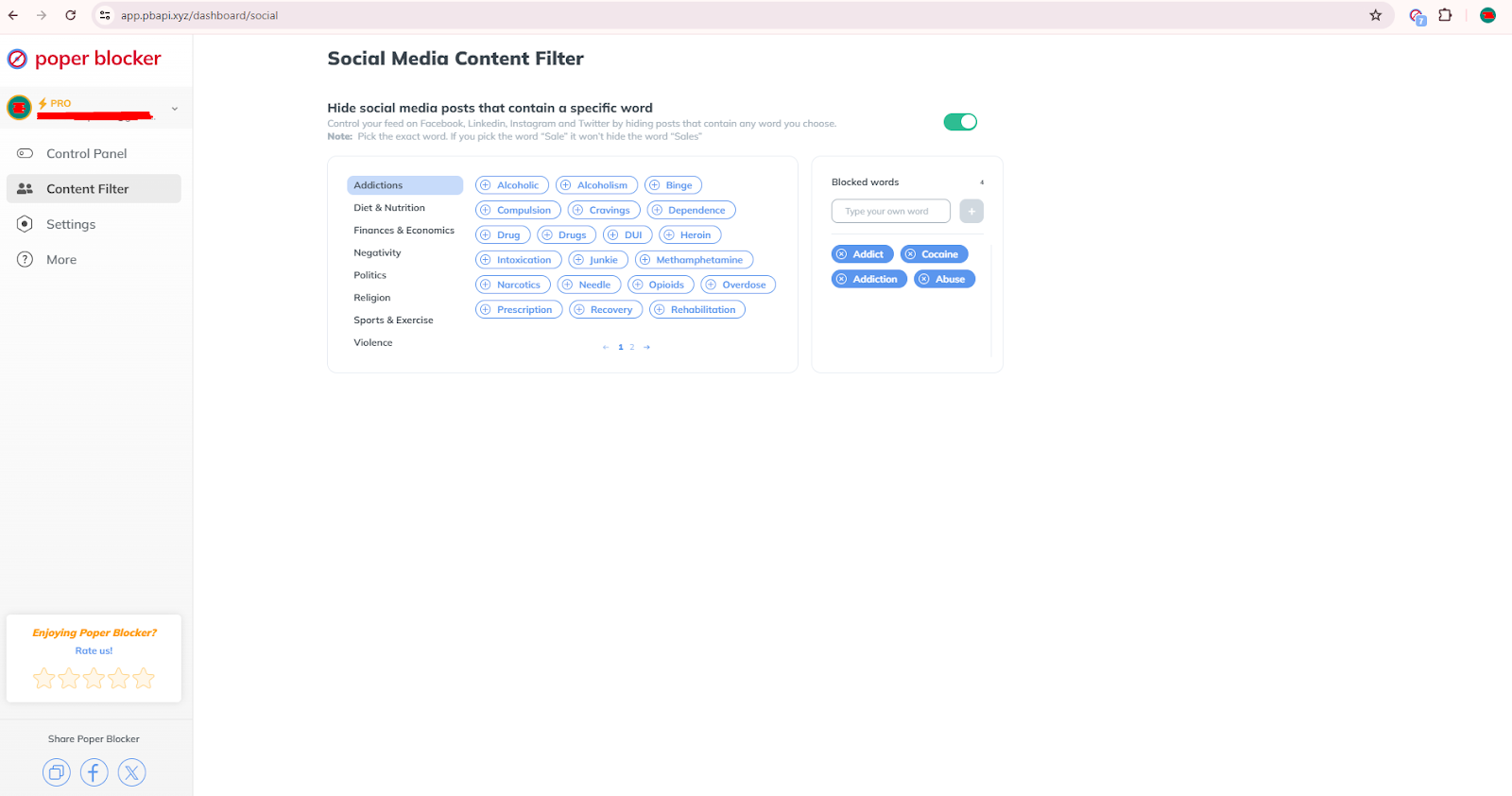
Block Ads on YouTube
This eliminates those annoying ads on YouTube during video playback. That means you’d get to enjoy uninterrupted videos on this online video-sharing platform.
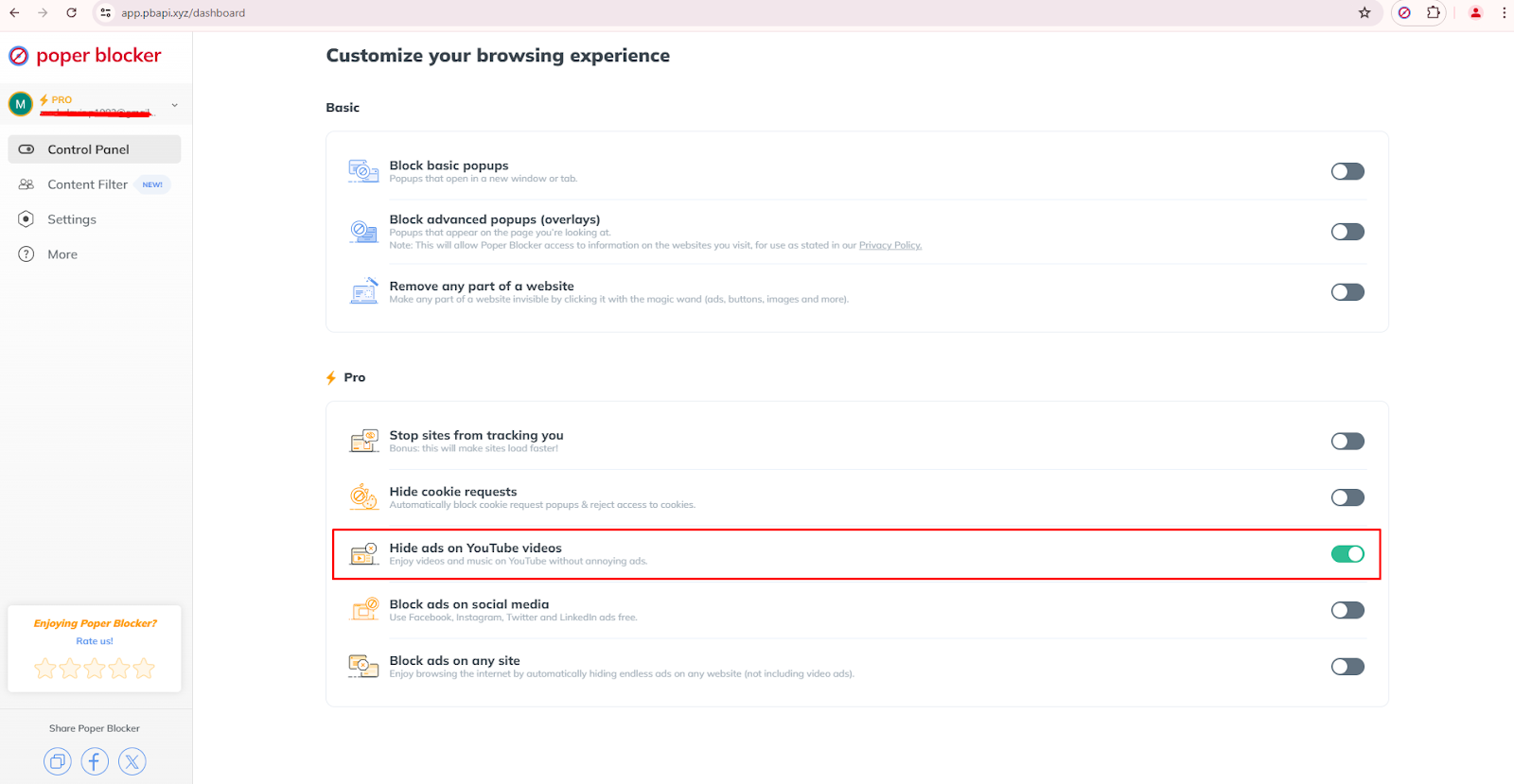
Read more: How to Block YouTube Ads
Block Ads on Social Media
It basically reduces distractions from your feed by blocking ads on these social media platforms:
- X (Twitter)
This lets you focus more on the content that really matters to you.
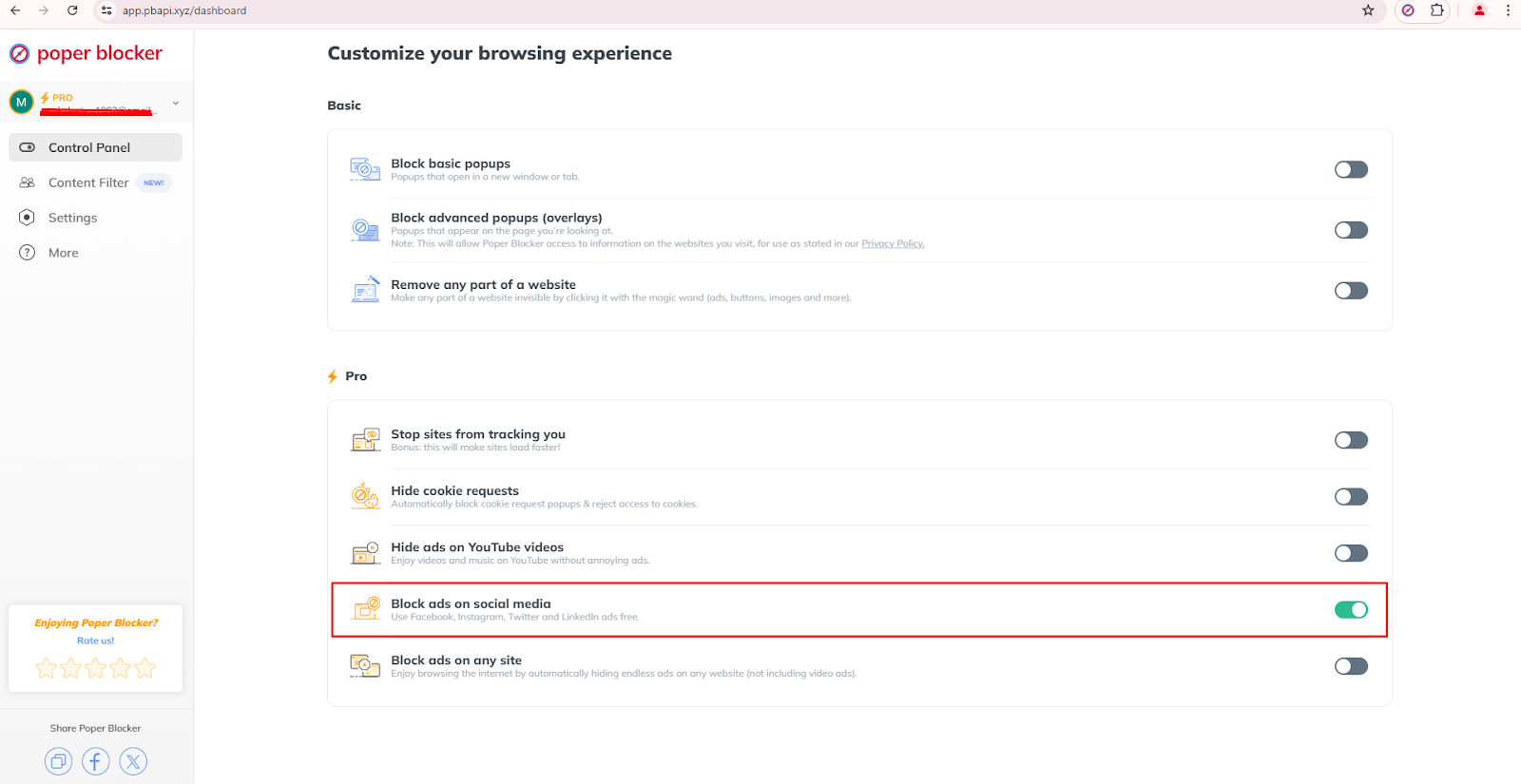
Learn more on how to declutter your social media accounts >>
Hide Cookie Consent Requests
This feature can automatically block cookie consent messages and pop-ups. Without these repetitive consent forms, you’ll have a cleaner and more enjoyable browsing experience.
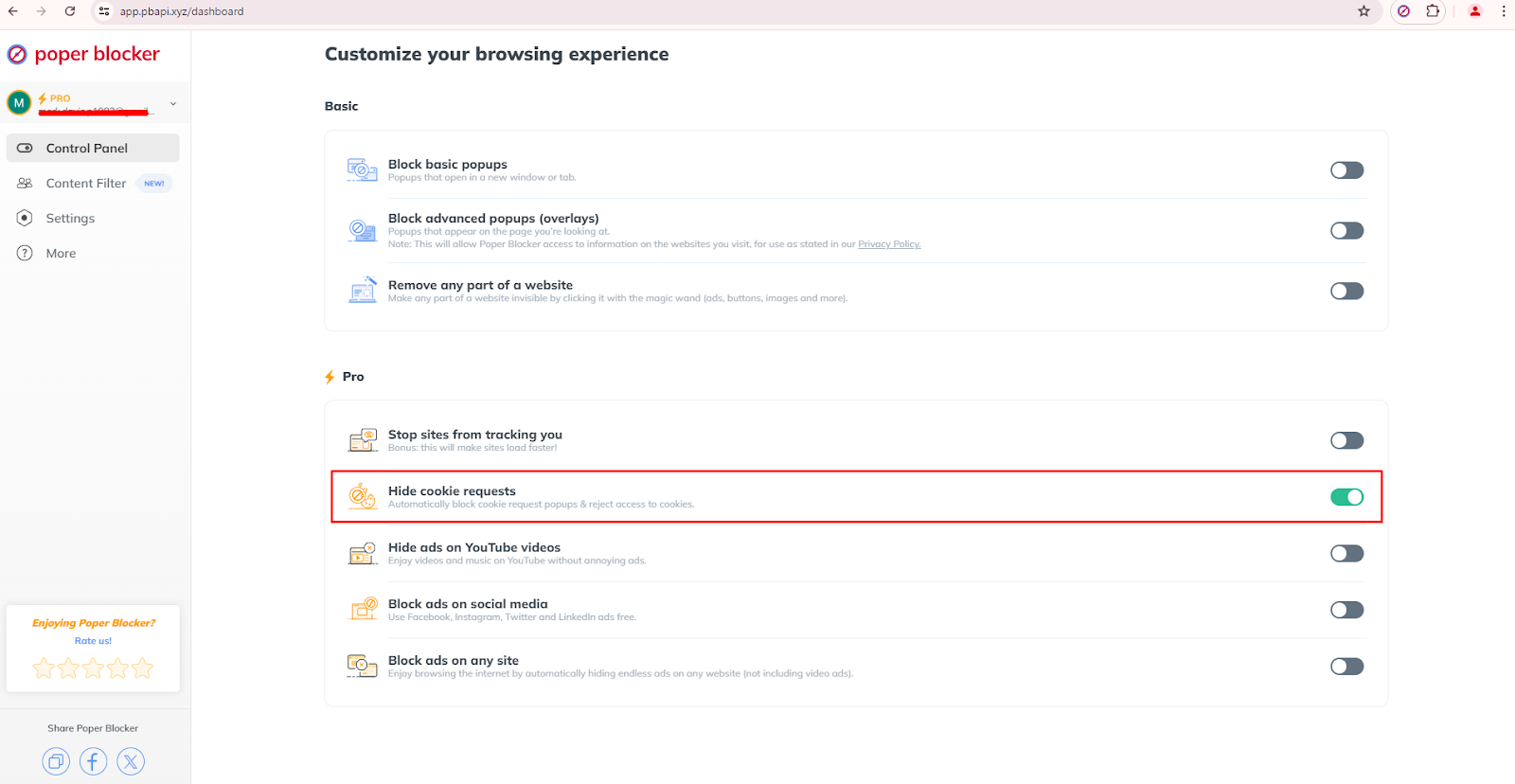
5. Keep Your Desktop Clear
Just like your table, you should have a clean desktop. Here, you need to keep only the most important shortcuts and files visible. It’s advisable that you regularly organize or archive documents to prevent clutter from accumulating. Think of it like doing a routine cleanup.
Having a clear desktop not only looks better, but also lessens the time that you’ll spend whenever you’re going to search for files or applications. Make use of folder shortcuts and keep your taskbar organized.
6. Manage the Amount of Browser Tabs
Decide on the maximum number of tabs that you should keep open on your browser and stick to it. You might want to consider using a tab grouping extension to organize your tabs and reduce the clutter.
The thing with too many open tabs is that it not only affects your focus, it can slow down your browser’s performance especially if the pages you are accessing are resource-intensive. Tools like tab managers may help in keeping your browsing clean and organized. It also prevents tab overload so that you can find what you need when you really need it.
7. Get Your Inbox in Order
Organize your email inbox by deleting old emails and unsubscribing from unnecessary lists. Take advantage of the filters and create several folders to categorize and prioritize incoming emails. When done correctly, you’ll be able to see important messages easily.
It’s also important to do regular cleaning of your inbox so that you won’t miss any crucial communications. This will also save you time from sorting through irrelevant messages. If possible, allot some time every week to manage your inbox.
8. Get Rid of Files in Your Downloads Folder
Routinely review and delete unnecessary files in your downloads folder to free up space. Doing this will also reduce the clutter. If there are important files, you should move them to their designated folders immediately after downloading. Making this a habit will prevent your downloads folder from becoming a dumping ground for unnecessary files. Remember, this is a temporary repository for the files that you receive online, not a permanent one.
9. Turn Off Notifications You Don’t Need on Your Phone
Customize your phone’s notification settings to show you only the most relevant ones. Doing this will reduce constant interruptions and it can also help you to stay focused on more important tasks. Review your phone’s notification settings from time to time and immediately disable any alerts that don’t add value.
10. Clear Cookies and Cache from Your Browser
Always clear cookies and cache from your web browser and strictly follow a fixed schedule. Doing this not only improves its performance but also keeps your privacy safe. You’ll be surprised how much storage gets consumed by the pages you are browsing.
11. Consider a Digital Detox
Schedule regular breaks from your devices to give yourself some time to recharge and reset. Doing this will reduce your screen time and can also promote a healthier balance between your regular digital tasks and real-life activities.
So what is a digital detox? It’s a timeout from your electronic devices which can provide significant benefits to your mental health and productivity. This will allow you to return to tasks with a more refreshed perspective. Consider doing these breaks daily, weekly, or monthly, and tailor them according to your lifestyle and needs.
You can also consider a social media detox.
Time to Start Your Digital Declutter
So, are you ready to regain control over your digital life? There’s no better time to start than today! And there’s no need to start big. Small and consistent efforts, when continually applied, will result in significant improvements in your productivity and well-being. So don’t wait for your digital clutter to become overwhelming and problematic. Clear out the clutter and feel more in control and empowered!
FAQ
How often should I do digital decluttering?
You should perform a thorough digital declutter every few months and make it a habit to continue this practice for the long term to avoid wasting your previous efforts. Incorporate small and regular maintenance tasks into your routine to prevent clutter from accumulating or returning.
What areas should I focus on when doing digital decluttering?
You should focus on any digital storage that tends to accumulate files or data over time. Check your email (including your inbox, outbox, and drafts), computer files, mobile apps, browser bookmarks, social media accounts, and cloud storage. You might also want to consider organizing all of your digital photos and videos.
How can I manage and declutter my mobile apps?
Regularly do a thorough review of the apps that are installed on your device. Delete those that you no longer use and organize the remaining ones into folders, if possible. If you’re receiving unnecessary notifications from specific apps, it is best to disable them and allow only those that are essential..
What should I do with my social media accounts during digital decluttering?
It’s advisable to evaluate the accounts that you are currently following. You can either unfollow or mute those that you think do not add value. Make sure to also clean up your own profiles regularly and always review your privacy settings.
How do I declutter my cloud storage?
Your cloud storage is similar to your computer or device’s storage, with the only difference being that it is stored online. Sort through files and delete those you no longer need. Organize the remaining files into folders. You might also want to consider consolidating multiple cloud storage accounts into one.
Annoying ads are everywhere and these interruptions can spoil your time on the web. This is the reason why a lot of internet users now resort to ad blockers to take control of their browsing. A report from Exploding Topics shows that almost 1 billion people now use ad blockers. But did you know what makes these ad-blocking tools more effective? They’re called filter lists.
With faster load times and fewer visual distractions, ad-blocking filter lists have become a must-have for many. Knowing how these filter lists work helps users make smart choices to improve their online experience. Let’s look into their functionality and block ads list types.
What are ad-blocking filter lists?
Ad-blocking filter lists are sets of rules that were created to spot and remove unwanted ads and tracking scripts on web pages. Unlike general blocking methods, these lists have detailed instructions that target specific types of ads. It can disable different types of pop-ups and block overlays and banners.
Basically, the main job of these lists is to point out which elements or domains should be blocked. This precision helps ad blockers prevent ads from showing up on web pages without messing up the content or other elements.
How do ad blockers use filter lists?
Ad blockers work with filter lists by following a set of rules to spot an ad and block them. These rules often make use of URL patterns to target ad domains. When you visit a website, the ad blocker will check the page elements against its filter lists to decide on what to block.
Some advanced methods include turning off the JavaScript and modifying the DNS entries to prevent the ad servers from sending content. The simplest way, though, is by using a browser extension like Poper Blocker, a pop-up blocker that smoothly integrates these filter lists. Take note that these lists can be pre-written or you can make them so that you will have control over what gets blocked.
Keeping these lists updated is important for ad-blocking efforts to work because. Think of it like getting the latest security patch or version to keep up with new advertising tricks. Basic filter lists are capable of handling common ad formats, while special lists are designed to handle more complex types like social media widgets or cryptocurrency mining scripts.
Common filter lists
For ad-blocking solutions to be effective, they need to use various filter lists. These lists help block different types of ads, and two of the most widely used are EasyList and Acceptable Ads.
EasyList
EasyList is the most popular ad filter list today and is constantly updated by a dedicated community of volunteers. It is often included by default in many ad blockers. It contains effective rules for blocking common ad formats, significantly reducing the number of disruptive ads.
Acceptable Ads
The Acceptable Ads list exempts specific ads that are able to meet specific criteria. Among the requirements, the ads need to be:
- Non-intrusive
- Clearly labeled
- Not overwhelming
This method lets websites earn money without hurting the user experience. You can still disable this list if you prefer stricter ad-blocking.
A cleaner, faster, and more private browsing experience
The bottom line is that ad-blocking filter lists will greatly improve your online browsing experience. When used well, these lists can remove a lot of intrusive content so you can browse faster and enjoy better privacy.
While these lists can reduce disruptions, you should customize them to balance ad blocking and still support your favorite content creators. With a balanced approach, you’re not only improving your browsing, but also encouraging good advertising practices. If you want distraction-free browsing, you’ll find that managing your ad-blocking filter lists helps you achieve this.
FAQ
Can I create my own filter lists?
Yes, you can create custom filter lists. You can set specific rules to block certain elements or domains and tailor them based on your ad-blocking experience so that it meets your personal needs and preferences.
How can I update my filter lists?
The great thing about ad blockers is that most of them have an automatic update feature for filter lists. You can also manually update these lists within the settings of your ad-blocking tool. It’s important that your filter lists are regularly updated so that it uses the latest ad strategies.
Do filter lists affect browsing speed?
Yes, having a filter list can generally improve your browsing speed because it blocks heavy ad scripts that could potentially slow down web pages. However, too many lists might result in performance issues so it’s best to keep a balanced number of lists.
Can I use multiple filter lists at the same time?
Yes, you can use multiple filter lists simultaneously. However, take caution as too many lists may cause websites to break or slow down your browsing experience. For optimal performance, maintain a reasonable selection of lists.
How do I whitelist a website in my adblocker?
For whitelisting a website, access your ad blocker’s settings, look for the whitelist section, and add the URL. This will allow the specific site to display ads.
